R9 270x Gaming - FX 6300 6x3.5gh Low fps

I have The same problem mate, but i have fx8350, its stupid andno one from the dev come here and answer
Not only us but many players with similiar specs have the same problem
I just want my Money back
Because noone from development will since these are player forums. You want help, submit a ticket to support and wait like everyone else.
I see that it was a mistake in trying to help you sakrav.
We are heroes. This is what we do!
RIP City of Heroes
RIP City of Heroes
Put Frame limiter to unlimited and uncheck High-res character textures and V-sync, and make sure you gpu is working at x16. Besides that, the only way to increase fps is by overclocking the cpu and ram.
Because, even all your rage about wrong hardware, YES, FX cpu single core performance sucks. And the game doesn’t care about how many cores are there, or how old or new the cpu is, all it asks is single core performance.
So you can improve your performance, but to a certain limit, determinated by you cpu single core performance
Is like asking to fill an olympic swimming-pool for tomorrow with a garden hose.
They will never solve the problem with low single core performance cpu (not only AMD) because that would require a deep and hard to do rewrite of their engine, plus also upgrading to a newer API. Work that would take millions od dollars and literally years to do.
PD: FX cpu are also cripples by only having pcie 2.0. This game takes quite advantage of better pcie speed, specially in empty places where you can easily see a 20fps jump between x8 and x16.
Ansau – Sylvari Mesmer – Exiled Warriors [wE] – Gandara
i7 5775c @ 4.1GHz – 12GB RAM @ 2400MHz – RX 480 @ 1390/2140MHz
i7 5775c @ 4.1GHz – 12GB RAM @ 2400MHz – RX 480 @ 1390/2140MHz
(edited by Ansau.7326)
That’s not true Ansau, the game does use more than a single core. The confusion comes from the fact that in a multithreaded program, no single thread can exceed the performance of a single core which is why people keep saying that single core performance is important. The game uses around 2 to 3 cores of performance on average, spread across all the cores on your CPU.
And please the difference in performance between a current PCIe V3.0 video card running in a V2.0 system is minor for a single video card. And the HD 7970 is a more powerful card than the R9 270x which is a OCed HD 7870 which the test at the following link concluded “In summary, no results were shocking to us with the Radeon HD 7970. Most games were within the margin of error …”.
We are heroes. This is what we do!
RIP City of Heroes
RIP City of Heroes
(edited by Behellagh.1468)
The game doesn’t care about how many cores you have =/= the game only uses one core.
What I said is core performance is the first thing to look. You can have as many cores as you want, that if their’re weak, gw2 won’t run really well. That’s why when you reach the sufficient amount of cores to handle gw2, having more doesn’t have such an impact.
And about pcie, I did tests in gw2 and there is an improvement. I tested 3.0 x16, x8 and x4 (to simulate 2.0 x8):
- x16 had 110fps underwater, 70’s in empty map, 50’s in more heavy graphic situation and 23-24 in heavy cpu situation.
-x8 had 100 fps underwater, 60’s in empty map, 46 in more heavy graphic situation and 22-23 fps in heavy cpu situation.
- x4 had 77fps underwater, 45’s in empty map, 36 in more graphic situation and 20-21 in heavy cpu situation.
Tests were done in South east of Gendarran Fields going from water to a house with a garden and some mobs closer to Cornucopian Waypoint. Cpu situation is upper north waypoint of Rata Sum and wait fps to stabilize.
PD: All people who say pcie speed doesn’t matter only show tests done in a lot of games, BUT gw2.
Ansau – Sylvari Mesmer – Exiled Warriors [wE] – Gandara
i7 5775c @ 4.1GHz – 12GB RAM @ 2400MHz – RX 480 @ 1390/2140MHz
i7 5775c @ 4.1GHz – 12GB RAM @ 2400MHz – RX 480 @ 1390/2140MHz
(edited by Ansau.7326)
The game doesn’t care about how many cores you have =/= the game only uses one core.
What I said is core performance is the first thing to look. You can have as many cores as you want, that if their’re weak, gw2 won’t run really well. That’s why when you reach the sufficient amount of cores to handle gw2, having more doesn’t have such an impact.And about pcie, I did tests in gw2 and there is an improvement. I tested 3.0 x16, x8 and x4 (to simulate 2.0 x8):
- x16 had 110fps underwater, 70’s in empty map, 50’s in more heavy graphic situation and 23-24 in heavy cpu situation.
-x8 had 100 fps underwater, 60’s in empty map, 46 in more heavy graphic situation and 22-23 fps in heavy cpu situation.
- x4 had 77fps underwater, 45’s in empty map, 36 in more graphic situation and 20-21 in heavy cpu situation.Tests were done in South east of Gendarran Fields going from water to a house with a garden and some mobs closer to Cornucopian Waypoint. Cpu situation is upper north waypoint of Rata Sum and wait fps to stabilize.
PD: All people who say pcie speed doesn’t matter only show tests done in a lot of games, BUT gw2.
Yes, you showed about a 10% difference. 10% is not “crippling” as you described PCIe 2.0 as.
FX cpu are also cripples by only having pcie 2.0.
And to be pedantic about it that’s the fault of the motherboard chipset. The FX- series doesn’t have a PCIe interface on die. The only way to support PCIe 3 on an FX motherboard is to use a PCIe 3 bridge chip like the one Asus uses in their the top end 990FX motherboards. And that is slightly smoke and mirrors since the bridge chip communicates to the 990FX over a PCIe 2.0 interface and simply couples 32 lanes of PCIe V2 bandwidth into 16 lanes of PCIe 3.0. And the 990FX is communicates to the FX- CPU over a HyperTransport 3.0 link.
And if the game is single core then why does it show up using 2-3 cores of available CPU performance on a quad core? The game doesn’t scale up to use all cores, I’ll grant you that but a lot of software has the same limitations, especially games built around Dx9.
We are heroes. This is what we do!
RIP City of Heroes
RIP City of Heroes
(edited by Behellagh.1468)
Put Frame limiter to unlimited and uncheck High-res character textures and V-sync, and make sure you gpu is working at x16. Besides that, the only way to increase fps is by overclocking the cpu and ram.
Because, even all your rage about wrong hardware, YES, FX cpu single core performance sucks. And the game doesn’t care about how many cores are there, or how old or new the cpu is, all it asks is single core performance.
So you can improve your performance, but to a certain limit, determinated by you cpu single core performance
Is like asking to fill an olympic swimming-pool for tomorrow with a garden hose.They will never solve the problem with low single core performance cpu (not only AMD) because that would require a deep and hard to do rewrite of their engine, plus also upgrading to a newer API. Work that would take millions od dollars and literally years to do.
PD: FX cpu are also cripples by only having pcie 2.0. This game takes quite advantage of better pcie speed, specially in empty places where you can easily see a 20fps jump between x8 and x16.
Changed settings as You wrote: still the same.
Submit ticket.
Yeah sure why not. Like i did in past when i had serious gw2 problems. And in the end i got no reponse + fixed it myself after month.
But sure. I’m opened for ideas that might help.
Oh and….. BUMP.
Attachments:

FX CPUs are crippled by having one FPU per Module. SO… your FX4xxx is a dual core CPU, your FX6xxx is a triple core CPU, and your FX8xxx is a quad core cpu. The additional core count is just a thread that is attached to the single FPU to ‘increase’ threaded performance, VERY similar to how Intels Hyper-threading works that is the inherent issue with the FX line. Also, the FX line’s single core performance is slower then the previous Phenom II line.
GW2’s performance IS limited by how powerful your cores are in single threaded performance DUE to DirectX9. That API uses 1 thread for the rendering engine and that is what makes or breaks the game for your CPU choice. NOTHING ELSE.
I am not going to get into the Intel VS AMD battle, But I am going to say this much.
A 59.99USD G3258 Clocked at 4.8 Ghz, beats AMD’s ENTIRE LINE for Single threaded performance, and comes in 50% Slower then a FX8350 (179USD), due to it being a Dual core CPU. – http://techreport.com/review/26735/overclocking-intel-pentium-g3258-anniversary-edition-processor/3
It comes down to, you get what you pay for.
Desktop: 4790k@4.6ghz-1.25v, AMD 295×2, 32GB 1866CL10 RAM, 850Evo 500GB SSD
Laptop: M6600 – 2720QM, AMD HD6970M, 32GB 1600CL9 RAM, Arc100 480GB SSD
Laptop: M6600 – 2720QM, AMD HD6970M, 32GB 1600CL9 RAM, Arc100 480GB SSD
Yeah sure why not. Like i did in past when i had serious gw2 problems. And in the end i got no reponse + fixed it myself after month.
But sure. I’m opened for ideas that might help.
Oh and….. BUMP.
You need to set Shadows to Medium and uncheck High Res textures, and post a screenshot of your ingame FPS then.
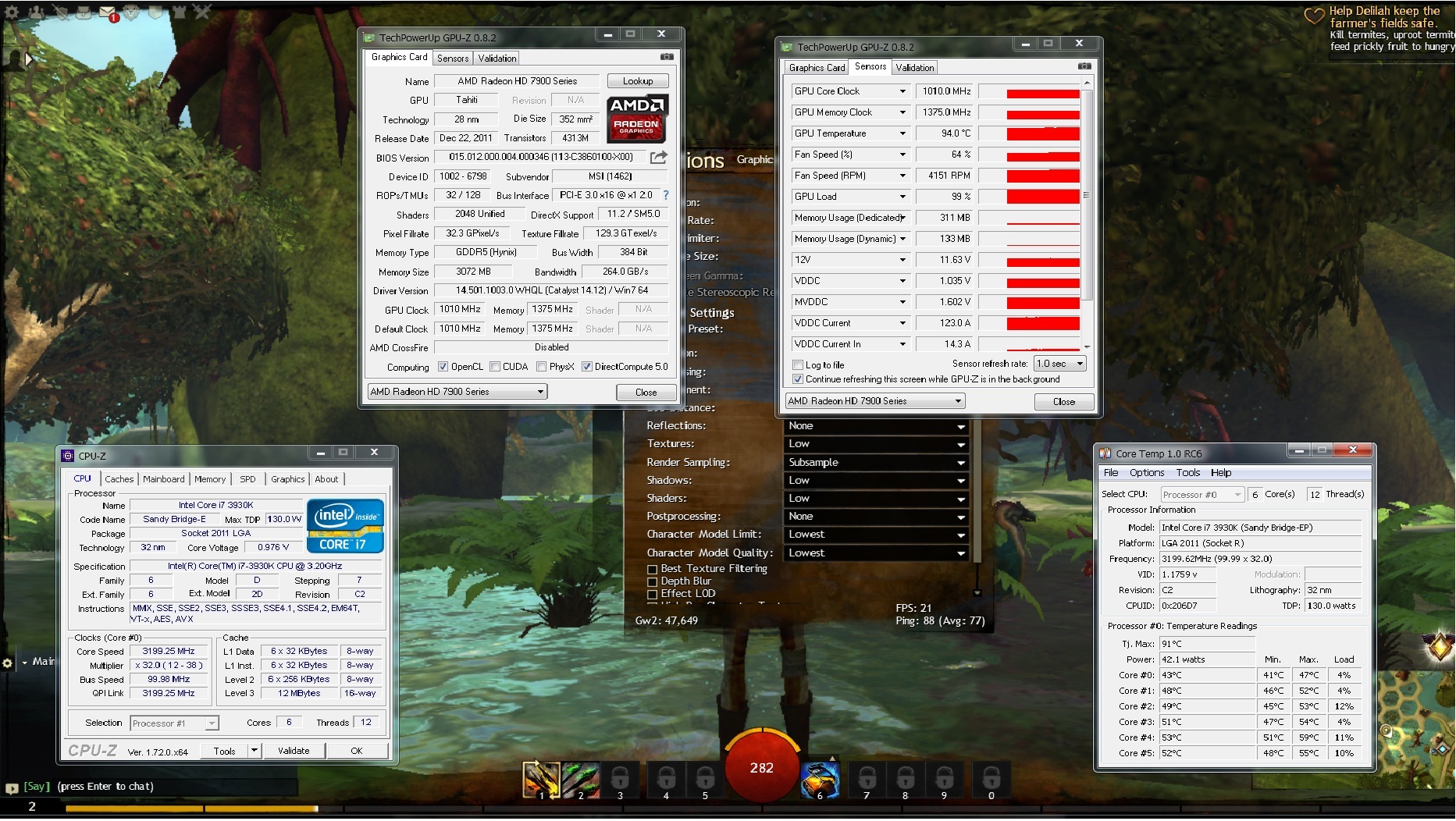
Also, Download GPU-Z, CPU-Z, and Coretemp. Lets get screenshots of those too. I want to see the main windows on GPU-Z and CPU-Z, and CoreTemp, and the Sensor Tab on GPU-Z, all while GW2 is running in a window.
Desktop: 4790k@4.6ghz-1.25v, AMD 295×2, 32GB 1866CL10 RAM, 850Evo 500GB SSD
Laptop: M6600 – 2720QM, AMD HD6970M, 32GB 1600CL9 RAM, Arc100 480GB SSD
Laptop: M6600 – 2720QM, AMD HD6970M, 32GB 1600CL9 RAM, Arc100 480GB SSD
Behellagh, if there’s a lost of performance of various fps then yes, it cripples. I never said that pcie speed have an enormous impact in performance.
But if lowest fps in those tests are 36 for x4, 43 for x8 and 49 for x16, I had a 20% more fps from x4 to x8 (2.0 x8 to x16) and 14% increase from 3.0 x8 to x16.
Also, the game doesn’t work using cores, but threads, and cores manage them. This game has one main thread (this is why single core performance matters) and a lot of secondary thread spread all over the cores.
But when things get heavier, what matters is single core performance because of the main thread that can only be managed by one core (and here is where the amount of cores doesn’t matter).
A 4 core cpu will use all 4 cores and a 8 core cpu will use all 8 cores when playing gw2. The only thing that changes is how much work each core does.
Ansau – Sylvari Mesmer – Exiled Warriors [wE] – Gandara
i7 5775c @ 4.1GHz – 12GB RAM @ 2400MHz – RX 480 @ 1390/2140MHz
i7 5775c @ 4.1GHz – 12GB RAM @ 2400MHz – RX 480 @ 1390/2140MHz
Behellagh, if there’s a lost of performance of various fps then yes, it cripples. I never said that pcie speed have an enormous impact in performance.
But if lowest fps in those tests are 36 for x4, 43 for x8 and 49 for x16, I had a 20% more fps from x4 to x8 (2.0 x8 to x16) and 14% increase from 3.0 x8 to x16.Also, the game doesn’t work using cores, but threads, and cores manage them. This game has one main thread (this is why single core performance matters) and a lot of secondary thread spread all over the cores.
But when things get heavier, what matters is single core performance because of the main thread that can only be managed by one core (and here is where the amount of cores doesn’t matter).
A 4 core cpu will use all 4 cores and a 8 core cpu will use all 8 cores when playing gw2. The only thing that changes is how much work each core does.
over all there is minimal difference from 16x version 3 to 16x version 2 PCIE specs. Most GPUs cannot even saturate above 8x Version3 (16x Version2) as it is (295×2 being the exception).
But there IS less PCIE latency between version 2 and version3 due to the faster spec. So your lower FPS (zerg content) will be faster on Version 3 then version2. I have tested this…bit, and that is what I see for this game anyway.
But as for a CPU only supporting Version2 PCIE spec being crippling? No, because your GPU will not saturate a 16x version2 connection, unless its a GTX980 or R9-295×2.
as for the single core performance issue, see my previous response it explains it pretty clearly.
Desktop: 4790k@4.6ghz-1.25v, AMD 295×2, 32GB 1866CL10 RAM, 850Evo 500GB SSD
Laptop: M6600 – 2720QM, AMD HD6970M, 32GB 1600CL9 RAM, Arc100 480GB SSD
Laptop: M6600 – 2720QM, AMD HD6970M, 32GB 1600CL9 RAM, Arc100 480GB SSD
Behellagh, if there’s a lost of performance of various fps then yes, it cripples. I never said that pcie speed have an enormous impact in performance.
But if lowest fps in those tests are 36 for x4, 43 for x8 and 49 for x16, I had a 20% more fps from x4 to x8 (2.0 x8 to x16) and 14% increase from 3.0 x8 to x16.Also, the game doesn’t work using cores, but threads, and cores manage them. This game has one main thread (this is why single core performance matters) and a lot of secondary thread spread all over the cores.
But when things get heavier, what matters is single core performance because of the main thread that can only be managed by one core (and here is where the amount of cores doesn’t matter).
A 4 core cpu will use all 4 cores and a 8 core cpu will use all 8 cores when playing gw2. The only thing that changes is how much work each core does.
Which is what I’ve said in the past as well as here. The game has numerous threads running but only a few that approaches an individual core’s maximum use. Maybe I’m describing it poorly but having more cores won’t benefit the performance of a single thread. Overall the game’s performance in my experience on multiple quad core systems is 50-75% of the entire CPU. That’s why I’ve said it uses 2 to 3 cores of performance but spread across all cores on the CPU.
But it still boils down to a single thread can not exceed the performance of a single core. One thread running using four cores won’t perform any better than if it running on one (ignoring Turbo modes and resource degradation you get on FX modules).
We are heroes. This is what we do!
RIP City of Heroes
RIP City of Heroes
FX CPUs are crippled by having one FPU per Module. SO… your FX4xxx is a dual core CPU, your FX6xxx is a triple core CPU, and your FX8xxx is a quad core cpu. The additional core count is just a thread that is attached to the single FPU to ‘increase’ threaded performance, VERY similar to how Intels Hyper-threading works that is the inherent issue with the FX line. Also, the FX line’s single core performance is slower then the previous Phenom II line.
But as you explained it the FX module is no more crippled with one FPU than an Intel core with HyperThreading enabled is since in both cases there is only one FPU supporting two threads. The FX-8xxx series is functionally equivalent to an i7 desktop CPU; the ability to run 8 threads but only having 4 FPUs.
Again there is no “crippling”.
We are heroes. This is what we do!
RIP City of Heroes
RIP City of Heroes
I’ve read posts. Gonna post answers soon.
I was reading articles while on my way to work (train).
Core parking -> gives nothing.
Besides i just found something….. this must be a joke.
Screen I mean.
Attachments:

I’ve read posts. Gonna post answers soon.
I was reading articles while on my way to work (train).Core parking -> gives nothing.
Besides i just found something….. this must be a joke.
Screen I mean.
supply the screenshots i requested please.
Desktop: 4790k@4.6ghz-1.25v, AMD 295×2, 32GB 1866CL10 RAM, 850Evo 500GB SSD
Laptop: M6600 – 2720QM, AMD HD6970M, 32GB 1600CL9 RAM, Arc100 480GB SSD
Laptop: M6600 – 2720QM, AMD HD6970M, 32GB 1600CL9 RAM, Arc100 480GB SSD
X4 860k + R9 270x 4gb checking in. Same kitten as you man. I moved from a laptop with an i5 2140 2.3ghz (if I remember well) and a gt 540m 2gb. I had between 50 and kittening 80 fps on low and medium settings on that ancient laptop. This is ridiculous.
Hate to be the bearer of bad news, but its your CPU that’s holding you back.
Look at the 2nd screenshot you posted. You have one core peaking at 87%, that’s going to be the DX9 API doing that. And if you look at the rest of your CPU the cores are all at 70% or higher.
that means the FPU that is doing the heavy lifting of the DX9 API is also doing ADDITIONAL work for the other thread that spawned on it.
In this case, it would probably be better to disable the 2nd core per module in your Bios and see if that helps at all.
the Dead give a ways;
1. Your GPU is at 60% utilization, peak
2. a single core on your FX6300 is at 87% while the rest are at 70%+
3. 21FPS
summary – your CPU cannot keep up
what I would expect to see, when you disable the 2nd core per module I expect your GPU to gain more utilization ,it MIGHT not go above 70% depending on how slow the CPU is behaving, but it shouldn’t be pegged at 60% like it is now, and your FPS should be higher.
But the issue is that FX6300. its doing double work due to the single FPU per module. Disabling the 2nd core per module SHOULD help, as it will free up 70% of the load on the FPU that is also doing the DX9 API work.
Desktop: 4790k@4.6ghz-1.25v, AMD 295×2, 32GB 1866CL10 RAM, 850Evo 500GB SSD
Laptop: M6600 – 2720QM, AMD HD6970M, 32GB 1600CL9 RAM, Arc100 480GB SSD
Laptop: M6600 – 2720QM, AMD HD6970M, 32GB 1600CL9 RAM, Arc100 480GB SSD
This is my problem fx 8350 / r9 270x 2gb
http://imgur.com/kF1zAhP
http://imgur.com/YybHGQ7
http://imgur.com/nYsAfiD
http://imgur.com/O6rmDht
Actually you can’t tell how much of the CPU is being used by the game from the data provided.
We are heroes. This is what we do!
RIP City of Heroes
RIP City of Heroes
I can’t disable core per modules, i can disable only entire modules 5/6 3/4 and then i can disable 2nd core as well
2 cores
http://i.imgur.com/6xySeAG.jpg
6 cores
http://i.imgur.com/r7Ikm9l.jpg
Well… tiny difference
I can’t disable core per modules, i can disable only entire modules 5/6 3/4 and then i can disable 2nd core as well
2 cores
http://i.imgur.com/6xySeAG.jpg
6 coreshttp://i.imgur.com/r7Ikm9l.jpg
Well… tiny difference
Post these screenshots again with GPU-Z and CPU-Z and Coretemp Loaded.
Desktop: 4790k@4.6ghz-1.25v, AMD 295×2, 32GB 1866CL10 RAM, 850Evo 500GB SSD
Laptop: M6600 – 2720QM, AMD HD6970M, 32GB 1600CL9 RAM, Arc100 480GB SSD
Laptop: M6600 – 2720QM, AMD HD6970M, 32GB 1600CL9 RAM, Arc100 480GB SSD
Actually you can’t tell how much of the CPU is being used by the game from the data provided.
yes you can, look at core temp it shows per load per ‘core’. We know that 2 cores = 1 FPU.
do the math.
Desktop: 4790k@4.6ghz-1.25v, AMD 295×2, 32GB 1866CL10 RAM, 850Evo 500GB SSD
Laptop: M6600 – 2720QM, AMD HD6970M, 32GB 1600CL9 RAM, Arc100 480GB SSD
Laptop: M6600 – 2720QM, AMD HD6970M, 32GB 1600CL9 RAM, Arc100 480GB SSD
This is my problem fx 8350 / r9 270x 2gb
http://imgur.com/kF1zAhP
http://imgur.com/YybHGQ7
http://imgur.com/nYsAfiD
http://imgur.com/O6rmDht
1. you need to run the screenshots with the CPU-Z, GPU-Z, Coretemp open with GW2 in windowed mode
2. your GPU is linked at 1x version 1.1 specs it needs to be linked at 16x version 2 specs.
Redo the screenshots as requested so we can verify the GPU Link speed. you may have to remove the GPU blow out the PCIE slot and reseat it to get it linked at 16×.
Desktop: 4790k@4.6ghz-1.25v, AMD 295×2, 32GB 1866CL10 RAM, 850Evo 500GB SSD
Laptop: M6600 – 2720QM, AMD HD6970M, 32GB 1600CL9 RAM, Arc100 480GB SSD
Laptop: M6600 – 2720QM, AMD HD6970M, 32GB 1600CL9 RAM, Arc100 480GB SSD
Actually you can’t tell how much of the CPU is being used by the game from the data provided.
yes you can, look at core temp it shows per load per ‘core’. We know that 2 cores = 1 FPU.
do the math.
No you can’t because you are assuming the OP only has the game running. What that is showing is the CPU running at around 75% for the system and not the game. We need the taskmanager up to see the game’s share. I notice Skype is running on his taskbar.
And why do you keep focusing on FPUs? The vast majority of code being executed by any app is integer and not floating point or SSE. Again a module is no different than an Intel HT core in this regard. Both can run two threads and those two threads must share the single FPU.
The FX Bulldozer architecture blurs the line in determining what’s a core and what isn’t. Each module has two integer units (2 cores) and one floating point unit (1 core). The integer cores share a single L1 instruction cache (1 core) but each has it’s own L1 data cache (2 cores) but the module has a shared L2 unified cache (1 core). AMD marketing went nuts when they found out about the twin IUs per module and labeled them cores and has made the whole issue a confusing mess to talk about.
We are heroes. This is what we do!
RIP City of Heroes
RIP City of Heroes
Volmarg, have you tried to play in windowed full screen? I will mostly do nothing, but you don’t lose anything to try…
Also have you tried different drivers?
You should have way better fps in minimum. This is what I get with an i5 2410m and a gt 550m.
Attachments:

Ansau – Sylvari Mesmer – Exiled Warriors [wE] – Gandara
i7 5775c @ 4.1GHz – 12GB RAM @ 2400MHz – RX 480 @ 1390/2140MHz
i7 5775c @ 4.1GHz – 12GB RAM @ 2400MHz – RX 480 @ 1390/2140MHz
Actually you can’t tell how much of the CPU is being used by the game from the data provided.
yes you can, look at core temp it shows per load per ‘core’. We know that 2 cores = 1 FPU.
do the math.
No you can’t because you are assuming the OP only has the game running. What that is showing is the CPU running at around 75% for the system and not the game. We need the taskmanager up to see the game’s share. I notice Skype is running on his taskbar.
And why do you keep focusing on FPUs? The vast majority of code being executed by any app is integer and not floating point or SSE. Again a module is no different than an Intel HT core in this regard. Both can run two threads and those two threads must share the single FPU.
The FX Bulldozer architecture blurs the line in determining what’s a core and what isn’t. Each module has two integer units (2 cores) and one floating point unit (1 core). The integer cores share a single L1 instruction cache (1 core) but each has it’s own L1 data cache (2 cores) but the module has a shared L2 unified cache (1 core). AMD marketing went nuts when they found out about the twin IUs per module and labeled them cores and has made the whole issue a confusing mess to talk about.
Considering gaming is done in FPU, and the INT work is done in the GPU…yea thats exactly why I’m right.
1 of the 6 cores hitting 87% while the other cores are hitting 70%+ means that FPU has to do double the work, which will result in lower FPS cause of it. Disabling the 2nd core per module did exactly what I knew it would, gave the OP more FPS.
why? Cause gaming is done on the FPU and not the INT.
Also – OP, think about over clocking your FX6300 to about 4.1Ghz (look it up on overclocking forums) you can boost that CPU’s single core performance by about 18% if your lucky.
Desktop: 4790k@4.6ghz-1.25v, AMD 295×2, 32GB 1866CL10 RAM, 850Evo 500GB SSD
Laptop: M6600 – 2720QM, AMD HD6970M, 32GB 1600CL9 RAM, Arc100 480GB SSD
Laptop: M6600 – 2720QM, AMD HD6970M, 32GB 1600CL9 RAM, Arc100 480GB SSD
GPUs are massive arrays of floating point units with throughput is measure in floating point operations per second. That’s what all those stream processors and CUDA cores are, FPUs.
The R9 270x can do a smidge over 2.5 TFLOPS. That’s 2,500 billion floating point operations per second. A core’s FPU isn’t where the floating point is done for a game.
We are heroes. This is what we do!
RIP City of Heroes
RIP City of Heroes
we got the same cpu but different gpu, i got sapphire r9 280x 3gb and 1680×1050 reso.
when i first played the game i also got an fps for about… 20MAX all low settings. If i put the settings on high i got a max of 9fps.
Well that was frustrating I almost quit the game. Then I’ve read the sticky on top about the fps stuffs.
What I did was, From PCIE3 which my video card was installed I switch it to PCIE2, why? Because it is the nearest slot on my processor. Even though there is a possibility that it won’t work well i tried it.
Then I installed the driver again, I did not uninstalled the driver, I just put in the installer and installed it, as is.
I open the control center, follow the settings on sticky, open the game, follow the settings on sticky.
And guess what, in high settings i got around 60fps.
No overclocked was made.
well just saying my part.
I’ve read the posts on my way from work (train).
I will provide the screens of 2 core running, and will check how is it about the PCIE slot – but in this case i doubt i can do anything unless more ppl will provide some more information like that. I still go warranty on pc so i don’t want to mess up on my own.
But if it’s already in the correct place then i won’t have to do anything.
I don’t have time to do this stuff today, got to prepare for university on this weekend, hopefully i can do it tommorow as I want to solve this problem.
why? Cause gaming is done on the FPU and not the INT.
lmao
R9 270x Gaming - FX 6300 6x3.5gh Low fps
in Account & Technical Support
Posted by: thesacredone.1370
OP , let us know if you got it.
we got the same cpu but different gpu, i got sapphire r9 280x 3gb and 1680×1050 reso.
when i first played the game i also got an fps for about… 20MAX all low settings. If i put the settings on high i got a max of 9fps.
Well that was frustrating I almost quit the game. Then I’ve read the sticky on top about the fps stuffs.
What I did was, From PCIE3 which my video card was installed I switch it to PCIE2, why? Because it is the nearest slot on my processor. Even though there is a possibility that it won’t work well i tried it.
Then I installed the driver again, I did not uninstalled the driver, I just put in the installer and installed it, as is.
I open the control center, follow the settings on sticky, open the game, follow the settings on sticky.
And guess what, in high settings i got around 60fps.No overclocked was made.
well just saying my part.
At least right now i had time to check it out.
Sadly my card is in the closest slot next to the CPU.
However i need to check some of the mainboard manuals. As on internet there is nothing about PCIE3, and some of the application shows that I’m using one. A bit confusing.
I still have to take screens of the 2 cpu running gw2.
During week i should have some time.
Btw I’ve installed shadow of mordor.
This is so sad… just check my previous gw2 screens.
And this shadow of mordor screen with every video setting on high +AA.
Attachments:

(edited by Volmarg.4310)
Modified 10th generation LithTech Engine is used in Shadow of Mordor. Like I’ve been saying, if you licence your engine you are motivated to keep up with the competition in the game engine market and are willing to invest the resources.
We are heroes. This is what we do!
RIP City of Heroes
RIP City of Heroes
I can’t disable core per modules, i can disable only entire modules 5/6 3/4 and then i can disable 2nd core as well
2 cores
http://i.imgur.com/6xySeAG.jpg
6 coreshttp://i.imgur.com/r7Ikm9l.jpg
Well… tiny differencePost these screenshots again with GPU-Z and CPU-Z and Coretemp Loaded.
http://i.imgur.com/sgIoCKi.png
http://i.imgur.com/O02zpP7.jpg
Volmarg, have you tried to play in windowed full screen? I will mostly do nothing, but you don’t lose anything to try…
Also have you tried different drivers?
Latest + windowed = same effect.
I can’t disable core per modules, i can disable only entire modules 5/6 3/4 and then i can disable 2nd core as well
2 cores
http://i.imgur.com/6xySeAG.jpg
6 coreshttp://i.imgur.com/r7Ikm9l.jpg
Well… tiny differencePost these screenshots again with GPU-Z and CPU-Z and Coretemp Loaded.
http://i.imgur.com/sgIoCKi.png
http://i.imgur.com/O02zpP7.jpgVolmarg, have you tried to play in windowed full screen? I will mostly do nothing, but you don’t lose anything to try…
Also have you tried different drivers?Latest + windowed = same effect.
Your CPU’s 2 cores are at 80%+, you must lower your in game settings or upgrade your CPU to Intel.
As long as your on AMD your performance is going to suffer under high detail settings. the only way to fix that is to upgrade the CPU to Intel. Sorry but thats just the fact of it.
If you can’t/won’t, then start by not using high res textures, full shadows, high post processing effects, and High res character models (probably disabled since your CPU is detected as a dual core right now).
Edit
For reference are 2 screenshots of a dual core G3258 clocked at 4Ghz running a HD5770. Built that system for under 200, by reusing my HD5770.
First is a open field way point in Queensdale, while the 2nd is during a Jormag Fight.
Attachments:


Desktop: 4790k@4.6ghz-1.25v, AMD 295×2, 32GB 1866CL10 RAM, 850Evo 500GB SSD
Laptop: M6600 – 2720QM, AMD HD6970M, 32GB 1600CL9 RAM, Arc100 480GB SSD
Laptop: M6600 – 2720QM, AMD HD6970M, 32GB 1600CL9 RAM, Arc100 480GB SSD
(edited by ikereid.4637)
Isn’t helping too.
Any other ideas besides " go for I5/i7".
I will have no problem with gettin Dragon age inquisiton just to take screens how well it runs. I just won’t agree with the fact that this game works like crap and the same is on low settings.
Still thank You for trying to help so far “sirsquishy.8531”.
Denying the truth doesn’t help though. The only thing you may do is overclocking the hell out of your fx, that will better your performance a lot. That however requires a strong motherboard as well as potent cooling, so in the end you might be better off just getting an I5 4460 on a cheap motherboard.
(edited by Dub.1273)
R9 270x Gaming - FX 6300 6x3.5gh Low fps
in Account & Technical Support
Posted by: thesacredone.1370
I can’t disable core per modules, i can disable only entire modules 5/6 3/4 and then i can disable 2nd core as well
2 cores
http://i.imgur.com/6xySeAG.jpg
6 coreshttp://i.imgur.com/r7Ikm9l.jpg
Well… tiny differencePost these screenshots again with GPU-Z and CPU-Z and Coretemp Loaded.
http://i.imgur.com/sgIoCKi.png
http://i.imgur.com/O02zpP7.jpgVolmarg, have you tried to play in windowed full screen? I will mostly do nothing, but you don’t lose anything to try…
Also have you tried different drivers?Latest + windowed = same effect.
Your CPU’s 2 cores are at 80%+, you must lower your in game settings or upgrade your CPU to Intel.
As long as your on AMD your performance is going to suffer under high detail settings. the only way to fix that is to upgrade the CPU to Intel. Sorry but thats just the fact of it.
If you can’t/won’t, then start by not using high res textures, full shadows, high post processing effects, and High res character models (probably disabled since your CPU is detected as a dual core right now).
Edit
For reference are 2 screenshots of a dual core G3258 clocked at 4Ghz running a HD5770. Built that system for under 200, by reusing my HD5770.First is a open field way point in Queensdale, while the 2nd is during a Jormag Fight.
I have AMD but intel aswel, that changes nothing.
It seems that you have more usage of CPU, unlike mine which is is at 5-12% usage. Could that be related?
(edited by thesacredone.1370)
I can’t disable core per modules, i can disable only entire modules 5/6 3/4 and then i can disable 2nd core as well
2 cores
http://i.imgur.com/6xySeAG.jpg
6 coreshttp://i.imgur.com/r7Ikm9l.jpg
Well… tiny differencePost these screenshots again with GPU-Z and CPU-Z and Coretemp Loaded.
http://i.imgur.com/sgIoCKi.png
http://i.imgur.com/O02zpP7.jpgVolmarg, have you tried to play in windowed full screen? I will mostly do nothing, but you don’t lose anything to try…
Also have you tried different drivers?Latest + windowed = same effect.
Your CPU’s 2 cores are at 80%+, you must lower your in game settings or upgrade your CPU to Intel.
As long as your on AMD your performance is going to suffer under high detail settings. the only way to fix that is to upgrade the CPU to Intel. Sorry but thats just the fact of it.
If you can’t/won’t, then start by not using high res textures, full shadows, high post processing effects, and High res character models (probably disabled since your CPU is detected as a dual core right now).
Edit
For reference are 2 screenshots of a dual core G3258 clocked at 4Ghz running a HD5770. Built that system for under 200, by reusing my HD5770.First is a open field way point in Queensdale, while the 2nd is during a Jormag Fight.
I have AMD but intel aswel, that changes nothing.
It seems that you have more usage of CPU, unlike mine which is is at 5-12% usage. Could that be related?
we know you have a FX6300, and we know its limitations. What do you have for Intel. If its like a Q6600 its in the same boat as the FX6300….
Desktop: 4790k@4.6ghz-1.25v, AMD 295×2, 32GB 1866CL10 RAM, 850Evo 500GB SSD
Laptop: M6600 – 2720QM, AMD HD6970M, 32GB 1600CL9 RAM, Arc100 480GB SSD
Laptop: M6600 – 2720QM, AMD HD6970M, 32GB 1600CL9 RAM, Arc100 480GB SSD
R9 270x Gaming - FX 6300 6x3.5gh Low fps
in Account & Technical Support
Posted by: thesacredone.1370
I can’t disable core per modules, i can disable only entire modules 5/6 3/4 and then i can disable 2nd core as well
2 cores
http://i.imgur.com/6xySeAG.jpg
6 coreshttp://i.imgur.com/r7Ikm9l.jpg
Well… tiny differencePost these screenshots again with GPU-Z and CPU-Z and Coretemp Loaded.
http://i.imgur.com/sgIoCKi.png
http://i.imgur.com/O02zpP7.jpgVolmarg, have you tried to play in windowed full screen? I will mostly do nothing, but you don’t lose anything to try…
Also have you tried different drivers?Latest + windowed = same effect.
Your CPU’s 2 cores are at 80%+, you must lower your in game settings or upgrade your CPU to Intel.
As long as your on AMD your performance is going to suffer under high detail settings. the only way to fix that is to upgrade the CPU to Intel. Sorry but thats just the fact of it.
If you can’t/won’t, then start by not using high res textures, full shadows, high post processing effects, and High res character models (probably disabled since your CPU is detected as a dual core right now).
Edit
For reference are 2 screenshots of a dual core G3258 clocked at 4Ghz running a HD5770. Built that system for under 200, by reusing my HD5770.First is a open field way point in Queensdale, while the 2nd is during a Jormag Fight.
I have AMD but intel aswel, that changes nothing.
It seems that you have more usage of CPU, unlike mine which is is at 5-12% usage. Could that be related?we know you have a FX6300, and we know its limitations. What do you have for Intel. If its like a Q6600 its in the same boat as the FX6300….
Here is what I got.
Attachments:
R9 270x Gaming - FX 6300 6x3.5gh Low fps
in Account & Technical Support
Posted by: dodgycookies.4562
Here is what I got.
pcie @ 1x 2.0 is your problem, the card is in powersave mode and not recognizing gw2 as a d3d program that needs more power
reseat gpu in closest slot, make sure power setting are on performance, clean install drivers, and maybe reinstall the game?
[ICoa] Blackgate
R9 270x Gaming - FX 6300 6x3.5gh Low fps
in Account & Technical Support
Posted by: thesacredone.1370
I can’t disable core per modules, i can disable only entire modules 5/6 3/4 and then i can disable 2nd core as well
2 cores
http://i.imgur.com/6xySeAG.jpg
6 coreshttp://i.imgur.com/r7Ikm9l.jpg
Well… tiny differencePost these screenshots again with GPU-Z and CPU-Z and Coretemp Loaded.
http://i.imgur.com/sgIoCKi.png
http://i.imgur.com/O02zpP7.jpgVolmarg, have you tried to play in windowed full screen? I will mostly do nothing, but you don’t lose anything to try…
Also have you tried different drivers?Latest + windowed = same effect.
Your CPU’s 2 cores are at 80%+, you must lower your in game settings or upgrade your CPU to Intel.
As long as your on AMD your performance is going to suffer under high detail settings. the only way to fix that is to upgrade the CPU to Intel. Sorry but thats just the fact of it.
If you can’t/won’t, then start by not using high res textures, full shadows, high post processing effects, and High res character models (probably disabled since your CPU is detected as a dual core right now).
Edit
For reference are 2 screenshots of a dual core G3258 clocked at 4Ghz running a HD5770. Built that system for under 200, by reusing my HD5770.First is a open field way point in Queensdale, while the 2nd is during a Jormag Fight.
Do you overclock you cpu? I see that your cpu is at 80% load, as mine sits in about 20%.
Also, I noticed that I have 12 cores, should I reduce it in msconfig to 2 / 4? if at all?
Thanks!
Attachments:

(edited by thesacredone.1370)
The best way to ensure Core Parking is off is by pressing the Windows Key + R, type regedit, Click Edit → Find → 0cc5b647-c1df-4637-891a-dec35c318583. Search this key and make sure ValueMin and ValueMax are both set to 0. Press F3 to find the next batch – rinse & repeat until you reach the end.
I have about the same setup, FX 6300 – 8G RAM – XFX R9 270x – ASRock 990FX board, and I pull up to 70 FPS PVE world depending on the map and population. LA does dip to around 30-35 FPS norm, 20-25 heavily populated. SW and DT – 40FPS most of the time.
My Settings in the CCC:
AA: Override Application – 24x – Edge Detect – Supersampling – Morph Off
Texture Filtering – Override Application – 16x – High Quality – Surface Opt On
Vertical Refresh – Always On (I get screen tearing if I don’t) Triple Buff Off
Tessellation – Overried 64x
In game:
1080p – Refresh Rate 60 – Frame Limiter Unlimited – Interface Small
All Settings High
Reflections: Terrain & Sky
Render: Supersample
Model Limit High
Model Qualilty Highest
Best Texture Filter On
Depth Blur On
Effect LoD Off
High Res On
VSync On
I am running the Omega Drivers – both chipset and GPU.
Do you overclock you cpu? I see that your cpu is at 80% load, as mine sits in about 20%.
Also, I noticed that I have 12 cores, should I reduce it in msconfig to 2 / 4? if at all?Thanks!
1. your GPU is linked at 1x, you need to pull your GPU out and air dust the PCIE slot to fix that. It should be linked at 16x or 8×.
2. you are running a 6 core CPU with 12 threads (due to Hyper Threading) clocked at 3ghz. IMHO I would explore overclocking the CPU to 4Ghz and see what you can get out of it. If I had your CPU I would even disable 2 of the 6 cores if I had to to get it clocked at or near 4ghz, just sayin.
If your Ivy bridge CPU over clocks like my Haswell systems; disable the Memory XMP profile in your bios to ensure the RAM is clocked at either 1333mhz or 1600Mhz, and adjust the CPU multiplier to 40x, and make sure turbo-boost is disabled. The Auto voltage should be OK at that clock, I have my 4670K clocked at 4ghz and the vCore is still on auto and it phases up and down correctly based on load so I would expect the same for your CPU.
I would not push your CPU any higher then 4Ghz if you are on the stock Intel cooler. And after over clocking make sure you run Prime95 for 30-45mins to test temps, and if you dont blue screen then run it for a good 4 hours to ensure system stability.
That is the basic/bare min you need to do to over clock the 2nd-4th gen Intel-K series CPUs.
Desktop: 4790k@4.6ghz-1.25v, AMD 295×2, 32GB 1866CL10 RAM, 850Evo 500GB SSD
Laptop: M6600 – 2720QM, AMD HD6970M, 32GB 1600CL9 RAM, Arc100 480GB SSD
Laptop: M6600 – 2720QM, AMD HD6970M, 32GB 1600CL9 RAM, Arc100 480GB SSD
The best way to ensure Core Parking is off is by pressing the Windows Key + R, type regedit, Click Edit -> Find -> 0cc5b647-c1df-4637-891a-dec35c318583. Search this key and make sure ValueMin and ValueMax are both set to 0. Press F3 to find the next batch – rinse & repeat until you reach the end.
I have about the same setup, FX 6300 – 8G RAM – XFX R9 270x – ASRock 990FX board, and I pull up to 70 FPS PVE world depending on the map and population. LA does dip to around 30-35 FPS norm, 20-25 heavily populated. SW and DT – 40FPS most of the time.
My Settings in the CCC:
AA: Override Application – 24x – Edge Detect – Supersampling – Morph Off
Texture Filtering – Override Application – 16x – High Quality – Surface Opt On
Vertical Refresh – Always On (I get screen tearing if I don’t) Triple Buff Off
Tessellation – Overried 64xIn game:
1080p – Refresh Rate 60 – Frame Limiter Unlimited – Interface Small
All Settings High
Reflections: Terrain & Sky
Render: Supersample
Model Limit High
Model Qualilty Highest
Best Texture Filter On
Depth Blur On
Effect LoD Off
High Res On
VSync OnI am running the Omega Drivers – both chipset and GPU.
I’ve made some changes following what You wrote and i got few more fps in open area.
But in Dry Top is still the same.
I’m kinda the same with FPS as You.
But that’s the problem.
I can’t even get stable ~40 FPS by lowering my settings.
I still keep dropping in la even on LOW settings barely ~30.
So…. kinda BUMP hoping for some more ideas.
Anyone? Some new ideas maybe?
Anyone? Some new ideas maybe?
what if you drop that character model limit to medium or low? what happens then?
Desktop: 4790k@4.6ghz-1.25v, AMD 295×2, 32GB 1866CL10 RAM, 850Evo 500GB SSD
Laptop: M6600 – 2720QM, AMD HD6970M, 32GB 1600CL9 RAM, Arc100 480GB SSD
Laptop: M6600 – 2720QM, AMD HD6970M, 32GB 1600CL9 RAM, Arc100 480GB SSD
Anyone? Some new ideas maybe?
what if you drop that character model limit to medium or low? what happens then?
Gettin 1 FPS less…. kinda epic.


