GW2.exe stands still on memory...
Several GW2.exe files as you can see on jpg after closing program.
Attachments:
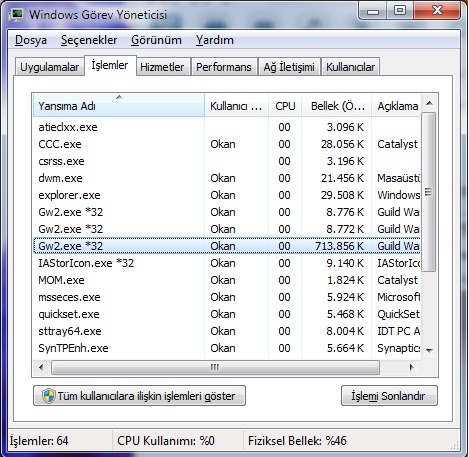
I had this recently and my client wasn’t starting up. Cancelling the one that takes up the most resources fixed it for me (Although I still had to go in and cancel the other 20 or so).
I had a similar thread about the issue here:
https://forum-en.gw2archive.eu/forum/support/tech/Unable-to-start-Gw2-exe-Launcher/first#post1337215
The issue is for anybody who runs Windows 8. Those processes get stuck in the kernel and you are unable to end them using task manager. The problem is with Windows 8 Hybrid boot feature – it does not shut down any processes in the kernel, but rather only user processes.
For anybody running Windows 8 – you need to create a manual shortcut to shutdown windows completely (and not the “Hybrid” way) by creating a mnaual file extension of
C:\Windows\System32\shutdown.exe /s /t 0
Hope it helps another poor sap with a new computer that has Windows 8…
Had this happen as well – using Windows 7 64 bit. Never had it happen in beta or any release up until now.
Went into task manager and ‘end task’ on both executables and then restarted and all was fine.
So far it’s happened only once.
Had this happen as well – using Windows 7 64 bit. Never had it happen in beta or any release up until now.
Went into task manager and ‘end task’ on both executables and then restarted and all was fine.
So far it’s happened only once.
This has been happening to me since the 28th patch. I’m also running Win7 x64. But for me, it happens every single time I quit out. It gets quite annoying when I need to restart for a patch.