i5-4670K @ 4.6 GHz | GTX 660 | 8GB @ 1600MHz | Samsung 840 EVO 120GB | Win 8.1
Although it might not have too much to do with this, what CPU do you have? How hot does it run, also how about GPU? Have you tried complete reinstalling? How healthy is your hard drive? Do you get these symptoms from anything else?
i5-4670K @ 4.6 GHz | GTX 660 | 8GB @ 1600MHz | Samsung 840 EVO 120GB | Win 8.1
It’s a crash report. There’s some bug going on and it happens to me every once in a while too. I don’t believe it’s a hardware issue or has too much to do with your end but rather in the program code. Don’t worry too much about it until it gets a fix.
i5-4670K @ 4.6 GHz | GTX 660 | 8GB @ 1600MHz | Samsung 840 EVO 120GB | Win 8.1
If you buy prebuilt you will always pay extra, it’s that simple. They buy the same parts and sell them to consumers, building a machine out of it requires extra work so that’s added to the price. That being said, yes that computer would run GW2 pretty smoothly, apart from it having a weird PSU (and an overclockable mobo paired with non-overclockable CPU?). I’d still say you would get better performance with my suggested £635 computer. And also as stated by Nova building a pc isn’t too hard, just follow the manual and all you need is a screwdriver and a few hours (extra time there if you’re new to it). Like playing with hi-tech legos.
i5-4670K @ 4.6 GHz | GTX 660 | 8GB @ 1600MHz | Samsung 840 EVO 120GB | Win 8.1
What if you stand on dry land and look at your feet, does it drop then? If you lower your resolution and graphic settings, does it get any better? What are your system specs?
i5-4670K @ 4.6 GHz | GTX 660 | 8GB @ 1600MHz | Samsung 840 EVO 120GB | Win 8.1
For GW2, the ebay one is the best as it is Intel. Bottom line, get the best CPU you can and like Nova said, HD 7790 or GTX 650 Ti or above. You can’t really compare “other games” as that’s quite a huge span. Hoping to play Crysis 3 on Ultra? Heh, expect single-digit fps. Minecraft with original texture pack? What doesn’t run it? For most games, modern FPS’es at least you want stronger GPU. You have to make sacrifices somewhere, either CPU power, GPU power or cost of the machine.
i5-4670K @ 4.6 GHz | GTX 660 | 8GB @ 1600MHz | Samsung 840 EVO 120GB | Win 8.1
For me it was bound to page up and down by default, although scroll works too. See if that’s a good setup, or if yours is different or change it to something else
i5-4670K @ 4.6 GHz | GTX 660 | 8GB @ 1600MHz | Samsung 840 EVO 120GB | Win 8.1
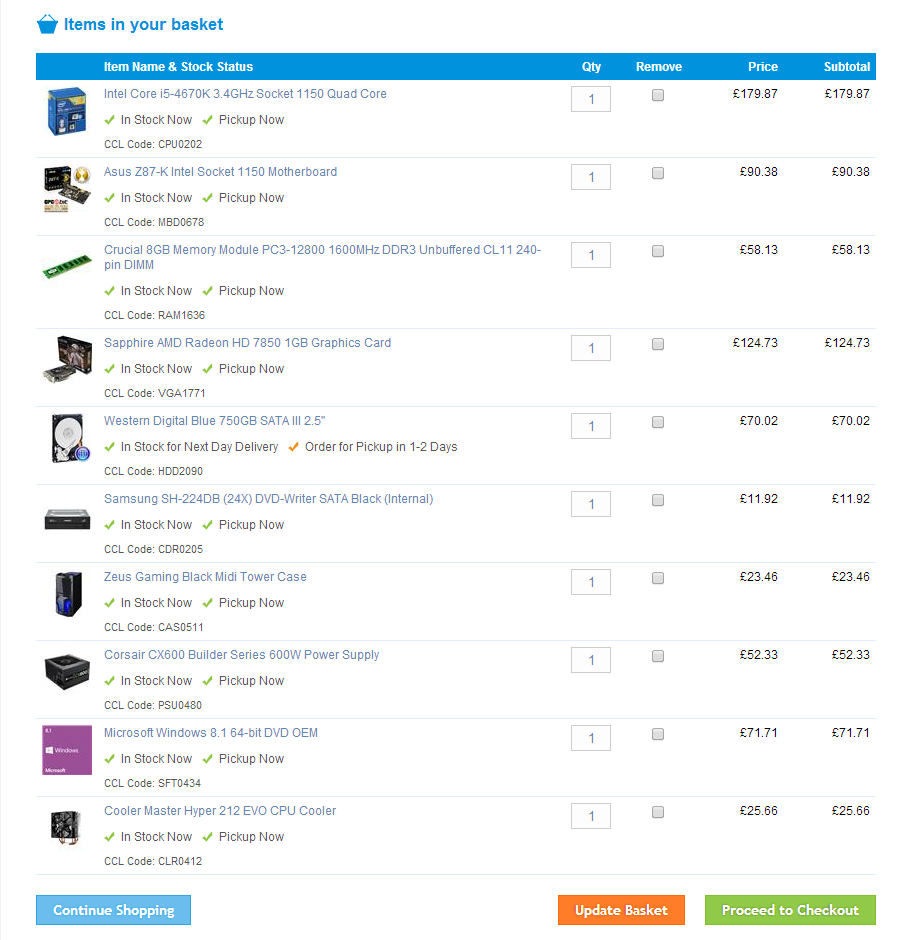
I would go for something like the picture attached. Grand total is £700 here, but that’s pretty much the only thing that made sense to me. The pre-built suggestion there looked good, but it was lacking OS and with all those changes it would’ve been more expensive with less power. The graphics card is a bit more powerful than necessary but the sufficient ones were only like 10 pounds cheaper so I went with that. It has overclockable CPU and mobo as well as a cooler, all of which you kinda need to get decent framerate in big zerg fights and world boss events, but if you decide not to go that route £40 can be saved downgrading CPU and mobo (regular i5-4670 and Gigabyte B85-HD3, or H87-HD3 if H87 chipset is required, only 6 pounds more but I didn’t see too much benefit in it), aftermarket cooler can be dropped then too if needed, another £25 saved. that makes it £635.
Since you seem to live in the UK I have a suggestion: Germany. Hardware prices are cheaper there and the shipping cost isn’t too bad. In the second pic is pretty much the same machine from a german hardware store, with shipping cost included it’s gonna be about £640. Up to your preference but I just want to give you that as an option.
Attachments:

i5-4670K @ 4.6 GHz | GTX 660 | 8GB @ 1600MHz | Samsung 840 EVO 120GB | Win 8.1
Cyclical fps drop usually indicates heat a problem, but I read that someone said it could be RAM or HDD communicating with your OS. Did you pull the components out for a second or not?
Try opening the Task Manager while in game, make sure it stays always on top and run the game in windowed full screen. When those lagspikes appear does the CPU usage stay the same the whole time or bounce with fps?
As for checking your storage, you can run SpeedTest’s S.M.A.R.T analysis (or any other producer’s as well). RAM can be checked with Memtest86+, this requires a blank CD or USB stick and leaving your pc on for a night.
The last thing I can think of right now is clean install of your OS. I wouldn’t rush into this because only GW2 is causing problems.
i5-4670K @ 4.6 GHz | GTX 660 | 8GB @ 1600MHz | Samsung 840 EVO 120GB | Win 8.1
And how old is that drive? It could be coming to the end of it’s life. I’ve never done this, but based on some googling you could try SpeedFan and S.M.A.R.T utility to diagnose your drive’s health. If someone has better knowledge on it not working or some better program please correct me.
If you haven’t already, you could try repairing the game client or even reinstalling the game if you want to be extra sure.
i5-4670K @ 4.6 GHz | GTX 660 | 8GB @ 1600MHz | Samsung 840 EVO 120GB | Win 8.1
100 GB out of what? Sounds quite full. I can’t remember the exact numbers but I believe it was somewhere around 80% of HDD’s max capacity where it starts to slow down. Could’ve been lower too. I bought an SSD (alongside with bunch of other hardware parts to be fair), installed OS and GW2 on it and all the rest on that old hard drive. I used to have those symptoms as well and now they’re all gone. I’m not sure whether it was the new drive or clean install of OS but I believe it’s either one of those and more likely the former.
i5-4670K @ 4.6 GHz | GTX 660 | 8GB @ 1600MHz | Samsung 840 EVO 120GB | Win 8.1
Mantle is Open just like tressFX (nvidia already optimize it)… Mantle does not require GCN core. Mantle is not a battle against NVIDIA it is battle against INTEL….
More games that will support MANTLE better is for us costumers….
Mantle
+ less CPu power, much better games
- support
It’s not about whether Intel fanboys think Mantle doesn’t help, it does, that’s proven, but the thing is, it’s not so easy implementing it in game as pressing a button and waiting it to load. Also BF4 =/= GW2. Until we see it in GW2 we can’t talk about what kind of performance change it brings. Also, wasn’t at least part of Mantle’s job to shift work to GPU, not to spread it evenly between cores?
i5-4670K @ 4.6 GHz | GTX 660 | 8GB @ 1600MHz | Samsung 840 EVO 120GB | Win 8.1
Does it work properly then? Do you get disconnects doing anything else or does any other computer have those problems on that router?
i5-4670K @ 4.6 GHz | GTX 660 | 8GB @ 1600MHz | Samsung 840 EVO 120GB | Win 8.1
Is it connected by WiFi or cable? If you have WiFi in your pc try to update drivers. If it’s cable all they way, connect your ISP. If there’s a router you’ve bought in the middle, at least try shutting it down and letting it cool down for a bit. You can try another router there too, if possible.
i5-4670K @ 4.6 GHz | GTX 660 | 8GB @ 1600MHz | Samsung 840 EVO 120GB | Win 8.1
Sounds like a problem with your hard drive. Is it getting full, is it riddled with viruses and have you defragmented it lately?
i5-4670K @ 4.6 GHz | GTX 660 | 8GB @ 1600MHz | Samsung 840 EVO 120GB | Win 8.1
I see, and yeah, you shouldn’t cut on the cost of the CPU for this game just to get a good GPU, especially if you have a working GPU already. Intel HD 4600 in the 4670K is just roughly the same as 9800 GT, but I guess iGPU’s develop too (They had a huge bump from IB IIRC), I think I saw a vid of someone playing Skyrim on it with decent fps.
That 650 Ti fits in the $750 budget though if you exclude SSD’s and whatnot, so I don’t see too much of a reason to not buy it.
i5-4670K @ 4.6 GHz | GTX 660 | 8GB @ 1600MHz | Samsung 840 EVO 120GB | Win 8.1
You think 9800 GT would cut it at 1080p max graph? In PassMark benchmark it has 723 points whereas HD 7790 has 3000. The good thing about it is that it can be left out for now and it can always be added later without too much of hassle.
Hmm, I might’ve not watched the list too carefully, how much more does 650 Ti cost? If it’s not too much then definitely that, 650 is still on the borderline. That 320GB drive, I don’t even really know how it got there, I think it was pretty much the cheapest decent HDD around. Sure it can be upgraded but I didn’t really look into it if the old one is still fine.
i5-4670K @ 4.6 GHz | GTX 660 | 8GB @ 1600MHz | Samsung 840 EVO 120GB | Win 8.1
And what about when playing?
i5-4670K @ 4.6 GHz | GTX 660 | 8GB @ 1600MHz | Samsung 840 EVO 120GB | Win 8.1
Should…. But does it? Do you have some secret information that I don’t have? If it’s coming anytime soon I’d tell people to run screaming to the nearest store and get an AMD GPU if they want performance in GW2 but I don’t see that happening very quickly.
i5-4670K @ 4.6 GHz | GTX 660 | 8GB @ 1600MHz | Samsung 840 EVO 120GB | Win 8.1
On the main page of GPU-Z look for the Bus Interface. Then, on the Sensors tab have a look at your temperatures. I believe maybe your thermal paste on CPU has dried up and it’s running too hot or something, maybe too much dust inside the case. That’s why I want to know what the readings are.
i5-4670K @ 4.6 GHz | GTX 660 | 8GB @ 1600MHz | Samsung 840 EVO 120GB | Win 8.1
The ultimate solution is to reinstall the whole game, that should get rid of the possible software problems. And CoreTemp/RealTemp showed no different results?
One more test you can do is to set the graphics as well as the resolution to lowest possible (for test purpose, don’t worry) and see the issue still persists. If it doesn’t, up something and see what’s the situation now. Do this until it starts to happen again.
i5-4670K @ 4.6 GHz | GTX 660 | 8GB @ 1600MHz | Samsung 840 EVO 120GB | Win 8.1
Ok, do these following things:
1. Download Real Temp or Core Temp (which one looks nicer) and GPU-Z.
2. Check your CPU’s temperature with whichever you chose and with GPU-Z your GPU’s.
3. Check your GPU’s link width from GPU-Z (it’s the part which says Bus Interface: PCI-E 2.0 x16 @ _(whatever you have here) or something similar).
4. Download the latest drivers from GeForce Experience (download that from GeForce site if you haven’t)
5. Repair the game client or reinstall the whole game. Repair doesn’t always fix the problem but it’s a lot faster so might do that first.
Your specs look otherwise sufficient to run GW2, but the can be a problem somewhere in the configuration or software level. Does any other game behave weirdly?
i5-4670K @ 4.6 GHz | GTX 660 | 8GB @ 1600MHz | Samsung 840 EVO 120GB | Win 8.1
i5-4670K @ 4.6 GHz | GTX 660 | 8GB @ 1600MHz | Samsung 840 EVO 120GB | Win 8.1
Right, if they can manage that, come back here and we’ll put the parts list together for you, just give us the budget!
i5-4670K @ 4.6 GHz | GTX 660 | 8GB @ 1600MHz | Samsung 840 EVO 120GB | Win 8.1
Hard to say with only that information.
What kinda of lag is this? Skill delay or fps? if the latter, do you just stay at low fps all the time or get it in spikes? if so, are they random or very frequent and even same intervals every time? What are your system specs?
i5-4670K @ 4.6 GHz | GTX 660 | 8GB @ 1600MHz | Samsung 840 EVO 120GB | Win 8.1
Btw you might wanna check the Fire Strike, Ice Storm is more for like mobile devices. Seems like you’re on the average anyways tho.
Have you tried repairing the game client? I might not work but it’s not gonna cost you anything. Do you have anything else running in the background? Try closing everything but essential OS programs and GW2.
i5-4670K @ 4.6 GHz | GTX 660 | 8GB @ 1600MHz | Samsung 840 EVO 120GB | Win 8.1
@dodgy I believe Shadowplay is available from 650 Ti BOOST on, it is at least on my 660. It’s maybe better for this game since from what I’ve heard it uses GPU power whereas fraps uses CPU. Also someone said recently that 680 in SLI has no problem doing 3 monitors at 1200p but 1600p was a struggle so a single 770 Should be fine for 1080p multimonitoring.
@Lux yeah, I’d say if you get a $150 card or better you wont see any difference. the 3rd option seems to be the best out of those, however if you order parts and pay for assembly like I suggested you’ll get more fps and need to spend less money. You’re paying for that Alienware logo for nothing.
i5-4670K @ 4.6 GHz | GTX 660 | 8GB @ 1600MHz | Samsung 840 EVO 120GB | Win 8.1
Above that click the Show Result Details and see the graph. Are you anywhere near the masses?
i5-4670K @ 4.6 GHz | GTX 660 | 8GB @ 1600MHz | Samsung 840 EVO 120GB | Win 8.1
My computer’s motherboard died last week. I need a new computer but honestly Guild Wars 2 is the only game that I play. The machine won’t be used for anything else that is demanding.
I am always worried about buying and spending more than I need.
What recommendations do you fellow Tyrians have?
I do have:
Graphics card (EVGA nVidia GeForce 9800GT 1 GB DDR3 VGA/DVI/HDMI PCI-Express Video Card 01G-P3-N988-TR)PUS (Cosair CX500)
Windows 7
I can use those components to build a new machine but I have never attempted that beforehand.
About 4 times more powerful GPU is advised to have. Sorry, they outdate very quickly. Somewhere along the lines of HD 7790 and GTX 650 Ti, whatever you can find the cheapest, will do you wonders.
If you’re only wanting to play GW2 and really want it to run decent, a Strong CPU is a must. It’s gonna leave a mark in your bill but in the end it’s worth it. I understand that your pc broke and you want a new one quickly and you can’t wait a few months until you’ve saved more money, but if it’s possible to borrow some from your parents you wont regret it later. I don’t like the idea of spending several hundreds of dollars on something and not be happy with the outcome when you could spend a hundred more and get the best result possible.
This here is my suggestion:
(I assume you can use your case too?)
http://pcpartpicker.com/p/2OLKA
A few notes:
1. What was the reason your mobo fried? It could’ve been your PSU gone bad and overvolting it. If that’s the case your GPU could be gone as well and I DEFINITELY wouldn’t plug it back into the new system to see it all happen again on day 1. A new non-modular version of that PSU is just $40 right now, not too bad of an investment.
2. How’s you old hard drive? There’s that 320GB drive suggested but if your old one is fine I don’t really see a reason to spend on that. Another $40 saved (perhaps the one you just spent on that PSU  )
)
3. I added a $20 optical drive there. If you can use your old one just take that out.
4. Now it’s at $730. If you’re willing to spend more I have 3 letters for you: SSD. That bad boy will shorten your loading times so much you wont even be looking at old HDD’s anymore. My boot-up time is about 12 seconds and another 13-15 second from desktop to Lion’s Arch all ready to go. It’s gonna cost you another $100 or so though.
Sorry I missed the budget. I would like to stay under $750, which I know isn’t a lot but I don’t have a rich aunt willing to spend $5k on me.
I see what you did there 
i5-4670K @ 4.6 GHz | GTX 660 | 8GB @ 1600MHz | Samsung 840 EVO 120GB | Win 8.1
Yeah, CPU is the bottlenecking part of every pc in this game. It shouldn’t drop your fps to 5 every few seconds though. A few weeks ago I upgraded from a system weaker than yours and it didn’t drop the fps, it just kept it steadily at low.
i5-4670K @ 4.6 GHz | GTX 660 | 8GB @ 1600MHz | Samsung 840 EVO 120GB | Win 8.1
I’ve had different results from HWmonitor, although not drasctically different, than some others- Try Real Temp or Core Temp, people seem to be suggesting those 2 over all else. Also run it without other monitoring programs as I’ve heard if two are trying to pull the same information out of the system it might give an incorrect one.
One possibility is that you’ve just got a defective chip. Do you have this issue in any other game? If you run a benchmark (3DMark for example) do you get a score way lower than the average?
i5-4670K @ 4.6 GHz | GTX 660 | 8GB @ 1600MHz | Samsung 840 EVO 120GB | Win 8.1
You need a better GPU, that’s what’s holding you back right now. This game is not too demanding on the GPU so going from 680 to 780 isn’t going to bring you anything (unless you play at higher res than 1080p and multi monitor setup) but 7450 is so powerless compared to them that any kind of upgrade would be needed. a GTX 660, which I have, is easily enough with max graphics (Only supersampling brings fps down to 60 at times).
Like Avelos said, 4820K is not necessary for this game. To be honest, an non-Extreme i7 could be even better. This game requires tremendous amount of single threaded performance from the CPU (which AMD’s are lacking, a lot, hence the huuuuge fps jump over that) and both 4670K and 4770K beat your choice in that, plus they run at lower stock clock speed so you don’t have to push their overclocks as much as 4820K’s. if you decide to do that.
Some might argue, but I believe beyond 8 GB of RAM is giving you nothing in terms of gaming fps. You’re fine on that front either way.
You say building it yourself is not an option at this time. Let me give you a suggestion though: buy them as parts and pay someone to set it up for you. For example my local hardware center does it for like $50, I bet many other do too. You’re gonna save a lot more than that $50 by doing so.
i5-4670K @ 4.6 GHz | GTX 660 | 8GB @ 1600MHz | Samsung 840 EVO 120GB | Win 8.1
cyclical fps drop indeed indicates a heat problem, but you say your temps are ~43. How are you measuring it?
I doubt it’s a GPU issue but do you have the latest drivers?
You could try disassembling the whole machine, power cables that go into mobo and taking RAM and video card out of their slots, and then putting everything back to their place.
Just for the reference (even tho it’s not directly into this issue) what was your older machine like?
i5-4670K @ 4.6 GHz | GTX 660 | 8GB @ 1600MHz | Samsung 840 EVO 120GB | Win 8.1
I just got a hold of 3 nec 30 inch 2560 × 1600 after my office upgraded to dell ultrasharps =). My 680 slis had pretty good performance at 5760×1200 surround (w/vsync), but is struggling mightily at 7680×1600 (having to cut down on settings to get 30+ in open world)
Unfortunately my asus p8z77 board has 2×16 channels, so i guess i’m out of luck for a tri sli? If I can ever offload these 680’s, do you think i should go for the 780/ti’s or 290/x’s? I’v read that the amd drivers have some issues and that the cards run hot, but the price to performance on those 290’s look soooo good.
Depends on when you’ll be considering this. GTX 880 and AMD equivalent might be out by then and who knows, maybe even 860/870 outperforms 780 Ti. If we’re talking about situation right now of course 290X is more bang for the buck while 780 Ti is the uncrowned king. They do run a bit hot but if the chassis has decent airflow I don’t think even XFire would be a problem.
i5-4670K @ 4.6 GHz | GTX 660 | 8GB @ 1600MHz | Samsung 840 EVO 120GB | Win 8.1
@Flatley if you read only even this post you’d have the answer. If you don’t feel like I’ll give you a brief summary.
The game doesn’t see the price tag of your pc. It’s not gonna give any better FPS because this came is capped by your CPU, moreover it’s single thread performance. A GTX 660 performs roughly the same as 4-way SLI 780 Ti at 1080p. Now, the most expensive CPU on the market (non-Xeon anyway), the 4960X actually has lower single thread performance than 4770K or 4670K, but it has more cores so it performs roughly the same. For the rest of the parts, it doesn’t really make a difference.
i5-4670K @ 4.6 GHz | GTX 660 | 8GB @ 1600MHz | Samsung 840 EVO 120GB | Win 8.1
As I said, it’s for testing purpose only. just lower it for a minute or two to see if it makes a difference.
90% is pretty full, that could be an issue. Can you remove any unnecessary files or move them (temporarily at least) to another hard drive? When was the last time you defragmented your drive?
i5-4670K @ 4.6 GHz | GTX 660 | 8GB @ 1600MHz | Samsung 840 EVO 120GB | Win 8.1
So did you try what I suggested?
i5-4670K @ 4.6 GHz | GTX 660 | 8GB @ 1600MHz | Samsung 840 EVO 120GB | Win 8.1
Best possible performance without spending $2K on Extreme plus LGA 2011 is I7 4770K. It doesn’t matter if the game does or does not use hyperthreading. The i7 will always be better at stock settings, which is what counts.
Right. 4770K is 3.5 GHz at stock while 4670K is 3.4. I couldn’t justify spending $80 on that 3% increase just for GW2, but it is true that it beats 4670K at stock. I’m not too sure that what counts is stock performance on unlocked CPU however, I think most people who spend extra cash on getting a K-processor and a Z-motherboard do it to keep their system at stock.
i5-4670K @ 4.6 GHz | GTX 660 | 8GB @ 1600MHz | Samsung 840 EVO 120GB | Win 8.1
yea, dont troll with your system. That system costs well over 5k. Not everyone is going to be able to afford it. The common Price point around here is about 1k~
hes a fun troll though, he originally posted: “asus x79 mobo” as his motherboard in another thread and i told him to say “RIVE BE” instead since the BE was designed for the ivy-e (but he forgot to add BE on his troll rig)
Would setting priority to high under task manager have any affect on it?
yes, it does. not so much in direct FPS but i have seen it create smoother gameplay.
better yet download process lasso and use that to take control for your processes.
Note that this is a year old thread as well
i5-4670K @ 4.6 GHz | GTX 660 | 8GB @ 1600MHz | Samsung 840 EVO 120GB | Win 8.1
So what’s the situation with your HDD? That’s what I’m most interested in right now. Also if you try as a test lowering the resolution for example does it make a difference?
i5-4670K @ 4.6 GHz | GTX 660 | 8GB @ 1600MHz | Samsung 840 EVO 120GB | Win 8.1
The last thing I can think of is that maybe your antivirus is blocking it’s usage. Have you tried “whitelisting” GW2 on it? I doubt it would do something like capping usage but who knows.
i5-4670K @ 4.6 GHz | GTX 660 | 8GB @ 1600MHz | Samsung 840 EVO 120GB | Win 8.1
What if you remove the keyboard from the USB slot and maybe even put it into another one? You could even do this while the game is running so it might register some kind of change happening.
i5-4670K @ 4.6 GHz | GTX 660 | 8GB @ 1600MHz | Samsung 840 EVO 120GB | Win 8.1
I used to have slow loading as well, GUI was transparent, map and mini-map blank and sometimes texture missing too. I believe it’s an issue with the game file or the hard drive. Have you tried repairing the game client or reinstalling the whole thing? Also how old is your hard drive? It could be coming to the end of it’s life or at least too full. I bought an SSD and the problem is completely gone, granted I upgraded CPU, motherboard, RAM and OS as well but I doubt those made any difference to this issue.
i5-4670K @ 4.6 GHz | GTX 660 | 8GB @ 1600MHz | Samsung 840 EVO 120GB | Win 8.1
I figured out what’s going on. The autodetect preset was working, however I was in Lions Arch when I used it a around 7:00 PM EST, which is peak game time. The FPS was TERRIBLE so I thought it was using my old video card settings. When I step out of Lions Arch the fps jumps back up to 40-60 fps.
@sobe
I picked your answer because I don’t think I can trust the preset settings. Those seem to optimize my GPU settings which doesn’t appear to improve fps in environments with a lot of other players. Seriously, what’s with this game??@locx
Sucks to hear that. That explains a lot though.
yeah, fps in LA is terrible because it’s the place where people gather, making it CPU intensive. I think the autodectect should work dynamically according to what your current enviroment demands.
Settings have very little meaning when your GPU is strong enough because most of them really controls the graphics, calculated in the GPU. The only ones I think that have any effect on CPU performance are shadows, reflections, postprocessing, AA and char quality/limit.
i5-4670K @ 4.6 GHz | GTX 660 | 8GB @ 1600MHz | Samsung 840 EVO 120GB | Win 8.1
@Behellagh we probably didn’t feel the same way about the word overkill, I though you meant it as it has so much power all of it cannot be utilized by the game no matter what (well, at 1080p at least). yeah, 650 Ti would be a significant jump from 7750 as a gfx card and yeah, it wouldn’t bring anything to him cos his CPU is holding him back. With a Q6600 the 7750 might be unleashed to it full potential in certain situations (soloing) and we don’t know if that will even go with his mobo. We all agree thought that upgrading his cpu performance in any way is the only solution.
I don’t live in the US either and parts are more expensive here than in most of the contires. If he happens to be living anywhere near there or Germany for example he might be able to get the parts shipped to him with a lower cost. If not, well, he just has to spend more.
@CursedShaitan I don’t know how the prices go exactly where he lives but an HD 7790 is almost 2x the performance over a single 7750 and it’s under $100. There might be better options than CrossFire, but that’s all after his CPU issue is sorted out.
i5-4670K @ 4.6 GHz | GTX 660 | 8GB @ 1600MHz | Samsung 840 EVO 120GB | Win 8.1
I don’t think there’s a way with a software to test it. What if you set your graphics to bare minimum, maybe even resolution, do you still get crash?
i5-4670K @ 4.6 GHz | GTX 660 | 8GB @ 1600MHz | Samsung 840 EVO 120GB | Win 8.1
Of an HD 7750? GTX 650 I think but that might be a tad slower depending and the game and settings. nVidia isn’t know for it’s fine gradations in performance at the low end. The GTX 650Ti is significant overkill and there is nothing in the 7xx series that low end yet. The GTX 550Ti is similar to the GTX 650 in terms of performance.
Have you tried an older driver/rolling back to the one that had better performance?
I wouldn’t say significant overkill, my GTX 660, which is significantly faster than 650 Ti, can bring only 60 fps at times @ 1080p with correct settings (but this requires supersampling and such). The game will look very nice with lower settings but that extra performance can be used.
i5-4670K @ 4.6 GHz | GTX 660 | 8GB @ 1600MHz | Samsung 840 EVO 120GB | Win 8.1
That part doesn’t tell much yet. Also tell us your system specs and we can help a bit better.
i5-4670K @ 4.6 GHz | GTX 660 | 8GB @ 1600MHz | Samsung 840 EVO 120GB | Win 8.1
It’s tad below GTX 650.
I used to have Q6600 at 2.9 GHz (stock being 2.4) and it still gave me less than 20 fps in LA. Dungeons and open world were fine tho.
i5-4670K @ 4.6 GHz | GTX 660 | 8GB @ 1600MHz | Samsung 840 EVO 120GB | Win 8.1
Again shot in the dark but you can try different cables. If you have another cord that goes from wall to pc try that. Also if there’s an unused PCIe power cord inside the case try swapping it with CPU or GPU cord. Try carefully dusting the PSU itself as well. If internal cord swapping helps that’s only a short term solution and you need to get another one. And once again, try to get your hands on at least 430W PSU for testing, I strongly believe that’s the cause.
i5-4670K @ 4.6 GHz | GTX 660 | 8GB @ 1600MHz | Samsung 840 EVO 120GB | Win 8.1