API errors & bugs
- Since WvW paired up with other servers I get more queues in EBG, I also get more errors from game and keep kick me out of game and wait for queue again, it happen mostly to me when there’s more presure fights in one area like zerg (20+ players) vs zerg (20+ players) fights.
I hope theres’s a way to increase the capacity for people to join EBG other than normal BL and fix the errors that always happend to me.
- I also notice in some gates and walls in the keeps in normal border lands that when it upgrade to reinforce, the outer gate/wall is reinforce and the inner gate/wall is reinforce but looks like a wooden.
I hope this one be fixed too.
Thank you.
Thanks for the heads up, here’s a tracking issue. Probably going to require a content change, so the fix won’t be out for awhile 
I’m not sure if this belongs here, but there seems to be an issue with https://api.guildwars2.com/v2/skills/6084?lang=fr and https://api.guildwars2.com/v2/skills/6084?lang=es
Both the ‘en’ and ‘de’ versions of the skill work fine, but ‘es’ and ‘fr’ through some oddball errors.
I’m not sure if this belongs here, but there seems to be an issue with https://api.guildwars2.com/v2/skills/6084?lang=fr and https://api.guildwars2.com/v2/skills/6084?lang=es
Both the ‘en’ and ‘de’ versions of the skill work fine, but ‘es’ and ‘fr’ through some oddball errors.
Whoops, sorry about that. Just deployed the fix.
Thanks for the heads up, here’s a tracking issue. Probably going to require a content change, so the fix won’t be out for awhile
UM?
It’s changed lol
Well at least Thunder Hollow is correct now.
I’m just going to hardcode the newly incorrect ones to the right places. I’m not yet sure what’s spooked them around the map, but catching them in the act is definitely going to help narrow it down a bit.
EDIT: Change is live. Labels coordinates still are a bit off, but the objective coordinates should be correct again.
(edited by Lawton Campbell.8517)
Well at least Thunder Hollow is correct now.
I’m just going to hardcode the newly incorrect ones to the right places. I’m not yet sure what’s spooked them around the map, but catching them in the act is definitely going to help narrow it down a bit.
EDIT: Change is live. Labels coordinates still are a bit off, but the objective coordinates should be correct again.
Those gremlins are so elusive.
Thank you very much, It looks a lot better now
Screenshot
This item shows up when I call the account inventory (shared inventory) endpoint:
https://api.guildwars2.com/v2/account/inventory?access_token=myAccessToken
This is what I get back:
[{"id":78599,"count":1,"binding":"Account"}]
However:
https://api.guildwars2.com/v2/items/78599
result:
{"text":"no such id"}
It’s the HoT Level 80 boost, which SHOULD be
https://api.guildwars2.com/v2/items/78586
So, uh. What do I do about that, aside from hard coding a catch?
Edit: spelling and also! I think we’ve found it. I currently have the item active on a warrior sitting in the Silverwastes. So that’s the version of the item that’s in use... why is THAT not in the API?
(edited by roj.1085)
So, uh. What do I do about that, aside from hard coding a catch?
Huh. The item id in your /v2/account/inventory is correct, and I’ve just now whitelisted it. It was a bit of a special case and — since it’s never been dropped in the world — it’s never shown up in the item whitelist queue. I’ve gone ahead and added it manually.
The other item is a container that you get after accepting the level 80 boost — not the level 80 boost itself.
I’ve got some code for the account bank and character inventories that pushes any unknown items into the queue automatically; I guess I’d forgotten to add it to the shared inventory slots. Though this is kind of a special-case, here’s a tracking issue to whitelist any future unacquirable items deposited straight into an inventory.
The following three items are referenced as craftable items, but have no corresponding entry in the /v2/items API endpoint:
76527
72307
70982
For the three item identifiers listed above, the endpoint at https://api.guildwars2.com/v2/items/ gives {"text":“no such id”}
However, these three items are referenced in the recipes API (/v2/recipes). Specifically, they are listed as the output_item_id for three recipes. The (recipe_id, output_item_id) mapping is given below:
(10638, 76527)
(10940, 72307)
(11695, 70982)
These seem to be some sort of guild consumables.
In addition, the following 7 items exist as buy listings in the trading post API (/v2/commerce/listings) but do not have corresponding item entries (/v2/items):
14907, 14913, 14915, 14918, 21651, 36666, 76527
For example, this URL (https://api.guildwars2.com/v2/commerce/listings/14907) has two buy listings, but no item entry exists (https://api.guildwars2.com/v2/items/14907).
Eugh, the guild upgrade items are a known issue on my end — AFAIK all of the items associated with guild upgrades are purely advisory (e.g., when you craft them the item specified in the recipe doesn’t get produced — it just gets inserted into the guild’s inventory). That the recipes refer to acquirable items is an implementation detail rather than an invariant.
I’ve not a clue why those items ended up in /v2/commerce/listings without ever appearing in the whitelist queue.
In any case, thanks for the continued reports; I’ve whitelisted all of those.
Are items supposed to have non-empty item names? I found that the following item ids have no associated item name:
63366, 70994, 71093, 71914, 72587, 72726, 72897, 72971, 73746, 74126, 76651
Not sure how to verify if this is an error or not, since there’s no way to search for these in game..
Great API by the way!
Hmm, those look like content bugs — those items are mostly acquirable in-game but don’t have localized names. I’ll bug someone about it and see if we can get them fixed. Thanks for the report!
when i am usesing something like this:
https://api.guildwars2.com/v2/commerce/prices?ids=12497,12493,12541,12270,38216,12167,12501,12260
i am often getting wrong values at buy quantity and buy unit_price.
By wrong value, i mean 0… And the more IDs i use, the more wrong values i get, of course.
That happens since, lets say, 24 hours and i dont know why.
(edited by Turak.3286)
Huh, that’s super weird. It’s definitely a bug in one of the backend servers; I’ll notify the people involved and see if we can get it fixed.
(EDIT: I think there are just no buy orders for that item — so the backend server is doing the correct thing and those 0’s are totally legit).
(edited by Lawton Campbell.8517)
But at the time, were i posted this, i checked ingame and there WERE buy orders.
My theorie is, that it had something to do with the release of the patch, because it started 20 hours before the release of the big one and now its working again. And i checked my whole program but changed nothing.
My theorie is, that something overstressed that servers, so that an unfished object was send, but thats only my theorie.
i can confirm that its working now. and i will be here, IF it happens again
THANKS for checking!
(edit: I was thinking about it and i didn t mention the following:
Lets say, i checked 160 items, then maybe 50-60 of them had wrong values.
Those items with the wrong values at buy quantity and buy unit_price and ONLY there, as far as i saw, were fluctuating…so:
one time the values are wrong…a few sec later, they were right again…but then again wrong…but mostly wrong(checked in browser and my program = same result).
items with low mount of buy orders like 10 to 20 are mosty show the right value. It looks to me like the algorithem wich counts the number of buy orders and adds them to another, isnt getting done, till the object is send.
My theorie, thats how it looks to me.)
(edited by Turak.3286)
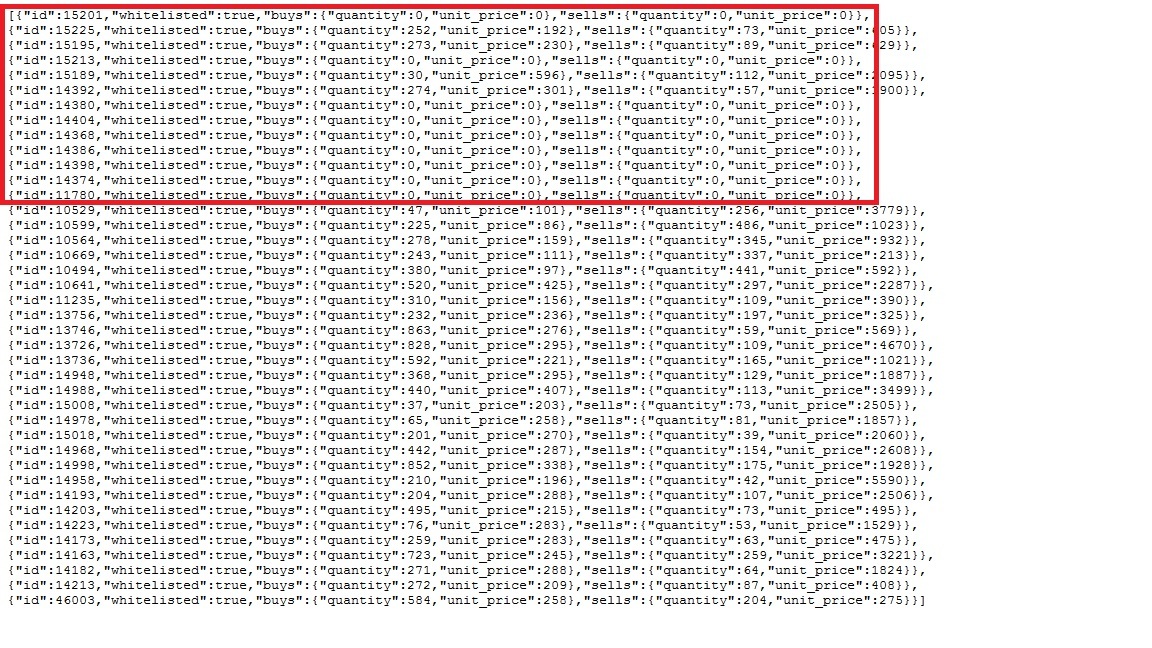
It is happening again. I made a sceenshot from my browser at 8:44 (UTC +1:00).
(EDIT: These are wrong values, there ARE buyorders ingame)
(Second EDIT: its getting better…from 3300 checked IDs only 5 to 40 are showing wrong values)
Attachments:


(edited by Turak.3286)
Hmm. I’ll continue investigating; I’m pretty sure that this isn’t an API issue at least — the backend servers that handle the trading post were responding with that exact data. My suspicion is that there’s a cache coherency bug somewhere in the trading post servers that causes them to occasionally return erroneous data to both the game and the API.
I started having an issue with incorrect coord locations for the tile service for the WvW Continent (id: 2) about 2 days ago for a website I’m in the works of making. I figured that it was a self-created bug since I had done a bit of work on it the day before.
Upon further investigation, it appears to happen to the JS fiddle example on the wiki as well:
http://jsfiddle.net/CRRGC/1092/
Notice that the points of interest are positioned correctly, but it looks like the map its self has zoomed in.
The issue appears to have come and gone over the past 2 days, with it being fixed for a few hours then incorrect again a few hours later. It also appears to be different at varying zoom-levels.
Has something changed?
Thanks,
- Aqueducts
Max zoom of the WvW map is now 6 (instead of 7). It’s best not hardcoding this (like in the example) but use the values returned from https://api.guildwars2.com/v2/continents/2.
Max zoom of the WvW map is now 6 (instead of 7). It’s best not hardcoding this (like in the example) but use the values returned from https://api.guildwars2.com/v2/continents/2.
Thanks for this!
As soon as the update was announced(you know, update will be coming within 2 hours), i am getting tonns of wrong values again.
(Edit: Values are now back to normal)
(edited by Turak.3286)
Hello,
Unfortunately the API seems to be switched off completely.
Calling https://api.guildwars2.com/v2 brings only a {"error": “not found”}.
I hope this is only a temporary problem.
greeting
Markus
Function: Captain
I’m not getting Tile Service when in Sanctum Sprint.
I don’t know if it’s the Tiles missing or the API is corrupt?
Map 919 floor 34.
@Markus: The game servers were offline because of the rollback (more info), and the API had to be taken down too.
@Reincarnated: Lawton will look at this once he is back from his vacation.
Sorry about the delay on the tiles. The process for updating them is complicated and Lawton’s the only one w/ his machine correctly configured to update them atm.
Hi,
the current matchups are not reflected by the corresponding endpoints.
https://api.guildwars2.com/v2/wvw/matches/2-3
"all_worlds": {
	"red": [
		2006,
		2003
	],
	"blue": [
		2005,
		2013
	],
	"green": [
		2301
	]
},
“all_worlds” is still showing last week’s matchups. Can you please update?
/cheerz
Sorry, I didn’t get the memo that the world linking was updating. EU updated (I needed to update NA slightly before reset as well, sorry)
Thank you, good Sir!
Hi,
I am currently experiencing another issue concerning this request :
https://api.guildwars2.com/v2/commerce/listings/70459
It returns an error.
But since this item is Soulbound on acquire, it shouldn’t be appearing on this list, should it ?(irrelevant)
But when i consult :
https://api.guildwars2.com/v2/commerce/prices/70459
I can see that there’s buyer.
Thanks in advance,
MrHappyFace
(edited by MrHappyFace.3841)
Hi @ all,
i want to report a Bug within the specializations API + the image renderer.
Some specialization backgrounds are a little out of shape.
For example https://render.guildwars2.com/file/B969F9B27EE82CBF0E4651FD0F760F702CB5FCED/1012101.png

you can see that there’s a large area of nothingness above and on the right side of the image itself. Same here – https://render.guildwars2.com/file/6FCF0E0E0C0E539290A8245F0DA49D0556D71E62/1012110.png

This wouldn’t be a huge problem if the images would habe the same areas of nothingness around them, but for example https://render.guildwars2.com/file/992D53319C5FCD4AE841C592DC2AE91D5906AECF/1012057.png is totally different – so a code based image cutting on my side is not really an option

could you maybe fix the images to get rid of all the empty space around them?
It’s still the same area that needs to be cropped, in your example the image just expands a little into the otherwise black/transparent part, but thats not visible ingame. The game internally renders them by upscaling the image to 1024×256px (if they are not already), then cropping it to the lower-left 647×136px.
Noticed the same since yesterday evening (here in UTC +1) – Item Icons & stuff are also broken but seem to come back step by step.
Edit: did a little debug-run and saw the foowing result:
Request failed with code: 500
java.io.IOException: Request failed with code: 500
Pretty strange, the images are loadable with my webBrowser but my Client(okhttp3) gets an Error 500
Why can my browser display the images but okhttp quits its service on the same URL cal?
(edited by Loex.5104)
Why can my browser display the images but okhttp quits its service on the same URL cal?
Caches.
render.guildwars2.com is currently broken ;__;
EDIT: I think I fixed it.
(edited by Lawton Campbell.8517)
Hi Lawton,
Do you know which items have the ids of: 14918, 79430, 79491, 79521, 79571? They are listed on the commerce/listings endpoint but do not exist in the items endpoint.
Thanks!
Do you know which items have the ids of: 14918, 79430, 79491, 79521, 79571? They are listed on the commerce/listings endpoint but do not exist in the items endpoint.
Mostly guild hall decorations, looks like.
I’ve gone ahead and whitelisted them; they should appear in /v2/items shortly.
There are 20 items which are craftable (appear in the /recipes output_item_id field) but which have item identifiers which do not exist in the /items endpoint. The full list of these items and which recipes they come from are included in the attached TSV file.
Lawton, would you prefer additional bug reports to be posted here, posted as a separate thread, or should we skip this forum and directly create a Github issue (https://github.com/arenanet/api-cdi/issues)?
Attachments:
Whitelisted all of those items. No idea why they weren’t in the queue.
Lawton, would you prefer additional bug reports to be posted here, posted as a separate thread, or should we skip this forum and directly create a Github issue (https://github.com/arenanet/api-cdi/issues)?
It doesn’t matter too much for me — for whitelist issues it’s usually only a few minutes to fix, so I can just fix them as they come up. For anything larger, I’ll create a github issue one way or another so that I don’t totally forget about it.
Do whatever’s easiest for you. If you do open github issues, open separate issues for each batch of ids so I can close ‘em out and keep track of which I’ve done though.
Ok, I guess I’ll just continue to post here then.
The following 26 recipe identifiers (from /recipes) have empty disciplines information (they can be crafted but there is no information about which profession can craft this item):
{8677,
9295,
9637,
9638,
9639,
9640,
9641,
9642,
9643,
9644,
9645,
9646,
9647,
9648,
9649,
9650,
9651,
9652,
9653,
9654,
9655,
9656,
9657,
9658,
9659,
9660}
Hmm, not actually a bug. Those recipes aren’t craftable by any disciplines.
I’ve gone ahead and un-whitelisted them; they might show back up since they’re technically auto-learned (e.g. every account should have them unlocked).
I brought this up for the GW2Efficiency developer, but according to him it’s an error with the official API:
The dyes’ lightness value seems bugged, and not actually reflecting the lightness of the colours. It results in bugs like this ordering. I checked the numbers in Photoshop, and the colours indeed aren’t ordered correctly by either the lightness or the brightness values.
There’s a small copy-paste issue in the WvW objectives endpoint:
https://api.guildwars2.com/v2/wvw/objectives?ids=38-22,38-15
The 3D coordinates for Langor Gulch are exactly the same as the ones for Bravost Escarpment, they seem to have been copypasted from Bravost.
Opened an issue for the WvW objectives overlapping.
Doing a bulk search, such as https://api.guildwars2.com/v2/items/?ids=12345,12346,12347,12348,12349 returns “301 Moved Permanently” and then redirects to https://api.guildwars2.com/v2/items/
Doing a bulk search, such as https://api.guildwars2.com/v2/items/?ids=12345,12346,12347,12348,12349 returns “301 Moved Permanently” and then redirects to https://api.guildwars2.com/v2/items/
You’ve got a stray “/” before the “?”. Use this URL instead: https://api.guildwars2.com/v2/items?ids=12345,12346,12347,12348,12349
Some new achievements are not returned from the API. For example, I have this achievement: https://api.guildwars2.com/v2/achievements?ids=3843
I noticed this issue here: https://metagamerscore.com/forum_topics/5086