Attachments:
Blackfang’s Demon Alliance [BfDA]
Hey everyone, I am a Laptop user and I have been running this game on Low Details, 0 shadows, etc since this game has come out. However, thanks to SweetFX, I can now appreciate some detail in the game without sacrificing my FPS!
I will be showing some screenshots with all settings on Low / off except for Texture details, it is set to Medium.
I am using SweetFX Guild Wars 2 Dragons Reborn Settings. There are plenty of others, but I like this one because it brightens the game and also makes the textures look decent, all without hurting my FPS at all. Not even a 1 point drop! That’s impressive. Hope this helps some people out there!


Thats pretty cool. I might need to check it out, however I kinda like the before shots :P
I run on low with native settings for models and generally dont have any issues, although I can bump up to medium settings, but it gets a bit laggy in higher populated areas.
There are plenty of others, but I like this one because
It’s very easy to modify the sweetfx settings, there is no need to use premade ones.
Another option to play in a laptop if you have a more powerful desktop is to use steam game streaming. I’ve used it several times and it works surprisingly well with GW2.
Thanks a lot for sharing! This is just what I was looking for.
I’ve only started playing this game about a little less than a month ago with my low end laptop and set all of my settings to the lowest (except for Character Model Limit and Quality as well as Resolution) just to have a decent enough FPS (at least 30) to play. Although I’m not the type of person who cares a lot about graphics in games, I still would prefer having better quality if it doesn’t really sacrifice speed or anything of the sort.
I’ve only tested the SweetFX for about an hour but so far so good! I haven’t had a noticeable dip on speed as far as I’m concerned and the graphics seem to be clearer than before. This will help my experience in Tyria a little better than it what it could’ve been.
Not all of us who play GW2 are running on gaming rigs and for those who are playing on low-end laptops such as myself, this might just be the solution.
Again, thanks for sharing!
what’s the difference between regular and premium versions?
I started playing with sweetFX last night and didnt really notice much of a change at all. Maybe I was doing something wrong. I’ll have to play with it some more.
I started playing with sweetFX last night and didnt really notice much of a change at all. Maybe I was doing something wrong. I’ll have to play with it some more.
Have you tried the SweetFX Guild Wars 2 Dragons Reborn Settings that Otaur was using? All I did was load the same preset and it worked for me.
should I get regular or premium? are both of them free cuz I don’t see a price tag
I started playing with sweetFX last night and didnt really notice much of a change at all. Maybe I was doing something wrong. I’ll have to play with it some more.
Have you tried the SweetFX Guild Wars 2 Dragons Reborn Settings that Otaur was using? All I did was load the same preset and it worked for me.
I didn’t. Where do I find it?
should I get regular or premium? are both of them free cuz I don’t see a price tag
Wait, there’s a premium version? I haven’t encountered any premium version. I simply downloaded mine for free from this site: http://sweetfx.thelazy.net/
I started playing with sweetFX last night and didnt really notice much of a change at all. Maybe I was doing something wrong. I’ll have to play with it some more.
Have you tried the SweetFX Guild Wars 2 Dragons Reborn Settings that Otaur was using? All I did was load the same preset and it worked for me.
I didn’t. Where do I find it?
I got it from here: http://sfx.thelazy.net/games/preset/1403/
There are also other presets available for Guild Wars 2 here: http://sfx.thelazy.net/games/game/1/,
but I’m not sure if they have the same effect as the Guild Wars 2 Dragons Reborn Settings (which is to improve graphics a bit without sacrificing speed) so I’m sticking with this one for now.
Thanks a lot for sharing! This is just what I was looking for.
I’ve only started playing this game about a little less than a month ago with my low end laptop and set all of my settings to the lowest (except for Character Model Limit and Quality as well as Resolution) just to have a decent enough FPS (at least 30) to play. Although I’m not the type of person who cares a lot about graphics in games, I still would prefer having better quality if it doesn’t really sacrifice speed or anything of the sort.
I’ve only tested the SweetFX for about an hour but so far so good! I haven’t had a noticeable dip on speed as far as I’m concerned and the graphics seem to be clearer than before. This will help my experience in Tyria a little better than it what it could’ve been.
Not all of us who play GW2 are running on gaming rigs and for those who are playing on low-end laptops such as myself, this might just be the solution.
Again, thanks for sharing!
No problem at all, I played for almost 2 years with minimum settings so it is a nice change.
I started playing with sweetFX last night and didnt really notice much of a change at all. Maybe I was doing something wrong. I’ll have to play with it some more.
SweetFX must be in the GW2 folder. Also, you have to restart the game before you notice the settings. Another thing, check the keys to turn it on and off. Once you load you can hit the button to see the difference…
Under save / load configuration, when you load selected preset and return to main screen. Be sure to Save New Config. I hope this helps. Once you get used to it, you can change the settings to make it look better.
In Game options – FXAA must be DISABLED.
SweetFX Takes the load for anti-aliasing from the CPU to the GPU. Hope that helps.
I started playing with sweetFX last night and didnt really notice much of a change at all. Maybe I was doing something wrong. I’ll have to play with it some more.
SweetFX must be in the GW2 folder. Also, you have to restart the game before you notice the settings. Another thing, check the keys to turn it on and off. Once you load you can hit the button to see the difference…
Under save / load configuration, when you load selected preset and return to main screen. Be sure to Save New Config. I hope this helps. Once you get used to it, you can change the settings to make it look better.
In Game options – FXAA must be DISABLED.
SweetFX Takes the load for anti-aliasing from the CPU to the GPU. Hope that helps.
I did, but I was using the default presets that were included, and didnt see much of a difference. Unless those presets were just examples and not really functional.
Ok So I loaded the game with the dragon reborn preset via the configurator
This is how it looks WITH the preset

And this is how it looks WITHOUT the presest

And another thing, I get an error report about d3d9.dll when trying to launch the game. If I delete that it runs. I wonder if that has something to do with the very minor, if any, changes?
The different screenshots wouldnt be in the Documents/Screenshot folder. Mine ended up in the main GW2 folder just an FYI. Also, I would watch a video on YouTube on how to setup SweetFX for GW2. It must be in the main GW2 Folder, and make sure sweetfx is activated. In Graphics options FMAA must be DISABLED. Finally, when you load a configuration it must be Saved. To see the effects you must restart the game as it cannot be changed while in game.
I really hope this helps you out.
There is a slight difference in your screenshots. Look at the ground. What is your texture detail set at? Mine is on Medium and my difference is like night and day for me. Also, if you have Postprocessing OFF you will see the difference better. As it adds a lot of Light. Since it looks to me that you have Post Processing ON, you might be better off with a different SweetFX configuration.
Check http://sfx.thelazy.net/games/game/1/ for more presets OR Configure your own to match your tastes.
(edited by Otaur.9268)
Here’s the problem for me. I attempted to use SweetFX on Guild Wars 2, and both game and laptop promptly freaked the kitten out. My game crashed completely and I couldn’t even uninstall/reinstall it. I had to reset my computer to a previous backup in order to even regain any semblance of control.
Needless to say, that was one heart attack I am not keen on trying again. And it makes me sad because I see all these awesome screenshots and stuff, and here I am with poor graphics on my only computer.
Here’s the problem for me. I attempted to use SweetFX on Guild Wars 2, and both game and laptop promptly freaked the kitten out. My game crashed completely and I couldn’t even uninstall/reinstall it. I had to reset my computer to a previous backup in order to even regain any semblance of control.
Needless to say, that was one heart attack I am not keen on trying again. And it makes me sad because I see all these awesome screenshots and stuff, and here I am with poor graphics on my only computer.
This is covered in several youtube videos about SweetFX and GW2. This can happen from improper installation / setup of SweetFX. Best of luck to ya. I just wanted to share my experiences with the program for others who may be able to use it.
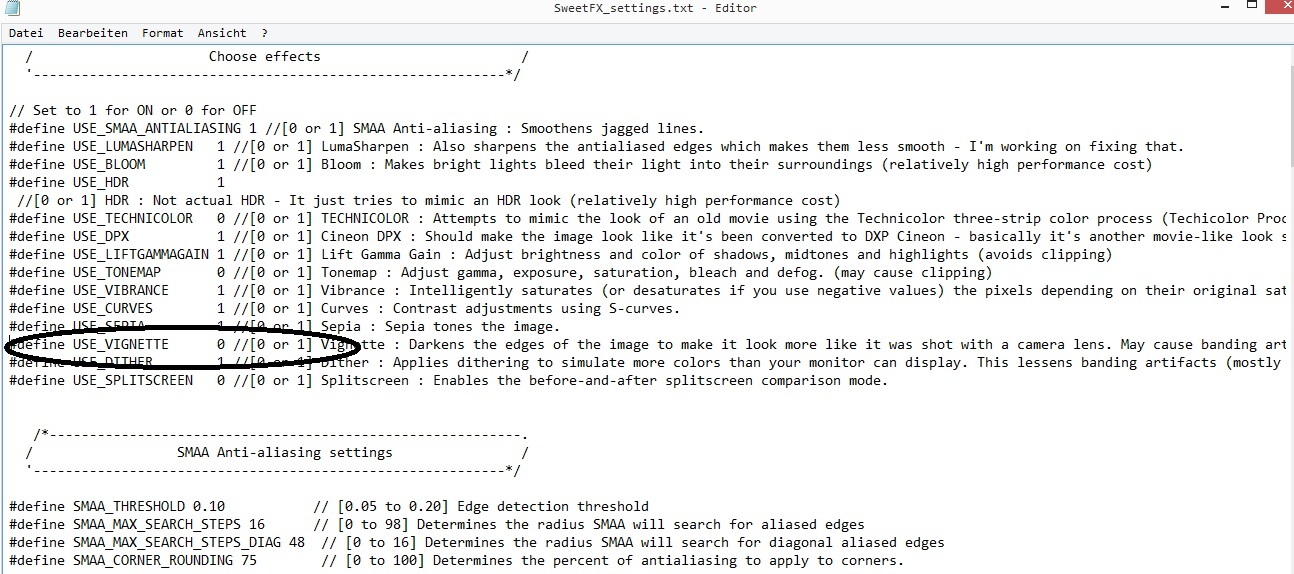
I see only difference in the tone – like using display brightness and contrast. And that SweetFX adds annoying vignette effect. Not worth of the effort.
I have Intel GPU. Does SweetFX make the game feel like it runs on Nvidia flagship GPUs? Puzzled.
By the way, GW2 developers could add the same features to GW2 that the SweetFX provides. Makes nice feature request.
And that SweetFX adds annoying vignette effect. Not worth of the effort.
Maybe you should take a look at the settings they are very well explained.
Not affiliated with ArenaNet or NCSOFT. No support is provided.
All assets, page layout, visual style belong to ArenaNet and are used solely to replicate the original design and preserve the original look and feel.
Contact /u/e-scrape-artist on reddit if you encounter a bug.