Character moving backwards
If you click your left mouse button then it initiates camera rotation for viewing surroundings. Your character movements will be then based on their currently facing direction instead of based on the camera’s position. This is to allow looking at your surroundings while moving without making your character move where you are looking with the camera.
If you hold your right mouse button and move then your character’s movements will be in relation to where your camera is positioned instead of the character’s positioning as the camera and character movements are linked.
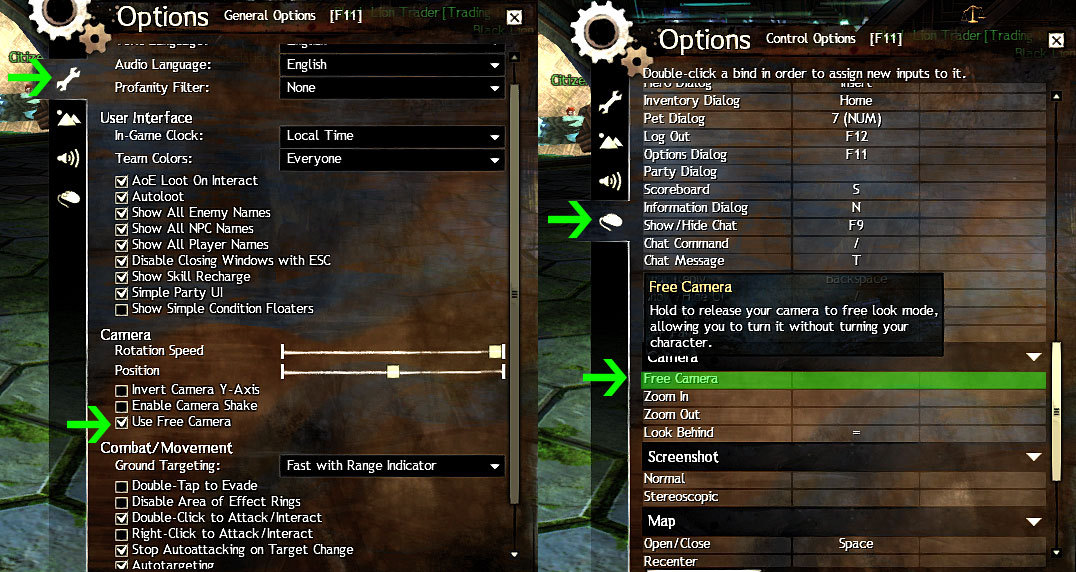
May also want to check your Game Options for the ‘Use Free Camera’ setting and see if it is enable or disabled. (Enabled = Prevents the camera from realigning behind your character. Use mouse-steer to reset the camera.)
edit
May also want to check your camera keybindings to see if you’ve enabled Free Look mode. I am not sure if right mouse button (mouse steer) will disable this mode or not if it was manually enabled via hotkey.
Added pics for assistance in locating the settings I mention.
Attachments:
| [“I’d really like this…” — Resource for Gifting Strangers] |
| [Free Ports For All “Not So Secret” JP Needs (and 1st Try Dive Tips)] |
| [Classic Thread: “all is vain”] |
| [Free Ports For All “Not So Secret” JP Needs (and 1st Try Dive Tips)] |
| [Classic Thread: “all is vain”] |
(edited by StinVec.3621)