Q:
Attachments:
:)
(edited by slinkiestyew.6823)
Q:
Hello, friends! I write to you for support (or at least consolation) after having ignored (or having tried to ignore) awful framerate that I should not be having given my high-end late 2012 macbook pro.
I am on a Retina MBP, but am using an external Apple Thunderbolt Display monitor (not my RMBP screen). My system specs are as follows:
2.6 GHz Intel Core i7
16 GB 1600 MHz DDR3
NVIDIA GeForce GT 650M 1024 MB
My system is fantastic with the work I do (system-intensive graphics / design programs), but yet gives me a framerate of 5 in Divinity’s Reach. I’m playing a slideshow! On predominantly Low settings, too, meaning my beautiful steel Aetherized Hammer looks like it’s made from play-doh (which is tragic as I’m an absolute sucker for visuals and aesthetics)!
I know there’s something about graphics cards switching and resetting of SMC. (I’ve read the sticky post on this forum). I’ve done those — I’ve even installed a program that allows me to override said graphics card switching so I can manually force the use the “better” one when playing!
I’m at a loss as to how to proceed from here. I understand the GW2 client is some form of PC wrapper or something but I don’t think I should be getting the poor performance I have with a system like mine. I’ve shut everything off but Guild Wars, no background processes – not even Skype or Safari. What am I doing wrong? 
I’ll also add that performance is additionally poor when my mac is not at 100% battery charge. Even if plugged in, the game gets extra choppy until my battery is at full charge. sigh
Of course, everything runs extra smoothly even on High settings on Bootcamp, but constantly rebooting every time I take a short break from work is not entiiiiirely practical (or enjoyable in the slightest).
Any help, suggestions, insight or shrugs of sympathy would be greatly appreciated.
Cheers!
Edit: Attached are my settings and me trying out a smaller letterbox resolution with mediocre results.

(edited by slinkiestyew.6823)
Technical Support
Hey Slinkiestyew,
If you’ve tried all the steps on the basic troubleshooting stick can you take a screen shot of the in-game graphic settings you’re using and attach it to the thread? Because of the way the Mac Beta client is run, unfortunately you won’t get the kind of performance out of your system as you would expect, however you should definitely be getting better than 5FPS so some adjustments may be in order.
As an FYI:
Without the program to force graphic card use, you can go under your energy saver settings and untick the box for “use graphics switching.” Do this for both when plugged in and running on battery.
Although it is odd that you are having fps degradation based on battery charge.
Have you tried playing at a lower resolution?
You may get reasonable performance lowering your resolution to the setting just below the one you are using in the image above. Sorry, my hubs has the MBPr and he is not currently home for me to get the exact #; he plays on an external monitor too at times, but always has ~60fps, never less than ~45fps in cities, medium~high settings.
If you find the tp text gets ugly and near unreadable, turn best texture filtering on and it will clear it right up.
He’s going to get me a screen of his settings when he gets in front of his computer in a bit. I’ll post it once I get it.
I also have a 2013 rMBP and i just can not find a setting that allow me to enjoy the game but have decent graphics, i have try the Mac Client and also in bootcamp and i can not get more than 20 fps with all setting to low
If you’re on an rMBP and getting really poor performance, it might be worth trying to reset your SMC. Back when I had this issue, games would drop to ~1/3 performance after my machine being on a while, and a quick SMC reset would bring it right back up. Also make sure to apply all the recent Software Updates since one of them should prevent the SMC from going silly.
Sorry, didn’t get the settings screenshot until today. Will get it here soon for you.
If you didn’t already do the SMS reset (I thought you did since you stated you tried the troubleshooting sticky), that should be the first thing you do now.
These settings were prior to today’s update. Also, my bad, I had the wrong numbers in my head for fps… The numbers I quoted were his pc. Sorry.
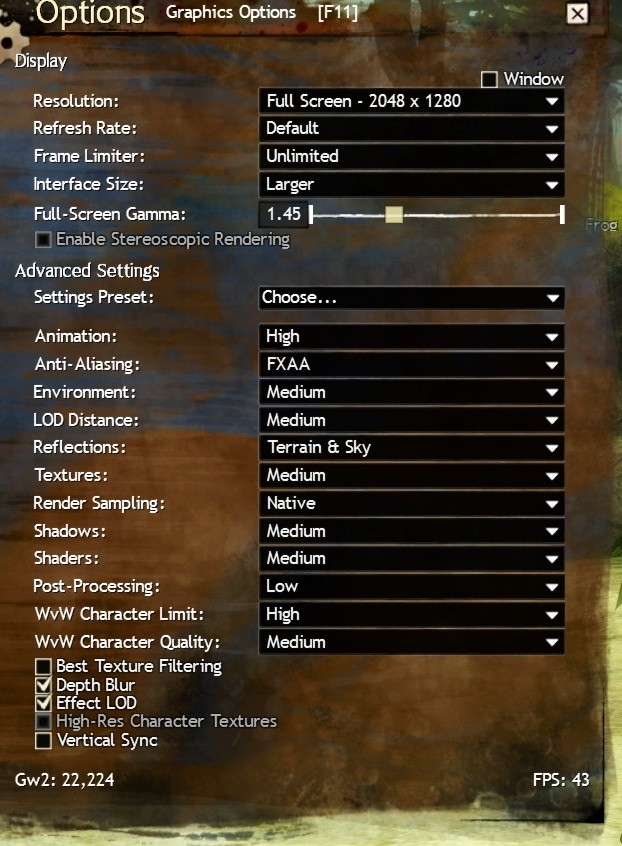
(edited by Kyllaa.1385)
He is currently out of town, but last time I saw on his external monitor, his frame rates weren’t much different. He hasn’t suffered any fps loss with these latest patches either.
Can you check to see if you’re overheating? Use the istat widget to see your CPU and GPU temps. Maybe post those for us too.
And you’re absolutely certain you’ve disabled graphics switching? (For both battery and power)
My last thought for the moment… Could you check your activity monitor and view your CPU and memory usages?
I get your frustration, im using same rMBP to play diablo 3, SWTOR, WOW and i get a steady 35 fps, but no matter what on GW2 is 20 fps the most, some areas goes down to 8 and on LA is a steady 4 on prime time, WvW on my lap is a dream only lol
I have done the SMC reset, i have play using a fan on the lap and still low performance, what it really bothers me is that i see the same performance on bootcamp, so if any one have any more advice i would like to hear
[this is going to be longer for explanation sake]
I’m not saying this is going to fix your problem, but do you see that big blue chunk of memory? That’s inactive ram that sometimes doesn’t get reallocated back to the system. When I was running my MBP on 4gb of ram, that blue would get so large that I would only have 10MB of memory available and that would cause my fps to drop to 4fps, I would stutter, skip, freeze momentarily during fights, and usually die lol. To fix that, I had to purge my memory every hour, if I forgot… Same issue. Upgrading to 8gb has helped significantly, but my is still does not give that memory back, so I still run purge, just not on schedule… I do it now when I’m monitoring for temps or such on habit.
In the last few updates, gw2 has significantly increased the amount of ram it uses, it used to use under 2gb, now after playing for far too many hours last night, I was over 2.5gb usage and my inactive memory left me with about 2gb of free memory causing me to purge more frequently as preventative maintenance.
As a help, try to close as many unnecessary programs and apps if you can to free more memory (web browsers are memory hogs, etc).
The reason I asked about temps is because that is a usual suspect for fps dips. I also use the cooler master laptop cooler (metal riser with 2 movable fans), but on a MBP (or MBPr) the fans are really only keeping the bottom panel cooler, yes this translates to overall cooler, but if the internal fans are dusty, this will cause increased internal heat. Our processors can go up to a max of 100C, but we like to avoid that lol. I noticed after the Queen’s Jubilee update my CPU was running slightly warmer as was my GPU, but that could be coincidence due to required fan maintenance. After this update, I’m running cooler again, but there is still more heat than before. I just want to make sure you aren’t running too warm either (I find if the top left corner (~.1.2.3 side etc) of the laptop is cooler than the processor is running warmer and vice versa).
Anyway, let me know what you think of this or anything else.
Edit: (Your swap files and page outs are pretty high too, not sure if that’s just a direct correlation with the inactive memory without more testing, when was the last time you restarted?)
(edited by Kyllaa.1385)
I know you said you tried the troubleshooting steps, but have you tried deleting the gw2 folder again? I’d like to hope there have been some changes with these latest updates. You’re getting nasty performance as it is, it can’t hurt lol. Step 4 again at the link below. As you know, it will reset all locally saved in-game settings including your login/password if you have those saved as well.
https://forum-en.gw2archive.eu/forum/support/mac/Basic-Mac-Beta-Client-Troubleshooting
Also, I just reviewed your posts again, I didn’t see any temperature pats for your CPU or GPU, could you get those for us? A baseline of running shortly after a fresh boot while comp is idle is useful, but the important one to see is while running gw2 (after it has been running for about 10-20 mins).
I’m sorry to hear you’re still having these issues. And as a follow up, my hubs MBPr does not have bootcamp on it, so it is all mac, all the time! Obviously 10.8.4. He hasn’t really played much since the new culling updates, but once he gets to, I’ll try and post back if there was any change in performance.
(edited by Kyllaa.1385)
Not affiliated with ArenaNet or NCSOFT. No support is provided.
All assets, page layout, visual style belong to ArenaNet and are used solely to replicate the original design and preserve the original look and feel.
Contact /u/e-scrape-artist on reddit if you encounter a bug.