FPS Problems (GPU issue, PCI-e x16@x4)
1 2
If you change graphic settings around, but fps doesnt, it is a good indication the CPU is holding it back. You have a Quad core, but gw2 won’t fully utilize all your cores, so you will never see 100% load. The game relies a lot on a single thread performance which runs only on one core and likely that core will be at max load at 2.8ghz. Overclocking will help some.
Im running a Q6600 OC to 3.2ghz and able to get 30-65fps in PVE, but WvWvW is low 10-20fps.
http://www.twitch.tv/kirito4138
The only exclusive skyhammer stream
The only exclusive skyhammer stream
(edited by kirito.4138)
First of all thank you for your comment!
In-game None of the cores is maxing out, not even close!
And as I said, my graphic settings are the Lowest Possible. (even though fps doesnt change at all even on Highest possible).
I see my GPU maxing in a matter of seconds while my CPU remains fairly Idles (all 4 cores).
According to your comment do you not think that the x4 bus affects it?
Thanks.
Having only a x4 bus does hinder it a little bit. Look at this chart. http://tpucdn.com/reviews/Intel/Ivy_Bridge_PCI-Express_Scaling/images/perfrel.gif
When running gw2 on a quad core, you won’t see individual core load reach 100%. Windows sorta distributed it out to other cores, making it look like each core is partially loaded. If you use a program called ‘ProcessExplorer’ you can inspect each thread’s cpu load. You will see the main gw2 thread eating 22-24% of CPU load, and because you have a quadcore each core will be 25%, so it is already max. Since that one thread is probably the main game loop. other threads will wait for it to finish before getting more instructions.
Gw2 actually has about 50 threads, but only 3 of them actually have cpu loads, the remaining 47 uses barely any cpu. On my quad core, the 3 threads have cpu loads of 22, 17 and 10 respectively. So gw2 at best is working 3 cores, but because the main thread is running at max it slows down other threads.
Another easy way to test is to disable one of your core. You will find that running the game on 3cores will yield no FPS difference.
http://www.twitch.tv/kirito4138
The only exclusive skyhammer stream
The only exclusive skyhammer stream
(edited by kirito.4138)
x4 vs x16 depends heavily on the game. It may be that GW2 is heavily dependent on maximum bus speeds. PCI Express version 1.0 vs 2.0 also has a large impact on whether x4 will be acceptable.
Read the third post here:
http://www.tomshardware.com/forum/260880-33-express
x4 numbers shows variation by games x4 v1.0:
http://www.tomshardware.com/reviews/pci-express-scaling-analysis,1572-8.html
Also, I agree in that even though the CPU is not under heavy load it will limit the game. You might try underclocking your CPU just to confirm the impact, and then try overclocking (several guides out there) while monitoring temperatures and load testing as necessary.
What is your overall CPU load ? (it wont be max)
Chances are your CPU is the bottleneck.
Kirito has bassicaly explained why you wont see 100% cpu load on a quad core ..but can still be bottlenecked, so i wont repeat that
3930k 4.6ghz | NH-D14 Cooler | P9x79 Pro MB | 16gb 1866mhz G.Skill | 128gb SSD + 2×500gb HDD
EVGA GTX 780 Classified w/ EK block | XSPC D5 Photon 270 Res/Pump | NexXxos Monsta 240 Rad
CM Storm Stryker case | Seasonic 1000W PSU | Asux Xonar D2X & Logitech Z5500 Sound system |
EVGA GTX 780 Classified w/ EK block | XSPC D5 Photon 270 Res/Pump | NexXxos Monsta 240 Rad
CM Storm Stryker case | Seasonic 1000W PSU | Asux Xonar D2X & Logitech Z5500 Sound system |
While alt tabbing (if it matters):
Main GW2 Thread (2120 if its universal) takes about 24.XX
CPU0: 29%-41%
CPU1: 16%-28%
CPU2: 16%-28%
CPU3: 87%-95%
And it keeps saying that GW2.exe:6048 is using 39%~
And GPU is 98%-100% when game is not alt tabbed.
Btw PCI-e x4 is 1.1
What does that mean?
CPU3 is the one that Gw2 is using the most, and thats where your bottleneck is.
As for your GPU. That could well be running as fast as it can. PCI-e v1.1 i beleve is perfectly fine for old cards like your own. But its not good enough for modern cards. We are on PCI-e x16 and x8 v2.0 and v3.0 nowerdays. v3.0 isnt being fully utilized atm though ..its kinda ‘next gen’.
I sugest tryign this.
Find a place in GW2 that you get low FPS BUT the area doesnt change much ..so a place showing alot of land with little movement.
Then OC your CPU to 3ghz or maybe 3.2ghz
Go back into GW2 .. you should still be in the same place and see if your fps is any better ..if its not.. then you have an ‘equal bottleneck’ of both GPU and CPU. Meaning any upgrade to your GPU will quikly be bottlenecked next by your CPU.
3930k 4.6ghz | NH-D14 Cooler | P9x79 Pro MB | 16gb 1866mhz G.Skill | 128gb SSD + 2×500gb HDD
EVGA GTX 780 Classified w/ EK block | XSPC D5 Photon 270 Res/Pump | NexXxos Monsta 240 Rad
CM Storm Stryker case | Seasonic 1000W PSU | Asux Xonar D2X & Logitech Z5500 Sound system |
EVGA GTX 780 Classified w/ EK block | XSPC D5 Photon 270 Res/Pump | NexXxos Monsta 240 Rad
CM Storm Stryker case | Seasonic 1000W PSU | Asux Xonar D2X & Logitech Z5500 Sound system |
I will try that now,
tough i know absolutely nothing on Overclocking.
I found this guide:
http://www.tomshardware.co.uk/forum/259899-11-core-overclocking-guide
is it what i am looking for?
Yea pritty much.
it also depends on how much access you have in the BIOS ..if you computer was pre built ..like A old Dell for example ..you wont have much choice in the OC area.
You should still be able to up the multiplier though (which in a locked bios usualy automaticaly ups the voltage)
Heavy OC rquires alot of research. So for now ..try a small OC to 3ghz. ..then push from there.
3930k 4.6ghz | NH-D14 Cooler | P9x79 Pro MB | 16gb 1866mhz G.Skill | 128gb SSD + 2×500gb HDD
EVGA GTX 780 Classified w/ EK block | XSPC D5 Photon 270 Res/Pump | NexXxos Monsta 240 Rad
CM Storm Stryker case | Seasonic 1000W PSU | Asux Xonar D2X & Logitech Z5500 Sound system |
EVGA GTX 780 Classified w/ EK block | XSPC D5 Photon 270 Res/Pump | NexXxos Monsta 240 Rad
CM Storm Stryker case | Seasonic 1000W PSU | Asux Xonar D2X & Logitech Z5500 Sound system |
Using a lower res, you will use more CPU usage. Try to overclock to help. Also, your video card with only 512mb is a problem.
There is not enough to handle the higher textures and details.
i7 3770k @ 4.2Ghz | Z77 Sabertooth | EVGA GTX670 4GB | Crucial M4 256GB SSD | Corsair AX650
2×8GB Crucial Ballistix 8-8-8-24 @ 1600 | Arc Midi R2 | Asus VE278Q 27" 1920×1080
Edifier S330D | Superlux 668B | Audiotrak Prodigy Cube | CMstorm Trigger | Logitech G500
2×8GB Crucial Ballistix 8-8-8-24 @ 1600 | Arc Midi R2 | Asus VE278Q 27" 1920×1080
Edifier S330D | Superlux 668B | Audiotrak Prodigy Cube | CMstorm Trigger | Logitech G500
My CPU (Q9550) goes from 6x up to x8.5 multiplier.
Anyway, I just entered my BIOS, and to my surprise my CPU was 333×6 (2ghz instead of 2.83).
Apparently i was underclocked(?!) in comparison to stock values.
It is now 8.5×333(2.83ghz), and to my surprise I get LESS FPS (how the hell?!).
I took SolarNova’s advice and found a bridge I can stand on staticly with no movements. I had 11.8FPS.
After the return to stock values i get 10FPS. Temps are 55~celsuis and GPU load didnt change.
But all the cores work harder now, what was earlier 16%~ now is 41%~.
And the busy core is CPU3 now and not CPU2.
I will try to OC it to 3.2ghz and see if anything changes.
Any observations on why this happened?
It is possible that due ot the OC the cpu is causing errors when doing computations. This isusualy due to having to low a voltage. Check to see if your motherboard is compensating for the higher clock.. if it is not ..you would need ot up the voltage. be carefull.
if it is doing it autmoticaly, try going manual.
Also i should point out that 11.8 to 10 fps i would consider within an acceptable margin for error.
And as i said in previouse posts ..it may just end up that your GPU isnt powerfull enough and is capping out. The cpu ..though also not powerull enogh ..is just powerfull enough to allow that GPU to run at max in GW2.
3930k 4.6ghz | NH-D14 Cooler | P9x79 Pro MB | 16gb 1866mhz G.Skill | 128gb SSD + 2×500gb HDD
EVGA GTX 780 Classified w/ EK block | XSPC D5 Photon 270 Res/Pump | NexXxos Monsta 240 Rad
CM Storm Stryker case | Seasonic 1000W PSU | Asux Xonar D2X & Logitech Z5500 Sound system |
EVGA GTX 780 Classified w/ EK block | XSPC D5 Photon 270 Res/Pump | NexXxos Monsta 240 Rad
CM Storm Stryker case | Seasonic 1000W PSU | Asux Xonar D2X & Logitech Z5500 Sound system |
well, im trying to OC now, and when no matter what value i enter, it always goes back to stock 333×8.5.
If i change the Multiplier it boots fine. (8.5 is max and it works)
but if i change the FSB (even lower) it boots back to 333…
I currently have the same CPU as majhol. I Have mine overclocked to 3.8GHz ( see my signature). I believe the problem to be the motherboard and the PCI-E x4, this could be causing all the problems.
also overclocking the Core 2 series isn’t as simple as flipping a multiplier.
Core 2 series has Intel Speed Step which has to be disabled first, along with Intel C1E. These power saving features can cause instability very easily and are most likely why the bios reported 6×333 FSB.
on my current hardware I get an average FPS of 58.8FPS (V-Sync @ 60fps/Hz) according to FRAPS whilst running arround Hoelbrak with High Textures, FXAA, Supersampling.
CoolerMaster Masterbox 5 | H110i | AMD Ryzen R7 1800x 4.0GHz | 32GB DDR4
512GB Samsung 950pro | 2TB SATA-3 | AMD Radeon RX 580 8GB
512GB Samsung 950pro | 2TB SATA-3 | AMD Radeon RX 580 8GB
(edited by Nitro.4732)
C2D CPU have locked multipliers so you can’t go higher, just lower. So to overclock you want to increase your FSB, not lower. (e.g 400fsb x 8.5 multi = 3.4ghz)
But remember that when adjusting your fsb, your ram/memory frequency will also increase. So you need to adjust the ratio so that it does not exceed your ram’s rated speed. I assume your ram is 667 or 800mhz.
As you increase the fsb and ram speed you might also have to adjust your voltage to keep it stable. Usually people increase slowly until it becomes unstable and notch back a little.
My guess to the reason why your bios keeps going back to 333×8.5 is the mobo couldn’t handle whatever setting you used and defaulted back to be able to actually boot.
Also remember to set the PCI bus speed to 100mhz instead of auto.
I left speedstep and C1E still enabled on my system. Reason why a lot of guides tell you to disable them is because it helps determining the overclocking limit. If speedstep/C1E was on the computer wouldn’t be at full stress to reveal any instability. Once you have found the stable setting, you can safely enable it again.
http://www.twitch.tv/kirito4138
The only exclusive skyhammer stream
The only exclusive skyhammer stream
(edited by kirito.4138)
I have disabled C1E (and C2E etc…), but i find no evidence of Speedstep on my BIOS.
I have set my PCI-e speed 100.
I also dont think its the OC values that fails.
If I turn OC on and even put 334FSB speed, it will still reset back to 333, same thing if I turn FSB speed DOWN! its like FSB doesnt accept ANY other value than 333.
Nitro, can you please share your OC settings with me? (in pm or here, whatever is comfortable) so I could have some guidlines of what im doing wrong.
I was thinking maybe the problem is the BIOS? I got Gitabyte F2 and i can try updating to F5beta.
Also tried using the Gitabyte EasyTuner software but it doesn’t seem reliable…
This is what happens exactly:
Pc boots up, POST completed, Intel logo showing up
It shows the CPU speed that I have set up (lets say 400×7.5 for example)
And when it starts to test the memory it says “Me”… (The first part of Memory Testing OK) and “crashes”.
Than it loads up again with FSB speed of 333(multiplier stays what i set up, 7.5)
And says “Memory testing OK” and system loads up.
Next time I will enter the bios it will say “system expirienced a crash due to unstable oc values or voltage” or something like that.
Now it doesnt matter what I do, It always happens.
ANY FSB\multiplier i have tried I get the boot and “me”… crash.
Even stock values with OC turned of (ofc it doesnt show the error than cause oc is off) but it still the same problem…
So basicly I dont seem to OC\UC at all.
Could be a memory voltage problem?
I also got here more options that no guide seems to consider under “Advanced Overclocking” like Robust Graphic Booster (which seems to boost the bandwidth on PCI-e slots) or Cpu Clock “Skew” and stuff like that, some clock that is set to 800,
I will enter the BIOS and upload some photos next time.
BTW My RAM is: 4.00 GB Dual-Channel DDR2 @ 399MHz (6-6-6-18)
Any ideas?
(edited by Majhol.1598)
Update:
I have updated my BIOS and I think the OC will stick this time.
In case my PC is not fit for OC, is there anything else that I can do to improve my FPS?
Hi majhol,
A few notes:
Your Ram, it does not look right to me 399MHz @ 6-6-6-18, at that speed 399 (800MHz DDR) it should be around 4-4-4-12 for high performance ram such as Corsair Dominator, G.Skill etc. At the very least I would expect this to be 5-5-5-18 for 800MHz DDR2. this maybe why your overclocks failed the memory ok test.
My system actually has DDR2-1066 ram rated for 5-5-5-15 by corsair. However whilst overclocked I got better performace for my overclock and from my ram whilst running it at 900Mhz 4-4-4-12 this allows for the ram to be in sync with my FSB. my fsb is at 450Mhz x8.5 = 3.825Ghz my ram is at 450Mhz (900MHz at Double Data Rate).
secondly, you need to make sure your cooling is upto scratch, I use a Corsair Hydro H50 water cooling kit along with 2x 1800rpm 120mm fans. My case also has a 140mm fan directly above my CPU. The rest of my system has 3x 120mm fans focusing airflow at major components like my Northbridge and Southbridge chipsets on my motherboard to keep them cool under load. Cooling is an essential step to keeping a cpu overclock stable.
I will get my settings to you in this forum, I cannot remember all of them, as I save them as a profile in my bios to load up. (I have one OC for summer @ 3.4Ghz low voltage and one for winter 3.8Ghz higher voltage.)
also as a final note, overclocking increases power usage, your cpu is rated at 95w but this can easily reach 130w + after overclocking (not to mention other components such has hard drives, fans, graphics card also need power), it is essential to have a decent Power Supply if you plan to overclock as if this is under powered you could end up having to replace it.
If you are going to overclock this cpu, then you are most likely going to have to modify the voltages to certain components such as CPU, RAM, and North/South bridges. As you increase the speed of your cpu the demand for power on these key ares increases, so its inevitable that you will have to increase voltages.
P.S. I like your graphics card. I still have my 9800GTX+ which gave me lots of fun gaming time. I even had flashed a new firmware to that back in the day with some great overclocks.
CoolerMaster Masterbox 5 | H110i | AMD Ryzen R7 1800x 4.0GHz | 32GB DDR4
512GB Samsung 950pro | 2TB SATA-3 | AMD Radeon RX 580 8GB
512GB Samsung 950pro | 2TB SATA-3 | AMD Radeon RX 580 8GB
(edited by Nitro.4732)
Thanks for your comment!
After updating my BIOS, my OC Sticks, I am running now 377×8.5=3204
Still NO CHANGE at all to the FPS.
Is this enough to conclude that the GPU is the problem here?
I will try to change to my max OC possible (ram limits) 400×8.5=3400 and report back.
The way I see it, the GPU is the bottleneck here (more accurate, the 4x bus size).
As for the RAM clock sync speeds, they are AUTO on the bios and goes for 6-6-6-18.
According to EVEREST Ultimate:
@ 400 MHz 6-6-6-18 (CL-RCD-RP-RAS) / 24-51-3-6-3-3 (RC-RFC-RRD-WR-WTR-RTP)
@ 333 MHz 5-5-5-15 (CL-RCD-RP-RAS) / 20-43-3-5-3-3 (RC-RFC-RRD-WR-WTR-RTP)
@ 266 MHz 4-4-4-12 (CL-RCD-RP-RAS) / 16-34-2-4-2-2 (RC-RFC-RRD-WR-WTR-RTP)
I got no idea where did it read this information and no idea if it even comes into play.
What I do know is that I can change Auto in the BIOS to Manual and change it, Should I?
UPDATE:
3.4Ghz OC Stable (50-60celsius), No change to the FPS
(edited by Majhol.1598)
I just took some pics with my iphone on my bios screen will attach them to my next post.
What make, model and manufacturer are your ram?
CoolerMaster Masterbox 5 | H110i | AMD Ryzen R7 1800x 4.0GHz | 32GB DDR4
512GB Samsung 950pro | 2TB SATA-3 | AMD Radeon RX 580 8GB
512GB Samsung 950pro | 2TB SATA-3 | AMD Radeon RX 580 8GB
well, this is what i gathered from CPU-Z and Everest, hope it’s enough:
[img]http://s14.postimage.org/pchmxu99b/ramcpuz.png[/img]
[img]http://s14.postimage.org/xw10vlhlr/rameverest1.png[/img]
[img]http://s14.postimage.org/to68mug67/rameverest2.png[/img]
[img]http://s14.postimage.org/6b874c02n/rameverest3.png[/img]
[img]http://s14.postimage.org/r9ed2ezxb/rameverest4.png[/img]
well the ram will potentially limit your overclock and overall performance.
If it were me in that situation I would like to try going for 400×8.5 FSB:RAM 1:1
800Mhz Ram at 5 – 5 – 5 -18 (this word filter is extremely annoying with all its false positives)
whats your ram voltage at?
ram timing can be very conservative sometimes so its always worth while attempt to get better out of them.
My ram defaults to 800Mhz @ 5 – 5 – 5 – 18 but it runs stable at 900Mhz 4-4-4-12. thats a big difference.
In the end though that 4x slot will be having an impact n your gaming period. Socket 775 motherboard still exist. You can now even get them with DDR3 support these days.
a quick look on the internet brought up an MSI socket 775 with DDR3 support @ £32 GBP thats quite tempting for me :P but it means buying new ram which makes it less of an attraction to my wallet :/
CoolerMaster Masterbox 5 | H110i | AMD Ryzen R7 1800x 4.0GHz | 32GB DDR4
512GB Samsung 950pro | 2TB SATA-3 | AMD Radeon RX 580 8GB
512GB Samsung 950pro | 2TB SATA-3 | AMD Radeon RX 580 8GB
Attaching photos of my settings, let me know if there is something not clear or missing and I can find that information for you.
remember every system is different and that goes for memory and processors also, just because I get an overclock at these settings doesn’t mean it will be stable for you too.
Attachments:
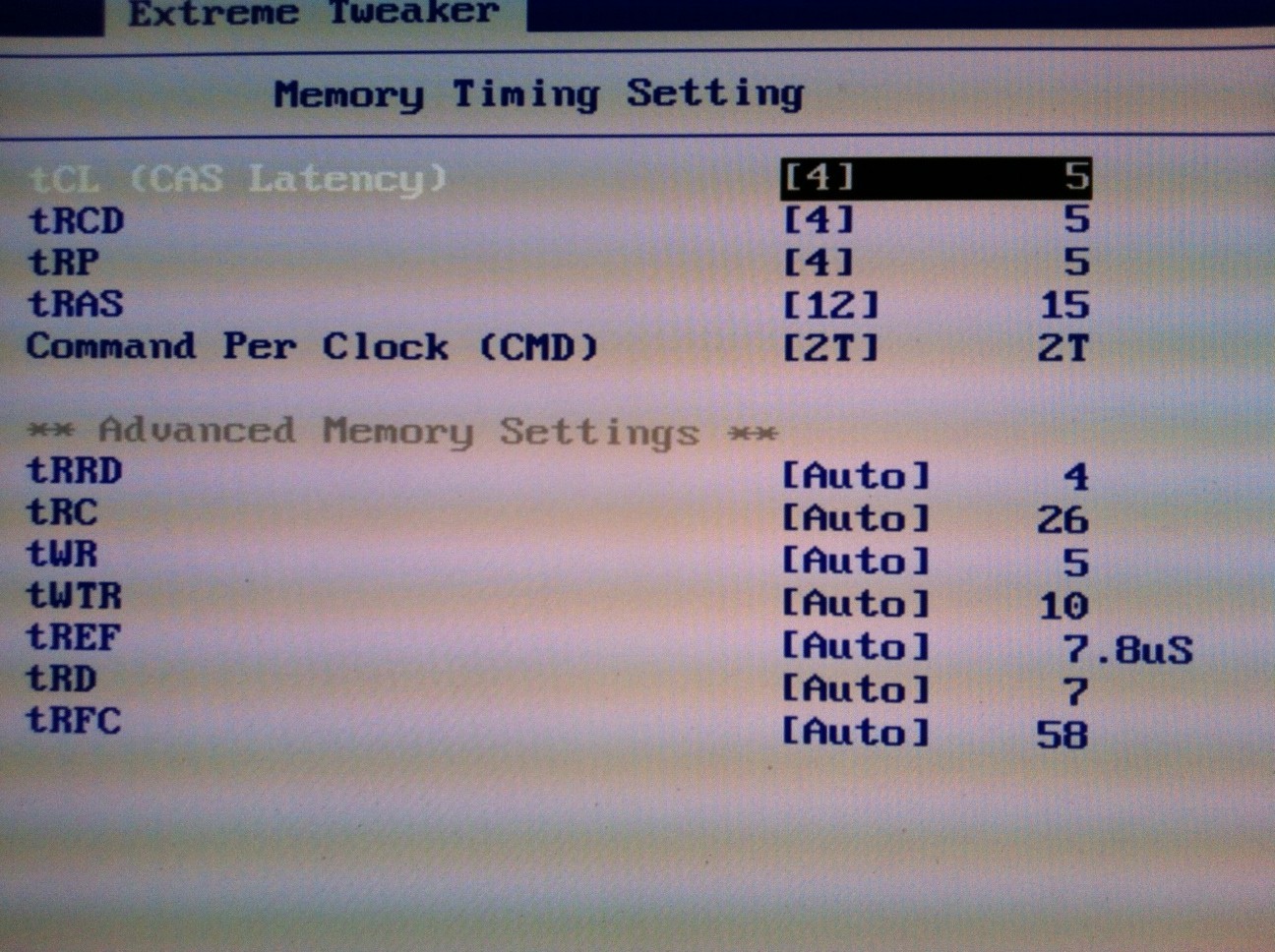
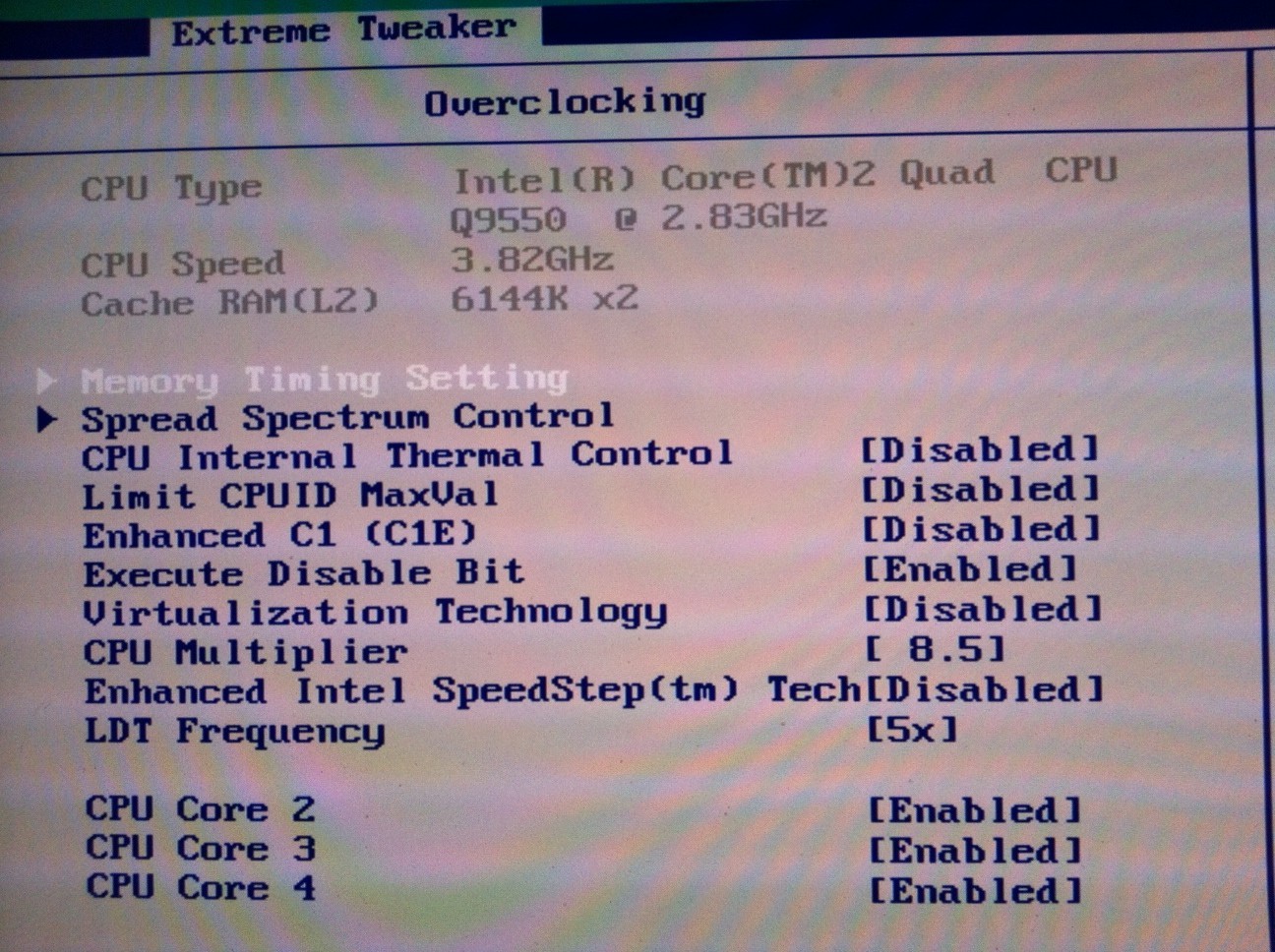
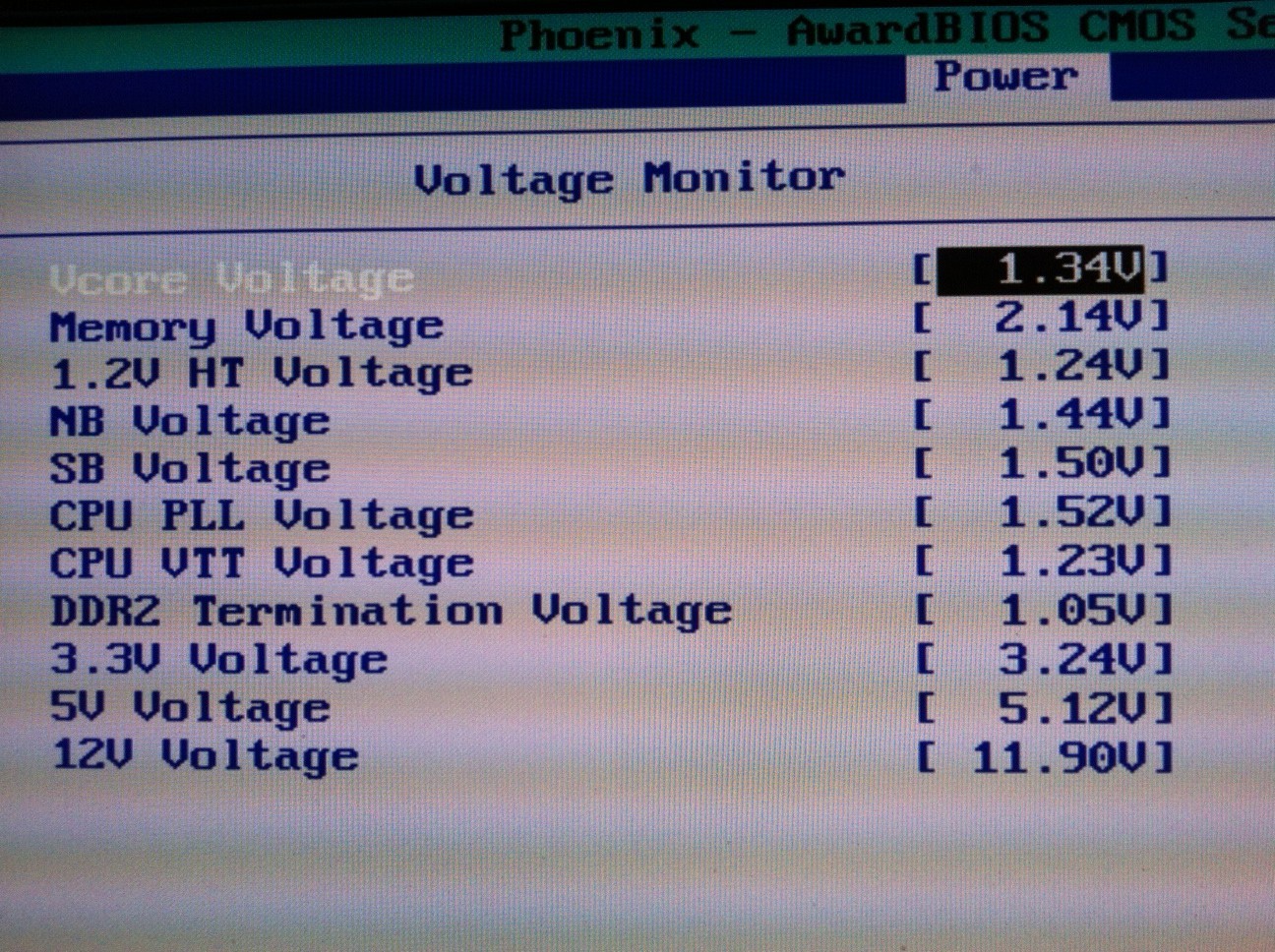


CoolerMaster Masterbox 5 | H110i | AMD Ryzen R7 1800x 4.0GHz | 32GB DDR4
512GB Samsung 950pro | 2TB SATA-3 | AMD Radeon RX 580 8GB
512GB Samsung 950pro | 2TB SATA-3 | AMD Radeon RX 580 8GB
If you dont see any differencei n fps then thats the diffinitive answere that your CPU is not the bottleneck.
That leaves your GPU and/or PCI-e x4 1.1 mothebroard.
Chances are its a bit of both. The x4 1.1 wont be taking to much of the 9800gtx’s performance away (maybe 10% probaby not even that). So even with a new motherboard you will likely see little improvment.
3930k 4.6ghz | NH-D14 Cooler | P9x79 Pro MB | 16gb 1866mhz G.Skill | 128gb SSD + 2×500gb HDD
EVGA GTX 780 Classified w/ EK block | XSPC D5 Photon 270 Res/Pump | NexXxos Monsta 240 Rad
CM Storm Stryker case | Seasonic 1000W PSU | Asux Xonar D2X & Logitech Z5500 Sound system |
EVGA GTX 780 Classified w/ EK block | XSPC D5 Photon 270 Res/Pump | NexXxos Monsta 240 Rad
CM Storm Stryker case | Seasonic 1000W PSU | Asux Xonar D2X & Logitech Z5500 Sound system |
Thanks a lot for your answers,
I would give these OC settings a chance once I get better cooling.
But due to the lack of FPS increase at 3.4Ghz I presume it wouldn’t do much…
Nitro, do you think that even if I run at 2.83Ghgz (Stock 333×8.5) I should change my Ram Clock Values?
All the Voltage Values are on AUTO.
I would assume that given that 9800GTX+ is above the minimum requirements, it would have been able to run the game on playable stats… now I don’t mind rolling with 20+fps, it hurts the eyes but it IS playable.
But playing with less than 10 fps is not only torture, but also impossible to function fluidly.
I was thinking, usually the main killers of FPS are Shadows and Draw Distance.
Shadows are set to None, as well as Shaders to Low (Doesn’t change much).
Is there any way or command (because the lack of video setting) for changing Draw Distance? I am sure if I lower that it would do wonders.
LoD is what affects the distance at when objects are drawing, you should be able to change this from high/ultra to low/medium.
yes you can try different memory timing at any cpu speed, although the default speed is a good setting since you know its stable testing platform.
I know your voltages are on automatic but there should be a page that shows you what those values currently are (see my third image for example).
if your ram is running at 6-6-6-18 @ 1.8v then I am fairly confident that 800MHz at 5- 5- 5-15 should be achievable at 2.1v which is still within DDR2 specs.
however if the ram is running already at 2.1v then it could be possible that the memory used is just cheap generic ram which is usually typical for prebuilt computers from manufacturers like DELL, Acer, Packard Bell, Fujitsu etc.
even on 2.8GHz I still had good FPS in game (between 40-60fps with v-sync on) so I think the issue is more likely either a combination of Ram and/or the 4x PCI-E.
The 9800GTX+ is an old card but I believe it can do better. My friend plays this game with the non GTX version (vanilla 9800) and gets better FPS than what you report.
Also I am currently downloading the latest nvidia beta drivers as they mention GW2 improvements in Ambient Occlusion as well as upto 15% increase in FPS in other games. Perhaps you may also want to check them out.
CoolerMaster Masterbox 5 | H110i | AMD Ryzen R7 1800x 4.0GHz | 32GB DDR4
512GB Samsung 950pro | 2TB SATA-3 | AMD Radeon RX 580 8GB
512GB Samsung 950pro | 2TB SATA-3 | AMD Radeon RX 580 8GB
I have a setting on my Gigabyte Motherboard called “Robust Graphic Booster” (RGB).
It says it boosts the bandwidth of the PCI-e…
Ive tried it in Auto\Fast\Turbo and nothing seems to change…
Is this thing even related?
Its a technology that was used to enable faster graphics core frequencies on integrated graphics chipsets when they needed it. So with this option enabled, whenever the onboard graphics detected high load it automatically overclocked itself to a set higher performance frequency.
This will not make any difference to your game but I does highlight something I didn’t know about your computer system. If you have this option it means your motherboard has an on-board graphics chip. Make sure that this is not the default graphics solution otherwise this could be causing the Low FPS issues.
CoolerMaster Masterbox 5 | H110i | AMD Ryzen R7 1800x 4.0GHz | 32GB DDR4
512GB Samsung 950pro | 2TB SATA-3 | AMD Radeon RX 580 8GB
512GB Samsung 950pro | 2TB SATA-3 | AMD Radeon RX 580 8GB
How can I make sure of that?
The monitor is plugged in to the External PCI-e DVI input,
and not to the onboard VGA input way up the pc tower.
Plus no other pc game ever had any problems like I said.
Is there any way I could make 100% sure?
Got to the ‘onboard devices’ tab in the BIOS and set the graphics to off.
3930k 4.6ghz | NH-D14 Cooler | P9x79 Pro MB | 16gb 1866mhz G.Skill | 128gb SSD + 2×500gb HDD
EVGA GTX 780 Classified w/ EK block | XSPC D5 Photon 270 Res/Pump | NexXxos Monsta 240 Rad
CM Storm Stryker case | Seasonic 1000W PSU | Asux Xonar D2X & Logitech Z5500 Sound system |
EVGA GTX 780 Classified w/ EK block | XSPC D5 Photon 270 Res/Pump | NexXxos Monsta 240 Rad
CM Storm Stryker case | Seasonic 1000W PSU | Asux Xonar D2X & Logitech Z5500 Sound system |
I got PCI or PEG.
As far as I know, PEG refers to the PCI-e card.
So PEG is the choise I should put there
Or am I mistaken?
Yes PEG is the correct option (Pci Express Graphics).
also I just noticed that on your bios Intel speed step is abreviated CPU EIST FUNCTION
EIST = Enhanced Intel SpeedStep Technology
CoolerMaster Masterbox 5 | H110i | AMD Ryzen R7 1800x 4.0GHz | 32GB DDR4
512GB Samsung 950pro | 2TB SATA-3 | AMD Radeon RX 580 8GB
512GB Samsung 950pro | 2TB SATA-3 | AMD Radeon RX 580 8GB
It is indeed PEG.
I have set my ram 5 – 5 – 5 – 15.
And changed its voltage to 2.1. (I think it can even stabilize on lower)
Now it seems stable, how can I measure the Ram Temp or decide if it is indeed stable?
I don’t want to stay in these settings for a few weeks and then find out I was melting my RAM (lol).
About the SpeedStep, should I be turning it On or Off?
if you are overclocking its easier to have this disabled. once you find a stable overclock you can then experiment with speed step. no point having it messing with the cpu multipliers when you are checking for stability. I personally don’t like speed step or amd’s equivalent I have alway preferred my cpu to run at one frequency (max! ), so I disable it permanently
voltages between 1.8 and 2.2 should not harm your ram, these are within the DDR2 specification. There temperature cannot be measured by software either. If your ram comes with no Heat Speaders and you can physically see the chips on the memory PCB then perhaps investing in generic heat spreaders will help relax your feelings. something like this even available in your favourite mesmer colours.
you might even want to try 4-4-4-12 to see if thats stable at the same voltage. If it does not work you will get either system crashes if it boots or a blank screen at boot up. You may have to reset your CMOS if it does not boot.
leaving the pc for a few hours running a program such as MemTest86+ will confirm if the memory is stable. from there you can progressively lower the voltage until it becomes unstable to find out what the lowest voltage your memory will operate at with the new timings.
I noticed you have everest installed, this has many memory benchmark test that you can run to see the differences between different timings. 6-6-6-18 memory will probably be around the 60-70ns latency were as 4-4-4-12 is less than 50ns. thats a far chunk of performance in memory terms. Along with these lower timings you’ll fin memory bandwidth increases also.
CoolerMaster Masterbox 5 | H110i | AMD Ryzen R7 1800x 4.0GHz | 32GB DDR4
512GB Samsung 950pro | 2TB SATA-3 | AMD Radeon RX 580 8GB
512GB Samsung 950pro | 2TB SATA-3 | AMD Radeon RX 580 8GB
(edited by Moderator)
Great, if I try 4-4-4-12, what voltage should I begin with? (currently on 2.1)
Or perhaps it is better to go with Auto? (From what I read, Auto always exaggerates with more voltage than what is needed)
I recommend posting on hardware forums like overclock.net or hardforum.com regarding ocing your system for help. They have a lot more people with their with detail expertise in the area and more likely someone will have the same exact motherboard you got.
http://www.twitch.tv/kirito4138
The only exclusive skyhammer stream
The only exclusive skyhammer stream
Thank you,
So leaving the OC matter on the side.
Anything else I can do to try and improve my FPS?
(edited by Majhol.1598)
Having only a x4 bus does hinder it a little bit. Look at this chart. http://tpucdn.com/reviews/Intel/Ivy_Bridge_PCI-Express_Scaling/images/perfrel.gif
When running gw2 on a quad core, you won’t see individual core load reach 100%. Windows sorta distributed it out to other cores, making it look like each core is partially loaded. If you use a program called ‘ProcessExplorer’ you can inspect each thread’s cpu load. You will see the main gw2 thread eating 22-24% of CPU load, and because you have a quadcore each core will be 25%, so it is already max. Since that one thread is probably the main game loop. other threads will wait for it to finish before getting more instructions.
Gw2 actually has about 50 threads, but only 3 of them actually have cpu loads, the remaining 47 uses barely any cpu. On my quad core, the 3 threads have cpu loads of 22, 17 and 10 respectively. So gw2 at best is working 3 cores, but because the main thread is running at max it slows down other threads.
Another easy way to test is to disable one of your core. You will find that running the game on 3cores will yield no FPS difference.
Yep, what he said, and well said.
Keep in mind too OP, that you are only running 4GB of memory. While this is not bad and will run the game, the problem is the game uses a LOT of memory. Just the other day I was looking at the memory usage on gw2.exe — it was up to 2.6G of memory usage. Keep in mind that your OS will use a good portion, around 1-2GB of memory, and anything else running in the background.
If money is an issue look at least towards the 8GB realm of things. I run the game with 12GB (triple channel) as well have virtual memory disabled on my OS and never run out of memory — you’re kinda pushing the limits here.
CPU overclocking will benefit you quite well for this game (sadly and oddly), so take the above suggestions provided and start OCing that bad boy
(edited by Crawford.4135)
Have you considering overclocking the GPU? This article concludes a potential 10% increase. But 10% of 12fps is only 13.2 fps Perhaps a new video card…
http://www.tweaktown.com/articles/1377/nvidia_geforce_9800_gtx_overclocked/index1.html
Thank you for your answers.
Crawford, I never felt that the game asks for too much RAM… Even with my game on I still have plenty of RAM Available… Even to alt+tab and play other heavy games perfectly. Plus it’s alot more than what the system requirements ask for.
BTW Also tried running the game with GameBooster to make sure of that.
Will give it another look though.
I have stabilized my RAM on 5-5-5-15 (on 1.8v). unfortunately 4-4-4-12 was unachieveable even at 2.2v (I dont know if it’s safe to go higher, is it?)
So this + CPU Overclocking to 3.4Ghz (On Auto Voltage) Still NO change at all to the FPS.
I think it’s safe to rule out the RAM and the CPU being Bottlenecks, right?
Next step is the GPU OC, I will get right on that. (Thank you Swedemon)
Latest Update:
With CPU Quad core OC’ed @ 3.4Ghz
C1E step and Intel Speedstep are DISABLED.
4Gb of RAM DDR2@399Mhz (5-5-5-15)
And GPU Oc’ed to:
Core Clock 780Mhz
Memory Clock to 1163Mhz (2326Mhz)
Shader Clock to 1953Mhz
Frankly, I don’t know if there was a change, I think not.
If there was, It was minor and clearly not enough.
Games takes up to 688MB of RAM, so no worries there.
All graphic options on lowest possible (including subsamples).
Could this maybe a Win7 64-bit problem?
I have noticed the FPS is lowest (10-) when I look to the horizon.
If I run around facing a mountain or straight to the sky FPS goes WAY higher (even seen 40+-). Of course this is not practical for playing because 90% of the time you see the horizon.
I was thinking when you don’t look to the horizon and the fps caps from 10~ to 30-40~ the bottleneck may be changing from the GPU to the CPU. (This is only an idea, I don’t know enough about this game to say for sure).
*GW2 only takes about 220+ from GPU memory (on lowest graphics) – 440~ on highest. so the GPU Memory shouln’t be a problem
Waiting for comments on this latest update… Good day!
(edited by Majhol.1598)
Basically, You’ve done all you can. Probably can’t do much better with your hardware than wait for software optimization in the game code it self.
Your CPU is bottlenecked, OCing helped a little, but still bottlenecked. Since OCing, your CPU was able to give out more data for the GPU to process, but your GPU is also bottlenecked ( you said it runs at 98-100% load full time )
For reference. I have Q6600 @ 3.2ghz with GTX 660 (4x faster than your 9800GTX) Running max setting, 1680×1050. GPU at 70-90% load. My CPU is still bottlenecked, but I get 30-70fps PVE questing.
http://www.twitch.tv/kirito4138
The only exclusive skyhammer stream
The only exclusive skyhammer stream
Is there any plan for a software optimization?
Short answer: probably.
Long answer: https://forum-en.gw2archive.eu/forum/support/tech/FPS-GPU-CPU-Performance-issues-FAQ read the last Question on FAQ.
http://www.twitch.tv/kirito4138
The only exclusive skyhammer stream
The only exclusive skyhammer stream
Yes, BUT Anet would have to change how the game engine works. And that is not somthign that can be done in a short amount of time.
So short answere ..yes but dont hold your breath.
In all honesty your computer is around 4-5 years old tech wise, and that time frame has generaly been the limit from past experiance.
Its time for an upgrade.(and not just 1 component)
3930k 4.6ghz | NH-D14 Cooler | P9x79 Pro MB | 16gb 1866mhz G.Skill | 128gb SSD + 2×500gb HDD
EVGA GTX 780 Classified w/ EK block | XSPC D5 Photon 270 Res/Pump | NexXxos Monsta 240 Rad
CM Storm Stryker case | Seasonic 1000W PSU | Asux Xonar D2X & Logitech Z5500 Sound system |
EVGA GTX 780 Classified w/ EK block | XSPC D5 Photon 270 Res/Pump | NexXxos Monsta 240 Rad
CM Storm Stryker case | Seasonic 1000W PSU | Asux Xonar D2X & Logitech Z5500 Sound system |
I’m running fine with the old Q6600, not the best and WvWvW suffer, but everything else is very playable 30-70fps.
Yea he would be much much better with a new system upgrade, but he can still do a simple GPU upgrade and get better fps or at least playable fps.
If you can’t afford now to buy a whole new system you can just upgrade a better GPU now and build the rest later, or just get a mid range that is cheap. Just reference the http://www.videocardbenchmark.net/high_end_gpus.html charts and aim for something 2x+ of your existing card.
http://www.twitch.tv/kirito4138
The only exclusive skyhammer stream
The only exclusive skyhammer stream
I wish I could just upgrade one component, But if I replace my GPU, i’m still stuck with a PCI-e x4 slot…
So the new card will take a MASSIVE hit…
And replacing the motherboard means replacing the the CPU and the RAM… so whats left? the case? lol
http://www.tomshardware.com/reviews/pci-express-scaling-p67-chipset-gaming-performance,2887.html
Example chart. Yes, a new GPU running in a x4 will be slower than had it been x16, but its not that much. The new GPU will still be much faster than your current GPU, even while running @ x4.

http://www.twitch.tv/kirito4138
The only exclusive skyhammer stream
The only exclusive skyhammer stream
(edited by kirito.4138)
A full upgrade woud requir minimum (asuming you can use parts form yor current rig)
CPU + Cooler
Motherboard
RAM
GPU
Extras will depend on what you have now. So if you dont have SATA hard drives and optical drives, you need to get some. .they aint that expensive tbh.
If your current case is NOT ATX compatable, you would need a new case. There are main types of case ATX, ITX, BTX ..BTX aint used no more.. ITX are for very small computers. Most casses are ATX, mATX(micro), or E ATX
I think your powersupply might need upgrading, if it doesnt have the required connectors for the new boards, aswell.
3930k 4.6ghz | NH-D14 Cooler | P9x79 Pro MB | 16gb 1866mhz G.Skill | 128gb SSD + 2×500gb HDD
EVGA GTX 780 Classified w/ EK block | XSPC D5 Photon 270 Res/Pump | NexXxos Monsta 240 Rad
CM Storm Stryker case | Seasonic 1000W PSU | Asux Xonar D2X & Logitech Z5500 Sound system |
EVGA GTX 780 Classified w/ EK block | XSPC D5 Photon 270 Res/Pump | NexXxos Monsta 240 Rad
CM Storm Stryker case | Seasonic 1000W PSU | Asux Xonar D2X & Logitech Z5500 Sound system |
1 2