Before you continue reading, you should know that this fix only pertains to those users who receive (quite often randomly) a CTD with the error…
“Exception: c0000005
Memory at address XXXXXXX cannot be read/written”
…and are users of programs such as MSI AfterBurner, EVGA Precision X, or any other video card overclocking utility that relies on the RivaTuner core program/statistics server. These programs are written by the same author of the once-popular RivaTuner, so they are very similar/based upon the same code as far as I know.
The following blurbs reference my use of ATI cards while diagnosing this issue, however should be relevant to NVidia users as well.
Since I dislike using Catalyst Control Center for my ATI video card, I opt to use MSI AfterBurner instead, as it gives me complete control of clock speeds, fan speeds, and voltages, offers performance monitoring, an in-game OSD, and many other advantages.
After suffering through these “memory CTDs” for a couple weeks, and watching the game get updated almost nightly but in no way fixing my CTDs, I went into fix-it mode. I tried nearly everything – forcing Catalyst A.I. completely off (requires registry editing for newer cards such as 7xxx series), raising voltages in the system (GPU, CPU, CPU PLL, FSB, NB, RAM), clean driver re-installation, getting the new CAP for the 12.8 driver, updating Windows 7, uninstalling .NET 4.0, etc. I was nearly stumped.
Then it occurred to me – since I recently upgraded to the 7870 GHz Edition up from an aging 4890 (which I had BIOS flashed to overclock, meaning I didn’t use CCC -or- AfterBurner), I had started receiving these memory CTDs in GW2. I didn’t have those with the old 4890. So I asked myself: what did I change? Besides the actual hardware upgrade, I installed the latest version of MSI AfterBurner, in order to make separate 2D and 3D profiles – not only for overclocking, but for fan speed control.
So the other day, I really sat down with AfterBurner and went over ALL the settings available. Now, I had used AfterBurner before in the early days of my 4890, long before I flashed it’s BIOS. I figured that -maybe- I ought to re-review all of the individual settings, as perhaps something had changed or I overlooked something important. It should be noted that I have AfterBurner set up to use it’s Automatic Profiles Management system, simply meaning it will detect (through the use of the RTSS server that runs in the background) application calls to the Direct3D and OpenGL runtime libraries, and automatically change profiles to what you have selected for 2D and 3D. In essence, when it detects application calls to D3D or OpenGL, AfterBurner automatically loads my custom 3D profile – upon exiting the application/game, will automically re-load my 2D profile. This is convenient for those that do not want to use hotkeys and the like for changing profiles.
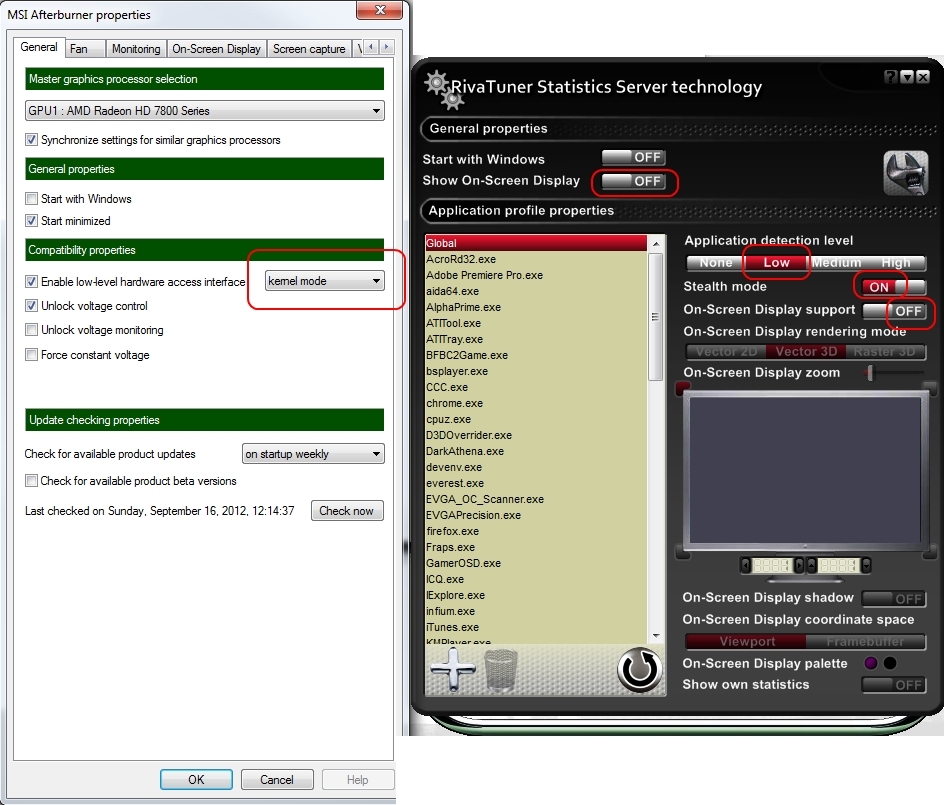
So, upon perusing the many options in the AfterBurner settings page, I came back to one single thing that caught my eye. There is a setting called ‘Enable low-level hardware access interface’ in the main tab of the settings page, with the options of ‘User mode’ (this is the default setting) or ‘Kernel mode.’ The tooltip is lengthy, but basically states that ‘User mode’ gives the best monitoring performance and doesn’t consume kernel address space, while ‘Kernel mode’ can protect hardware-mapped memory ranges from unauthorized access by badly-designed applications* and in this way can protect the system from instability. That got me thinking – I had been receiving, seemingly at random (could be 2 minutes or 2 hours), these memory CTDs in GW2 and apparently the default setting of ‘User mode’ does not provide protected kernel address mapping for AfterBurner/RTSS. I decided to change that setting to ‘Kernel mode’ and hoped for the best, as I could not find any other setting that may cause system instability that I had not already changed…
(continued in post #2)
(edited by Idolicious.6091)