Good God Help!!!!
As far as the lag goes, just run a speed test to Houston, TX just for certainty to the server location (running a speedtest anywhere else would be pointless). Also, run a ping trace to the server IP, which would check for possible anomalies somewhere down the line.
Sorry about your discharge, I’m an Active Duty veteran myself.
3770k 4.9ghz | Koolance 380i | NexXxoS XT45 | XSPC D5 Photon | ASUS MVFormula |
Mushkin Black 16gb 1600 | 500GB Samsung 840 Evo |2×2TB CavBlack| GALAX 980 SoC |
NZXT Switch 810 | Corsair HX850 | WooAudio WA7 Fireflies | Beyerdynamic T90
Mushkin Black 16gb 1600 | 500GB Samsung 840 Evo |2×2TB CavBlack| GALAX 980 SoC |
NZXT Switch 810 | Corsair HX850 | WooAudio WA7 Fireflies | Beyerdynamic T90
Thanks a ton for your reply! Much appreciated. I’ve included an attachment of my speed test to a server in Houston, and also a direct link to the test results.
ping=65ms
Download=13.01Mbps
Upload=3.56Mbps
So that seems pretty good to me. Also, this seems to be the only game such major lag happens with. Aion, Rift, Neverwinter, Lord of the Rings Online, and World of Tanks all run smoothy.
Also, how can I get my toon out of the Lions Arch battle and back to just questing around? It’s just a level 6 and from what I’ve seen the ‘enemy’ is level 80, so I just get one shotted; which coupled with the lag, makes for a very unfun gaming experience.
Thanks again,
Cyn
Attachments:

(edited by Cynphul.9413)
Do you have the north or south waypoints in lions arch? You could just die, and then waypoint north or south, and run out of the portal there to get out.
Also, as far as the lag goes try this: When you login, and load a character, in the chat box type /ip and hit enter. It will show you the IP of the server you are on. Open command prompt and try pinging it. Type (without quotes)
“ping IPaddressGoesHere -t”
It will continuously ping that IP. Press Ctrl + V to stop it. Let us know what you get.
(edited by Sir Kaboomski.1508)
Your speeds definitely look great to the area, try pinging the server as mentioned above ^
If there’s a bad node you are hitting from your ISP to the GW2 server, you will be able to see a large spike in latency.
3770k 4.9ghz | Koolance 380i | NexXxoS XT45 | XSPC D5 Photon | ASUS MVFormula |
Mushkin Black 16gb 1600 | 500GB Samsung 840 Evo |2×2TB CavBlack| GALAX 980 SoC |
NZXT Switch 810 | Corsair HX850 | WooAudio WA7 Fireflies | Beyerdynamic T90
Mushkin Black 16gb 1600 | 500GB Samsung 840 Evo |2×2TB CavBlack| GALAX 980 SoC |
NZXT Switch 810 | Corsair HX850 | WooAudio WA7 Fireflies | Beyerdynamic T90
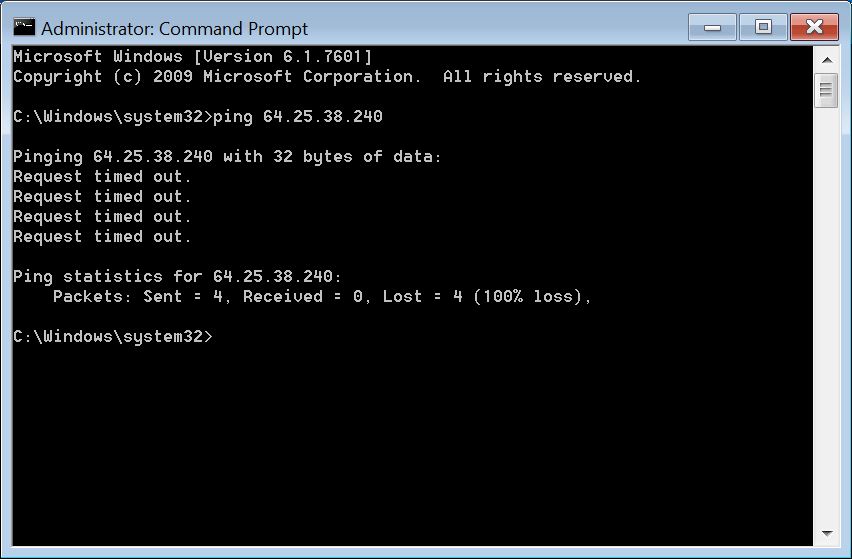
Sorry for the delay, however my online play time is limited. I logged into the game, I am getting 10fps, and the ip is 64.25.38.240
I verified I wrote it down right, however all i get is a ‘time out’ error. /shrugs. Odd because I am logged into the game; tabbed out, right now. LOL
Anyrate, not much help on my end I know. Any more advice would be grand. I turned graphics totally down, and still get 10fps and major lag.
Cyn
Attachments:
I could be wrong but it seem to me that you are confusing two different issues lag and fps. Lag is caused by the internet, it causes you to get rubber banding, long load times, and slow skill activation. Fps is caused by older system, hardware and software issues and out of date drivers. You said you haven’t played for months, maybe it was before culling was removed from the game. What culling did was reduce the number of player you saw from your prospective in the game to increase performance, but the one problem with this was that you might not be able to see some of the people you were playing with. So they took this out of the game and added some new graphic setting to adjust to improve performance try these setting to see if this helps
Full Screen: 1680 × 1050 Depending on monitor
Refresh Rate: Default
Frame Limiter: Unlimited
Interface Size: Normal Personal preference
Animation: High
Antialiasing: FXAA or None Some system this has no effect
Environment: High
OD distance: High
Reflections: Terrain & Sky or None It depends if you don’t care if you see the reflections in water this will improve fps.
Textures: High
Render Sampling: Native
Shadows: Low or None This is one of the main Fps reducers if you don’t care to see your shadow.
Shaders: High
Post Processing: High
Character Model Limit: Medium or low This effect how you see other characters in game and improve fps in mobs
Character Model Quality: Medium or Low This effect how you see other characters in game and improve fps in mobs.
Best Texture Filtering: Unchecked
Depth Blur: Checked
Effects LOD: Checked
High-Res Character Textures: Unchecked
Vertical Sync: Unchecked
Some of the setting that are set to High May need to be lowered on older system or AMD processors if you are running on an intel i5 or better theses setting seem to work well. It will be a balance between performance and visual quality.
Opinions are like ______ everyone has one I could
put the correct term in but not everyone has kittens
put the correct term in but not everyone has kittens
(edited by Feirlista Xv.1425)