Graphical bug - RADEON R9 280X Graphics Card
in Account & Technical Support
Posted by: LetheLuxuria.2641
in Account & Technical Support
Posted by: LetheLuxuria.2641
Hi everyone.
Long question short – is there a way to fix this?
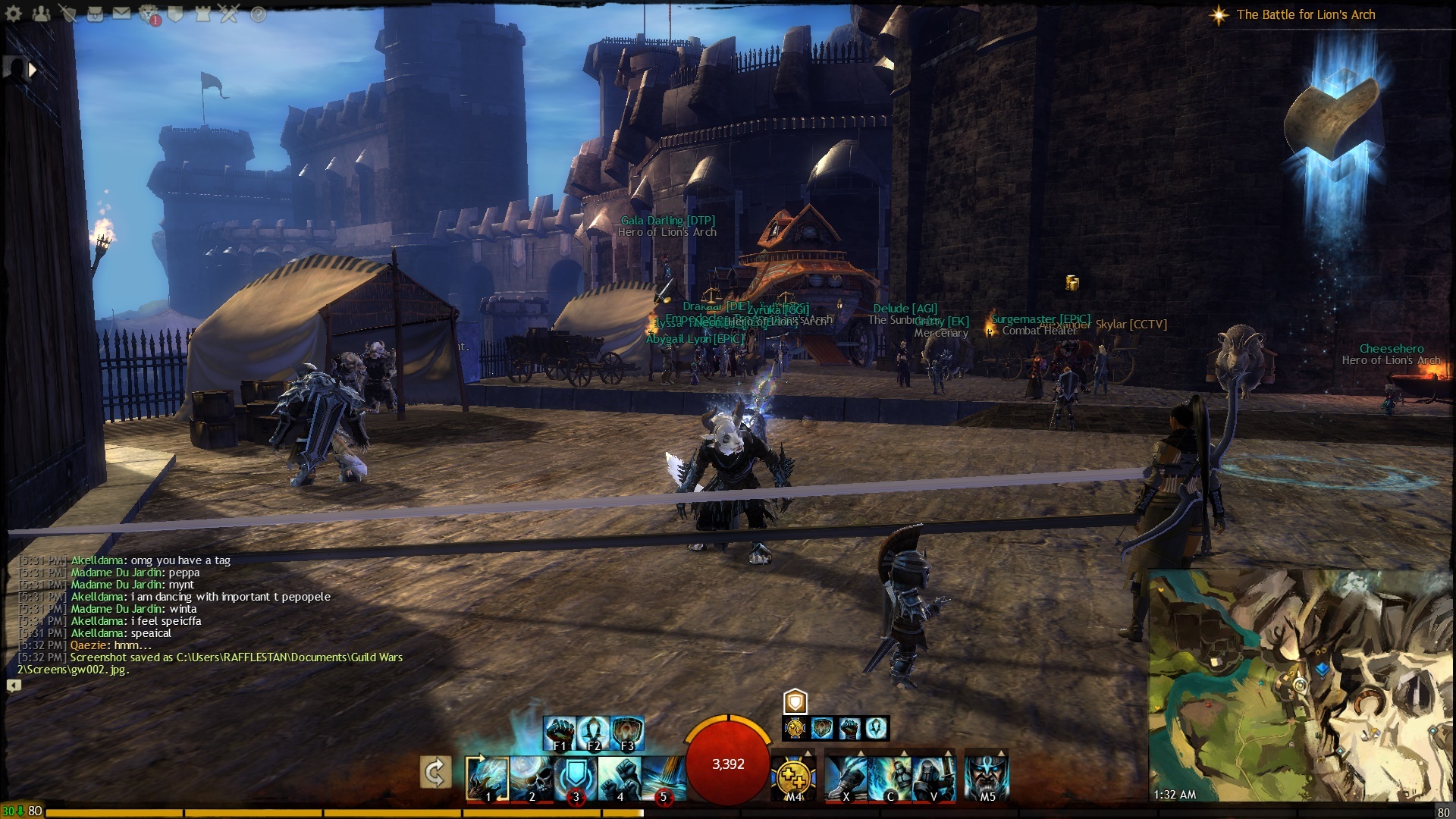
Basically the graphics end up being like this, as though their hand leads into another plane of the world. This happens almost randomly, sometimes a lot worse (like in Frostgorge), and it can render the game unplayable at times.
Any tech-savvies able to help? Thanks~
Try a clean driver reinstall firat
in Account & Technical Support
Posted by: LetheLuxuria.2641
Already done that. The same thing happens. Should have posted that information first.
That happens to me to. Also have a 280×. Ive been reading about alot of people having trouble with their 280x cards. Im thinking bad card and might return it. I did downclock mine though and it helped alot. But didnt make the problem go away just alot less frequent.
That is a common graphical bug with Radeon 7xxx series cards. 280x is only a 7970 repackaged. Its unknown what causes it exactly, if its driver related or if its the game engine itself. But its not hardware related. Here are some points to note for those who do not know about the problem:
in Account & Technical Support
Posted by: Knight In Shining Armor.1708
I also have this problem on R7 260X. I have pics but don’t want to upload them. It’s also been suggested to me that this is a hardware problem but yours is not the only thread regarding this bug, so I can’t really imagine that we all have bad cards.
This seems to happen to me when I alt-tab out of the game and leave firefox running in the background. Bringing up the world map also kinda clears it up, but when you’re facing the corrupted scene the problem just reappears. Note the second bullet in Aza’s reply. Seems to happen when a lot of players are on screen, but I think this just implies that there are more bodies to glitch up on.
FXAA is on in my catalyst control panel, and I’ve wondered if that might have anything to do with it.
in Account & Technical Support
Posted by: LetheLuxuria.2641
For the past 4 days, everything was ‘fine’, like it did not happen, I followed the ‘recommended settings’, you know, tweaking this and that as per the stickied post in this forum section.
Then today;
wa-la~
So after reading everyone’s replies, its just like this? There’s no fix? Urghhh.

Try clean install of 13.12 drivers, no glitches so far on this driver(except those common for all platforms like lightning hammer box etc.) for me on 280×.
I have the very same problem with my R9 280X. I tried 13.12 with a clean install and no success, still getting the same tearing artifacts. VSync on/off doesn’t make any difference either.
This screenshot from tonight:

Here is a picture of the bug happening to me. I’m running a Radeon 280x as well.

in Account & Technical Support
Posted by: Knight In Shining Armor.1708
Here’s my example. As I said this tends to happen to me during large groups. Has happened to me during Teq, for example
This is on an XFX R7 260X

This might be a longshot but you can try anyway.
Update your directx, http://support.microsoft.com/kb/179113
Also update to your latest chipset drivers, if you can safely update bios of your mother board too(backup dual bios), update it.
Also reseat your video card/memory.
I had a smiliar problem when my 270x was stock overclocked, only effecting gw2 as it was stable on furmark and all my other games. Try underclocking the card and see if it makes any difference?
I had a smiliar problem when my 270x was stock overclocked, only effecting gw2 as it was stable on furmark and all my other games. Try underclocking the card and see if it makes any difference?
This suggestion doesn’t work nor does the posters above you. The problem is either engine related or driver related. I can’t say which one it is.
in Account & Technical Support
Posted by: Knight In Shining Armor.1708
I already have the latest direct x and graphics card drivers, and I don’t really believe the hardware can be blamed for this.
Maybe if OP were the only one having this problem I could see that, but nope it’s more than one person as the screenshots show.
From what I understand, If the graphics card were spazzing out, the corrupted graphics would not appear in a screenshot, correct?
Correct, as far as I know (?). They would not show in screenshots.
And I can confirm that underclocking does not work, just tried it tonight with 100-200 MHz. Reducing another 50 MHz right now but if that doesn’t work I’m going back to the default clocking.
I take that back, now experimenting on clocking lowered by 250 MHz and haven’t had a problem since yesterday. I’ll keep playing and see if this actually works!
These settings work at least for me; so far so good. Not seeing any effect on my FPS.
I’ll post it here if I start getting massive tearing artifacts again.
in Account & Technical Support
Posted by: abomally.2694
According to Tom’s Hardware, the RADEON R9 280X maxes out around 260 Watts of power usage:
http://www.tomshardware.com/reviews/radeon-r9-280x-r9-270x-r7-260x,3635-18.html
Can you please provide information (brand and model) regarding your power supply?
A noisy (switching noise) or insufficient current rating on the 12 volt rail(s) can cause video card artifacts and stability problems.
This is my power supply.
in Account & Technical Support
Posted by: abomally.2694
Seems to be a decent power supply, although the specs for that graphics card do state that a 600 Watt power supply is required.
However, I can’t say for sure that that is the issue. It could just be a defective graphics card. It looks like lots of people have had issues with that card. If possible, you should try and return it for a replacement.
Ok, I got tearing artifacts again, even with underclocking.
I’m not sure there’s anything wrong with so many cards of the same make and model ‘specially since loads of them, me included, report problems only with Guild Wars 2. I’m not taking my card back to the store just yet, not until I see glitches in other games too.
This is getting very annoying, I’m ready to try anything. :P
in Account & Technical Support
Posted by: abomally.2694
It could be a manufacturing defect. This usually occurs in ‘bursts’ of production runs.
Who is the card manufacturer? AMD only makes the GPU chip, not the card.
It could be a manufacturing defect. This usually occurs in ‘bursts’ of production runs.
Who is the card manufacturer? AMD only makes the GPU chip, not the card.
If the problem was hardware related then it shouldn’t appear in screenshots. And then consider the bullet points I made.
It comes down to two things:
in Account & Technical Support
Posted by: abomally.2694
Actually, that isn’t correct. When you take a game screenshot, it grabs it from the display buffer on the GPU. The screenshot will show what is being sent to the monitor. If it was a monitor problem, it wouldn’t show up in screenshots.
Also, if it was the GW2 engine, it would show up on all graphics cards. I agree that it could be a driver issue, however, it should show up on every single R9 280X card if that’s the case – unless there are some significant differences between different manufacturers…in which case it’s a design flaw with particular brands.
in Account & Technical Support
Posted by: Knight In Shining Armor.1708
Also consider: if this was a hardware issue, why does alt-tab and bringing up the map screen temporarily fix it?
If all our cards are broken, shouldn’t all, or one certain piece of artwork on the same toon trigger this?
How are we able to play for days, or hours at least just fine and dandy?
I kinda get the feeling it might be a graphical setting, or cards artifact when stressed or overclocked/overheated
From the stretching it causes I want to think it’s engine related.
My temporary fix is to keep switching between Windowed Fullscreen and Fullscreen 1920×1080, but sometimes I have to do that every two minutes which is far from ideal… x_x
Now I am experimenting on different settings but that takes time, ’cause as it was mentioned earlier, sometimes I can play 2 days straight without any problems, then suddenly it goes bohica on me for a whole evening. :/
My heart is crying blood though, the game looks so pretty on high graphic settings, and downgrading them is kick in the quad — ‘specially since I know my lovely new rig absolutely can handle the ultimate settings very well if it weren’t for those pesky tearing artifacts.
goes to sulk in a quiet dark corner
in Account & Technical Support
Posted by: abomally.2694
Alt-tabbing probably clears the graphics card screen buffer (which is in the graphics card memory). Most games do this if they support the Alt-Tab feature. When you restore the tab the screen is redrawn.
My “guess” is that the GPU itself is corrupting the textures because it has become intermittent. Search around, lots of people with this card are having texture corruption problems.
Like I said, it could be a manufacturing defect. The GPU’s are mounted with a process called BGA. Ball-Grid-Array mounted chips are notorious for having intermittent issues – especially if they weren’t mounted correctly at the factory.
Are you familiar with the Xbox intermittent “red ring of death”? Guess what that’s caused by? BGA mounted chips. Numerous laptops also have this “BGA” problem, especially the HP DV 6,7 and 9 series.
BGA mounted chips are actually mounted with solder balls. During the process, they are heated with very hot air. If not done exactly right, you end up with intermittent connections; which I think is what is happening here.
Thanks for you help, abomally, I really appreciate it.
I’m getting tearing artifacts more and more frequently now, and more quickly after starting the client. Do you think this would support the theory that it is a manufacturing flaw?
Here’s one I got after ~30 seconds of playing.

in Account & Technical Support
Posted by: brokenrabbit.6538
I had a very similar problem years ago with PlanetSide and my old X800XL. I don’t have an R9 so I can’t test this suggestion myself, but try downloading RadeonPro and lowering the Flip Queue Size (default is 3 I think) and see if that helps.
Uninstall the Catalyst Control Center before installing, just DON’T remove the Catalyst display drivers.
Good luck.
(edited by brokenrabbit.6538)
Alt-tabbing probably clears the graphics card screen buffer (which is in the graphics card memory). Most games do this if they support the Alt-Tab feature. When you restore the tab the screen is redrawn.
My “guess” is that the GPU itself is corrupting the textures because it has become intermittent. Search around, lots of people with this card are having texture corruption problems.
Like I said, it could be a manufacturing defect. The GPU’s are mounted with a process called BGA. Ball-Grid-Array mounted chips are notorious for having intermittent issues – especially if they weren’t mounted correctly at the factory.
Are you familiar with the Xbox intermittent “red ring of death”? Guess what that’s caused by? BGA mounted chips. Numerous laptops also have this “BGA” problem, especially the HP DV 6,7 and 9 series.
BGA mounted chips are actually mounted with solder balls. During the process, they are heated with very hot air. If not done exactly right, you end up with intermittent connections; which I think is what is happening here.
So why is gw2 the only game that has this problem? Everyone who has this issue says the same thing, none of their other games have issues.
in Account & Technical Support
Posted by: abomally.2694
Not sure why, but GW2 really stresses hardware. As I said before – it could be a driver issue or a hardware issue. I’m just throwing out some theories here as to what may be the cause. If I knew for sure what it is I would say so.
How about this one:
Why doesn’t this problem show up on my Evga Nvidia card?
Not sure why, but GW2 really stresses hardware. As I said before – it could be a driver issue or a hardware issue. I’m just throwing out some theories here as to what may be the cause. If I knew for sure what it is I would say so.
How about this one:
Why doesn’t this problem show up on my Evga Nvidia card?
Gw2 stresses hardware? Are you kidding me? It uses 50% on average of my gpu power. Why it doesn’t affect nvidia cards? Who knows?
Thats why I said it could be a driver issue or quite possibly a problem the engine has with ati cards. We do not know. And Anet has yet to ever respond to the threads created by users with this issue.
in Account & Technical Support
Posted by: abomally.2694
Your card is defective. But, don’t listen to me.
Adjusting Flip Queue Size didn’t work.
I’ve played over a dozen games on this rig (it’s new, purchased it in Dec 2013), most of them very gfx intensive and GW2 is the only one I have problems with.
Well, since nothing suggested here is helping and GW2 is the game I really want to play every day, such is my addiction to WvW, I’m taking my card back to the store and beg them to take it back ’cause of a manufacturing flaw. And possibly take Nvidia in exghance. :/
Well, after being given a brand new R9 280X off the shelf, this is the result (screenshot below).
Any other suggestions? sigh

in Account & Technical Support
Posted by: Brendell.8659
I had that same problem with 7870 oc. Downclocking it helped a bit but didnt take the problem away entirely.
Don’t have any problems anymore with my new Nvidia card.
Well, after being given a brand new R9 280X off the shelf, this is the result (screenshot below).
Any other suggestions? sigh
Now maybe Abomally will understand that its not a defective card.
in Account & Technical Support
Posted by: abomally.2694
Yes, I might be wrong; I can accept that. I’d rather find the cause than be concerned about being right.
Anyway, try disabling anything related to the Radeon graphics card from running at start-up and see if it makes any difference on the problem.
I use Ccleaner to diable start-up programs, but you can also use Msconfig (use Task Manager in Windows 8 ). Disable the following from starting when you start your PC:
StartCCC
Catalyst Control Center
MOM.exe
…and any others related to your graphics card. I don’t have CCC installed on my laptop so I can’t remember the name of each one – I think there are 3.
Go into Services by typing services in the search box from the Start button and disable (set them to Manual):
AMD FUEL Service
AMD External Events Utility
Reboot the computer and try GW2.
(edited by abomally.2694)
Have any of you guys tried the 14.x beta drivers?
On my 270, 260x, and 7790 I do not have these issues. But I am also using the Beta drivers as opposed to the ‘stable’ 13.12 drivers.
As for the BGA post. If a card was having a BGA solder break issue, you would have Dead Video. And that is not the case here.
in Account & Technical Support
Posted by: abomally.2694
“As for the BGA post. If a card was having a BGA solder break issue, you would have Dead Video. And that is not the case here.”
Not necessarily. It depends on how many, which connections and how bad the connections are. Sometimes, solder connections become brittle and build up resistance instead of completely breaking free (similar to “cold” solder joints). The results can be anything from texture corruption to intermittent video to freezing video, etc.
Of course, the only way to know for sure is to re-flow the connections, which I’ve done using a small torch (a friend at a PC repair shop uses a toaster oven for this – which is a bit less risky).
Is that the problem here? I really don’t know and I don’t know how each video card manufacturer’s QC department tests their video cards.
“As for the BGA post. If a card was having a BGA solder break issue, you would have Dead Video. And that is not the case here.”
Not necessarily. It depends on how many, which connections and how bad the connections are. Sometimes, solder connections become brittle and build up resistance instead of completely breaking free (similar to “cold” solder joints). The results can be anything from texture corruption to intermittent video to freezing video, etc.
Of course, the only way to know for sure is to re-flow the connections, which I’ve done using a small torch (a friend at a PC repair shop uses a toaster oven for this – which is a bit less risky).
Is that the problem here? I really don’t know and I don’t know how each video card manufacturer’s QC department tests their video cards.
BGA breakdown primarily happens due to excessive heat/cool cycles.
Affects laptops more due to the proximity of the GPU to the CPU and the lackluster heatpipes built into them.
BGA breakdown on GPUs in desktops would occur due to QA (as you stated, and we have no way to confirm that), and poor thermal design.
I have only had 1 GPU break down due to BGA issues, it was a x850. and it was because the fan died and I ignored the thermal warnings (was due for an upgrade anyway). Eventually the GPU’s Die separated from the Press board, and you could see some of the BGA melting down towards the PCI-E pins. Thats how hot that card got with out a fan :-)
but I really dont think that 75% of the product out there has the BGA flowing issues you are thinking about. If so, thats a serious recall waiting to happen.
in Account & Technical Support
Posted by: abomally.2694
“but I really dont think that 75% of the product out there has the BGA flowing issues you are thinking about. If so, thats a serious recall waiting to happen.”
Agreed.
I am curious to know if these issues are from the same manufacturer as it appears to not affect everyone with this exact card.
“but I really dont think that 75% of the product out there has the BGA flowing issues you are thinking about. If so, thats a serious recall waiting to happen.”
Agreed.
I am curious to know if these issues are from the same manufacturer as it appears to not affect everyone with this exact card.
From what I gathered it only affects the Radeon 7970 series gpus, the 280x is affected because as many know its only the 7970 rebranded.
I feel that in order to get to the root of the issue, the cause needs to be known. So far it “seems” random. I have yet to find a pattern in its occurrence that can be replicated. The only thing I’ve observed is that it affects objects, not the entire scene as the screenshots might hint at.
In other words if the affected object disappears from the map, then the bug ceases.
in Account & Technical Support
Posted by: Sir Kaboomski.1508
I’ve mentioned before I had a very similar problem with a Radeon 7950 about 2 years ago. Look on youtube for “Radeon 7950 flickering” and you will see a few videos of it. It didn’t last long enough to screenshot it like it seems you can with the R series, but to me it looks like a very similar issue. I haven’t seen it firsthand with the 280x but let me know if that’s close.
Kind of discouraging to see issues like this still exist after all this time. My solution was to buy an NVidia card. (and no, I’m not a fanboy, I go with whatever is bang for buck), but my opinion of Radeon cards has steadily declined because of issues like these.
I had it happen in Guild Wars 2 and Skyrim, but never in Battlefield 3 or Lord of the Rings Online. Those were the only games I played at the time I had the card.
I guess I would suggest what everyone else does… Try using an overclocking program to underclock it a bit and see if it helps at all. If it does, return it.
[edit] I actually wish there was a video of the 280x issue.. I couldn’t find one.
(edited by Sir Kaboomski.1508)
in Account & Technical Support
Posted by: AkiraZero.8514
I get varying degree’s of artifacting on a regular basis in GW2, on my second R9 280x Toxic Edition, thinking its time to send this one back too and try something else! Have no problems when I put my old HD7750 in.
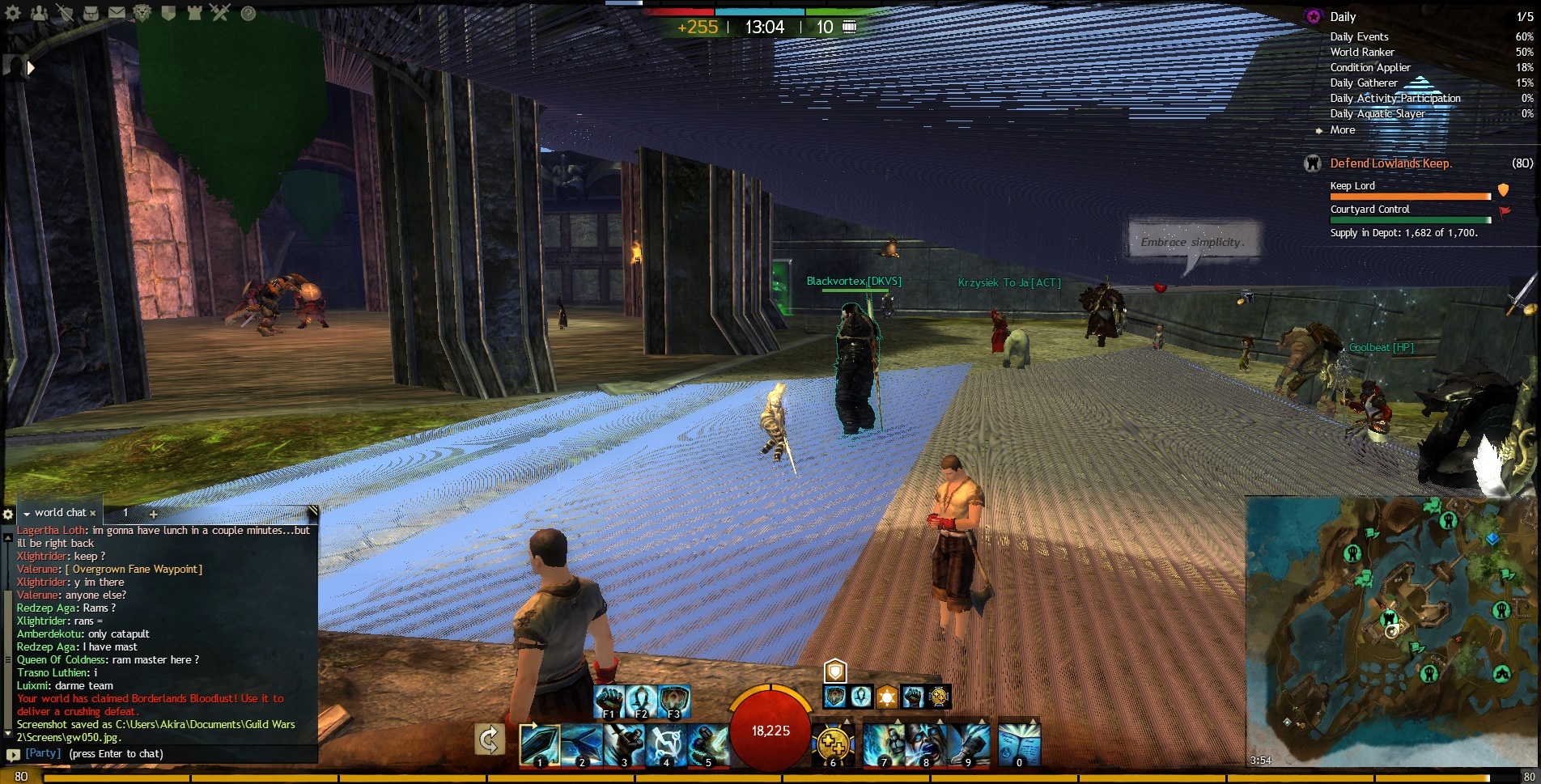
Saying this very tentatively, but disabling CCC might be a fix. After 5+ hours of gaming I haven’t gotten any tearing artifacts. But wouldn’t be a first time I’ve said too soon…
I’ll keep you posted.
in Account & Technical Support
Posted by: Knight In Shining Armor.1708
Thank you to the guy who replicated the issue on his old and new card. At least we can put the defective hardware issue to rest.
Could it be this is a focus issue? As in, the card fails to grab the display? Could that be why atl-tab makes it go away?
I’m just throwing that out there.
in Account & Technical Support
Posted by: GunGrace.3621
I dont know if this help but i notice Turning on EFFECT LOD lessen the problem..
All my Graphic setting are set to the highest only the Character model limit and the Character Model quality are set to low.
Best Texture Filtering tick
Depth Blur tick
Effect LOD tick
High-Res character Textures tick
so far no tearing.. i notice my fps goes up.. :/ it hink
in Account & Technical Support
Posted by: Knight In Shining Armor.1708
I have all those settings checked except high res characters, and this problem still happens irregularly.
Tried display driver uninstaller, tried driver 14.4, even tried to disable system memory overclocking, still happening.
Thanks tho for keeping this thread going.
Not affiliated with ArenaNet or NCSOFT. No support is provided.
All assets, page layout, visual style belong to ArenaNet and are used solely to replicate the original design and preserve the original look and feel.
Contact /u/e-scrape-artist on reddit if you encounter a bug.