Graphics Breaking
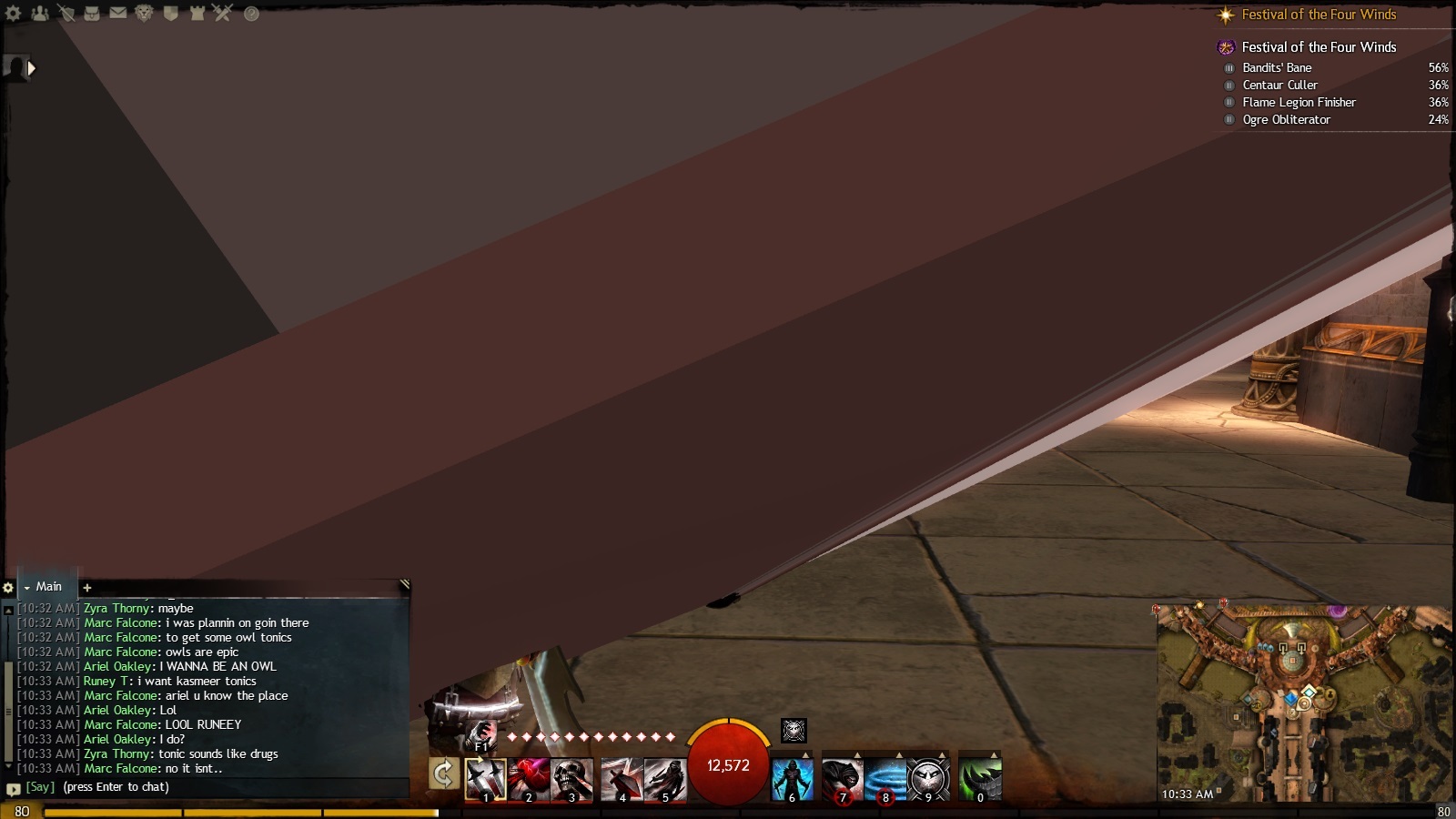
Hey, that looks like a defective or overheating video card. Have you tried checking temps while gaming? If the temps are within reason reduce the video card clocks (gpu and mem) by 100MHz to see if that helps.
that happens to me every once in a while. restarting the GW2 client, or switching characters then back to the affected character has resolved it in every situation. Last time it happened was the night before last in Lions Arch, the issue followed another player as I looked at them (I think it was Spark that was the cause), when I logged out/back in I was in a different instance for LA and that player wasn’t around and Boom issue gone. Thought it might be game files, so did a -repair last night and have not been back in since.
Desktop: 4790k@4.6ghz-1.25v, AMD 295×2, 32GB 1866CL10 RAM, 850Evo 500GB SSD
Laptop: M6600 – 2720QM, AMD HD6970M, 32GB 1600CL9 RAM, Arc100 480GB SSD
Laptop: M6600 – 2720QM, AMD HD6970M, 32GB 1600CL9 RAM, Arc100 480GB SSD
Did a repair like sirsquishy suggested, didn’t work. Did a full re-install. That worked for a while, but the problem is back again. I don’t have this problem w/ SWTOR, or any of my Dragon Age games. GW2 is the only game w/ a Graphics issue. Tabbing-out and back in fixes the graphics, as before.
GPU Heat while running the game is @ 41-45 C
GPU Heat while running the game is @ 41-45 C
Where are you getting that info from? And what model is your GPU exactly? My R9 280X is around 70 degrees on full load, 45 degrees is way too low.
GPU Heat while running the game is @ 41-45 C
Where are you getting that info from? And what model is your GPU exactly? My R9 280X is around 70 degrees on full load, 45 degrees is way too low.
My video card is the Radeon 280X 3GB. The temps are from Speedfan, and it’s currently running between 55-65 C
GPU Heat while running the game is @ 41-45 C
Where are you getting that info from? And what model is your GPU exactly? My R9 280X is around 70 degrees on full load, 45 degrees is way too low.
My video card is the Radeon 280X 3GB. The temps are from Speedfan, and it’s currently running between 55-65 C
Verify those temps with GPU-Z.
Speedfan can be flaky at times (reading the wrong sensor for the incorrect Device ID).
Desktop: 4790k@4.6ghz-1.25v, AMD 295×2, 32GB 1866CL10 RAM, 850Evo 500GB SSD
Laptop: M6600 – 2720QM, AMD HD6970M, 32GB 1600CL9 RAM, Arc100 480GB SSD
Laptop: M6600 – 2720QM, AMD HD6970M, 32GB 1600CL9 RAM, Arc100 480GB SSD
GPU Heat while running the game is @ 41-45 C
Where are you getting that info from? And what model is your GPU exactly? My R9 280X is around 70 degrees on full load, 45 degrees is way too low.
My video card is the Radeon 280X 3GB. The temps are from Speedfan, and it’s currently running between 55-65 C
Verify those temps with GPU-Z.
Speedfan can be flaky at times (reading the wrong sensor for the incorrect Device ID).
Repeated w/ GPU-Z. Temps are still reading the same.
GPU Heat while running the game is @ 41-45 C
Where are you getting that info from? And what model is your GPU exactly? My R9 280X is around 70 degrees on full load, 45 degrees is way too low.
My video card is the Radeon 280X 3GB. The temps are from Speedfan, and it’s currently running between 55-65 C
Verify those temps with GPU-Z.
Speedfan can be flaky at times (reading the wrong sensor for the incorrect Device ID).
Repeated w/ GPU-Z. Temps are still reading the same.
Then you got really lucky, those 280x’s run really hot. I had to drop my Direct CU II Asus cooler for a MK-26 to get my 280x’s temps down. Now my top end temp is 46c :-)
But that aside, did you install the AMD Omega Drivers yet? If not, I highly suggest it.
Desktop: 4790k@4.6ghz-1.25v, AMD 295×2, 32GB 1866CL10 RAM, 850Evo 500GB SSD
Laptop: M6600 – 2720QM, AMD HD6970M, 32GB 1600CL9 RAM, Arc100 480GB SSD
Laptop: M6600 – 2720QM, AMD HD6970M, 32GB 1600CL9 RAM, Arc100 480GB SSD
GPU Heat while running the game is @ 41-45 C
Where are you getting that info from? And what model is your GPU exactly? My R9 280X is around 70 degrees on full load, 45 degrees is way too low.
My video card is the Radeon 280X 3GB. The temps are from Speedfan, and it’s currently running between 55-65 C
Verify those temps with GPU-Z.
Speedfan can be flaky at times (reading the wrong sensor for the incorrect Device ID).
Repeated w/ GPU-Z. Temps are still reading the same.
Then you got really lucky, those 280x’s run really hot. I had to drop my Direct CU II Asus cooler for a MK-26 to get my 280x’s temps down. Now my top end temp is 46c :-)
But that aside, did you install the AMD Omega Drivers yet? If not, I highly suggest it.
Thanks, just installed the new driver, I guess we’ll see how than goes.
I have gone so far as to buy a new power supply to solve this problem, and that didn’t work. Still getting random artifacts like these.
Currently I’m using catalyst control center to lower the memory clock speeds from it’s default of 1600 downward in 25mhz increments . 1575, 1550, 1525, yup artifacts still there. Right now it’s setting at 1500, and I’ve been running that for a few days. No artifacts yet.
Artifacts indicate a defective graphics card, power supply or overheating.
Since you’ve eliminated two of the three, that means the graphics card is failing. Down-clocking can work, but it will need to be replaced to completely solve the issue.