Guild Wars 2 client doesn't save password
in Account & Technical Support
Posted by: Super Meat Boy.5728
Q:
in Account & Technical Support
Posted by: Super Meat Boy.5728
Q:
Even though I’ve ticked “remember my password” it’s still blank every time. My account name is saved still.
I have a long password that I always have to copy from my LastPass vault by hand.

A:
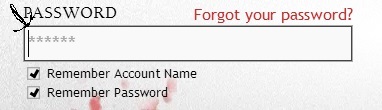
For security purposes, the saved password is displayed as ******. Your image appears to have the password saved, as shown by the ****** and the ability to click login.
in Account & Technical Support
Posted by: Super Meat Boy.5728
For security purposes, the saved password is displayed as ******. Your image appears to have the password saved, as shown by the ****** and the ability to click login.
OK, I thought it was just a blank screen.
They need to change it back the way it used to be. Good lord, since feature patch arrived i thought “remember password” was broken for me. Before the update stars used to be black. Now they are so gray that you can barely see them, not to mention that when you open the client, text coursor is flashing right at the front of the remembered password. As if nothing was entered, just because of that coursor, i thought that it wasn’t working for over a month.
The stars were always gray .. what has changed is that the autologin doesn’t work
and thats why you notice the color of the stars.
However .. you can enable the autologin now again if you use “- autologin”
as command line argument.
If they were gray, then they need to remove that text coursor flashing at the front. Because it makes it look like nothing has been entered
Not affiliated with ArenaNet or NCSOFT. No support is provided.
All assets, page layout, visual style belong to ArenaNet and are used solely to replicate the original design and preserve the original look and feel.
Contact /u/e-scrape-artist on reddit if you encounter a bug.