Q:
How can I disable linked authentication?

How can I disable linked authentication?
in Account & Technical Support
Posted by: Inculpatus cedo.9234
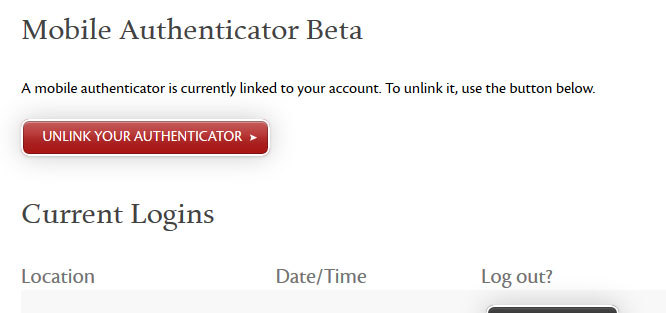
Visit Account Recovery to unlink your authenticator. You can also unlink the authenticator at any time by logging in to Account Management and proceeding to the Security section. Please note that to log in while two-factor authentication is configured on your account, you will need to have access to your mobile device.
I have the same problem with the greyed out option, the account management option doesn’t work as the reason I need to unlink is because I have updated my phone and google authenticator didn’t remember its settings. Currently not a huge issue as my current IP address is fine, but if it changes I will be locked out
How can I disable linked authentication?
in Account & Technical Support
Posted by: Sir Zantius Alatso.4952
David, I don’t think it’s because you updated your phone I am having the same problem and I haven’t done no updates. The authenticator is working fine but the button is greyed out if you lost your settings in your google authenticator simply go the the app and “add a new authenticator” and reapply the secret code or rescan the qr code you got when you first linked the authenticator and you should be able to have it back (only will work if you wrote down your secret code and/or saved the QR code) hope this helps brother
I had the same problems. Authenticator wasn’t working, and the button to unlink it was greyed out.
I gave up on using the authenticator and just went to email authentication instead, and I had get support to unlink it for me (twice).
How can I disable linked authentication?
in Account & Technical Support
Posted by: Sir Zantius Alatso.4952
I had the same problems. Authenticator wasn’t working, and the button to unlink it was greyed out.
I gave up on using the authenticator and just went to email authentication instead, and I had get support to unlink it for me (twice).
So gw2 support actually helped in unlinking it? I use the mobile authenticator and it is working well for me my only concern is of I lose my phone or anything happens I can contact support and have them unlink it I also have the greyed out button did u have any problems having them unlink it?
Same problem.
When i try to unlink the mobile authenticator using the recovery url, i have the button disabled.
Attachments:

The Sleeping Bard [TSB] | The Bard, http://bit.ly/1GSrsZu
How can I disable linked authentication?
in Account & Technical Support
Posted by: Inculpatus cedo.9234
Has any one of you posted in the Forum and Website bugs sub-forum? This issue may get more attention there, if it is not working as intended.
Hiya, I was having the same problem a few moments ago, (Now Resolved) Contact support and they will help you
Signature removed by popular demand…….
Checking into this so that hopefully we can correct it and not require a ticket. At this point in time, directly contact Support by filing a ticket through the “Ask a Question” tab on that linked page. They will be able to assist you.
Gaile Gray
Communications Manager
Guild & Fansite Relations; In-Game Events
ArenaNet
Communications Manager
Guild & Fansite Relations; In-Game Events
ArenaNet
It’s grayed out for me too. Is this going to be fixed in a few days or should I contact support?
Same here, I got into my account..but when going to recovery to unlink authentication, its still grayed out. I sent in a ticket last night, still waiting to hear back.
Ticket request #5271
Resolved, Thank You.
(edited by DoubleIris.4785)
I’m inquiring about this now and hope to have more info soon.
Gaile Gray
Communications Manager
Guild & Fansite Relations; In-Game Events
ArenaNet
Communications Manager
Guild & Fansite Relations; In-Game Events
ArenaNet
I’m seeing the same behavior. I just switched phones and can’t re-setup my authenticator.
How can I disable linked authentication?
in Account & Technical Support
Posted by: Sir Zantius Alatso.4952
I’m seeing the same behavior. I just switched phones and can’t re-setup my authenticator.
Phokal did you by any chance save the QR code or the special code when you linked your authenticator? You can do this by taking a screenshot or your screen crop it and save the picture and print it out as an extra security this way if you lose the app or switch phones all you gotta do is rescan or type in the special code into your new phone and voila authenticator now works with the new phone I STRONGLY recommend players to UNLINK their authenticators and RELINK it and save this information and KEEP IT SECURE AND PRIVATE. It might save you a ton of headaches
This problem still exists. My old phone had a factory reset and need to activate this on my new phone. At the password screen the unlink button is disabled and on my account / security page I need two generated codes which I don’t have.
A few months ago this was working perfectly and the unlink button wasn’t disabled on the recovery page.
I really think that you’ll want to contact Support. I’m sorry there isn’t an easier means to do this right now, but I want you to get the help you need as quickly as possible, so a ticket (click “Support” above and then “Submit a request” to get in touch.
Thank you.
Gaile Gray
Communications Manager
Guild & Fansite Relations; In-Game Events
ArenaNet
Communications Manager
Guild & Fansite Relations; In-Game Events
ArenaNet
I had the same issue this morning and this was the first thread I found, came here now to say it’s still bugged but I see it’s already been updated. Support didn’t take more than an hour to fix it for me. Gaile, if it helps, actually visiting the URL the button points to made no difference so there’s something behind the scenes that makes our accounts not viable for unlinking, though I’m sure your webteam knows this already.
(edited by Xenolith.6154)
Still doesnt work