(edited by Omega.8260)
New Computer - Flicker / FPS drop
New PC built 2 days ago
CPU – i7 4790k 4.0ghz
GPU – R9 295×2 (single card)
MOBO – ASUS Z97 Mark1
RAM – 16gb Corsair Vengeance (2133Mhz)
PSU – Thermaltake SP-1200M
OS – Win 8.1
HD – Kingston Hyper X 250gb SSDWhen in game the lighting on my character and some times others flicker like a strobe light. Also getting FPS drop, when i log in its around 175 fps after an hr 6 fps… Not a faulty GPU or CPU because it has no issue with other games and brother also runs the same GPU from a diff manufacturer ( one Visiontek other XFX) and is having the same issue with the lighting. Not sure he is getting the FPS drop but 100% sure he has the strobe issue. This set up should be way more than enough to max out GW2 on max setting with great FPS. Don’t know what the issue is just looking for suggestions because the FPS drop makes the game unplayable
Load up GPU-Z and watch the sensor screen while GW2 is active. What does the Memory and Core Clock do, what about utilization? Are the Temps stable and in a good range?
when the FPS drop happens, switch over the to summary screen, what is the listed Link speed (16x @ 16x version3?)
Desktop: 4790k@4.6ghz-1.25v, AMD 295×2, 32GB 1866CL10 RAM, 850Evo 500GB SSD
Laptop: M6600 – 2720QM, AMD HD6970M, 32GB 1600CL9 RAM, Arc100 480GB SSD
Laptop: M6600 – 2720QM, AMD HD6970M, 32GB 1600CL9 RAM, Arc100 480GB SSD
Wouldn’t be surprised if it’s a driver problem, or that single slot dual gpu cards are not best friends with GW2.
AMD drivers update is SO slow, and the overall experience is SO clunky and worthless compared to NVIDIA.
And we all know GW2 is SO bad optimized, than older cards with much worse performance than newer ones can run the game at same fps and graphic levels…
That I don’t know if there’s a viable fix for your problem :S
PD: Lucky family if you have 2 295x at home
Ansau – Sylvari Mesmer – Exiled Warriors [wE] – Gandara
i7 5775c @ 4.1GHz – 12GB RAM @ 2400MHz – RX 480 @ 1390/2140MHz
i7 5775c @ 4.1GHz – 12GB RAM @ 2400MHz – RX 480 @ 1390/2140MHz
(edited by Ansau.7326)
This is just sitting in lions arch
Attachments:

This is with the flicker
Attachments:
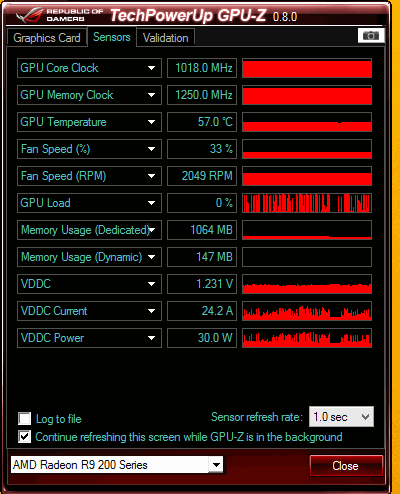
Didnt drop any frames tonight was at an average of about 90 fps every time i check with Not counting TQ where i was at 23. Drivers have tried both the newest and the beta and both have the issue.
I guess what i need to do is determine if there is an issue with the card that way i can get it returned asap. So if those charts make since to you and there is an issue with the card please let me know. Or if there is another way to test the card to ensure its ok im willing to try so i know.
PS: The cards where from me for me and him for an early Xmas present.
This is at the end of the night before i logged after playing a few hrs. Had 67 FPS at this point
