Leader of Heroes [Hero] – Seafarers Rest
(edited by Treeline.3865)
Since installing Windows 8.1 (Or randomly around that time) I started having an issue where my game will be unresponsive for a while.
To describe it the best I can, this is what happens:
> Game runs “smoothly” – I’m on a laptop, so “smooth” is between 50 and 10 FPS, but obviously that is a matter of performance, how many players and stuff nearby etc.
> Suddenly the game clogs up giving me a slideshow. And by slideshow, I really mean slideshow. It’s not a matter of getting 2-3 frames per second. Usually I get a new picture every 3-10 seconds. Sometimes I even get a Windows loading icon (the blue circle) instead of my regular mouse icon, and sometimes GuildWars is “Not Responding” for a few seconds. That’s how bad it is. With that said, the game never crashes, and I seem to somewhat be able to interact with the game meanwhile. Sometimes I have tried running while this happens, but I obviously can’t navigate properly. The character moves though and seems to respond to most things.
> This usually goes on for ~15-30 seconds.
> What I notice while it happens is that my harddisk, a 7200RPM, 500GB WD, is running at 100%. It is reading or writing on full speed for some reason.
> This happens pretty reliably a few seconds after mapping to a new area, after a few seconds. It also happens a bit randomly, but the case of waypointing almost always triggers it.
> This did not happen until a few weeks ago, around the time I threw Win 8.1 on my laptop from Win 8. Could be a coincidence.
Any ideas at all?
The laptop has these specs:
CPU: Intel Core i5-460M (2.4Ghz Dual-Core)
GPU: ATI Radeon HD 5870M (1 GB DDR5)
HDD: WD 500GB 7200RPM – Partitioned into 65GB C:\ drive with OS (15GB available) and 400GB D :\ which holds GuildWars (99GB available).
4 GB DDR3 SDRAM – 1066Mhz if I remember correctly.
(edited by Treeline.3865)
Did you do a clean install of Windows 8.1?
Have you tried reinstalling your video drivers?
What are your temperatures like?
Is your laptop set for High Performance or Battery Saving/Balanced power profile?
Did you do a clean install of Windows 8.1?
Have you tried reinstalling your video drivers?
What are your temperatures like?
Is your laptop set for High Performance or Battery Saving/Balanced power profile?
No, I used the Windows Store upgrade. A clean format is not an option for me at the moment.
Yes, beta and non-beta.
70-76 celcius on the CPU, quite normal.
High Performance. Catalyst Control Center is also set to not mess with the performance.
Those " upgrades" can have detrimental affects on performance and reliability.
Check ur GPU VRAm usuage just befor this happens, if its maxed out at 1024mb then its possible ur seeing a performance tank due to the VRAm, RAM, and HDD having to swap out data.
That said, since this is now happening after u installed W8 its likely just a software hitch. personaly i stick with W7, its more mature and helps avoid such problems.
Try defragging your hard drive, that may help you a bit with load times and related woes.
Check ur GPU VRAm usuage just befor this happens, if its maxed out at 1024mb then its possible ur seeing a performance tank due to the VRAm, RAM, and HDD having to swap out data.
That said, since this is now happening after u installed W8 its likely just a software hitch. personaly i stick with W7, its more mature and helps avoid such problems.
I will try checking out if this is a case. Usually my GPU is not anywhere near maxed out, but who knows. I will give it a try Thanks for the suggestion.
By the way, I only upgraded from Windows 8 -> Windows 8.1.
As for defragmenting, I do this on both my partitions somewhat regularly. While I have a lot of crap on my laptop, it should also be “clean”. No crapware, no malware, no adware etc etc. The issue also persists when nothing but Windows stuff is running on the computer besides GuildWars. I tend to have a lot of things open, but it does not seem to affect the problem by any significant amount.
Aaaand I hit a new can of worms.
So I decided to be a bit more thorough and use DriverSweeper to remove my ATI drivers and everything associated with it completely. After removing the driver I tried both the latest beta and latest stable – But when running the installer I do not get the option to install the ATI drivers, nor Catalyst Control Center. I have no clue why. Luckily Windows Update was clever enough to give me the latest stable driver from there. But I’m now without the Control Center to monitor the GPU. :/
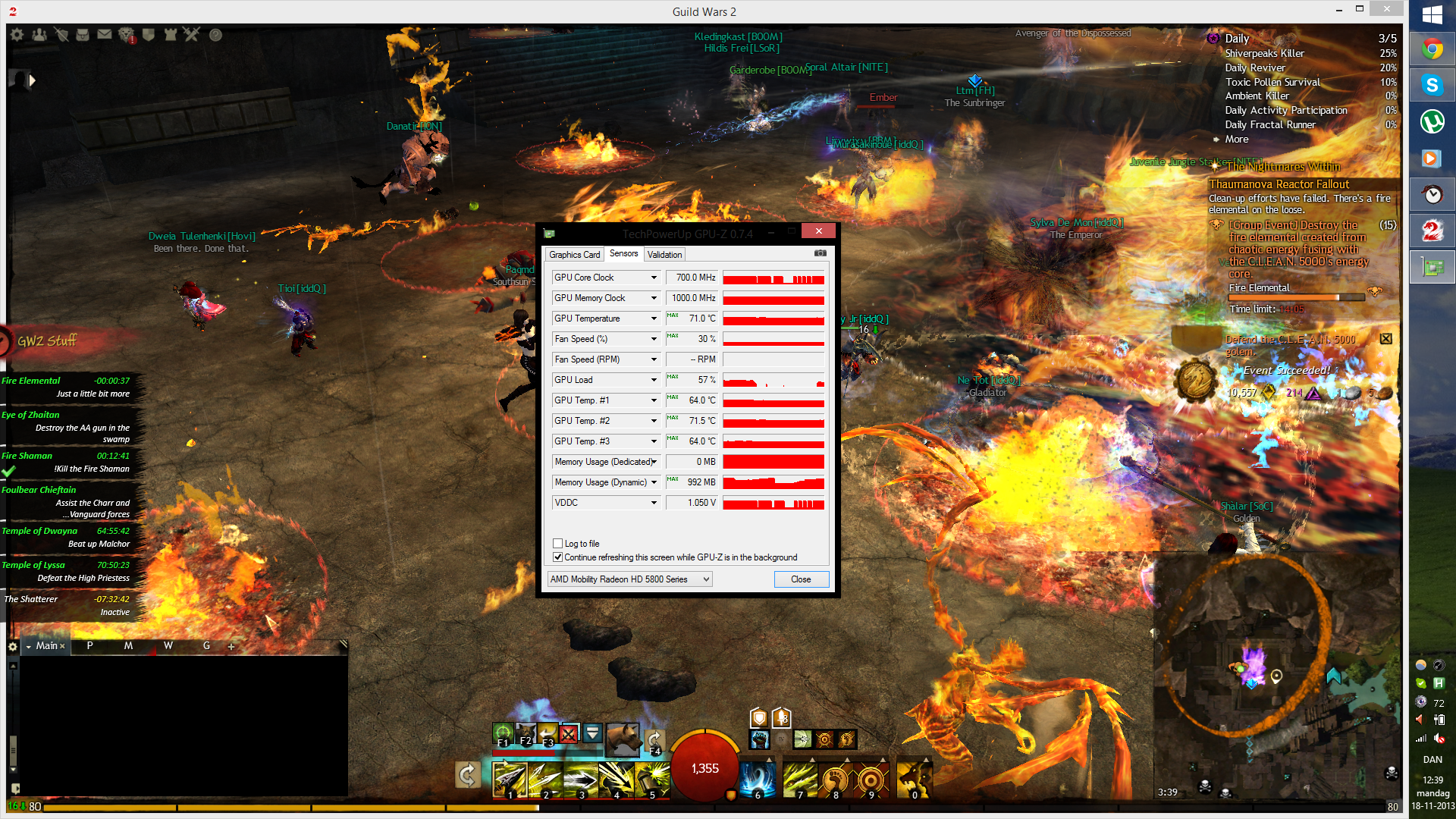
Another update: I ran GPU-Z to monitor my GPU, as suggested by SolarNova. Truth is that graphics isn’t exactly my specialty, but some something odd is definitely going on. I attached a screenshot showing the GPU-Z windows about 10 seconds after one of the FPS tanks ceased, letting the game go back to normal.
The spike started around 30 seconds before Fire Elemental was up. (It was not caused by that odd issue where the FPS drops right when it pops) The Fire Elemental spawns with a 15 minute timer, and as you can see on the screenshot it shows 14:07, meaning that the spike lasted for little more than a minute.
Im not sure what conclusions to draw from the GPU-Z data, hoping for some help there.
What I notice first is that for a while there is no load on the GPU at all. Secondly the GPU clock is.. Weird! Seems to keep jumping between 700mhz (Standard max clock) and 400mhz (standard minimum clock i think). And then something about the memory usage.
I hope someone gets an idea from this
Does ur rig have a onboard GPU ?
It may be switching to ur onboard GPU when ur dedicated GPU usuage drops below a set , at which point u get horrible FPS untill it realizes it needs to go back to the dedicated card. I notice the max GPu usuage only being 54 which isnt suprising considering GW2 is very CPu bound and ur running a weker CPU, when u happen across an area with increased CPU load ur GPU usuage drops and then kicks into the onboard GPU ..maybe..
In regards ot ur HDD usuage during the FPS drops it could be due to any onboard GPU having a very small amount of system memory to use as VRAm and thus the HDD is constantly in use.
If u do have a onboard GPU, try find the BIos settings for it and dissable it.
If u dont have a dedictaed GPU then honestly..i would try a complete system format. As u have already done a driver change the only thing left to try is a format.
I cant see anything that would indicate u GPU being faulty as ur not maxing it out usuage wise, temps are fine, and its not throteling, the only downside i can see is its maxing out on VRAm usuage, but that according to the GPU z screenshot isnt the problem as it was maxed out before the FPS drop and loss of GPu usuage.
It’s a kitten good guess, but no, unfortunately no onboard GPU Only the dedicated card. Thanks for all your suggestions though. I won’t format my computer, at least until a holiday comes up, so I guess I will have to live with it for now.
About the memory usage on the GPU. Could there be something there? Or is it normal that it could max out often?
Again, thanks for your effort!
You only have 1GB VRAM so its normal.
Nowerdays most people will sugest atleast 3Gb VRAM due to upcoming games and increase in resolutions to above 1080p, though 2GB can still surfice for now.
^ You are sitting at 992 MB VRAM usage in that picture. 2GB will be OK for now for 1920×1080, but if you play at a modern res of 2560×1440, even 3GB is cutting it close.
Not affiliated with ArenaNet or NCSOFT. No support is provided.
All assets, page layout, visual style belong to ArenaNet and are used solely to replicate the original design and preserve the original look and feel.
Contact /u/e-scrape-artist on reddit if you encounter a bug.