Upgrade, Purchase, or Build? -- System Help
The dell model # would help to see if anything can be reused.
A good build if you are not going to overclock the processor.
http://pcpartpicker.com/p/H6fy
(edited by zerk.9701)
Upgrade, Purchase, or Build? -- System Help
in Account & Technical Support
Posted by: Jazhara Knightmage.4389
depends on how far you can push it and how many years you want it to last
http://pcpartpicker.com/p/Fg17
thats what i would consider optimal for lasting a few years.
heres a lesser option http://pcpartpicker.com/p/H6e2
I personally would spend the extra to get the first option, think of it as future insurance, you wont need to upgrade much if anything with the first option before its time to fully replace, BUT you will have the option of new cpu’s and adding a 2nd 7870xt without need of a new psu(why i suggest the 850)
the 32gb ram will let you use fancycache to speed loadtimes without need of an ssd, it also will mean as games and apps use more and more memory, you are set.
its up to you.
as to the dell, they arent easy to upgrade with board replacements due to the dell front panel connector, you could try and upgrade to another dell board but, honestly cant recommend that….
I want to point out, the first option is what I myself would do, its the best bang for the buck if you want something to last as long as possible.
it will also allow an easy oc to 4.5-4.6 ghz range (very safe oc and very easy, well worth doing.)
http://pcpartpicker.com/p/Fg1x
added some pk-1 thermal compound…..
if you can swing that, it WILL give you the best results for the longest time.
you could go intel but the downside is that you will have no upgrade path in 6 months when intel changes sockets again.
this isnt “top notch” that would add a good 300-600bucks (7970 videocard and faster ram and some other stuff)
I build “bang for the buck” and this is what I been suggesting for a while to people as the current bang for the buck build.
the case is NICE
the boards one of the best that dosnt cost alot(the best cost 2x as much or more in some cases)
the rams good stuff and plenty of it.
the videocard is bar none the best bang for the buck you can get.
the hdd is the best price per gb for a drive thats got a good warr.
you can re-use your optical drive(or do what I did last build and not bother with one)
the PSU is a superflower built unit, one of the top OEM’s out there.
all in all, this is a great bang for the buck build that, would give you easy cheap upgrade paths in the future if you felt you needed more speed/power without spending alot or doing alot of work.
hope this helps
AMD FX-8350@4.8ghz on air(SilverArrowSB-E Extreme) , 32gb 1866mhz(10-11-10 cr1)
PCP&C 1200watt TC, Crosshair V F-Z, Sapphire 290x
PCP&C 1200watt TC, Crosshair V F-Z, Sapphire 290x
I think you went way over his budget and did not include the operating system or even the CD/DVD drive and that case with one fan whats up with that.
I appreciate the responses. I’ll definitely look into these. And the budget is just ideal as I don’t mind to go over if it’s going to last me.
Edit — System Model: Studio 540
(edited by Phantom.3659)
Upgrade, Purchase, or Build? -- System Help
in Account & Technical Support
Posted by: Jazhara Knightmage.4389
Zerk, most dells just standard optical, and today, most people really dont need them.
you can scavange the optical from your dell if you want an optical drive, more and more, people I know arent wanting optical because they never use it, Putting your OS install on a USB stick is faster then from dvd, it also lets you toss anything extra you need on flash drive(mine has office 2010 as well as a bunch of utilities)
as to OS, he may not need one, some people have windows already OR like a friend of mine have a discounted way to get it via their companies, I figure if they need windows they will know where/how to get it.
he can always toss extra fans in, really that case dosnt need them if hes not gonna overclock alot, its got very good passive flow.
I would toss a couple akasa viper 140mm rans in the top BUT, again, they are not a must.( i have build with that case, dont really need a stack of fans if your not going overboard with heat production)
Phantom im gonna send you a PM
AMD FX-8350@4.8ghz on air(SilverArrowSB-E Extreme) , 32gb 1866mhz(10-11-10 cr1)
PCP&C 1200watt TC, Crosshair V F-Z, Sapphire 290x
PCP&C 1200watt TC, Crosshair V F-Z, Sapphire 290x
Buying a AMD processor is perrty kitten when Intel is clearly better.
32GB of ram is way over his head if he has to ask what to buy.
But no biggie I could care less what he buys.
AMD is one step below anyway you look at it but fan boys will never listen.
http://www.tomshardware.com/reviews/gaming-cpu-review-overclock,3106-kittenml
Here are the 2 since this is for gaming just look at the game performance Intel beats it every time.
http://www.anandtech.com/bench/Product/697?vs=701
(edited by zerk.9701)
Allow me to share with you my build that I am currently running; the prices listed are those directly from Newegg at the time of me posting this except the DVD reader, which is currently discontinued (some parts were cheaper when I bought them) -
NZXT Guardian 921RB Mid-Tower: $69.99
Intel Core i5-3570k @ 3.4GHz: $229.99
G.SKILL Ripjaws Series 8GB (2 × 4GB) DDR3 1600MHz: $55.99
AMD Radeon HD 7770 1GB 128-bit GDDR5 PCI-e 3.0×16: $119.99
ASRock B75m-DGS SATA 6GB/s: $52.99
SeaSonic M12II 620 Bronze 620W ATX 12V: $89.99
SONY Black SATA DVD-ROM Optical Drive: $17.99
Seagate Barracuda 1TB 7200RPM SATA 6GB/s: $79.99
Factor in your basic OS that costs $99.99, and that comes to a total of $816.91 (minus tax and shipping, but Newegg doesn’t make you pay shipping or taxes if you take the standard three-day delivery option). Nothing is OC’ed yet; everything is stock and I am using only what came right out of the box. I am running WoW constantly above 100FPS with all the settings maxed out, and 50 during the heaviest fight scenes. I run Rift easily over 70FPS with my settings maxed out; I haven’t gotten into the larger fights, so I can’t say how it handles there. I’ve played Skyrim (again, with all the settings maxed out) and typically keep a steady 60-80FPS. In GW2, I’m running everything on high except LOD distance and I keep two settings unchecked; I do have vertical sync enabled, so my FPS stays around 60 to match the refresh rate of my monitor. In WvW, I keep above 30FPS from what I’ve experienced thus far; I doubt it’s been the most “intense” fights, but I have gotten into a few that were quite large and took note of my FPS then.
I personally don’t prefer AMD cores for gaming – Intel wins in that respect, although I will not deny the list that Jazhara listed you is a nice setup. AMD cores are good if you’re a guy who gets into rendering software or has a lot of multi-tasking going on; eight cores will definitely help you there. If you’re just going to be the guy to have something like GW2 and TeamSpeak open, I suggest Intel. If you’re going to want Fraps, a game, TeamSpeak, a web browser, and Steam all running simultaneously, then I suggest to go with Jazhara’s suggestion of an AMD 8-core processor. If you can drop an extra $33, then get the Cooler Master Hyper 212 Evo for your CPU and you can overclock the i5-3570k until the cows come home. Or until you turn it up to some crazy number like 12.9GHz and it fries like bacon. Lol
Oh! And one last thing. Cash was limited for me, so I got a good motherboard that had only one x16 slot, but it is PCI-e 3.0 (which benefits my GPU’s 3.0 speed). It also only had two slots for RAM, but it supports up to 16GB. Personally, I would never see a need to go past 16GB unless you’re an enthusiast – same with running SLI or Crossfire; one GPU is plenty if you get one high enough up the chain. While it is a micro motherboard, they did an incredible job in terms of its layout (unlike a number of other micro motherboards), so it was well worth it for me.
Edit: One last thing! Since I’m also at a university that’s a part of Microsoft DreamSpark, I got my OS for free. So my build was an extremely good bang for my buck in this case.
(edited by Sheer.7529)
Upgrade, Purchase, or Build? -- System Help
in Account & Technical Support
Posted by: Jazhara Knightmage.4389
Oh! And one last thing. Cash was limited for me, so I got a good motherboard that had only one x16 slot, but it is PCI-e 3.0 (which benefits my GPU’s 3.0 speed). It also only had two slots for RAM, but it supports up to 16GB. Personally, I would never see a need to go past 16GB unless you’re an enthusiast – same with running SLI or Crossfire; one GPU is plenty if you get one high enough up the chain. While it is a micro motherboard, they did an incredible job in terms of its layout (unlike a number of other micro motherboards), so it was well worth it for me.
Edit: One last thing! Since I’m also at a university that’s a part of Microsoft DreamSpark, I got my OS for free. So my build was an extremely good bang for my buck in this case.
pci-e 3.0 does kitten all for your 7770, it cant saturate pci-e 1.0 at 16x wouldnt be saturated by that card…..sorry but 3.0 is useless with todays cards….you would know that if you researched before buying.
http://www.overclock.net/t/1188376/hardwarecanucks-hd-7970-pci-e-3-0-vs-pci-e-2-0-comparison
http://www.techpowerup.com/reviews/Intel/Ivy_Bridge_PCI-Express_Scaling/3.html
please read and dont fall for the trap that Sheer fell for, even dual gpu cards dont need 3.0 speeds yet…..if you notice even todays top cards arent saturating 16x 2.0 slots….let alone his 7770.
despite what the intel zelot above said, everybody is working to use more cores the way forward is more cores, even intel knows it and are slowly working to pack more cores into their chips.
look at games like bf2 and crysis3 where the games engines are being designed to use more cores….thats how games in the future will be designed.
for gw2, you will see worst cases of 25fps on an 8350 at 4.6, on a 3570k or 3770k you will see 30….is the extra cost of an equivlant motherboard on intel worth it……not to me….
is the fact that whatever you buy from intel now will be EOL by the the year(eol=End Of Life, they stop making them and move to new socket)
AMD is sticking with AM3+ and FM2 for at least 2 more generations, meaning, you will be able to do a cheap upgrade IF you feel the need, rather then replace the board and cpu.
gonna do a direct reply to zerk’s “amd sucks” posts, since hes such a fanboi of intel and all.
AMD FX-8350@4.8ghz on air(SilverArrowSB-E Extreme) , 32gb 1866mhz(10-11-10 cr1)
PCP&C 1200watt TC, Crosshair V F-Z, Sapphire 290x
PCP&C 1200watt TC, Crosshair V F-Z, Sapphire 290x
Upgrade, Purchase, or Build? -- System Help
in Account & Technical Support
Posted by: Jazhara Knightmage.4389
http://techreport.com/review/23750/amd-fx-8350-processor-reviewed/7
http://www.tomshardware.com/reviews/fx-8350-vishera-review,3328-13.html
http://www.hardwareheaven.com/reviews/1598/pg6/amd-fx-8350-processor-review-battlefield-3.html
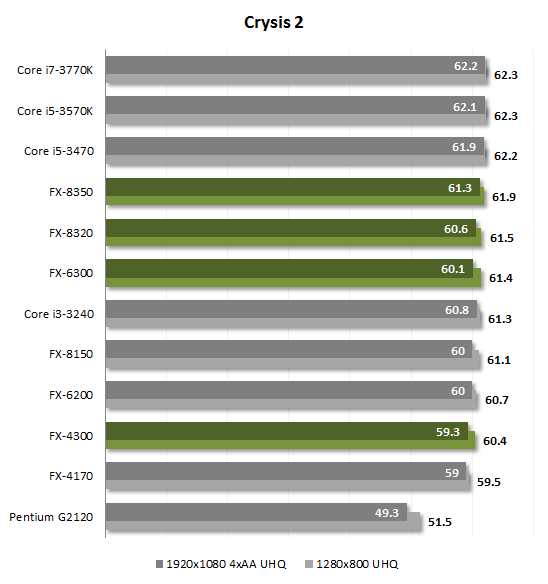
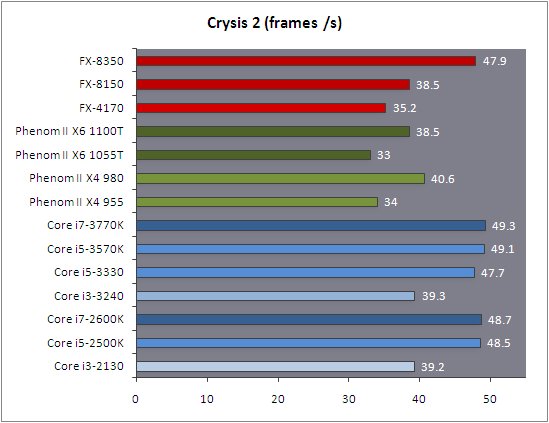
so intel wins every time…..huh…..interesting…..and the 8350 costs less then the 3570k….
http://www.legitreviews.com/article/2055/5/
http://www.legitreviews.com/article/2055/6/
yeah amd totally gets smashed….by all of 3.45fps at 1080p in borderlands 2……1.4fps in bf3@1080p…….and 0.24fps in AvP@1080p……3.76fps in dirt3@1080p
AMD cant game????
really?
http://teksyndicate.com/videos/crysis-3-benchmarks-amd-fx-8350-vs-intel-i7-3770k-both-overclocked
watch the video and read that, i think you will find that AMD is good for new games, and is quite playable even on the worst games, even skyrim a game used to slag off AMD gets playable fps(i honestly never see below 60fps in it during play….)
I personally prefer the platform that has a future…and dosnt require me to void my warranty to get decent temps… http://forums.anandtech.com/showthread.php?t=2261855
Attachments:






AMD FX-8350@4.8ghz on air(SilverArrowSB-E Extreme) , 32gb 1866mhz(10-11-10 cr1)
PCP&C 1200watt TC, Crosshair V F-Z, Sapphire 290x
PCP&C 1200watt TC, Crosshair V F-Z, Sapphire 290x
To the OP: I stand by my opinion that the build I showed you is an extremely good bang for your buck; I encourage you to do your research and not take just what I said as facts, though.
Jazhara, I sent you a PM in response to your post to avoid turning this thread into a debate.
Upgrade, Purchase, or Build? -- System Help
in Account & Technical Support
Posted by: SolarNova.1052
OP
Option 3 is the only viable one tbh. You current rig is to old to use any meaningfull parts for option 2 ..and option 1 would be useless.
For $800 u can build a respectable gaming rig. The only things u will re-use will be things like ur Optical Drive and possibly ur HDD if its atleast a 7200RPM Sata 3 drive. If its a 5k RPM slow one then u would probably want to spend some money on a new HDD aswell. Oh and ofc ur OS can be transfered across/reinstalled.
Anyway i would recommend the following.
http://pcpartpicker.com/p/Hmem
If u wanna stretch ur budget and be a tad more future proof then a LGA 2011 Intel rig would do well. U can upgrade in the future to a 6core 3930k or more likely a Intel IvyBridge-E CPU if/when they released, by just switching CPU’s.
http://pcpartpicker.com/p/HmlO
3930k 4.6ghz | NH-D14 Cooler | P9x79 Pro MB | 16gb 1866mhz G.Skill | 128gb SSD + 2×500gb HDD
EVGA GTX 780 Classified w/ EK block | XSPC D5 Photon 270 Res/Pump | NexXxos Monsta 240 Rad
CM Storm Stryker case | Seasonic 1000W PSU | Asux Xonar D2X & Logitech Z5500 Sound system |
EVGA GTX 780 Classified w/ EK block | XSPC D5 Photon 270 Res/Pump | NexXxos Monsta 240 Rad
CM Storm Stryker case | Seasonic 1000W PSU | Asux Xonar D2X & Logitech Z5500 Sound system |
Upgrade, Purchase, or Build? -- System Help
in Account & Technical Support
Posted by: Jazhara Knightmage.4389
Sheer, the zelot isnt you, look at who has attacked anybody who suggest or uses AMD, you will find that Zerk has attacked me and others any time AMD is suggested, even in the case if an intel user suggesting an APU as an upgrade because it was in the persons budget as an upgrade.
zerk has had a good number of posts removed for being totally off topic and un-helpful to the extreme.
pretty much anything I have seen him post in the support section is of no help to anybody, its just anti AMD garbage….
sorry you thought I was targeting you with that part of the above post, I was not, and to the OP sorry if the tone of my last post seemed a bit harsh, I just get tired of people like Zerk talking out their rectal orifice and attacking anything thats not their preferance….hes been well at it for a while now flat out attacking anybody(even other intel users who suggest APU’s as a possible upgrade for people on a very limited budget)
the fact is, As shown above, you can use either and get perfectly acceptable game performance and for me, the fact that a true 8core vs a quad…..well as shown by newer games, everythings headed to using more cores.
I even hear rumors that intel has a research project going into a design like what AMD did with bulldozer/piledriver, shared resources rather then mearly adding more logical cores.
your builds fine for you, but I do think in some cases, your build wasted money one one thing where it could have been better spend in others.
example
http://pcpartpicker.com/p/HlV4
that includes shipping, could add a couple cheap 140mm fans for 5-6bucks each off sidewindercomputers(great site, they got yateloons that are cheap and good)
or a bit more and use what I got, a couple 140mm akasa vipers (great fans)
now let me tweak that intel rig to be equiv to the amd rig for you
http://pcpartpicker.com/p/Hm3s
as close as i could get, the board dosnt got as many sata6 ports as the extreme4 990fx board in the amd build, the 990fx extreme4 has 8 sata 6gbps(sataIII) ports.
intel boards seem to, enlarge use 4 sata6 ports and 4 sata3 ports(6 and 3 as in gbps) i know it makes little differance with todays hdd’s but, still, the fact that intels chipset dosnt seem to support more then 4×6gpbs ports and your force to rely on 3rd party chips, that may not live up the the perf level or driver support of native chipset sata…..
long story short, havign dealt with alot of these chipsets, many annoy me because their drivers are not built into windows, they also annoy me because if they are using a 3gpbs chipset for half or more of the ports rather then a newer 6gbps chipset…..that sucks……(2 of my boards 8 internal ports are on jraid 3gbps, windows dosnt got a built in driver for them, it bugs me…..but i use them for front esata and optical drive in 1 rig and front breakouts for esata on the other to make hooking up portable hdd’s easier)
well, nuff said, I still stand by the fact I feel that bang for the buck you cant really beat
http://pcpartpicker.com/p/Fg1x
yeah its over his listed budget, but as I said, to me at least, its justifiably over, its still less then an equivalent Intel rig would cost.
AMD FX-8350@4.8ghz on air(SilverArrowSB-E Extreme) , 32gb 1866mhz(10-11-10 cr1)
PCP&C 1200watt TC, Crosshair V F-Z, Sapphire 290x
PCP&C 1200watt TC, Crosshair V F-Z, Sapphire 290x
Just to point out a quick error, Jazhara, but you included the cost of an OS in your Intel build but did not in your AMD build. Also, thermal paste comes with the Hyper 212 Evo; not sure how it compares to what you threw into the build, though.
Upgrade, Purchase, or Build? -- System Help
in Account & Technical Support
Posted by: Jazhara Knightmage.4389
oops forgot to remove the os, either way its higher, and the paste that comes with heatsinks SUCKS, first thing anybody whos got any exp building does is remove that crap and use good stuff that wont dry out.
NEVER rely on stock paste when building a gaming rig….for a work rig its fine but, stock paste tends to suck horribly….(i have seen as much as 15c dif between stock paste and decent stuff….no, im not kidding)
subtract 89.98 from the cost of the intel rig, or add it to the amd rig :P
still, pita trying to find an equivlant intel bord to a decent amd board….
my board has 3 full size pci-e slots that can work in 16-8-8(what they are in now), they can work in 16-16-0 as well( or infact 16-16-4 or 16-16-1 ) no intel board I have found thats socket 1155 has proper slots for trifire/trisli…..they all seem to have 2 pci-e 3.0 slots that work in 16-0 or 8-8 but and 1 pci-e 2.0 that works at 4×......
not that im a fan of more then 2 cards but…..it could be nice to be able to use for example a hardware raid card like my lsi logic card(pci-e x8), thats much faster then intel or amd onboard sata support. (even at sata3 its faster then the onboard at sata6 moving files drive to drive…..up to 3x as fast for large moves/copies….)
and again, get decent paste if you dont got it already, its worth a few bucks to get stufflike pk-1 that wont dry out on you……
AMD FX-8350@4.8ghz on air(SilverArrowSB-E Extreme) , 32gb 1866mhz(10-11-10 cr1)
PCP&C 1200watt TC, Crosshair V F-Z, Sapphire 290x
PCP&C 1200watt TC, Crosshair V F-Z, Sapphire 290x
Upgrade, Purchase, or Build? -- System Help
in Account & Technical Support
Posted by: SolarNova.1052
Well …u can somtimes us stock paste. But generaly only on the more expensive cooler options. The Noctua NH D14 for example comes with a rather good paste that really isnt worth replacing unless ur really pushing the clocks and temps and want maybe 2 degrees lower temps.
Anyway yea for the Evo 212 its worth spending another $10 on some top end paste..u wont need to buy more for a while, 1 small tube will give u enough to reseat ur cpu multiple times and still have enough to replace the TIM on ur GPU’s if u want.
3930k 4.6ghz | NH-D14 Cooler | P9x79 Pro MB | 16gb 1866mhz G.Skill | 128gb SSD + 2×500gb HDD
EVGA GTX 780 Classified w/ EK block | XSPC D5 Photon 270 Res/Pump | NexXxos Monsta 240 Rad
CM Storm Stryker case | Seasonic 1000W PSU | Asux Xonar D2X & Logitech Z5500 Sound system |
EVGA GTX 780 Classified w/ EK block | XSPC D5 Photon 270 Res/Pump | NexXxos Monsta 240 Rad
CM Storm Stryker case | Seasonic 1000W PSU | Asux Xonar D2X & Logitech Z5500 Sound system |
Upgrade, Purchase, or Build? -- System Help
in Account & Technical Support
Posted by: Jazhara Knightmage.4389
yeah, the noctua paste is decent, the pk-1 is better, its FAR FAR better then the evo comes with, infact, its better then what most heatsinks and waterblocks come with, its also cheap relatively speaking. (there are far pricier options)
I use pk-3 but, it costs more and isnt much better then pk-1.
AMD FX-8350@4.8ghz on air(SilverArrowSB-E Extreme) , 32gb 1866mhz(10-11-10 cr1)
PCP&C 1200watt TC, Crosshair V F-Z, Sapphire 290x
PCP&C 1200watt TC, Crosshair V F-Z, Sapphire 290x