Weird behavior after PC upgrade.
Could it be CPU parking?
Intel Core i7 4790K @4.7 GHz, 32 GB 2133 MHz DDR3.
MSI GTX 1080 Sea Hawk EK X 2xSLI 2025 / 11016 MHz, liquid cooling custom loop.
Samsung 850 Evo 500 GB. HTC Vive.
MSI GTX 1080 Sea Hawk EK X 2xSLI 2025 / 11016 MHz, liquid cooling custom loop.
Samsung 850 Evo 500 GB. HTC Vive.
Could it be CPU parking?
I checked the precise cpu usage & its not idle after all, so it’s not that for sure.
Reinstalled it overnight, did not help. (used the old gw2 folder before)
Reinstalled it overnight, did not help. (used the old gw2 folder before)
Make sure your SSD is working correctly. Download CrystalDiskInfo and make sure its still healthy.
Did you do a COMPLETE reinstall of windows or just GW2?
And when you installed the new hardware, was the OS reinstalled or did you just leave it as is and let windows auto reconfig itself.
Desktop: 4790k@4.6ghz-1.25v, AMD 295×2, 32GB 1866CL10 RAM, 850Evo 500GB SSD
Laptop: M6600 – 2720QM, AMD HD6970M, 32GB 1600CL9 RAM, Arc100 480GB SSD
Laptop: M6600 – 2720QM, AMD HD6970M, 32GB 1600CL9 RAM, Arc100 480GB SSD
Reinstalled it overnight, did not help. (used the old gw2 folder before)
Make sure your SSD is working correctly. Download CrystalDiskInfo and make sure its still healthy.
Did you do a COMPLETE reinstall of windows or just GW2?
And when you installed the new hardware, was the OS reinstalled or did you just leave it as is and let windows auto reconfig itself.
I did that before, my ssd is fine. The win7 install is 2 days old, only reinstalled/downloaded gw2 this time, because someone in my guild suggested it would help ..
It’s like this: hard drive led blinks twice then nothing for 30 seconds, task manager says “gw2 is not responding” for a while.
Download CrystalDiskMark – http://crystalmark.info/software/CrystalDiskMark/index-e.html
Run it and post a screenshot of the test reports. It will tell us if something is up with your SSD.
Desktop: 4790k@4.6ghz-1.25v, AMD 295×2, 32GB 1866CL10 RAM, 850Evo 500GB SSD
Laptop: M6600 – 2720QM, AMD HD6970M, 32GB 1600CL9 RAM, Arc100 480GB SSD
Laptop: M6600 – 2720QM, AMD HD6970M, 32GB 1600CL9 RAM, Arc100 480GB SSD
Download CrystalDiskMark – http://crystalmark.info/software/CrystalDiskMark/index-e.html
Run it and post a screenshot of the test reports. It will tell us if something is up with your SSD.
I already ran it yesterday and the results told me that it operates within tolerances, please believe me it’s fine. I know my SSD’s specs, it did not degrade much.
edit: I attached the disk mark results (did not even close gw2 to make the test), as you can see not stellar, but certainly not causing my problem.
Attachments:
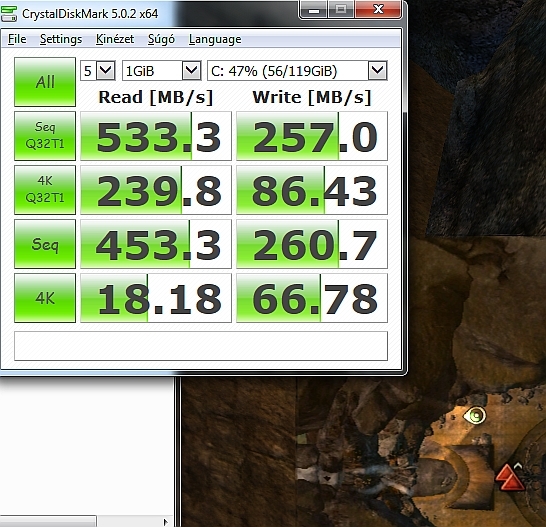
(edited by Sina.9208)
Ok looks like TRIM or Garbage collection is working as the Writes are 50% of what your reads are. This will put load on the SSD and reduce over all performance until the tasks are complete.
I would download the Samsung SSD tool and see if it reports the current status of what the Drive is doing for maintenance.
Desktop: 4790k@4.6ghz-1.25v, AMD 295×2, 32GB 1866CL10 RAM, 850Evo 500GB SSD
Laptop: M6600 – 2720QM, AMD HD6970M, 32GB 1600CL9 RAM, Arc100 480GB SSD
Laptop: M6600 – 2720QM, AMD HD6970M, 32GB 1600CL9 RAM, Arc100 480GB SSD
Ok looks like TRIM or Garbage collection is working as the Writes are 50% of what your reads are. This will put load on the SSD and reduce over all performance until the tasks are complete.
I would download the Samsung SSD tool and see if it reports the current status of what the Drive is doing for maintenance.
Lol okay, how would this cause my game load slow again? Especially since it only happens before the character select & I see no hdd activity what so ever during this extended load time? (I have/had the ssd magician installed, it was one of the first thing I did after win7 install..)
Attachments:

Ok looks like TRIM or Garbage collection is working as the Writes are 50% of what your reads are. This will put load on the SSD and reduce over all performance until the tasks are complete.
I would download the Samsung SSD tool and see if it reports the current status of what the Drive is doing for maintenance.
Lol okay, how would this cause my game load slow again? Especially since it only happens before the character select & I see no hdd activity what so ever during this extended load time? (I have/had the ssd magician installed, it was one of the first thing I did after win7 install..)
http://www.howtogeek.com/165542/why-solid-state-drives-slow-down-as-you-fill-them-up/
Desktop: 4790k@4.6ghz-1.25v, AMD 295×2, 32GB 1866CL10 RAM, 850Evo 500GB SSD
Laptop: M6600 – 2720QM, AMD HD6970M, 32GB 1600CL9 RAM, Arc100 480GB SSD
Laptop: M6600 – 2720QM, AMD HD6970M, 32GB 1600CL9 RAM, Arc100 480GB SSD
Ok looks like TRIM or Garbage collection is working as the Writes are 50% of what your reads are. This will put load on the SSD and reduce over all performance until the tasks are complete.
I would download the Samsung SSD tool and see if it reports the current status of what the Drive is doing for maintenance.
Lol okay, how would this cause my game load slow again? Especially since it only happens before the character select & I see no hdd activity what so ever during this extended load time? (I have/had the ssd magician installed, it was one of the first thing I did after win7 install..)
http://www.howtogeek.com/165542/why-solid-state-drives-slow-down-as-you-fill-them-up/
Yeah, my ssd is nearly 50% filled up…
How much is not allocated on the SSD? I suggest 10% if you are currently fully allocated.
Desktop: 4790k@4.6ghz-1.25v, AMD 295×2, 32GB 1866CL10 RAM, 850Evo 500GB SSD
Laptop: M6600 – 2720QM, AMD HD6970M, 32GB 1600CL9 RAM, Arc100 480GB SSD
Laptop: M6600 – 2720QM, AMD HD6970M, 32GB 1600CL9 RAM, Arc100 480GB SSD
How much is not allocated on the SSD? I suggest 10% if you are currently fully allocated.
If you click on the ssd magician picture you’ll see that over 50% of the ssd is free.
How much is not allocated on the SSD? I suggest 10% if you are currently fully allocated.
If you click on the ssd magician picture you’ll see that over 50% of the ssd is free.
That does not address Allocation, just % used in your NTFS volume. Your drive is 119GB, you should de-allocate 9.89GB from the drive so that it can better perform management tasks and duties.
Edit attached a image of my 480G SSD and how its allocated under disk management.
Attachments:

Desktop: 4790k@4.6ghz-1.25v, AMD 295×2, 32GB 1866CL10 RAM, 850Evo 500GB SSD
Laptop: M6600 – 2720QM, AMD HD6970M, 32GB 1600CL9 RAM, Arc100 480GB SSD
Laptop: M6600 – 2720QM, AMD HD6970M, 32GB 1600CL9 RAM, Arc100 480GB SSD
How much is not allocated on the SSD? I suggest 10% if you are currently fully allocated.
If you click on the ssd magician picture you’ll see that over 50% of the ssd is free.
That does not address Allocation, just % used in your NTFS volume. Your drive is 119GB, you should de-allocate 9.89GB from the drive so that it can better perform management tasks and duties.
Edit attached a image of my 480G SSD and how its allocated under disk management.
Ah I get it now. Very unrelated to my problem, but it is something to consider, ty.
My new video card finally arrived & now I get to the char select in 3-5 seconds, weird :P
My new video card finally arrived & now I get to the char select in 3-5 seconds, weird :P
Whats your old Video card?
Desktop: 4790k@4.6ghz-1.25v, AMD 295×2, 32GB 1866CL10 RAM, 850Evo 500GB SSD
Laptop: M6600 – 2720QM, AMD HD6970M, 32GB 1600CL9 RAM, Arc100 480GB SSD
Laptop: M6600 – 2720QM, AMD HD6970M, 32GB 1600CL9 RAM, Arc100 480GB SSD
My new video card finally arrived & now I get to the char select in 3-5 seconds, weird :P
Whats your old Video card?
It was an Ati 4850.