Invisible environment loading issue

defrag your hdd?
loading textures for the first time is a i/o bottleneck operation
defrag your hdd?
loading textures for the first time is a i/o bottleneck operation
Working on that suggestion, but, win7 automatically defrags on a schedule (supposedly mine goes every wednesday – last time it ran was in June). Assuming that’s correct, this has been a continuous issue before and after my last defrag.
defrag your hdd?
loading textures for the first time is a i/o bottleneck operation
Working on that suggestion, but, win7 automatically defrags on a schedule (supposedly mine goes every wednesday – last time it ran was in June). Assuming that’s correct, this has been a continuous issue before and after my last defrag.
june is a long time ago.
Do you shutdown your computer, hibernate, etc? The defrag program only runs a certain time and will not run if the system is not active. I usually defrag manually because I pretend nothing works.
https://www.piriform.com/defraggler/download
you can use this defragger to take a look at gw2.dat file. Its ok to for files to fragment but its not ok when they are fragmented in over 1k+ pieces.
defrag your hdd?
loading textures for the first time is a i/o bottleneck operation
Working on that suggestion, but, win7 automatically defrags on a schedule (supposedly mine goes every wednesday – last time it ran was in June). Assuming that’s correct, this has been a continuous issue before and after my last defrag.
june is a long time ago.
Do you shutdown your computer, hibernate, etc? The defrag program only runs a certain time and will not run if the system is not active. I usually defrag manually because I pretend nothing works.
https://www.piriform.com/defraggler/download
you can use this defragger to take a look at gw2.dat file. Its ok to for files to fragment but its not ok when they are fragmented in over 1k+ pieces.
Defragged, still have issues. Might try that file repair thing. My hdd was on the cheap end… guess this might be what I get for that lol.
Defragged with Defraggler?
Because,and someone correct me if im wrong, the Windows Defrag program wont touch files over 3GB in size and the GW.dat file is over 19gigs.
Edit: I use Auslogics Disk Defragmentation,myself.
i5 4690k @4.1ghz, r7 260x 1180/1680,8Gb G.skill Ripjaw 2133, 120gb ssd Gw2+OS
It’s a loading asset race issue. Basically they enable the renderer if enough of your immediate surroundings has loaded rather than waiting for all of them. They did wait until it all loaded at one time but players complained it took to long to zone. Very true if all you were doing was running from one portal to another in LA or porting to a WP in a city or zone from the entrance.
Defragging does help (2nd vote for Auslogics) but it’s really a hard disk issue speed issue.
We are heroes. This is what we do!
RIP City of Heroes
RIP City of Heroes
Defragged with Defraggler?
Because,and someone correct me if im wrong, the Windows Defrag program wont touch files over 3GB in size and the GW.dat file is over 19gigs.Edit: I use Auslogics Disk Defragmentation,myself.
yea, thats true. I kinda dont like auslogics since it puts any file regardless of size in one piece.
windows built in defrag wont defrag pieces larger than 64MB
(edited by loseridoit.2756)
Defrag every week,dont set it on auto..do it Manually.Also an SSD would significantly improve your loading times and remove the issue you have…Not saying you should spend any dime to make this happen..im just saying its related to your HDD and an SSD would fix this issue.
If you Do consider buying an SSD,remember that you should Never defrag it,since its completely different then using an HDD and defragging is not needed for an SSD,and could matter of fact screw things up.
(edited by Caedmon.6798)
Same problem here. With every patch it’s getting worst, it’s like the loading screen disappear before all the environment is rendered. At the beginning it was only in Heart of the Mist with the asura gate missing but now it’s spreading to every map. From the last patch this is LA that don’t load properly.
I tried defrag with defraggler, reinstalling all my computer, driver update ( with clean reinstall)… I also put the game in fluidity and the problem still the same as well as putting the game on SSD… This is the only game i have this issue with.
Can we have a dev statement on this issue please?
My set up :
Intel core i5-2500K
AMD Radeon HD 7950
8Go DDR3 RAM
Win7 64b
Attachments:
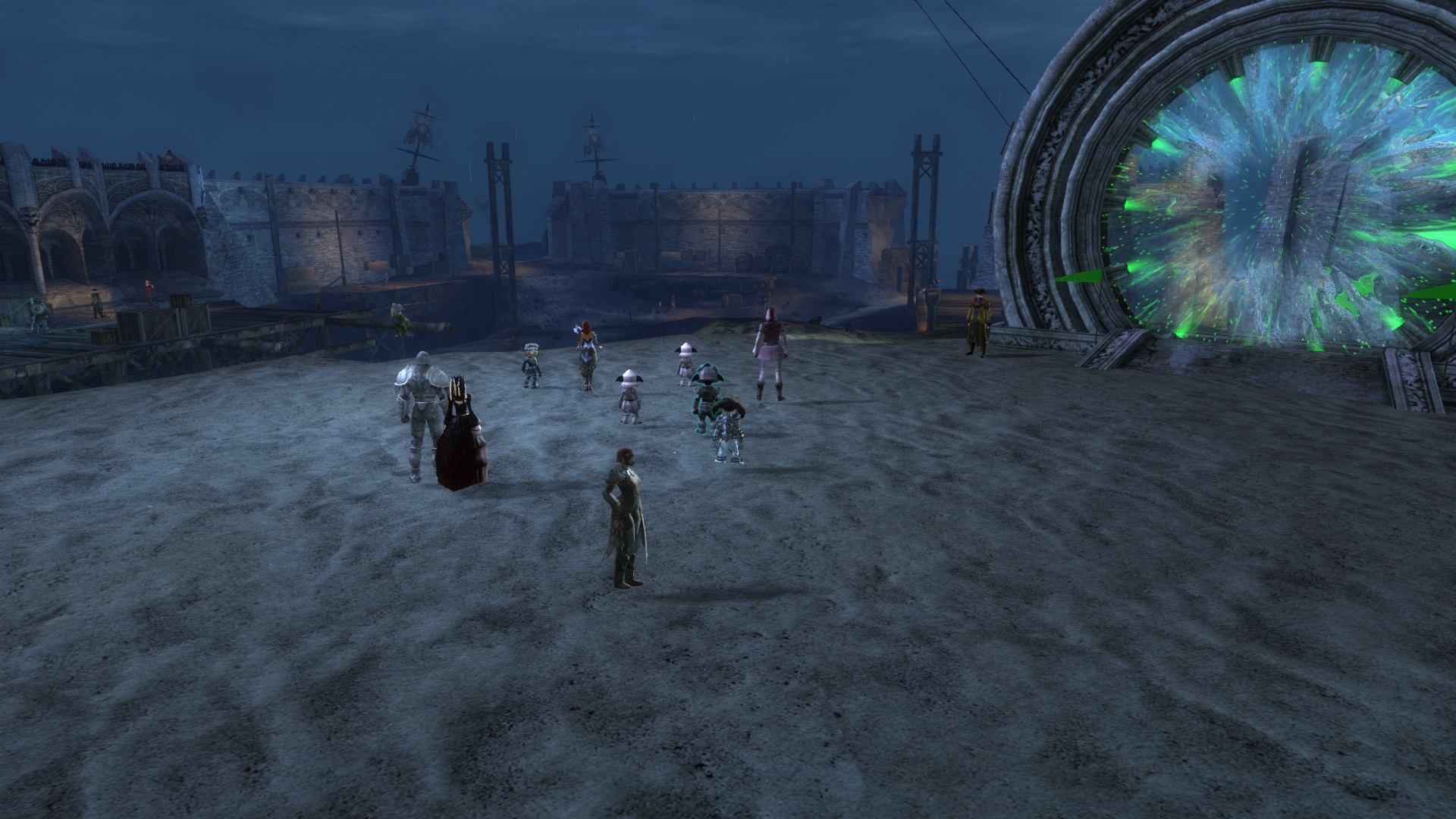
(edited by FireWars.9630)
Same problem here. With every patch it’s getting worst, it’s like the loading screen disappear before all the environment is rendered. At the beginning it was only in Heart of the Mist with the asura gate missing but now it’s spreading to every map. From the last patch this is LA that don’t load properly.
I tried defrag with defraggler, reinstalling all my computer, driver update ( with clean reinstall)… I also put the game in fluidity and the problem still the same as well as putting the game on SSD… This is the only game i have this issue with.
Can we have a dev statement on this issue please?My set up :
Intel core i5-2500K
AMD Radeon HD 7950
8Go DDR3 RAM
Win7 64b
not all ssd are created equal
i have the same problem when i warp into la.
This weekend it got way worse then it was before.
I dont defrag because i use a solid state disk(lol ssd gets kittened )
intel core i7 975 @4ghz
asus ramage 2 extreme mobo
nvidia gtx 590
6gb ddr3
win7 64bit
a man who doesnt make mistakes doesnt do anything