Guild Leader of Lunar Tree[LT].
Officer of Power Overwhelming[ZERK].
First term Forum PvE Specialist.
Officer of Power Overwhelming[ZERK].
First term Forum PvE Specialist.
So while playing games, mostly GW2, my PC decides it no longer wishes to be a PC but instead be a Jet Engine(slightly exaggerated). So I was wondering what could done to quiet it down? It’s relatively clean inside; as it is not hard to open the case up.
Specs:
i7 2600K @3.4
Radeon HD 7970 3GB
16GB (8 x2) 1600 RAM
2TB( 1 x2) HDD
256 SSD
1920×1080 monitor 60hz.
Will Overclocking the CPU,RAM or GPU make the pc louder or quieter?
Well, do you have a reference Radeon HD 7970? They look like the attached photo.
If you have one of those, then there’s nothing you can do but to adjust your preferences to it or buy a gaming headset which are nifty to have. You can have the PC set to maximum overtroll setting on the fans to keep it running cool and you won’t hear it with the average gaming headset since a fair amount of them have partial noise cancelling.
Other than that you can use MSI Afterburner or Catalyst Control Center ATI Overdrive and lower the GPU frequencies so it doesn’t enter high heat phases. I know all about Radeon HD 7970 from the ins and outs. I gamed on two of them for two years and they were loud and proud reference units.

Use can air to blow out your CPU and GPU heat sinks. Clean the case fans as well. Make sure the vents in the case aren’t being blocked.
Shouldn’t have to say it but you do this with the system powered down.
My GPU does not look like that. I do have a headset and imo I have yet to find a headset that actually cancels out most sounds. I have the Corsair Vengeance 2100 gaming headset.
my 7970 is from XFX if that helps too.
Could you perhaps guide me to how to change the settings you mention in CCC?
Also would that mean the graphics would go down? if so I am fine with that, depending on how low they have dropped.
Attached is pic 1/2 of my PC inside.

(edited by Riku.4821)
Pic 2/2 of Inside my PC.
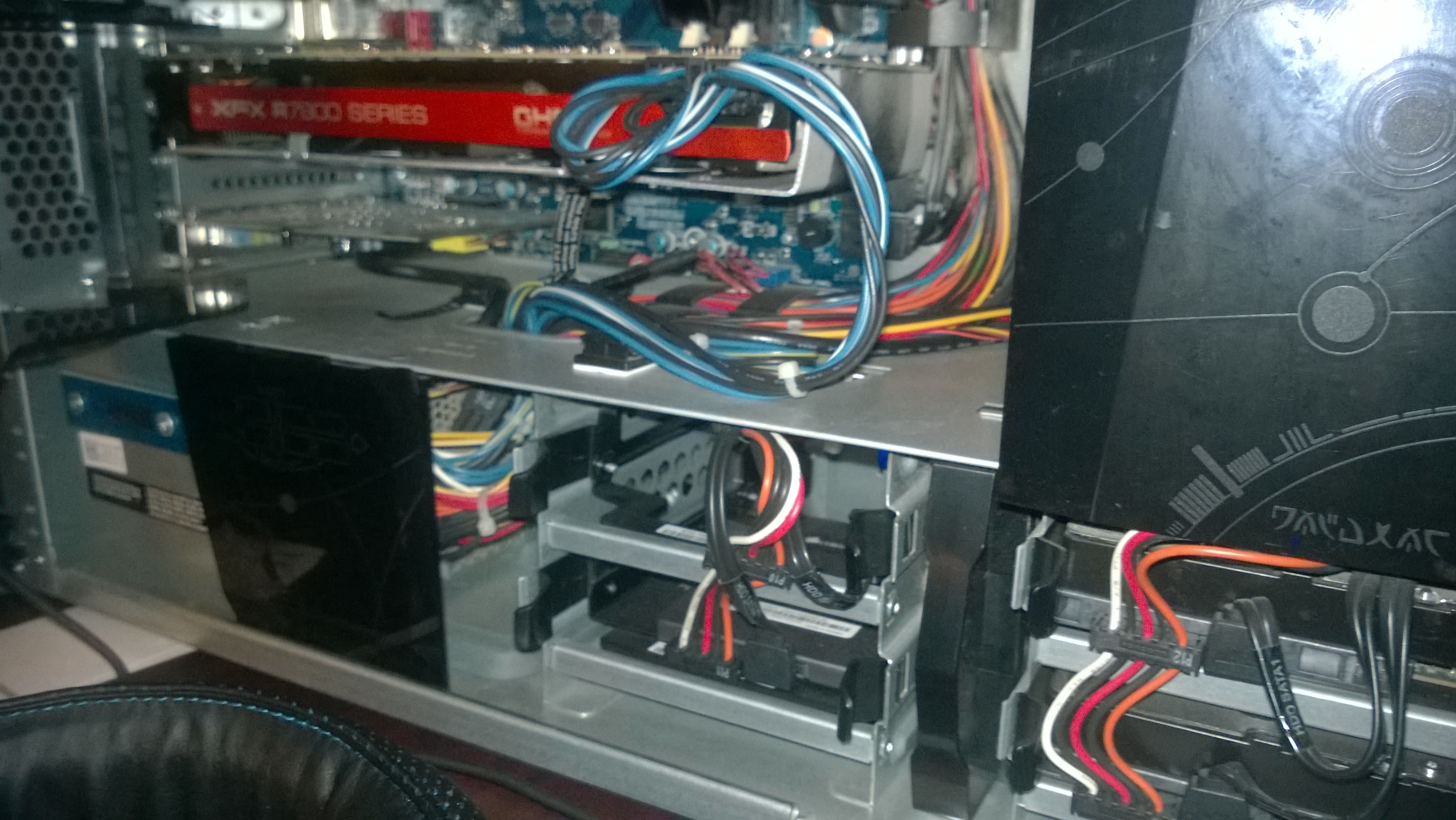
An Alienware. I can tell by the fan on that one sink on the motherboard without looking at the second picture haha. One of my friends has the exact same thing but with a GTX 560 and i5 2300. That computer should be fairly quiet as it is then. My friend’s alienware is in an unhealthy spot which means it doesn’t get much air so the fans ramp up a lot but even then it’s not really noticeable. If your XFX was a reference card it would be 4 times louder than it would ever get. I know those Double D coolers though. Very popular among other brands. Very quiet, very effective. The only thing I can see making noise is the radiator. I have a Corsair H100 and their mechanics is pretty much the same just I have 240mm of area coverage instead of just 120 and that’s the most noticeable thing on my PC now beyond the graphics card running high fan speeds. The RAD looks clean
Most gaming headsets won’t really cancel out noise until you’re gaming. My Creative Labs Sound Blaster Tactic 3D Alpha is like that.
Learning that your Radeon HD 7970 XFX unit has the Double D cooler on it, you don’t need to lower the values for the frequencies in Catalyst Control Center. It generally runs quiet anyway. I probably already said this but I think you’re just hearing the noise of the radiator keeping your i7 at a healthy happy temperature.
(edited by Avelos.6798)
Hmm okay, Is there a way to quiet that radiator down to quiet it?
(I changed the Turbo boost to my i7 2600K from 34 across the four cores to 34 36 37 39) I was told this is the “overclock” built in as the turbo boost, but it boosts it when it is needed opposed to all the time? I was also told GW2 doesn’t really use the 3rd and fourth core of CPU, should I then make its higher for the first and second cores?
If this is incorrect could you perhaps steer me into the correct direction?
And based on the pictures does everything look right to you? I usually keep it clean but those pictures make it look kinda dirty. Going to give it a cleaning tmrw.
As a CPU reliant game, more speed is more fps. I’d leave the i7 alone. Get your money’s worth out of that CPU. Waste of performance and money spent to try and configure it to act like an Intel i3. As for the game ‘not really using 3rd and 4th core,’ it’s not exactly like that. It generates enough work for three cores, but with an intel CPU on this game, it basically turns into, more fast cores, better performance. Even a 6 core i7 performs better than an quad core i7, even if slightly. You can try all you want with what you feel could help, I’m not too knowledgeable. I only recently came out of AMD processors to my 4770K. Still though I think you should be thankful for how loud that PC is not. :P Mine’s guaranteed twice or thrice as loud.
The liquid cooler you probably can’t configure unless the fan is plugged in to the motherboard. Then you can maybe change the RPM phases.
Okay then, lastly my PC runs 24-31C min-Max, I am assuming this is good? (when playing a game).
I believe I can manually change the PCI and Hardrive fan and perhaps the system fan. Or leave them all on auto.
Okay then, lastly my PC runs 24-31C min-Max, I am assuming this is good? (when playing a game).
I believe I can manually change the PCI and Hardrive fan and perhaps the system fan. Or leave them all on auto.
31c max while playing GW2? You should OC that 2500K above 4.0ghz then. You should be able to get the CPU to 60C and still keep your system quiet
Are you SURE its the fans on the radiator and not the fans on your GPU that are making the system noisy?
I suggest downloading speedfan and see if the I/O Control is available to that program to control your fan speeds. If so, from there you can manually set your Fan speeds to control how noisy they are.
For the GPU, You want to install MSI Afterburner and use its fanIO graph to control the GPU’s fans at the desired temps.
alternatively you can buy quieter fans for your system. There are some 1200RPM 98CFM fans from prolimatech that are 20bucks a pop but will fit on 120MM screws (they are 140MM fans), most 120MM fans that push above 60CFM are 2800+ RPMs and tend to be noisy when they are close to tight fit areas (such as the coils on your Radiator)
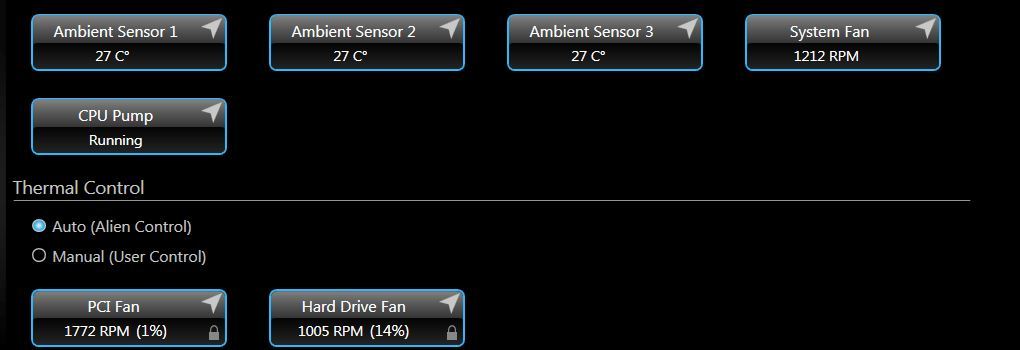
Here is a picture of my Temp’s and Fan’s(that are listed) while mostly Idle. (Youtube and GW2 forums are open no other upfront programs)
Could it by chance by the Harddrive and Radiator causing this problem?
Below is a pic from MSI Afterburner from about 25 or so minutes of playing.

(edited by Riku.4821)
Okay then, lastly my PC runs 24-31C min-Max, I am assuming this is good? (when playing a game).
I believe I can manually change the PCI and Hardrive fan and perhaps the system fan. Or leave them all on auto.
31c is maximum is like what my i7 4770K idles at LOL That’s downright awesome.
Have we decided what is causing the sounds from my PC?
A friend of mine had that same CPU cooler and it ended up sounding like a jet engine, after getting rid of it and installing a normal CPU cooler with fan, its near silent now, I personally don’t think them coolers are good for any sort of gaming system, as that radiator is pulling warm air from the system to cool the CPU….. closed loop water coolers are not always the best.
Pulling cold air or warm air from the system it’s going to make very little difference. I’ve been using my H100 for over two years and noticed this a lot. Heat from my system only ever pushed up the temperature maybe a couple degrees.
If your 2600K is only operating at a maximum of 31c, I highly recommend leaving it alone.
Hmm so is it perhaps that my pc is not actually performing louder than it should be?
For example I have a fan a small fan a bit larger than a medium sized palm and that alone is competing for the loudness with my PC.
Are you referring to the one directly on the motherboard itself?
The only things making noise in the setup is fans, hard drive, and pump. A radiator in an liquid cooling unit, unlike water cooling setups a reservoir is built into that radiator, but aside from moving water/liquid, rads make 0 noise.
The pump, being a cheap all in one unit, probably makes a little noise, but I’d venture to guess the fan(s) on the rad are one of the problem areas assuming they used the included fans that came with the aio. The vid card’s fan shouldn’t be loud, and that small fan on the motherboard, it should not get unbearable. Realistically in a proper setup you should only hear the whooshing of air, no fan noise except vid card if using an air cooler. If you hear fan noise, I would replace all fans in case and on rad with Scythe GentleTyphoons, they are no longer in production, but several shops still have several and they are the absolute BEST fans to use for radiators with Noiseblocker eLoop B12’s coming in as a replacement to the now discontinued GentleTyphoon.
One thing you COULD do, is purchase noise dampener from FrozenCPU or Performance-PCs and line the case with it, that should help significantly. Also, I would focus to check if your alienware came preinstalled with software for that AIO that ramps the rad fan up to high speed when cpu thermals go up.
i would suggest thinking about taking an Nvidia vid card, they are generally quit and are cooler then most ATI cards.
Sorry I believe I confused many people about the fan, I have a fan on my desk, the entire thing fits in my hands, and that fan alone competes with loudest noise with my computer while both are on and I am playing games. So the question is, am I just being picky or uneasy with the sound my pc is making when in fact it is normal.
Sorry I believe I confused many people about the fan, I have a fan on my desk, the entire thing fits in my hands, and that fan alone competes with loudest noise with my computer while both are on and I am playing games. So the question is, am I just being picky or uneasy with the sound my pc is making when in fact it is normal.
you are going to need to just find out where the sound in your PC is coming from.
Its going to be one of the following
1. CPU fans
2. CPU Water Pump
3. GPU fans
4. HDDs
5. PSU Fan
The only things making noise in the setup is fans, hard drive, and pump. A radiator in an liquid cooling unit, unlike water cooling setups a reservoir is built into that radiator, but aside from moving water/liquid, rads make 0 noise.
If you include the RAD as in fan on the RAD as well, then it does make noise. a fan pulling air through it and being as close as they usually are can get pretty audible.
I read about rubber padding on the bottom of your PC you can put, any recommendations?
Most cases ship with them. It’s mainly to cancel out vibrations from anything on the computer and to keep it from sliding around. I’d wager that it’s most likely the fan on the radiator of your alienware. What I’d first do is research people having similar experiences and looking at what they did. Chances are people just switched out for a quieter air cooler or researched quieter fan models. That’s exactly what I’m going to do with my liquid cooler if I don’t upgrade it— get quieter Corsair brand fans.
Okay thank you for the help everyone
Not affiliated with ArenaNet or NCSOFT. No support is provided.
All assets, page layout, visual style belong to ArenaNet and are used solely to replicate the original design and preserve the original look and feel.
Contact /u/e-scrape-artist on reddit if you encounter a bug.