Showing Posts For Albee.3521:
The only thing I can come up with that may help is if you go into your Nvidia Control Panel, Manage 3D Settings and turn the following to ‘application controlled’ – AA, AF, Vertical Sync. This may or may not help, personally I hope it does.
Thank you for the feedback. I already tried this before but I didn’t notice any improvement.
Hi Albee, if you wouldn’t mind answering some questions, I’m willing to try and help you iron this one out – we might be able to fix it.
Are you running the 304.79 (beta) driver set?
Do you have a profile for GW2 under “mange 3d settings”? (Nvidia Control Panel -> Manage 3d Settings -> GW2.exe in the dropdown)I’m running 304.79 right now. Previously I was on 306. GW2 on Nvidia is currently at default but I have already tried tweaking the settings by turning off unnecessary stuff yet I get the same FPS.
I dont mean to beat a dead horse…
Is your SLI actually disabled in the NVIDIA control panel? I realize that running on one core means it is not taking advantage of the SLI but if it is enabled then it might still be causing problems. I ran into a similar problem with crossfire….
good luck hope this helpsGood day,
I only have 1 GPU, no SLI and definitely no Crossfire.
I hope I can make you guys and Anet understand how bad I really feel for this game.
Here are video comparisons of GW2 and CS:Go running on the same machine and I really hope you understand how frustrating this is for me.
(Sorry for the crappy quality of the iPhone cam and sorry for my hand being shaky. I’m holding my phone in 1 hand while the other fiddles with the mouse and keyboard).
Guild Wars 2
CS:GO
At this point I really lost all hope. A-net, you provide no support at all. You have a Live Chat that only provides assistance for five hours in a week. Imagine that.
https://help.ncsoft.com/app/chat/chat_home/session/L3RpbWUvMTM0Njg4ODYyMC9zaWQvSWg3SUF3NWw%3D
You have a phone number
(5122256359) but can’t get to anyone nor even have someone get back to me after leaving all my contact details and waiting for days. So please, just respond to my request will you? Please?Personally I am sorry that you are having trouble on a compatible machine, and it would please me to know if you find a resolution to your issue. I think the reason that everyone is trying to get you to try different things is because we want to help you in some way and that is the best way we know how. We understand the situation your in, and I thank you for taking the time to create the examples
if you figure it all out please make a stop back here to let us know how it all worked out and everything.
I will. I know a guy who as an i7 and a GTX 260 having the same thing
(Sorry for the delay, I was helping someone with a new build)
Hrrm…
In gfx options, on the “Render Sampling” dropdown… Are you using “supersample” or native?
I saw it switch once while you were changing presets – looked like it went from super to something else.I can’t run supersampling without lag, personally. I used the ultra/high default, then switch sampling to “Native”.
Also, I used FXAA over the other options.
Could also try turning reflections and shadows to medium – see if that setup helps.Also, what’s your cpu utilization/temp while the game’s running? Would also be curious to know what your gpu temps are under load, if you don’t mind checking.
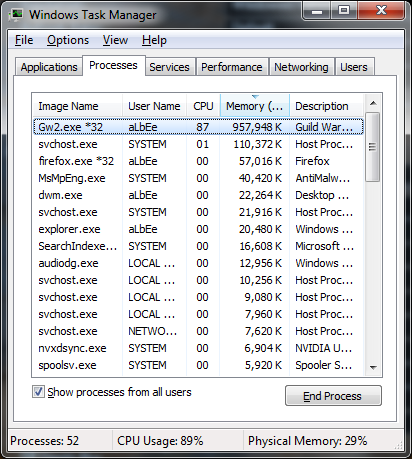
It was using Native and Subsample during the video. About CPU utilization, I’m not at home right now to check it but when I did earlier it was pretty much the same as what I posted before.
https://dviw3bl0enbyw.cloudfront.net/uploads/forum_attachment/file/314/Taskman.png
Now about the GPU temp, what I did notice though is that when GW2 was still running fine on my machine, I heard the fans being louder. After it decided to not work, the GPU fans just sound normal. I believe running GPU-Z 2 days ago and notice that the temps sit at around 50-60 degrees when GW2 is open and about 65-70 degrees when running CS:GO. If I remember correctly my idle temp was around 45 degrees. I play in an airconditioned room most of the time so I dunno if it helps.
(edited by Albee.3521)
Hi Albee, if you wouldn’t mind answering some questions, I’m willing to try and help you iron this one out – we might be able to fix it.
Are you running the 304.79 (beta) driver set?
Do you have a profile for GW2 under “mange 3d settings”? (Nvidia Control Panel -> Manage 3d Settings -> GW2.exe in the dropdown)I’m running 304.79 right now. Previously I was on 306. GW2 on Nvidia is currently at default but I have already tried tweaking the settings by turning off unnecessary stuff yet I get the same FPS.
I dont mean to beat a dead horse…
Is your SLI actually disabled in the NVIDIA control panel? I realize that running on one core means it is not taking advantage of the SLI but if it is enabled then it might still be causing problems. I ran into a similar problem with crossfire….
good luck hope this helps
Good day,
I only have 1 GPU, no SLI and definitely no Crossfire.
I hope I can make you guys and Anet understand how bad I really feel for this game.
Here are video comparisons of GW2 and CS:Go running on the same machine and I really hope you understand how frustrating this is for me.
(Sorry for the crappy quality of the iPhone cam and sorry for my hand being shaky. I’m holding my phone in 1 hand while the other fiddles with the mouse and keyboard).
Guild Wars 2
CS:GO
At this point I really lost all hope. A-net, you provide no support at all. You have a Live Chat that only provides assistance for five hours in a week. Imagine that.
https://help.ncsoft.com/app/chat/chat_home/session/L3RpbWUvMTM0Njg4ODYyMC9zaWQvSWg3SUF3NWw%3D
You have a phone number
(5122256359) but can’t get to anyone nor even have someone get back to me after leaving all my contact details and waiting for days. So please, just respond to my request will you? Please?
(edited by Albee.3521)
Hi Albee, if you wouldn’t mind answering some questions, I’m willing to try and help you iron this one out – we might be able to fix it.
Are you running the 304.79 (beta) driver set?
Do you have a profile for GW2 under “mange 3d settings”? (Nvidia Control Panel -> Manage 3d Settings -> GW2.exe in the dropdown)
I’m running 304.79 right now. Previously I was on 306. GW2 on Nvidia is currently at default but I have already tried tweaking the settings by turning off unnecessary stuff yet I get the same FPS.
Any update on this? It’s almost a week!
Like I said, the game was running fine prior to the 09/02 update. My FPS goes above 50 then all of a sudden after logging out and applying the 09/02 update my FPS went down to 6-10FPS. I haven’t changed any setting nor added/removed any hardware. I only have 1 GPU so no SLI is involved.
I don’t think this is a problem with the CPU as prior to the 09/02 update it was just running at 40% CPU usage then after the update it now reaches 100% which really slows down everything in my computer.
I’ve changed the graphic settings from the recommended to absurdly low and the only improvement I get is 1FPS.
Again, this is not an issue with my computer but with the optimization of the game with the NVidia GTX hardware. It’s as if it wouldn’t like to use the GPU at all.
If you think 3 days isn’t long enough, I have nothing against your opinion. All I can say is I pre-purchased the game because of the headstart access and being down for over 3 days is quite unacceptable. I can barely click on any enemy when playing at 10FPS nor use any skill.
Sorry but I’ve just had enough.
(edited by Albee.3521)
But it’s been a while. This is worse than getting banned. At least you know that after the ban expires, you get to play the game right away.
Thanks for your kind response
Lastly, the result after I ran the program included in the support ticket.
Attachments:
Task manager showing too much CPU usage just for running the game which isn’t happening prior to 09/02 update
Attachments:
My Operating System
Attachments:

Good day. I’d like to follow up in my refund request as the game doesn’t properly work on my computer even if it meets the requirements. I can only run the game at 10FPS max no matter what settings I choose. Funny thing is, this only happened after the update on 09/02. I’ve re-imaged my computer. Re-seated all hardware inside my CPU. I’ve uninstalled and re-downloaded which took me almost the whole day just to download and install. I updated my video drivers to the latest and even used your recommended beta version. To this point, I really cannot continue. I’ve received 0 support from you guys so all I wanted is a refund.
My specs are not that great but I’m 100% sure I should be able to game on it even with minimal settings.
Intel Core i5 750
8GB Gskill DDR3
2GB GTX 275 Overclocked Edition
1TB HDD (30% full)
For some reason, the game runs fine on my girl’s 2011 Macbook Pro @ 30-40FPS and it only has Intel HD for it’s graphics and it really strikes me.
PS. I can run Skyrim, CS:GO, GTAIV without any slowdown. Attached in the ticket are the detailed screenshot and reports you need that your program pulled up on my computer.

