Showing Posts For Aldorion.9741:

Suggestion: Favorite builds button

in PvP

Posted by: Aldorion.9741

Aldorion.9741

Hey there fellow Gw2 players!
Since I’ve read KehxD’s post I was inspired to pick up his ideas and photoshop a proper GUI-Element after his ideas and some additions which i really missed. (Like the Attributes window, which is a must for me while creating builds)


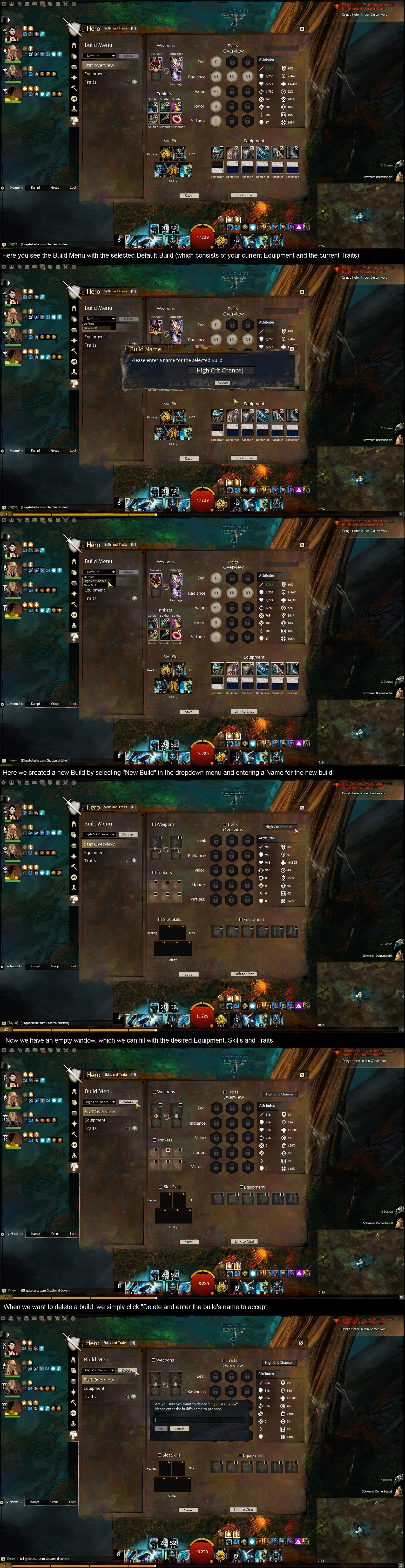
(Picture 1)Since the BBCode for pictures doesn’t work, I post a link to my first picture.

  • At the moment the selected tab is the “Default” build. If this one is selected you are using your current setup from the “Traits and Skills” and the “Equipment” page.
  • On the right side of the build-selection tab you see a “Delete” button. It’s greyed out because you have the “Default”-tab selected, which can’t be deleted because you need it if you want to use the old “Equipment” and “Traits and Skills” window.
  • In the upper right corner you see a Textarea, where you can enter and therefore change a build’s name (Except the default one).

If you want to see all the traits and not just the Adept|Master|Grandmaster ones, you can switch to the “Traits”-tab (on the left side, below the dropdown menu). It looks just like the “Traits”-window you are used to, and if you change it it will apply to the “Stat-Overview”-tab. (Also if you want to reset them you can do it there)
Here you can see it.


(Picture 2)So lets create another build!

  • You can simply click on the dropdown menu in the upper left corner and select “New build”
  • Afterwards it will ask you to enter a name for the new build. In this case I will call it “High Crit Chance”. Let’s press “Accept” and continue.

(Picture3)Here we see how the dropdown looks now.

  • We now click the new “High Crit Chance”-tab to select and modify it.

(Picture 4)It should look like this now.

  • You now have an empty build you can fill in by either clicking “Paste Setup to Build-Menu” in the Equipment and Trait page of your Hero-Panel or by filling in everything in yourself.
  • The build’s name can be modified in the upper right coner.
  • Also you might notice that every Armorpiece and the Skills have a checkbox. This checkbox determines if this armorpiece/skill will be changed if I apply this build.
    Example: Lets say I want to use my Ascended Backpiece in all of my builds, i equip it in the default Armor-Tab and just leave it unchecked in my build-menu.
  • This also applies vice versa for empty slots. If you check an empty slot and activate this build you will not wear any piece of armor in this slot. This can be helpful if you want to have a special slot empty, for example if you dont want to wear some Townclothing-alike armor.
  • Also whole sections can be deselected this way, by unchecking the box next to the section name.
    Example: You want to keep your armor but just want to change the Traits. Then you only check the box next to “Traits” and leave the others unchecked. When you then apply this special build, only the Traits change and the armor, and the skills stay the default ones.
  • Below/Above every armor piece you can see it’s prefix to make it easier to recognize your setuo without having to hover over every single piece.

(Picture 5) Let’s now delete the build since we don’t need it anymore.

  • You need to put in your build-name so you don’t delete it accidently and press “Yes” afterwards to accept.

More important Information:

  • Items you put into the Equipment slots or Trinket slots will remain in your Inventory while it’s not selected or not yet saved. (so you always wear the current armor, and the rest is in the inventory)
  • The save button on the bottom will save your current overall-setup, so you can reselect it or post it into the chat using the “Link to Chat”-Button on the right.
  • On the right side, you see the updated Attributes, influenced by your Traits and the Equipment, to make it easier to see the stat’s impacts.

I didn’t mention the 2nd Tab. But its simply the default Equipment-Tab so you can use the wardrobe and the dyes. Just like the Trait window.
Thanks for reading, and if you have questions I will edit the answers into my post.

TL;DR : Quick Overview in the attached picture.
Attachments:

(edited by Aldorion.9741)

Using autohotkey for playing instruments

in Guild Wars 2 Discussion

Posted by: Aldorion.9741

Aldorion.9741

Okay just out of curiousity:
-Having a script that counts the amount of times you pressed the z-key (for example) and plays the same amount of notes afterwards would be okay then, right?
You pressed, lets say, 10 keys and afterwards 10 notes will be played (which equivalent 10 keys). That could not be exploited in combat, since you don’t know how fights will go in advance.
- Also if you make a Autohotkey Script which does only mousepositioning should also work then. So lets say i want to enter “Lion’s Arch” and hover my mouse over the playerportrait, do a leftklick, press z, the script moves my mouse to “Enter Lion’s Arch” and presses the left mousebutton (only 1 keystroke for one action). Then if i press it again it moves the mouse to the “okay the map is full” window and presses leftMousButton. Should also be allowed then, I guess.

Working around the “One Keystroke”-thing is pretty interesting ^^
(That was just an idea, so let my know your thoughts on that)

Have a good day everyone! ^o^/
-Aldorion

(edited by Aldorion.9741)

Dolyak Express - March 28, 2014

in Guild Wars 2 Discussion

Posted by: Aldorion.9741

Aldorion.9741

I wonder what happens to the Fused Gauntles when the wardrobe hits.
Will we get the skin unlocked for each tier or will we just get the one we chose? And what if people (like me) kept the Ticket? It would be really awesome to see it unlocked for each type of armor!

hint achievment wvw hints

in Bugs: Game, Forum, Website

Posted by: Aldorion.9741

Aldorion.9741

Have you played every class?
Like Warrior has his adrenalin, Thief has energy and so on. There are hints for all of these things.

TxS Wurm 0:20 sec! Record, First Guild&OF!

in The Origins of Madness

Posted by: Aldorion.9741

Aldorion.9741

Thank you for that awesome run, the Loot could have been better though
Nah the fight really was just awesome.