Showing Posts For Easypeasy.1246:
Agree FGM.
I’ve played many mmo’s / classes and there’s just something that doesn’t “feel” right about the elementalist. It’s like the abilities / weapons / stances don’t synergise well.
Choosing a weapon combo restricts you to single target / AoE in either long range, middle range, and short range. It’s like you have to plan your approach before you engage EVERY battle – if things change then you’re stuck having to improvise somehow (in both PvP and PvE).
Staff’s for example – if you use one you’ve decided (technically) your ranged and playing an AoE role (with lower single target dps). I just don’t get it, are we supposed to change weapon sets every encounter? We’d be better off with a weapon swap than attunement dance the way the weapons are classified.
Attunement timers – you switch out and then decide you need to switch back 14s timer to see out. Not to mention each one is different. It forces you to look at your action bar too much.
Land on target abilities? – how pointless, almost everything moves and it misses. Its only use is some stationary PvE mob on the pull. Or maybe something being “tanked”.
There just always seems to be something lacking in every spec, gear setup combo I’ve tried. It’s like because I cant set it up optimally its frustrates me.
In gank PvP or support PVE its fun. In solo PvP or sole PVE its painful (to play well) for long durations.
I too like Mariah above settled on Sceptor/Dagger with full Earth, Fire and some Air/Arcane – it gives good survivability and reasonable damage thru bleeds/burns however I sill find myself in situations thinking “wish I had my staff on” “wish I had my dual daggers on” etc.
60 levels of circle straifing / changing stances 3 times every encounter and I’m nearly done – much rather jump on a Guardian some nights and smash stuff while having a beer. I don’t want to fly a jet fighter every night – I like some down time.
(edited by Easypeasy.1246)
Took me 4 resets to get that done. First was the bug you had and the others were Traheame getting stuck at various points.
Think of it as a blue/green farming session
GW2 is currently CPU bound, what this means is that your graphics card is doing kitten all.
At the moment, people with low-spec PC’s will experience better framerates than people with top-of-the-line gaming rigs.
Something that Anet has suggested, and I’ve seen some people get results from, is stop any overclocking you have going on either your graphics card or you CPU. I’m not entirely sure why this would help, but it does.
W…T…F…
^^I’ll have 3 of whatever he’s on…
Actually that was a pretty informed post. A bit dated by now but still holds true to a lesser degree then during the beta.
Absolute rubbish.
100fps+ here thru beta and still going strong i7-2700k@4.8GHz, 2xgtx580 SLI
CPU doesn’t even sweat, both GPU’s 90%+
There are over 1 Million people that play this game and there is lucky to be 500 people in the forums complaining about low fps. Of them, most have poor systems with high expectations.
There are however a few with genuine issues but nothing to make such global sweeping statements.
My system runs fine no issues at all with 2xGTX580 SLI
Great frame rate using max settings plus ultra shadows.
You don’t understand.
The problem is to many things drop and that players have the ability to list anywhere in the world.
So they use the TP as a vendor regardless if they get a little less.
Solution is to make less drop, remove ability to list anywhere so ppl use vendors as their garbage bin.
So for beginners. Warrior is the best pick ??
My advice is try a Ranger (or another ranged class) – it will allow you to keep your distance and out of trouble most time while you learn the ins and outs of mmo’s.
GL.
Strangely enough, I can run Skyrim at pretty good detail settings, and Diablo 3 on medium-high quality without low framerate or stuttering. GW2 seems to chew my computer up and spit it out.
You cannot compare those games to GW2.
GW2 literally has 100’s of other ppl running around near you and will tax your system much more.
I’ve been investigating reports of money and/or items disappearing when using the Trading Post. I’m going to report my current status.
To start with – I have found no cases yet where money and/or items have actually been lost. There are however a number of issues in the current trading post UI which could lead players to think their stuff has been lost. Combined with intermittent delivery delays, this is leading to a lot of understandable confusion.
I listed items for sale, some sold, I looked at the sold items and the total was about 40-50s.
I received about 60 copper.
There also needs to be a buy confirm step – making multiple purchases due to the TP system lag is a problem.
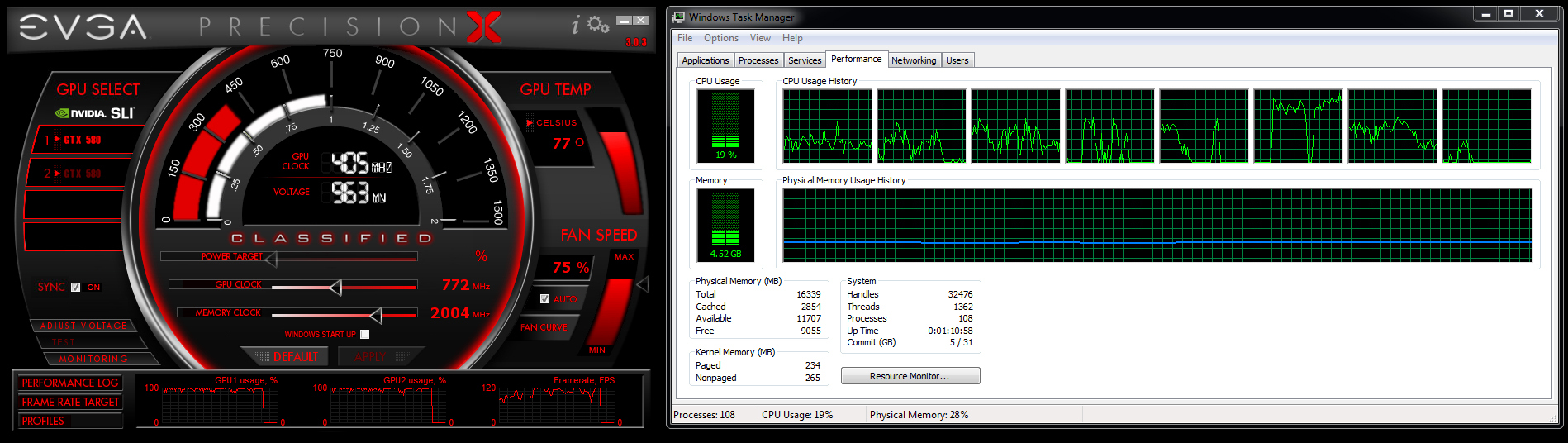
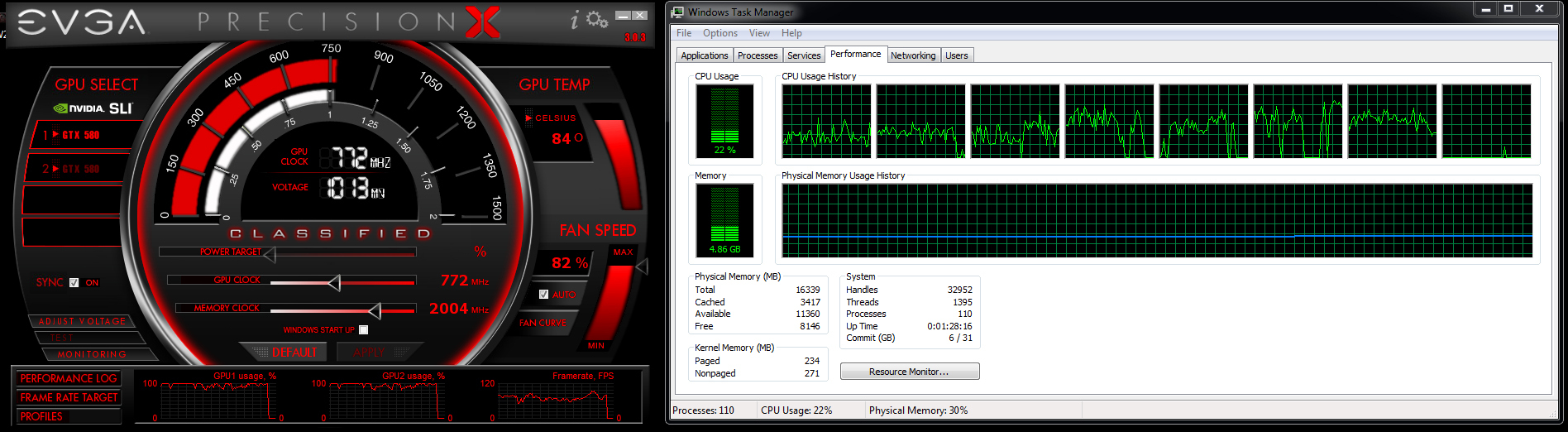
Is there any way you guys can post a screen shot of you CPU utilization? I’m curious to see what the average cpu usage is like.
Here’s two of mine 1) From running around doing PVE 2) Running around in some WvW battle
1920×1080 everything high plus ultra shadows – 120Hz monitor vsync on
i7-2700k@4.8GHz, 2xGTX580 SLI, 16GB @ 2133MHz, 2xssd raid 0
I have zero issues and great frame rate so hope this can be used for comparison.
Attachments:
Hi Spartan ,
Unfortunately you probably wont get much better performance – your video card has a memory bandwidth of 12GB/s which is very low for use with modern games. WoW may run passable on low settings (I have an old laptop with old Nvidia card about the same vintage) but GW2 is more demanding than WoW.
To explain your loading screen 60 fps – when on the loading screen nothing is happening. It displays a PICTURE that is rendered at your windows refresh rate (in this case 60Hz aka 60 FPS).
Good luck mate.
I was looking through my startup folder and found a program called Pando Media Booster. On investigation it seems it’s some sort of p2p program used by NCsoft amongst others. Is this program used by Guild Wars 2 and, if so, can I safely remove it?
Did you play Aion by any chance? At one point they made that rubbish mandatory to download a large update.
Kill it.
@Easypeasy.1246
I don’t think my system has any bottle-necking issues, if it would, then i couldn’t play the other 20 games on my machine ultra smoothly with ultra max settings and stupidely high FPS compared to GW2.
My bottle-necking comments weren’t towards you.
An interesting thing with the GTX680 though – they reduced the memory bus width so it has the same memory bandwidth as the GTX580. That means when the card isn’t near its limit it will out perform the GTX580 however when it is close or at the limit they perform the same – something which shows up on tests say at Anandtech for example.
Our cards have 192GB/s memory bandwidth btw (in SLI that’s 384 GB/s) – the ppl I was referring to are the ppl with cards in the order of 80-100 GB/s complaining they cant get high fps.
Well i agree with Swordbreaker here….
I have posted my true high-end system specs already in that low fps thread, also gave details to GPU and CPU usage…. it’s a weird issue, expecially since the CPU is almost idling arround with just 20% usage while playing GW2, and both GPUs are only getting an usage of 50 – 56%.
Strange – drivers may not be as mature on the 6 series cards.
My system:
i7-2700k@4.8GHz
2xGTX580 SLI
16GB RAM @ 2133MHz
2x SSD Raid 0
120Hz LED monitor
I’m running at max settings (1920×1080) including ultra shadows.
In general PVE I’m hitting my vsync @ 120fps most of the time sometimes down to about 95 fps.
In heavily populated events (including WvW) I’ve seen 45 fps but not often.
I’ve never seen 20 fps.
My GPU usage is often > 90% with high fps and less with lower fps as to be expected.
I use EVGA precision x on screen display to track it while I’m playing.
Running 304.79 beta drivers.
One thing I’ve seen throughout these threads is people that don’t know how CPU, GPU usage relationships work in combination with their graphics cards memory bandwidth. People just assume low usage means they aren’t being used and have know idea what bottle-necking means and how it reflects in performance.
And of course there are those with their aspirations ahead of their machines capability.
Maybe I might over 9000 in BF3.
That is just simply untrue.
If you are such an expert you should have figured out by now, that pretty much EVERY SINGLE MMO on the market has the exact same issues (massive framerate drops in crowded areas).
It’s client -> server -> client communication that is the bottleneck, not our rigs.
That is just simply untrue.
If you are such an expert you should of figured out by now that approaching an area with a massive population places a significant load on your CPU / GPU to render the 100’s of new models.
You can sit stationary in Stormwind (or any mmo) for example with 100’s of other people stationary and suffer reduced frame rates. It has nothing to do with latency beyond a minimum and everything (more CPU in that case) to do with your rig.
I am no expert btw thanks though.
Right now I’m running an i7-2600k on a Gigabyte Z68XP-UD3.
I have 16gb of DDR3-1600 Ram and a Geforce GTX690.
The game itself is running on a raid0, while windows is running on a ssd.I cannot, for the life of me, figure out ANY bottleneck my system is supposed to have running GW2, yet I run into framedrops far more regularly than I should.
I’m running a fresh installation of windows 7 as I just recently reinstalled, thinking that it might be my OS.
I do have the latest beta drivers.
My system is i7-2700k @4.8GHz, 16GB Ram, 2xGTX580 SLI, 2xSSD Raid 0
I’m playing on max settings including ultra shadows and I experience drops in frame rate under certain conditions. Often I’m at the ceiling of my monitor (120 fps aka 120Hz vsync) in PVE world but I do get drops.
The GTX690 has the same bandwidth as the GTX580 (the 6 series was more about power usage reduction than processing power) at 192 GB/s and as we both have SLI that’s 384 GB/s – still not enough at 1920×1080 ultra settings it seems.
The reason changing settings makes no difference is because your card is bandwidth limited even at lowest details. GTX 560 Memory Bandwidth: 128.2GB/sec
One way to really test it is to not only lower your settings to the minimum but lower the screen resolution to the lowest possible and make sure anti-aliasing and anisotropic filtering etc is off – I know it will look like crap but its a test. If your fps goes up more with the lowest screen resolution then it verifies you are bandwidth limited.
GW2 WvW is pretty unique really – a spectacular looking game, effects and many people all in one spot in a HUGE outdoor setting. A strain for sure – a solution may be to lower the minimum rendering distance setting further.
Discounting that there was some flunk here.. There are countless other threads on this board with others users having the same problems. There is even a thread with Anet itself asking for Dxdiags and configs. Countless top of the line system are in that thread. Systems that should have zero issue at nearly all times.
Almost all the FPS issues I’ve read are a user issue. They all appear to be GPU memory bandwidth limited (“My GPU isn’t working flat out” is what gives it away) .
I haven’t seen countless top of the line systems in those threads mostly I’ve seen people with mobile GPU’s or cheap desktop GPU’s with a narrow memory bus width e.g. 64b, 128b etc resulting in low bandwidth capabilities in the order of 80-100 GB/s and wondering why they don’t get the performance of cards with 384b etc with 192 GB/s.
I have no doubt there are some quirks however in the vast majority of cases people have their aspirations ahead of their machine’s capabilities.
With your lack of knowledge on how Games use mutli-threading I’m willing to bet you and your “tech teams” are the goofs and the source of your problems.
Games do not utilise mutli-threading as per intended – they cheat. They load the main module on one cpu, the sound module on another and so on. Restricting the availability of CPU’s forces them onto the ones remaining and consequently increases their utilisation. This is completely different to say a video rendering process that will fully load all cores.
Wouldn’t surprise me if you were fraps’ing your tests with it set to record at 29fps or something similarly stupid given your mutli-threading claims.
GPU threading LOL.
Its a brave man that throws out the goof challenge on the interweb – there are always people smarter than you (and me) out there.
using Small interface option Causes unreadable Text in Trading Post
in Account & Technical Support
Posted by: Easypeasy.1246
Get this as well Nvidia GTX580 x2 SLI