Server Latency and Game Disconnects... proof its server side.
in Account & Technical Support
Posted by: Foonus.8149
(edited by Foonus.8149)
in Account & Technical Support
Posted by: Foonus.8149
1. Where do you live?
2. What server are you connecting to?RPG styled games can withstand higher latency and still function, but that 280ms isn’t seeing the entire picture. Processing overhead is probably adding another 100ms (maybe more considering the scale), but without stats from the game’s data stream its still hard to tell how badly its getting stalled.
And out of curiosity, whats the reference point for the 140ms?
The 140 reference point comes from the screenshot in of the traceroute app. The number is the highest ping achieved to any/every host during the tracert test along the line to the target server. Point being that the latency inst happening on any of these nodes and purely on the end connection (GW2 server). Also note the 70 ping connecting to one of their other servers using the same route…
Here’s what this does to game play… Like i said in the title. Unplayable.
Note the comments of the players in the game chat log.
http://www.youtube.com/watch?v=enq0-vnNgM0
Heres some more poor saps trying to play the game, at least its playable for them untill the server fail:
http://www.youtube.com/watch?v=DsBqJV-H9XQ
(edited by Foonus.8149)
…
Lets see your 1080P 200FPS from anywhere, including the loading screen.
…:D
I can reach easily 200+ fps in many places with high settings / 1080p in GW2 with my 2500k@4500ghz + 670 SLI.
Look at my last post in Low FPS topic (page 29) and take a screenshot in Lion’s Arch center as I did and post it here or there.
Let’s see your 200 fps in this “pve city”.
I’m still not seeing your 200 FPS screenshot. Enough of the pissing contest and trolling. give it up already. This is a technical forum to help the users and the developers, not to get off on yourself. The smileys don’t make it any less annoying.
(edited by Foonus.8149)
Running 2 GTX580’s SLI and not seeing any problems (200 FPS) with the setting in the picture below. Using latest Nvidia WHQL drivers.
Lol…200 fps screenshot from anywhere.
Go into a bigger WvW fight with your 580 SLI and look again your “200” fps.
Seems to be many trolls and whiners on this forum… Hopefully you don’t drive these devs out of the industry like whiners did to Biowares… Lets see your 1080P 200FPS from anywhere, including the loading screen. I posted that pic of settings for the user with problems so he could try to copy them (mainly render sampling) but of course some kid has to go and start hateing.
FPS has never been a problem, and as observed most of the complaints are from users crippling themselves to 60 fps anyways.
Regardless, onto something constructive.
PvP Lag however has… and same deal goes with the networking as for the .dat file size itself.. literally everything is poorly optimized.
Even a noob using common sense would realize you can split that .dat file into multiples, one main that every player uses all the time, and then separate ones to be loaded depending on what area (or pvp) they may or may not be doing.
Same goes here in the post below, you literally connect to their laggiest server right off the hop, and are forced to stay connected to it until it lags you right out of the pvp.
As other users have already stated in this post, optimizations are desperately overdue.
(edited by Foonus.8149)
…. A possible re-design of the game could maybe split that into more threads, but it’s anybody’s guess if that would help performance (and that’s three guesses, making my whole post highly speculative.)
Guess what this immediately brought to mind (pic below)… glad I am running SSD RAID to load this hog.
Can rest assured if the code also looks like this you are probably right.

Running 2 GTX580’s SLI and not seeing any problems (200 FPS) with the setting in the picture below. Using latest Nvidia WHQL drivers.
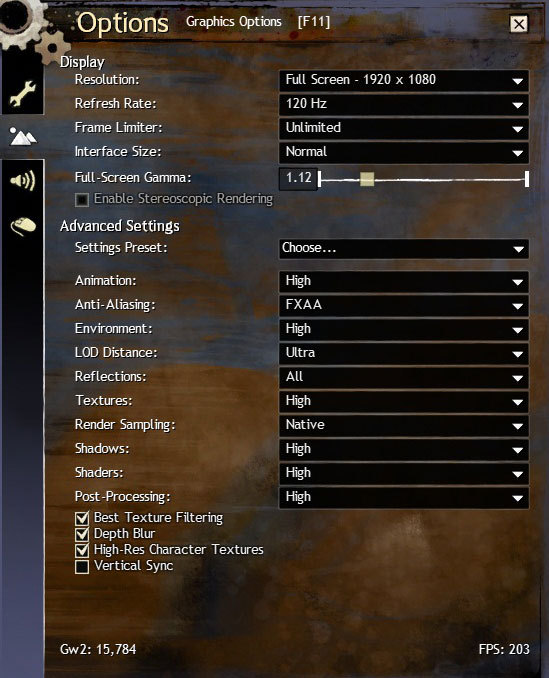

in Account & Technical Support
Posted by: Foonus.8149
I purchased the game back on release day, and due to work I had hardly any time to play up till the past couple weeks. Figured to myself, hey, at least all of the bugs should be worked out of the game by now. Sadly that’s not the case when it comes to the GW2 networking back end.
I enjoy playing many games, both FPS, MMO, and quite a few in between, most all of them requiring an online connection. I have the best internet pachage offered here by my ISP (250Mbit) and have absolutely no latency or hardware issues in any of the other games i am playing.
That being said, the GuildWars 2 is next to unplayable here when it comes to the PvP and lagging down until you flat out disconnect from the server. I have tested this even with no router and hooked right to the cable modem at 4AM when there is extremely low lvl of traffic out here and still the problem persists.
Looking into it more, i found the IP’s that GW2 is trying to connect to, ran both a graphical tracert for the duration of a short game session as well as used the windows resource meter to show the contrast in network latency and the latency the game was getting from the GW2 game server itself.
Results attached at the bottom of this post. Paraphrased it basically shows that over the entire duration of the gaming session my internet connection never had a higher latency than 140ping at the worst time in the entire session. However at the same time the GW2 servers are replying at close to 280ms…
This has absolutely nothing to do with the client side internet configuration, and is 100% caused either by networking issues on the GW2 side, or by extremely overloaded servers. I’m a certified MCSE and messed with this now for over a week trying to get to the bottom of it where this latency is occurring, even involving my ISP tech support. Frankly its out of the users hands at this point as there is nothing they can do on the client side at all to fix this.

Not affiliated with ArenaNet or NCSOFT. No support is provided.
All assets, page layout, visual style belong to ArenaNet and are used solely to replicate the original design and preserve the original look and feel.
Contact /u/e-scrape-artist on reddit if you encounter a bug.


