Showing Posts For Iluvatar.1203:
Update: just received review feedback from appstore submission, only one minor detail remark regarding an installation link, already corrected and re-submitted. So the Android version should be available in the next days I hope. The Amazon App store ID will be: MXQXTC9OOUZW5 (gw2events). As mentioned, the app will be free.
Is there a filter for specific servers?
Yes, there’s a list of all servers and meta events, you just switch on whatever combination you like.
Update: Android App is now in review for publication on the Amazon App Store.
Update (2-Feb): Android Version & GitHub Tracker are now available. For details, see
GitHub Project: https://github.com/okeez/gw2events
Project Blog: http://gw2events.aws.af.cm/
Hi guys,
Here are some screen shots of a free mobile app I’m building (iOS and Android for starters). The idea is to use a Twitter tag (#gw2events) as a channel and let you configure which meta events you want to follow on which server(s) with simple switches based on tags. The message list will filter tweets according to your selected tag filters.
The app has a quick tweet composer that automatically formats the tweet tags by using spinner lists for events, statuses and servers. But Twitter users may also send messages straight from their web browser. If you follow the message tag format, tweets will be featured in the app message list, irrespective of wether they originate from the app or from a normal tweet.The selection shown in the screen shots would translate into the following tweet:
#gw2events #jormag is starting on #fissure_of_woe
I will post a full listing of all event and server tags when the app is finished.
If you’re interested in testing the app, I will make an Android build available soon and post the link here– a beta for iOS would be difficult because of apple’s UDID policy for beta provisioning, but the code is multiplatform, so once it runs fine on Android other platforms should not pose much problems.
Full details on the project site: http://gw2events.aws.af.cm/
Attachments:

(edited by Iluvatar.1203)
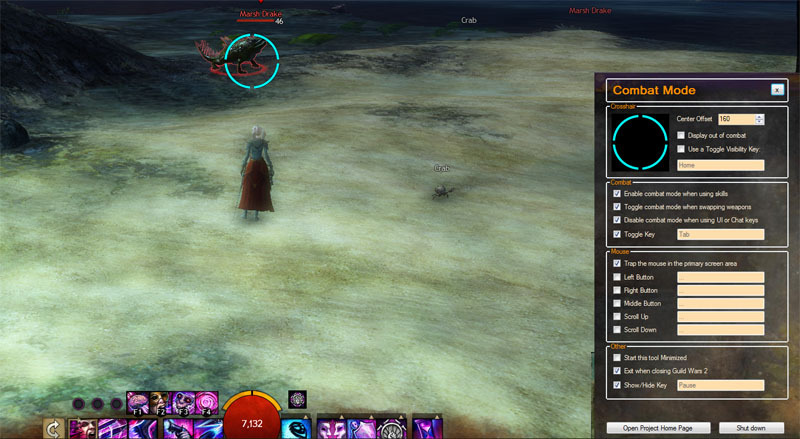
I’m working on a native code MOD based on the Guild Wars 2 Combat Mode MOD & idea by Michael Puckett & Jayce. There’s a couple of reasons why I started this:
Configurable Settings
This tool has a UI to configure all settings, so you don’t need to dig into code to change options. I’m also planning to enable several settings, so you can have separate settings for each of your characters.
More Options
There are several additional options you can configure:
-Shut down the tool when you close Guild Wars 2
-Start the tool minimized (currently to the task bar, working on System Tray)
-Vertical Offset for the cross-hair overlay
-More control over cross-hair display in/out of combat mode
-Auto-enable combat mode when using a skill key
-Auto-switch combat mode when switching weapons
-Auto-disable combat mode when chatting or opening UI windows (e.g. inventory, etc.)
-Toggle tool visibility, so it’s as close as possible to a GW2 UI window
Mouse Trap
These MODs (both the original and mine) require you to run Guild Wars 2 in Windowed Mode. If you have a dual screen setup, like me, you know what that means: the mouse is not “trapped” in your game screen but can move off to your second screen desktop while you’re gaming. So I added an optional mouse trap that locks the mouse on the primary screen in Windowed Mode.
Runtime
The original tool is written in AHK (AutoHotKey), which is an interpreter, not a compiler. This means every time the tool executes a line of code in the script, it is re-interpreted. For this reason, the original tool is kind of CPU hungry (it typically consumes between 5 & 10% of my CPU).
This code is compiled ONCE and then executed natively – it is therefore much faster and requires much less CPU (between 0 and 1% of CPU usage in Task Manager).
Status
Right now, the goal is to test the tool with a limited number of people to make sure all the T’s are crossed.
At this point, feedback from people that use non-US keyboards and non-standard GW2 installs (e.g. Steam) would be most welcome.