Showing Posts For Madeen.1793:
Ok for all you people still left with no answers, I found something that while I need more testing to know if it solves the problem, it definitely has been helpful, I’ve been playing for a while with no crashes… and I’ve done a lot of stuff even entered the fractals which was a problem…
Now I’ve read about this before venturing into it, it might not work for everyone, and if it works for you on something, you might start other problems in other applications, so be sure to back up your disk, or be prepared to reinstall windows, in the worst case scenario…
Though you shouldn’t be too scared its just precautionary measure’s, at most, if you encounter any problems just deactivate it. And all will be back to normal. If this doesn’t solve it so far, 64-bit is the only solver…
Search Google for “/3gb”, i found what i was looking for on a forum, the first link of the search “how to /3gb windows 7” you should look for your own windows if its different obviously. Read about it, and try it if you think its worth your time. What it will do is reduce the amount of memory used by windows, and leaving the rest for applications. For me it only slowed windows down a bit (so far). And the game is crash free… (so far).
Hope it helps some of you at least. Hope it helps me in the long term too…
Ok for all you people still left with no answers, I found something that while I need more testing to know if it solves the problem, it definitely has been helpful, I’ve been playing for a while with no crashes… and I’ve done a lot of stuff even entered the fractals which was a problem…
Now I’ve read about this before venturing into it, it might not work for everyone, and if it works for you on something, you might start other problems in other applications, so be sure to back up your disk, or be prepared to reinstall windows, in the worst case scenario…
Though you shouldn’t be too scared its just precautionary measure’s, at most, if you encounter any problems just deactivate it. And all will be back to normal. If this doesn’t solve it so far, 64-bit is the only solver…
Search Google for “/3gb”, i found what i was looking for on a forum, the first link of the search “how to /3gb windows 7” you should look for your own windows if its different obviously. Read about it, and try it if you think its worth your time. What it will do is reduce the amount of memory used by windows, and leaving the rest for applications. For me it only slowed windows down a bit (so far). And the game is crash free… (so far).
Hope it helps some of you at least. Hope it helps me in the long term too…
Ok for all you people still left with no answers, I found something that while I need more testing to know if it solves the problem, it definitely has been helpful, I’ve been playing for a while with no crashes… and I’ve done a lot of stuff even entered the fractals which was a problem…
Now I’ve read about this before venturing into it, it might not work for everyone, and if it works for you on something, you might start other problems in other applications, so be sure to back up your disk, or be prepared to reinstall windows, in the worst case scenario…
Though you shouldn’t be too scared its just precautionary measure’s, at most, if you encounter any problems just deactivate it. And all will be back to normal. If this doesn’t solve it so far, 64-bit is the only solver…
Search Google for “/3gb”, i found what i was looking for on a forum, the first link of the search “how to /3gb windows 7” you should look for your own windows if its different obviously. Read about it, and try it if you think its worth your time. What it will do is reduce the amount of memory used by windows, and leaving the rest for applications. For me it only slowed windows down a bit (so far). And the game is crash free… (so far).
Hope it helps some of you at least. Hope it helps me in the long term too…
I’m still hoping and waiting for this to be fixed…
I’d very much like to play some fragments without the need to buy new hardware just cause of some memory leak on 32-bit system, that changes every other build.
I still don’t think its funny someone changed this topic to tech support when its obviously a bug.
(edited by Madeen.1793)
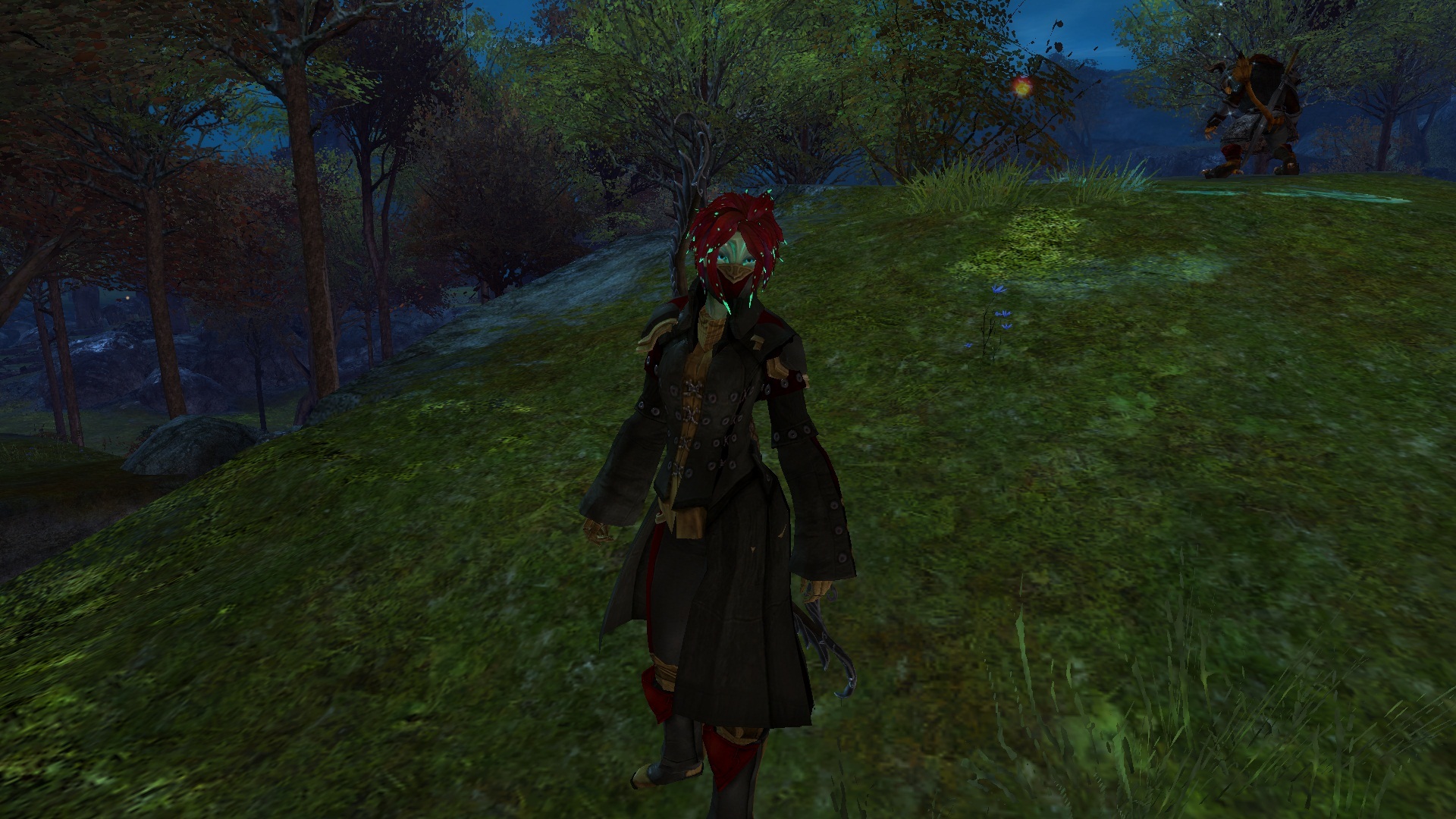
Sylvari Female Wearing
Swindler Pauldrons
Slayer’s Vest
Swindler Pants
Clipping issue at the left shoulders, and at the hip.
Attachments:
@Tobby, 64-bit certainly solved that problem for me, but raised several others concerning my hardware, and not just on the game, so I went back to my old 32-bit system thanks to a disk image.
Some people just don’t have the option to simply change to a 64-bit system on whim… They either lack the hardware or the software, and either costs money, and there should be no need, since the game is supposed to run on a 32-bit system. So far as I have tested, “Out of memory crashes” on 32-bit can be solved by changing to a 64-bit system. But that should not be the sole solution, especially considering this changes from build to build, so you can’t just blame it on the 32-bit system.
While I can play for little longer, this is still a problem, I just crashed inside the Fractals, and since this dungeon apparently doesn’t allow to join back like other regular dungeons, my team is stuck with 4 man, and I’m just standing outside… this makes this dungeon impossible to complete for me, or anyone with similar problem!
Meanwhile, back on a 32-bit system again, whatever you guys did on this last build fixed it, at least i played normally for 20 minutes with no crashes, if you did nothing to fix it, you guys better figure out whats going on so you don’t do it again!!
How are you doing Nundei? Does the game work again today?
Meanwhile, back on a 32-bit system again, whatever you guys did on this last build fixed it, at least i played normally for 20 minutes with no crashes, if you did nothing to fix it, you guys better figure out whats going on so you don’t do it again!!
How’s everyone else who complained doing? Does the game work again today?
Meanwhile, back on a 32-bit system again, whatever you guys did on this last build fixed it, at least i played normally for 20 minutes with no crashes, if you did nothing to fix it, you guys better figure out whats going on so you don’t do it again!!
How’s everyone else who complained doing? Does the game work again today?
64-Bit system seems to have stopped that problem… but while i used to have a perfect 32-bit system, now i have 64-bit system on hicups… this last part is totally noones fault but the hardware’s… Lucky i saved my 32-bit on a disc image.
this happens to me all the time and i would like to know why?can someone pleas help me find out?
Do you have a 32-bit system? I read somewhere in this forum, its was about how the 32-bit system and the video card handle the memory, that the application is trying to use more memory than possible, they advise changing to a 64-bit system as a solution, as it will not have that problem. I think its a ridiculous solution since the game is not “64-bit only”. If you don’t have a 32-bit system i have no idea.
I’ however am desperate… so I just installed a 64-bit OS… and am about to check the veracity of this option.
I still think however, this is not a solution! Only a work around, (and that is if it works) Some people do not have this choice, or might have to spend cash for it, and considering, its not a “64-bit only” system… well…
Same problem here!!
And, its gotten much worse with lost shores!! Uptime is usually 5 minutes… rarely more.
You did nothing wrong pal, they did, I have the same issue, you running on a 32-bit system? They’re blaming it on that instead of fixing it, say the solution it to switch to a 64-bit system. But it only happened this bad with the new build, so 32-bit its obviously not the problem.
Nor should the solution be, “switch to a 64-bit system” otherwise this should be a 64-bit game only…
(edited by Madeen.1793)
Hello there, ever since the introduction of this last build, for Lost Shores, I can barely stay on the game for more than 5 minutes before it crashes, with no bug report. It used to crash every once in a while, from a declared, “Out of Memory Crash”, and sugest i sent in the crash report, but it gave me the chance to actually play the game before that and it only crashed after several map travels. Now its just ridiculous.
I understand this may be a problem related to how the system and the video card handles 32-bit memory, but, considering its been getting worse from build to build and now I can hardly stay online, I think that is no excuse, its about how the game handles the memory, otherwise the problem would be consistently the same, and would not change from build to build.
If the game is, also, meant to run on 32-bit systems, then this needs a fix!! Otherwise just put 64-bit as minimum requirement.
PS: I run tons of other heavy duty applications and games, (not at the same time I play gw2, ofc) all of with would profit from a 64-bit system with loads of memory, all of witch have yet to crash a single time from that problem.
Took a while, but I got in, guess it was a false alarm.
Mine is in Straights of Devastation, can load all characters but the one there, its just sits on the loading screen.