Showing Posts For ObsidianTK.8710:

[Report] Low FPS [Merged]

in Account & Technical Support

Posted by: ObsidianTK.8710

ObsidianTK.8710

Sometimes when launching GW2, the game gets “stuck” at roughly 15 FPS, no matter what settings I’m using — lowest across the board, 15 FPS. Max settings, 15 FPS. Same everywhere in the game world. CPU, GPU and memory utilization are low/medium.

Win7. i7-5820k, NVidia GTX970, 16gb memory, decent sized SSD. Many other modern games run at 100+ FPS.

Often this can be fixed by restarting the computer, but that’s a pain in the rear. Any suggestions?

UPDATE: Restart of the computer is not required. I simply have to restart the game 1-2 times every time I start playing until it starts “properly” and I get a solid 60 FPS instead of being locked at 15. Still dunno what’s causing it, but it seems to be on the client software side.

[Report] Low FPS [Merged]

in Account & Technical Support

Posted by: ObsidianTK.8710

ObsidianTK.8710

Sounds exactly like the PCI-E x1/x4 bug.

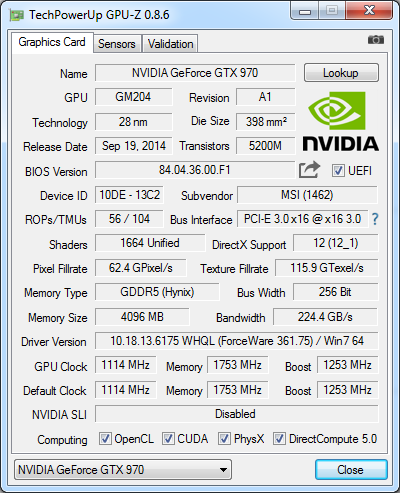
But I’m going to suggest downloading GPU-Z and taking a screenshot like this (ignore CPU-Z)

I’m betting your Bus Interface is sticking in the powersaving PCI-E x1/x4 mode when it should go x16 or at least x8 in certain situations.

If it does show x1/x4, take your GPU out of the slot and put it right back in. Make sure its seated firmly.

Looks like it’s fine to me, but you may be able to see something out of that that I don’t.

Attachments:
[Report] Low FPS [Merged]

in Account & Technical Support

Posted by: ObsidianTK.8710

ObsidianTK.8710

Sometimes when launching GW2, the game gets “stuck” at roughly 15 FPS, no matter what settings I’m using — lowest across the board, 15 FPS. Max settings, 15 FPS. Same everywhere in the game world. CPU, GPU and memory utilization are low/medium.

Win7. i7-5820k, NVidia GTX970, 16gb memory, decent sized SSD. Many other modern games run at 100+ FPS.

Often this can be fixed by restarting the computer, but that’s a pain in the rear. Any suggestions?