Showing Posts For SOLIDAge.5618:
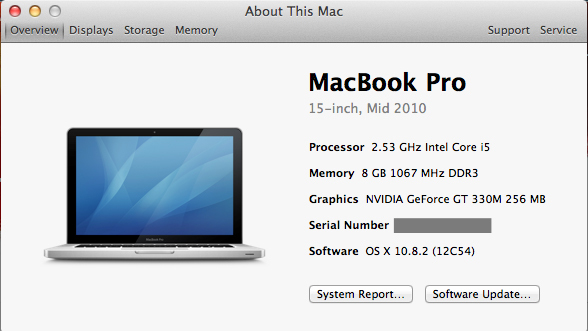
As soon as I get home I’ll post the direct link from my About section.
But it is a mid to late 2010 model if i remember correctly.
Appreciate the info…but even with the graphic power not being as high as it should be for the recommended specs why would there be an almost 15 FPS difference when in Windows vs OS X?
To be clear this is me dual booting Windows and OS X on the same MacBook Pro.
The FPS are not locked at all in the application, I checked twice.
I did download that application as well as look in the energy settings. I had thought to check which GPU was being used and to make sure I had disabled the switching and left my 330M on all the time.
I am running 10.8.1
(edited by SOLIDAge.5618)
So I just compared OSX beta with WIndows on the same laptop.
15" i5 2.2ghz
8 gigs of RAM
GT 330m
Area one
Windows 22 FPS
OSX 19 FPS
Area two
Windows 33 FPS
OSX 20 FPS
it almost seems like my OSX is capping it around 20 fps…even when I put it at the lowest settings or auto. Even lowered the resolution…it never moved above 20 FPS
Anyone have similar problems? I realize this is a beta but trying to figure out if it’s intentional or not.
I logged in and had really muffled audio that was breaking up and the quality was awful just like the OP had.
I went into Audio options and turned the quality to “fastest” (it was at highest quality) and the issues went away. Hope that helps!
I logged in and had really muffled audio that was breaking up.
I went into Audio options and turned the quality to “fastest” (it was at highest quality) and the issues went away. Hope that helps!
The same was happening for me.
To fix it I just left the client open for a few minutes and it downloaded an update and it’s good now.