Showing Posts For Shuriken.8412:
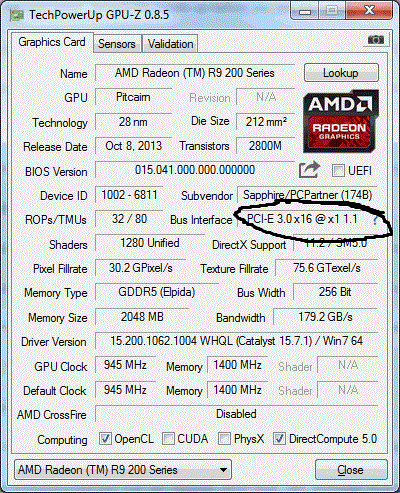
There isn’t really a software solution for checking it there are a couple of ways using a multimeter but its risky if you dont know I would not recommend.But check the GPU performance download the latest GPU-z software and compare it to your card specifications.The thing that was wrong with my readings was bus interface so check that first and if it shows different click the little ‘?’ button and start a render test see if it changes.So you’ll see here on a picture of my results when it wasnt working so you get the idea.
Attachments:
If reinstalling the game does not fix it, then obviously the problem is not the game, but something external, like video card drivers.
That is not necessarily true, if the game itself doesn’t use your pc’s drivers correctly, and there are dropped frames. If one day my game runs fine, then they update it, and it no longer works fine anymore, no matter how many times I reinstall the broken game, it won’t work. But we will see, I bought myself a new SSD C drive, Clean install of Windows 10, and all updated drivers.
If the game still won’t play above 20fps, I guess I’m done trying to play gw2.
I have to say I had the same opinion.After doing some testing with Anet’s employes I downloaded a GPU-z just to be sure and I found out my card was running on x1 1.1 instead of x16 3.0. Now it kind of switches by itself so sometimes the game works fine and sometimes I have ~5FPS.I then realised my PSU was not working properly by not supplying my GPU with enaugh power at times so I replaced it and my problem is gone.If you can’t actually find the problem yourself go write a ticket and do the diagnostics they ask you to do and you will find whats troubling you I’m sure of it.And I have to give it to them they answer really fast even tho it was Sunday.
Similar thing once happened to me,please try to disable your antivirus software for a while and then try.
This is what I found browsing,however there’s no actuall explanation on how to fix those files.
‘’Windows Error Code C0000417 is usually caused by misconfigured system files that create registry errors within your operating system. Windows errors can cause program lock-ups, slow PC performance, system crashes, computer freezing and more.’’
I would recommend checking if all drivers are installed correctly and up to date but nothing else comes to my mind
Same issue since I started playing the game..I thought everyone experienced this since there’s no reason that a simple window in the game would respond so slow for only some players,does it?
Yep I jumped ahead a little bit the problem still persists.
It was ok for a while but now it returned.
5 FPS hype!
Can't finish last file of Nov 5th patch. [Merged]
in Account & Technical Support
Posted by: Shuriken.8412
So the client decided to download the file today it was downloading in full speed for couple of minutes.The overall percentage did not exceed 0% but the file downloaded and I now have the 100% when I open the client.I didn’t do anything so I guess it self repaired.
Well here is my ticket response and it did actually fix the problem.
’’The problem you are having may be due to out dated graphics drivers on your computer. Please make sure that you have the latest video card drivers from your video card manufacturer (AMD, Nvidia, Intel). The websites in the links provided below have an auto-detect feature which will detect your graphics card and operating system and will locate the most recent driver for you.
AMD autodetect: http://support.amd.com/us/gpudownload/windows/Pages/auto_detect.aspx
Nvidia Autodetect: http://www.geforce.com/drivers (Click “Auto-Detect your GPU”)
Intel Autodetect: http://downloadcenter.intel.com/default.aspx?lang=eng
’’
Can't finish last file of Nov 5th patch. [Merged]
in Account & Technical Support
Posted by: Shuriken.8412
Definetly not malware…same thing here..Croatia
Can't finish last file of Nov 5th patch. [Merged]
in Account & Technical Support
Posted by: Shuriken.8412
If you check other articles you will find that people are already reporting the 1 file missing thing and trying to find the answer..however it should not make your game crash and is unreleated to it in my opinion
Can't finish last file of Nov 5th patch. [Merged]
in Account & Technical Support
Posted by: Shuriken.8412
Well obviously the last piece that wont download is a problem for everyone.I assume it will just grow as people are trying to reinstall the game for some reason and will turn into a serious problem affecting more and more players every day.Everyone here has the same issue with different computers,internet providers,routers,OS,Country the live in so this is a 100% ANET problem and a corrupted file or maybe there is nothing to download but the client thinks there is so its just trying to reach it but there’s nothing.
All in all don’t waste time cuz we are not the ones here that can fix this.If you have a friend playing gw2 copy entire game via external hard drive and you will have no problem,if not just wait for a response like me.
Aside from the fact that after reinstalling the game 1 file cannot be downloaded,the game started working normally today for me.My FPS is back to normal and I had nothing to do with it so try to log in guys and see if its better now.The 1 file remaining still remains an issue but there is another topic for that and it has a lot of people trying to figure it out.
Yeah,well the game reinstallation does not help so don’t even bother.I guess we just wait for someone to answer here or actually submit a ticket because I tried everything and failed.
So I see that it starts downloading and then prompts the message.
Maybe you are trying to download and don’t have enaugh space on your hard,maybe some files are leftover from when you played before and are now bothering the new files,maybe you are using the old gw2.exe file that you downloaded before make sure you erase everything and start over and add exeptions to your antivirus or disable for the time installing.Also try to run it as an administrator if you are using win7 or higher.
Let me know if anything helps
Its beating me up rly I get the same fps on lowest possible settings and resolution,I did a CPU,GPU test and it works fine,RAM is fine,internet is fine,other games similar to this one (Neverwinter) works on highest detail fine.Everything is ok except gw2 so I guess my only option is to fully reinstall althouth it makes no sence becouse since yesterday there was no patching or any other action that would change the game in any way and cause this situation..I’m really pushed against a wall here
Well that is a serious problem and that’s exactly why sms verification was built in the security system so by doing that you have no worries.To actually be sure I would do a clean new OS installation and scan the backup files if you choose to have any.It takes some time but in the end its the fastest way and 100% sure which isn’t the case with trying to clean you computer of any malware,viruses etc.
Well imo it happens to everyone since you have 150 people on one spot at the same time and it causes a little server lagg or am I wrong?
It happens to me aswell just for the record.
Hi,so I read the article about this and the thing is Im not a new player.Just yesterday everything was working fine and this morning Im maxed at 5fps at all times which is unplayable.I did not change any hardware,software,game settings or anything similar fps just decided to drop from 55-60 to this..I tested my internet connection,cpu,gpu and everything is more than good.Heres some info on the hardware but as said it worked normally for months..appreciate any opinions and tnx
AMD FX8320
Sapphire radeon R9 270
8GB ram
win7