Showing Posts For Tparkinson.1902:
@ilithis and @Kyllaa well thanks for the help guys, I really appreciate it. However, it looks like it isn’t going to work.
Eh, I’m not done trying to fix it yet. What are your computer specifications? Lets start from the bottom and see if we can’t find a problem. Main things are the GPU, CPU, and RAM capacity and speeds.
I downloaded the HWMoniter you told me about
Processor- Intel i7-2670QM CPU @2.20 GHz
Ram- 8 GB
System- 64 bit
Graphics- When I run the diagnostic tool it says I am using integrated graphics but that doesnt make sense. I should be running a GeForce Gt550M i believe. I hope this helps. Thanks once again!Hmm, well that MIGHT be a problem, not related to not being able to play, but still a problem. You should be able to set which graphics module you are using in BIOS. If not in BIOS then there might be some Intel graphics utility that allows you to swap between the two when you are booted into windows. Your best friend for this would be Google.
What are your GPU and CPU temperatures while idle and while the game has been running for 10 minutes?
Ok well I have been traveling and my computer has been off for a while. Right after turning it on it was at 111 degrees F after a few minutes it maxed out at 134. After playing the game however it maxed out at 185! Is this the problem. Also how do I access BIOS?
@ilithis and @Kyllaa well thanks for the help guys, I really appreciate it. However, it looks like it isn’t going to work.
Eh, I’m not done trying to fix it yet. What are your computer specifications? Lets start from the bottom and see if we can’t find a problem. Main things are the GPU, CPU, and RAM capacity and speeds.
I downloaded the HWMoniter you told me about
Processor- Intel i7-2670QM CPU @2.20 GHz
Ram- 8 GB
System- 64 bit
Graphics- When I run the diagnostic tool it says I am using integrated graphics but that doesnt make sense. I should be running a GeForce Gt550M i believe. I hope this helps. Thanks once again!
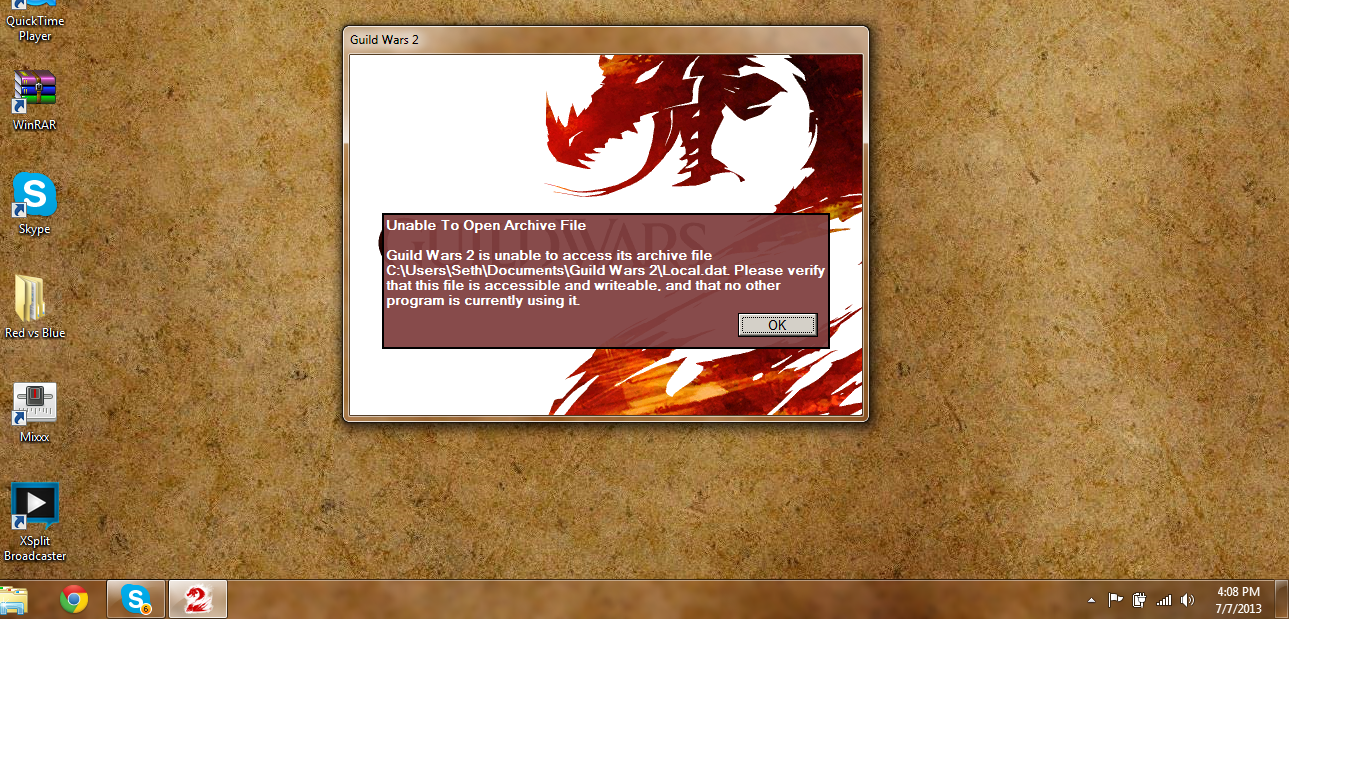
So i buy Guild Wars 2 about 4 days ago and i have already have had problems with the game. I will be playing and the game the screen will freeze , the sound is still going but the game stops. After force closing the game i cant get any other program to open and when i try guild wars again i get this error message saying " Unable To Open Archive File" and it tells me to locate File “Local.dat” its on my computer. S
Someone please help me , i have already re downloaded it, set the program as a admen program and have played it on my admen account, tried repair to. My labtop is only a year old and it out dues all the requirements to play the game so no problem there. Help
I have the same problem man. Did you ever find a solution?
@ilithis and @Kyllaa well thanks for the help guys, I really appreciate it. However, it looks like it isn’t going to work.
Ilithis, do you somehow think his file is set to read only? I mean, if he’s running the client as admin and MSE shouldn’t be affecting it, what else could be in your opinion?
He had already uninstalled it before any further troubleshooting could come about lol, so just in case the issue still exists post-install.
I doubt it, but you can always check the attributes of a file by right-clicking the file and going to ‘Properties’. Then go to the ‘Details’ tab and there should be a list of characters signifying what attributes that file has, ‘R’ being read-only.
I just checked the attributes and it was A.
OK well I finally re installed it and it played for about a half an hour and then froze. I checked to see if the run as admin was checked. It wasn’t for some reason so i re checked it, restarted my computer and tried to run again. Worked for maybe 10 mins and then froze again.
You shouldn’t need to do that.
Are you running any antivirus/firewall software or anything else that may be blocking access?
But let me know how you go after re-installing. For future, you’ll want to backup gw2.dat so you won’t have to download the whole ~17.5gb file every time.
I am running Microsoft Security Essentials by the way. I will let you know what happens after I re install. Thanks for the help by the way. This has been a very frustrating experience!
You need local.dat, this is your in-game settings and such. Make sure you are running gw2.exe as administrator and see if you still have this problem.
Yes I am running it in administrator. I uninstalled it and am going to try and re install it in a different location like my documents rather than program files.
So I just started playing the game and after a short stint of playing my game freezes and I have to Crtl Alt Delete to get out of it. After it has been shut down I try to restart playing and i get this error http://imgur.com/o0pLJlS I am not really sure why. The one thing that I noticed is that in my program files I have all of the files including local.dat, and in my Documents file I also have a local.dat file. If I delete the local.dat file in “My documents” then the game runs fine. The only problem then is that every time I start up the game it creates a new local.dat file in “my documents”. I think that this might be the problem. Any help would be greatly appreciated. Thanks!
Attachments:

So I just started playing the game and after a short stint of playing my game freezes and I have to Crtl Alt Delete to get out of it. After it has been shut down I try to restart playing and i get this error http://imgur.com/o0pLJlS I am not really sure why. The one thing that I noticed is that in my program files I have all of the files including local.dat, and in my Documents file I also have a local.dat file. If I delete the local.dat file in “My documents” then the game runs fine. The only problem then is that every time I start up the game it creates a new local.dat file in “my documents”. I think that this might be the problem. Any help would be greatly appreciated. Thanks!