I feels like you have removed the player from the character. The old system at least made you feel that you had some say in the build of your toon. Just a bad idea in general from my stand point.
Intel i7 3930k (4.7G) / 32GB of 2133 / ASUS R4E / 2X EVGA GTX580s / 2X 256MB Corsair PP SSDs (RAID0)
Corsair Pro AX1200 / SoundBlaster ZxR/ Windows 8 Pro x64 (+WMC) EFI Instal
If you could please add your dxdiag TXT file to the post I will take a look and see if I can help.
HOW TO: dxdiag
Windows 7
1) Start>Run
2) Type dxdiag
3) Select the check Box “check for WHQL digital signatures”
4) Wait for the progress bar at the bottom left of the windows to finish
5) Select “Save All information”
6) Save the file to your Desktop
Make sure to save the file as a Text File and not an XML (I believe default is a text)
7) Attach it to your post
Windows 8
1) Got to your start screen and type run then hit enter
2) Type dxdiag
3) Select the check Box “check for WHQL digital signatures”
4) Wait for the progress bar at the bottom left of the windows to finish
5) Select “Save All information”
6) Save the file to your Desktop
Make sure to save the file as a Text File and not an XML (I believe default is a text)
7) Attach it to your post
Intel i7 3930k (4.7G) / 32GB of 2133 / ASUS R4E / 2X EVGA GTX580s / 2X 256MB Corsair PP SSDs (RAID0)
Corsair Pro AX1200 / SoundBlaster ZxR/ Windows 8 Pro x64 (+WMC) EFI Instal
@ Tony Stark Mr. Ironman
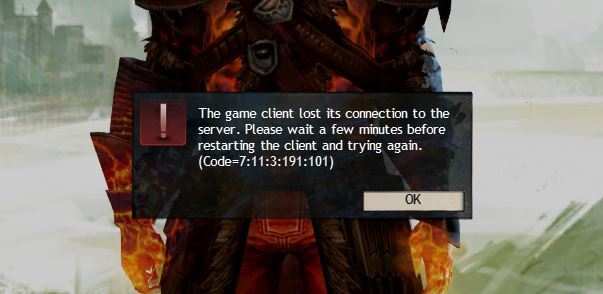
You may need to configure your firewall to un-restrict ports 80, 443, 6112 and 6600.
I have found that I do not need to configure my hardware firewall but software firewalls including the Windows firewall may need some configuring.
Running the client on port 80 may help alleviate the issue also.
1) Navigate to theGW2 directory normaly located at “C:\Program Files (x86)\Guild Wars 2\” or “C:\Program Files\Guild Wars 2\”
2) R-Click “Gw2.EXE” then select Send To>Desktop (create shortcut)
3) One your Desktop R-Click the “Gw2 – shortcut” and Rename it to “Gw2 – Port 80”
4) R-Click the “Gw2 – Port 80” shortcut and select Properties
5) In the tagert line, all the way to the right after the quotation mark add a space then type the following: -clientport 80
Example: “C:\Program Files (x86)\Guild Wars 2\Gw2.exe” -clientport 80
Example 2: “C:\Program Files\Guild Wars 2\” -clientport 80
6) Click Apply then OK
7) Try running the game
I hope this helps
Intel i7 3930k (4.7G) / 32GB of 2133 / ASUS R4E / 2X EVGA GTX580s / 2X 256MB Corsair PP SSDs (RAID0)
Corsair Pro AX1200 / SoundBlaster ZxR/ Windows 8 Pro x64 (+WMC) EFI Instal
1) Go to Start
2) Type Firewall in the search
3) Click on “Windows firewall with Advanced Security”
4) Select “Inbound Rules” from the left pane
5) Scoll through the Inbound Rules in the center pane and try to locate “Guild Wars 2 Game Client”
If you see the rules then is should be configured. There are normaly 6 rules
2 rules for the Temp directory TCP/UDP – Private profile
2 rules for the Program direcetoy TCP/UDP – Private profile
2 rules for the Program directory TCP/UDP – Public profile
Let me know if you see any rules for Guild Wars 2
Intel i7 3930k (4.7G) / 32GB of 2133 / ASUS R4E / 2X EVGA GTX580s / 2X 256MB Corsair PP SSDs (RAID0)
Corsair Pro AX1200 / SoundBlaster ZxR/ Windows 8 Pro x64 (+WMC) EFI Instal
Make sure your monitor is not the issue. It seems that you have ruled out most of the common issues but I haven’t seen anything about testing the monitor in your posts.
Check and see if your MOBO has diagnostic LEDs or screen on it. The small screen gives POST codes that you can use for troubleshooting. If you are able to get the POST code that the system is hanging on, do a search for your MOBO and the POST code that you are getting. Example: ASUS Rampage 4 Extreme post code 66. Alternatively you can use the model of the computer such as Dell Pavilion 8000 post code 02
From what I have read you have changed out the GPU, MOBO, RAM, and PSU. This does not leave a lot to troubleshoot. The CPU is one major component that you may need to check. Often the POST codes will let you know if it is hanging on the CPU.
Intel i7 3930k (4.7G) / 32GB of 2133 / ASUS R4E / 2X EVGA GTX580s / 2X 256MB Corsair PP SSDs (RAID0)
Corsair Pro AX1200 / SoundBlaster ZxR/ Windows 8 Pro x64 (+WMC) EFI Instal
If you keep on having trouble after configuring AVG you may want to try the port 80 switch. I would try it without the switch and see if configuring AVG fixes the problem first.
Running the client on port 80 may help alleviate the issue also.
1) Navigate to theGW2 directory normaly located at “C:\Program Files (x86)\Guild Wars 2\” or “C:\Program Files\Guild Wars 2\”
2) R-Click “Gw2.EXE” then select Send To>Desktop (create shortcut)
3) One your Desktop R-Click the “Gw2 – shortcut” and Rename it to “Gw2 – Port 80”
4) R-Click the “Gw2 – Port 80” shortcut and select Properties
5) In the tagert line, all the way to the right after the quotation mark add a space then type the following: -clientport 80
Example: “C:\Program Files (x86)\Guild Wars 2\Gw2.exe” -clientport 80
Example 2: “C:\Program Files\Guild Wars 2\” -clientport 80
6) Click Apply then OK
7) Try running the game
Intel i7 3930k (4.7G) / 32GB of 2133 / ASUS R4E / 2X EVGA GTX580s / 2X 256MB Corsair PP SSDs (RAID0)
Corsair Pro AX1200 / SoundBlaster ZxR/ Windows 8 Pro x64 (+WMC) EFI Instal
I need to do more research on this. It seems that I am seeing a lot for ATI owners running into issue with very low FPS. Your CPU, RAM and GPU are all factors but 8 FPS is down right terrible.
I am beginning to think that it could be a driver issue. I currently do not own a test system with an ATI so it does make it a bit hard to diagnose.
There are a few things that you can do.
You may want to get the latest drivers for you ATI. I would suggest getting them directly from ATI. NOTE: If you do update the drivers do it before any other steps.
You have a 64bit system and 4G of RAM so I would suggest turning off, at least, the High-Res Character Textures in the games Graphic Options.
In the Games Graphic Options try setting the “Settings Preset” to Best Performance and while you are there go ahead and turn on “vertical sync” if it is not.
Once you have made the changes go back into the games Graphic Option and change the Render Sampling to “Super Sampling” then immediately switch it to “Native”. NOTE: Make sure you switch it back to “Native” or you will get worse performance.
I hope this helps.
Intel i7 3930k (4.7G) / 32GB of 2133 / ASUS R4E / 2X EVGA GTX580s / 2X 256MB Corsair PP SSDs (RAID0)
Corsair Pro AX1200 / SoundBlaster ZxR/ Windows 8 Pro x64 (+WMC) EFI Instal