Showing Posts For izzy.5876:
The burn guards were me and my group of friends. We merely did this for a good laugh and despite losing we still had fun running it. We also did this crap with 5 mesmers as well kitten power rangers. You guys played very well and your comp was solid
our final thoughts after the match – “We freakin suck at this”
You guys gave me and my guildies one of the best, most hilarious matches we’ve had in months. Thanks so much for that!
We came across a full team of burn guards so everyone on our team put on generosity sigils on all weapons. The results were satisfying.
(2 D/D eles, one condi transfer necro, condi thief, condi engi)
- Revel [REV]
Was doing WvW with my guild and we made a siege golem from blueprints… and got two out of it.
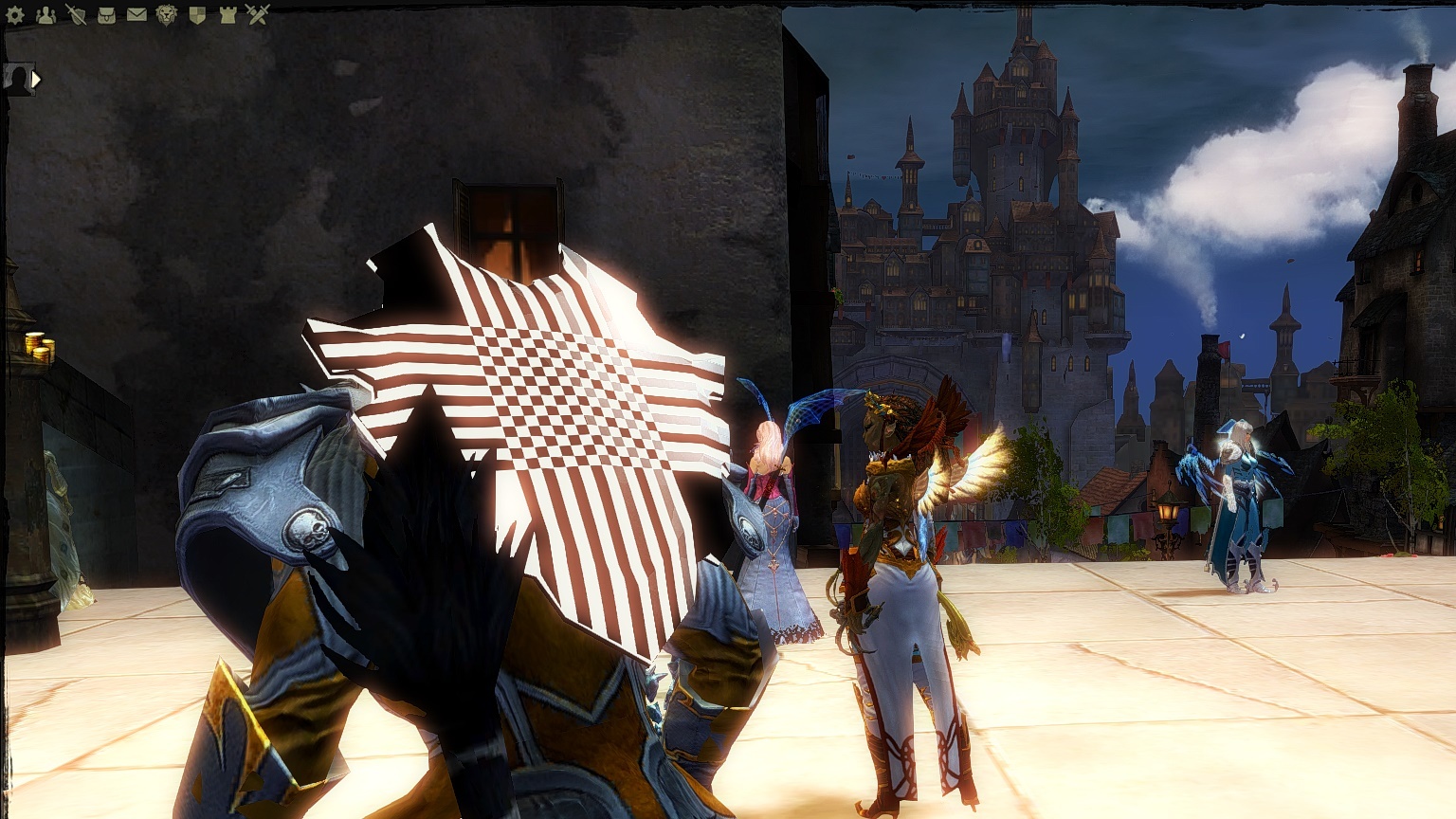
edit: also from earlier, extreme shininess?
Attachments:

(edited by izzy.5876)
So I’ve come to the conclusion that this may be a GPU issue for me, but it’s highly suspicious that it all started after I downloaded the 11/4 patch. Other games have begun lagging for me and I’ve experienced… whatever this is on some weapons in game.
EDIT: Nevermind to everything, oh my god, my battery was just on power saver mode.
Attachments:
(edited by izzy.5876)
Admittedly haven’t read the entire thread, but I have a laptop with an 860M, i7 processor, and used to get around 50-60 FPS and now can’t get above 32. Changing the settings have no impact (including Shadows, which I would expect would be a big FPS increase to turn off).
I recently installed the latest nvidia update which included the NVidia Experience for GW2. I haven’t tweaked any of the settings but could this be related?
THIS. THIS IS MY EXACT ISSUE.
I have a laptop with, as previously mentioned, Nvidia GeForce 755M 2g, 16 GB of RAM, and an Intel i7 processor. Previously ran the game at high fps, now I can barely get above 32 as well. Periodically I’ll climb to my previous FPS but it lasts in short bursts and I’ll go down to <32 again.When the patch first came out I had this issue, so I tried to fix it and updated my Nvidia driver to the new one, same problem. I just cleaned my fan after forgetting to for four months – computer performance has improved but my FPS and overall GW2 loading times have stayed the same since patch. I’ve also run -repair on GW2 and no changes, it’s stayed the same no matter what settings I use, high or low.
izzy, I believe I found something that may or may not be related to your issue. Please see my thread that I created here: https://forum-en.gw2archive.eu/forum/support/tech/Major-FPS-issue-with-the-Frame-Limiter/first#post4545218
Sadly my issue isn’t really with the frame limiter. I get the same FPS whether I’m on unlimited, 60, or 30. Right now I have GW2 in the background and I’m parked in Silverwastes, and I have 20FPS. Sometimes it magically goes back to 50-60 FPS for about twenty seconds, then returns to less than 20.
Also it may not JUST be FPS. My loading screen times have gotten increasingly longer – LA used to load in 15 seconds for me and now it takes 3 minutes. When I load into maps not everything is loaded, and character models take a few seconds to load. But still, no matter what setting I use, same FPS, same loading times.
(edited by izzy.5876)
Admittedly haven’t read the entire thread, but I have a laptop with an 860M, i7 processor, and used to get around 50-60 FPS and now can’t get above 32. Changing the settings have no impact (including Shadows, which I would expect would be a big FPS increase to turn off).
I recently installed the latest nvidia update which included the NVidia Experience for GW2. I haven’t tweaked any of the settings but could this be related?
THIS. THIS IS MY EXACT ISSUE.
I have a laptop with, as previously mentioned, Nvidia GeForce 755M 2g, 16 GB of RAM, and an Intel i7 processor. Previously ran the game at high fps, now I can barely get above 32 as well. Periodically I’ll climb to my previous FPS but it lasts in short bursts and I’ll go down to <32 again.
When the patch first came out I had this issue, so I tried to fix it and updated my Nvidia driver to the new one, same problem. I just cleaned my fan after forgetting to for four months – computer performance has improved but my FPS and overall GW2 loading times have stayed the same since patch. I’ve also run -repair on GW2 and no changes, it’s stayed the same no matter what settings I use, high or low.
I didn’t have issues after the 9/9 patch, but after this 11/4 patch my FPS has gone down from ~50 to staying around 20. I put my settings on the best performance preset and I still had the same FPS. During Tequatl I had 5 FPS, where I usually have 35 in the full zerg even with all the particles. I really wish Anet would fix this for the few of us.
Even my computer has slowed down since the patch, but that may also be the Windows update I installed the night before.
I have a Nvidia Geforce GT 755M and 16GB of RAM, I really shouldn’t be having this issue naturally.