Camera control issues – a documented list
No longer blowing up stuff up on Gandara [CM] :(
No longer blowing up stuff up on Gandara [CM] :(
(edited by Baxuz.1943)
I’d like to sign this.
I find the camera movement HORRIBLE.
I want the screen to stop moving when I stop moving the mouse, not a fraction of a second later.
It’s bearable in PVE, although there have been some things I’ve not been able to do because of it (jumping on pipes and so on) but for PVP it is the worse thing ever. By the time the cameras stopped moving the scenerio has changed and so I’m always a fraction of a second behind what’s going on.
Please AN, fix it. Proper linear control. Don’t make me buy MOP.
Edit – A small addition to the annoyance is that the mouse pointer disappears when using the mouse to turn view angle which means I don’t know where it is when I want to place spells. Please stop it from doing that too.
Another edit: Imagine you are viewing your char from behind, you right click and turn the camera angle, what it doesn’t do is turn your character, so it doesn’t look as if you are looking around. As a 40 man raid leader I take a dim view of not being able to see what my raid are doing or if they’re looking in the wrong direction.
From a social point of view it takes out the “feeling” of playing a person, I’m not explaining this very well I know, but imagine you and your friend are standing around and something really cool happens neither of you actually turn to look at it – I know you are but because (Wrong! you’re) Your(!) character doesn’t turn it takes the realism and social feel and connectedness out. Let me know if you understand what I’m talking about lol.
A great last point. There was always something bugging me about it but I didno’t know what. To put it simple, LMB should move the camera, RMB should turn the character. What we have now is a sensless mess with tons of improvisation. Free camera? Really?
The game currently has the same camera controls and behaviour that GW1 had. However, GW2 is not a flat, 2d click-to-move hotkey-fest like gw1 was. It’s very much 3d this time, and a lot more movement and action oriented. Notice I didn’t say “positional”. Because gw1 was more about positioning and unloading your skills statically. The same camera just doesn’t work here.
(edited by Baxuz.1943)
Hey everyone,
Thanks for the feedback! While there hasn’t been an “official” post on this subject until now, I want to assure you all that we are taking your thoughts and concerns into consideration. As one of the previous poster’s noted, we are currently spreading our resources among a large number of issues (account security, game security, etc.) and working towards a point where we can improve the camera functionality.
In the meantime, if you have suggestions or comments on ways we can improve the camera, please keep your feedback concise, constructive, and consolidated to this thread. While we may not reply to every comment, we’re constantly going through the forums and reading your suggestions.
Thanks again!
Thank you for taking the time to read and respond to this topic, and for the great news. Also, for letting us use the Game Bugs forum for essentialy a suggestion thread.
Keep being awesome!
(edited by Baxuz.1943)
Unfortunately, I just received a response from GW2 Support stating the camera is “working as intended”. An official response in this thread would be nice.
Well I doubt that they really mean that, since they changed the downed camera state, and are still actively working on fixing the camera bugs. Why would you fix something that you think is working as intended?
Noticed that as well.
Similar thing happens to my Asura. Starts screaming after every gate use.
First, a big thanks to ArenaNet for listening to feedback and tweaking the downed state camera. Keep up the good work! 
After a lot of testing in different areas, I came to the conclusion that the camera input lag is tied to the game performance. In the Hall Of Monuments, where I can push 60 fps on any settings, the game does not feature input lag. The problems defined later on are still present (FoV, bouncing, smoothing…), but the camera responds instantly if using vsync with a framerate cap, or if not using vsync at all.
That would suggest that the mouse input processing has lower priority than other processes at the time, which would also explain the unexpected lockups and variable speeds. If you take into consideration the big FPS drops the game currently has when turning the camera, it’s probably an optimization issue tied to many other problems.
(edited by Baxuz.1943)
Wow. Thanks again for all the support, and keep it coming 
Whenever players need to fight the UI instead of the enemy, a game design fairy dies…
Remember the unit groups and pathing in Starcraft 1? Now that was bad
One thing I would add to the list is that we have no control over the camera height, which leads to a very poor use of screen space.
It would be great if the camera would automatically increase height when entering combat, or when the ground targeting reticle comes up, or some other algorithm.
This is the point of view and behaviour that comes to mind (video):
Batman Arkham City – Survival of the Fittest Combat Challenge Map
Notice how the camera returns to the character’s height at the end of each stage (1:10), and how the FoV increases when the camera shoots up at the start of each stage (1:18).
(edited by Baxuz.1943)
Thanks guys for all the support. As of late, I began noticing another issue, that the camera experiences sudden slowdowns while rotating at a constant speed.
Might be related to the FPS drops.
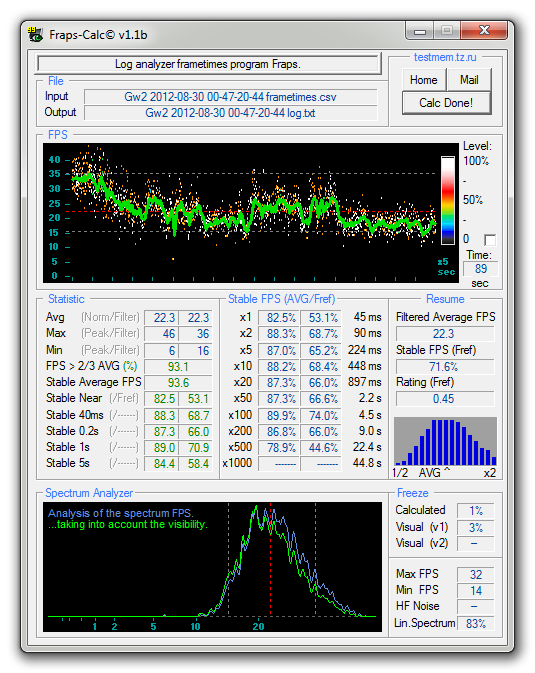
FPS fluctuates a lot, with very noticable drops while turning (15-20 fps drop).
Shadows and reflections have a huge impact on performance, everything else is neglible; I have the same performance in any resolution or other settings.
System Specs:
Core2Duo E8400 @ 3.6ghz
4gb DDR2
HD 6850
Catalyst 12.8 with the latest CAP (4.9.)
The included Fraps analysis shows a 90 second event with a large combat in metrica.
(edited by Baxuz.1943)
Thanks for reading
So, thanks for taking the time and patience to read this, geting to know the problem inside out, and what to look for. Hopefully this will be fixed soon. Cheers!
8) Camera positioning
Try playing in a squished window (greater FoV), zoomed in over the shoulder. It’s an awesome experience, which would be even better if the game featured a true over-the-shoulder camera, perhaps even a dynamic one like the one that is featured in UT3 engine 3rd person games such as Mass Effect, Gears of War, Arkham City and War for Cybertron. There is already a dynamic camera present during boss fights, but it’s not really that good.
Anyone who has played, for instance Arkham City knows that you have excellent situational awareness and control in all the available camera modes:
That said the camera is lacking in this department in GW2. The first person PoV is a must for this game, since the game already zooms into 1st person when you have your back against a wall. The implementation however is not good, and very disorienting, especially while in indoor jumping puzzles. An alternative camera for when you have your back against a wall could be a true over-the shoulder camera previously explained. Norns often collide with ceilings, and the Asura have grass blade problems.
The camera positioning simply needs an all – around polishing to make it feel better.
9) Lockups / erratic movement / other
This is not something that is intended like the previous examples, but simply bugs that need to be fixed. The camera will often lock up, or move really slowly. Sometimes it might even spazz out and you end up looking in a completely different direction. Combine that with the zooming and you have a very disorienting experience.
There are also other numerous camera bugs which can’t be categorized easily, such as camera zooming with Asura jumping on platforms, first person view lockups when near walls, not being able to turn with the RMB, etc.
There are videos out there that demonstrate these problems:
Even though the problem has been fixed in my case for the previous 2 videos, people are still commenting that the problem is present for them.
Why this matters
A lot of people have been commenting on how the camera and controls don’t feel good ever since BWE1. There have been numerous well documented reports on the official forums, GW2 guru, reddit, Twitter, email and support tickets. Clearly people are not just imagining things.
No matter how great everything else is, the potential fun is directly proportional to your ability to control your character. And tight, precise and responsive controls are the first and foremost thing a competitive game needs.
ArenaNet has stated multiple times that they intend for GW2 to become an e-sport. If the current camera implementation remains, they’re in for a rough surprise.
There is no way that a camera that doesn’t show you what you want to see, that doesn’t respond when you want it to, and that ocasionally stops working will allow a professional player to demonstrate his skill, apart from the skill required to tame the controls.
While there are options in the game that affect the camera motion, such as the camera speed slider, free camera toggle and the keybinding to turn 180°, they don’t actually fix the underlying problems, even if they may somewhat alleviate them.
What can be done about it
I believe that ArenaNet has far more pressing issues than camera controls, such as getting the game to work. That said, for a game that focuses around action oriented combat, positional and surrounding awareness, competitive PvP and jumping puzzles, this is not acceptable as a permanent solution.
As we have seen gamepad buttons in the .dat file and it has been confirmed that the game was being also developed for consoles at some point, it is also possible that they are using some hybrid gamepad / mouse camera algorithm, possibly even 3rd party. That would explain a lot, since the game often does feel like a bad console port, even if the idea was dropped at some stage of development.
That may suggest that the camera algorithm may have to be completely reworked, but hopefully I am wrong.
(edited by Baxuz.1943)
4) Inertia / easing
This is the bad part. Most of you have experienced inertial scrolling on your smartphones. You flick to scroll, and the screen keeps on scrolling. The same method is applied here, but with an added negative, since the camera requires some time to accelerate as it starts slow.
This is bad because the camera doesn’t start moving when you move the mouse, nor does it stop moving when you stop moving your mouse. This makes camera facing really frustrating, and is especcialy bad in jumping puzzles and PvP when you are trying to make fast, precise turns, since you will almost always need to reposition the camera multiple times after the initial movement.
Try playing with the effect duration on this page. Try easeInOutCubic with a duration of 1000 ms and 200 ms. That’s an approximation of how the camera easing works in GW2 with regards to the camera speed slider. Here is another example of how the camera behaves in regards to mouse movement: cursor following menu.
What we need is 0 ms of easing, that is, an instant response.
In my opinion, this is the primary reason why the controls aren’t as responsive as they should be. Depending on your playstyle, you need to put in the same effort to fight the camera as you would to fight your opponents.
5) A physical camera presence in the world that even gets stuck on terrain
You might have noticed that your camera bumps into stuff. A lot. And that it drags behind your character. That’s because the camera presence in the world is too… present.
You will often experience erratic zooming in when there is an obstacle near the camera, or even a camera stuck in a position while your character continues out of the shot (Try jumping over the Asuran Chess in Metrica).
6) Zooming / snapping / bouncing
A side – effect of too much physical camera presence. When climbing up/down stairs, or panning the camera in a narrow space or a one with columns, the camera keeps on zooming in and out in a very nauseating way.
If you hit just the right spot (which is often for me) the camera will keep on bounce zooming in and out until you correct it. Very irritating.
7) Narrow FoV
Now we come to the part why everyone is complaining that they don’t see enough and the main cause of the nausea. To put it simple, the field of view is a degree of vision which is rendered in front of you. The default one is very narrow and people try to compensate that with zooming out, leading to more camera / terrain collision, and asking for more zooming out.
The FoV is tied to the focal length of the camera. To explain it better, here’s a nice example. Your character is the red bottle in this picture. Notice how the distance to your character hasn’t changed, while at the same time you see a lot more of the surroundings. The distortion effect is less pronounced on widescreen images.
The game features a dynamic FoV which can be modified with the screen aspect ratio. Here are some screenshots I made with a very close camera, but with different FoVs:
When you compare #1 with #3, the difference is more than obvious. And in a real implementation, you would see more in the vertical axis as well. Notice that I have decreased the height by almost 50%, while retaining almost 100% of the scenery height-wise.
As you can see, you don’t really want a camera that’s further away. You want a larger field of view which should also increase on the y axis (height), which is currently not the case. Also, this fixes almost all of the nauseating feeling I had while playing.
Intro
In this topic I will try to explain the problems that a large part of the GW2 community has with the camera and controls, reasons why they are an actual problem, and possible solutions.
A plea to the community
Before I begin, I’d like everyone who doesn’t have an issue with the current camera and controls to refrain from posting how they don’t have issues. That’s fine and I’m really happy that you can enjoy this otherwise great game. But dismissing the problem does not contribute to the discussion, since the problem is there, with its roots in the camera algorithm. If you don’t experience the problems present now, I assure you that you wouldn’t notice any changes if they were made later on, or if the camera behaved differently to start with. And that’s perfectly ok.
That being said, the cause of the problem, unless you have problems that would otherwise add to the current one, is not in the hardware / software / network latency. So please, don’t advise people to buy a new computer / mouse, reinstall drivers / game or get a faster connection. It has nothing to do with any of those, and you will end up sounding arrogant and foolish.
So now that we have that covered, let’s get busy.
The issues
If you stuck with me so far, you probably experienced some of the effects that the current camera has. Some may say that the camera is slow, or that it feels “floaty”. Some people experience dizziness while playing and some will just tell you that the camera feels “off”. These are all symptoms, and they are all real. But let’s get down to the causes:
1) Input lag
What exactly is input lag? It is the time required from the moment you made an input (mouse movement, key press, etc) to the moment that there is a visible change on the screen.
All LCD monitors have some input lag (response time + signal decoding), so in no circumstances will you have 1:1 movement. Video options such as triple buffering and vsync also add to the input lag. The problem with the current camera is that it introduces input lag on the camera controls. That means that there is a noticable delay between mouse movement and the camera response. This is probably not an issue in itself, but a consequence of the later issues such as smoothing and inertia.
[EDIT: 6.9.]
After a lot of testing in different areas, I came to the conclusion that the camera input lag is tied to the game performance. In the Hall Of Monuments, where I can push 60 fps on any settings, the game does not feature input lag. The problems defined later on are still present, but the camera responds instantly if using vsync with a framerate cap, or if not using vsync at all.
That would suggest that the mouse input processing has lower priority than other processes at the time, which would also explain the unexpected lockups and variable speed. If you take into consideration the big FPS drops the game currently has when turning the camera, it’s probably an optimization issue.
2) Negative acceleration
Mouse acceleration is a relic from the times when we had low DPI mice. It can be turned off for the OS (not the game) in the mouse options, under the cryptic name “Enhance pointer precision”, which will also remove cursor snapping to x/y coordinates (toggling this option in Windows will not affect the game, only the OS).
So, how exactly does mouse acceleration work?
If you move your mouse exactly from point a to point b on your mat and back, you would expect the ingame camera / cursor to come back to the same place. Mouse acceleration works by modifying the distance travelled according to the speed of the mouse movement. So if you moved your mouse a -> b slow, and b -> a fast, even though the distances are the same, the camera wouldn’t end up in the same place.
We have positive and negative acceleration. Positive acceleration increases the distance travelled with speed, while negative acceleration decreases the distance travelled.
This game seems to feature negative mouse acceleration which is most noticable while trying to do a 180° turn. If you twitch your mouse fast enough, you won’t cover the same angle as if you did a slower turn.
3) Smoothing
Another relic from the past. DPI is an abbreviation for Dots Per Inch. Or you could say Pixels Per Inch. That means that if you have a 1000 DPI mouse, you would move your cursor 1000 pixels in 1 inch. In the past, mice had lower DPI so the mouse moved more than 1 pixel per reported dot. That means it skipped some pixels. To make the movement appear smoother, some games introduced mouse smoothing (UT99 pioneered it) which interpolated the movement, adding the missing positions in between.
However, what interpolation did was introduce input lag, since it needed to capture the first few frames to smooth them out, and prediction, to predict where the game thinks you would move the mouse next. You can already see why this is a bad idea.
(edited by Baxuz.1943)
Not affiliated with ArenaNet or NCSOFT. No support is provided.
All assets, page layout, visual style belong to ArenaNet and are used solely to replicate the original design and preserve the original look and feel.
Contact /u/e-scrape-artist on reddit if you encounter a bug.