Showing Posts For Hedge Dixon.5816:
Maybe it’s worth trying to report it as a bug directly via /support ingame… Seems like there isn’t a whole lot of staff at anet at all these days, just seems odd that they always try to push extremely time consuming new stuff instead of spending even the tiniest amount of time on very simple bug fixes. I mean, I would easily wait another month or two for LW season 3, but not having a properly working LFG tool or properly working usables really does start to get seriously annoying.
In reply to cedo: Just to clarify, i obviously didn’t buy “all” of them as in i bought out the market. I meant one of each of course
In reply to aidan: Really not helping here. Obviously you didn’t even read my entire post, otherwise you wouldn’t suggest the same workaround i have not only already mentioned, but already explained why it should not be necessary.
Unless they add another way of obtaining these items, they have to be seen as paid items (paid as in “bought for actual money”) and as such they should at least match their description. Certainly nothing about cooldowns or restrictions in there :/
So a few weeks ago there was a highly increased chance to get permanent usables (merchant, trader, bank access…) from BL chests. I took advantage of the thereby lowered TP prices and bought all of them. However, i soon was disappointed, as i came across two issues with the personal trader and personal merchant ([&AgGIjAAA] and [&AgGJjAAA]):
Issue 1:
The single usage versions of these two items can be placed simultaneously – which makes perfect sense because often times you need both merchant and trader. However, the permanent versions cannot be placed at the same time (only one rentable NPC at a time)
For this issue, there really isn’t a whole lot to discuss. It’s just ridiculous that the single usage items are better than the permanent ones. Period.
Issue 2:
You cannot use either of the rentable NPCs (both permanent and single usage) more often than once every 5 minutes (assuming you don’t swap maps of course).
Now this is particulary annoying. Let’s say your sickle runs out of uses and you place your personal merchant to get a new one. A few minutes later you are harvesting lumber and your axe runs out of uses, but you can’t place the merchant.
You might say that this is pretty much a first world problem. After all, you could check wether any of your harvesting tools are running low when you buy the first one that is out of uses. And you are right. One could most definitely do that. However, the personal rentable NPCs are supposed to be the ultimate deluxe comfort items. You don’t spend 1k gold (or a load of gems/money on BL keys) just so you still have to remember this kind of stuff.
Also, it is not like this is costly to fix. Obviously players should not be able to just spam the map with thousands of NPCs, which means that whenever a player places a rentable NPC, any other rentable NPC of his has to get removed to keep server load down. This method already is implemented. Whenever you leave a map, your personal NPCs get removed. So we’re talking literally less than like 50 lines of code to add a method call whenever a rentable NPC is used or presumably the same effort to just teleport the existing NPC to your current position (for a solution that is pretty much negligible in terms of server load).
Am I failing to see some reasons against these changes here? Wouldn’t those improvements make personal NPCs more appealing to players and thus increase demand for BL keys? I would really love to hear a devs opinion on the issues!
Greetings from Germany
Dixon
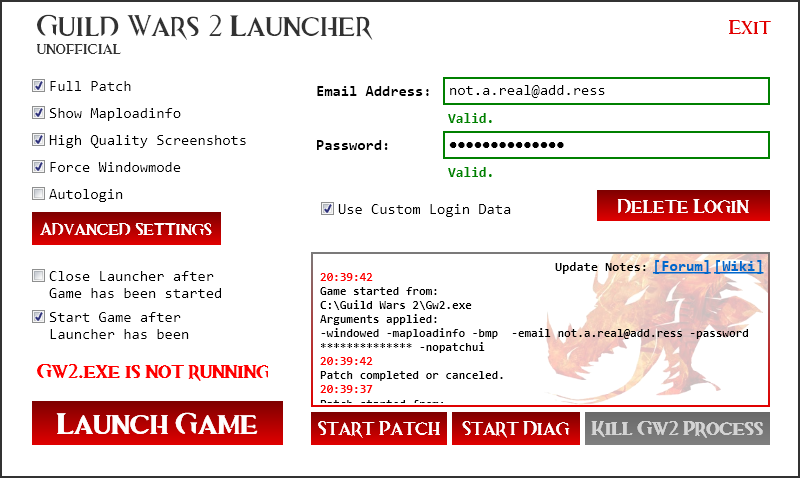
If you are only interested in having higher quality screenshots you can simply create a shortcut of your Gw2.exe, navigate to its properties and add " -bmp" to the target path (e.g. “D:\GW2\Guild Wars 2\Gw2.exe” – bmp). Also, you can use the launcher without entering your login data, all features except “-nopatchui” will be working!
Hello fellow Guild Wars players,
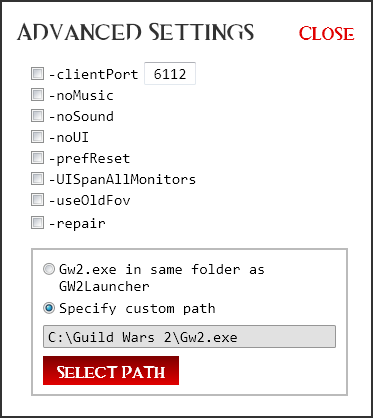
i’ve been messing around with Guild Wars 2 command line arguments lately and developed this very simple launcher. It lets you select most of the available command line arguments before launching the game. Check out the attachments to see what it looks like!
If you want to hide the official patch UI (command line argument -nopatchui), you will have to enter your account login data. Feel free to run any virus scans on the executable to confirm that it is legit. The launcher does not need internet access at any time. I have included a link to the C# source code (git repo), so if you don’t trust the binary you can build it yourself. Feel free to modify the program to your own needs, however please do not publish any modified versions! Code is quite messy at this point, apologies for that.
Also, you can use the launcher without entering your login data, all features except “-nopatchui” will be working!
If you decide to enter your login data it will be encrypted and stored locally. The encryption is fairly straightforward and should not be super hard to break, but it probably will be good enough to protect you against greedy roommates. If you build your own binary, don’t forget to set your own encryption keys in ControlLoginManager.xaml.cs.
The Unofficial Guild Wars 2 Launcher does not modify the Guild Wars 2 Client in any way. It does nothing else but starting the Gw2.exe with command line arguments. Have a look at the official wiki page for further information.
So far i have not really done any testing on other machines, so please feel free to give feedback on wether it works as expected or not (or if it works at all).
Have Fun!
Dixon
Download: Binary File (Microsoft .NET v4.0 required)
Source: Git Repository
Attachments:
(edited by Hedge Dixon.5816)
Tried 306.63 on my GTX690 and could not notice any significant performance increase at all.
[e1:] Same for 306.97.
[e2:] Same for 310.33.
(edited by Hedge Dixon.5816)
So if i got two 590’s I would not be able to run over 120fps all the time?
Well two 590s should give you ultimate premium FPS performance of hell.
Hi there,
using a GTX690 gives me the same performance problems. After doing a lot of research I’m pretty sure it definitely does depend on the GPU in this particular case. Here are the quick facts of my configuration:
Intel i7 3770k (OC 4.4GHz)
Gainward GTX690
Corsair Vengeance 16GB 1600MHz (Quad Channel)
ASUS Sabertooth Z77
Corsair ForceGT 120GB SSD
While I hardly reach more then 60FPS, I have heard of people getting twice as much with almost the same configuration but a different GPU (e.g. series 500 cards). Also keep in mind, that the GTX690 is designed for high performance gaming, which makes this issue a software problem, leading to the conclusion that we can only wait for either A-Net or Nvidia to release a game or driver update.
Greetings from Germany,
Dixon
Hi there,
Same issue here =(
Intel i7-3770k @ 4.4GHz
Asus Sabertooth Z77
Corsair Vengeance 16GB 9-9-9-24 1600MHz
Gainward GTX690
GW2 installed on a Corsair Force GT 120GB
(aaaand not to forget my 6 year old USB 2 standard Keyboard )
FPS won’t exceed numbers of 50-60, and there are massive FPS drops.
Already tried all recent drivers. HELP!