Showing Posts For Kadin Shino.7289:
 !
!"Moved" Memory leak issues in guild wars 2?
in Account & Technical Support
Posted by: Kadin Shino.7289
The thing is its a clean installed windows 8.1 OS checked for rootkits. The only other program installed is guildwars 2. So as much as id love to agree with you about theres other things going on in the system, i simply cant.
Im not an idiot when it comes to computers. This is the first time iv ever had problems with guild-wars my self and the only issues i have it with is specifically my blade 14" On top of that i verified with 5 other machines that all had been taken out of the box straight from manufacture to see if i was getting the same issues. and i was.
On top of that i went out yesterday to buy a MSI ghost G60 Pro with the 4k screen. Guess what same issues. Game crashes due to low memory errors.
Im starting to think this is more of a handling between scaling and 4k screens.
How many of the people replying have 4k screens? i cant imagine the amount of users having them is that large. i would suspect what im having is isolated incident for now but will become more of a problem as 4k screens become more normal.
"Moved" Memory leak issues in guild wars 2?
in Account & Technical Support
Posted by: Kadin Shino.7289
most of the processes running in the background are support services and device drivers for the blade specific notebook.
Anyway guess ill give up playing Guildwars for now. Thanks for the help guys!
"Moved" Memory leak issues in guild wars 2?
in Account & Technical Support
Posted by: Kadin Shino.7289
The only program that is running at the time is GW2, which is why this entry is labeled memory leak issues.
Iv had this problem on 5 other razor blade notebook 14" 2014 editions. I was at Microsoft store the other day taking up all there in store demos and trying to see if i get same results, which i do. So that’s why im here trying to figure out what could possibly be going on.
And to clarify the only programs i have running are guildwars 2. Its stock clean install of windows 8.1, no antivirus no windows defender nothing that could possibly affect memory in anyway that im aware of.
"Moved" Memory leak issues in guild wars 2?
in Account & Technical Support
Posted by: Kadin Shino.7289
Yep, this has done many times. Iv gone threw repairs and re-installs. and the game still has low memory errors.
It was one of the first things i did before even starting this thread and i do repairs on a daily bases just to see if it will prevent further problems.
Thanks again tho!
"Moved" Memory leak issues in guild wars 2?
in Account & Technical Support
Posted by: Kadin Shino.7289
I think my crash is due to a different reason? possible bad textures in memory? iv done msconfig and cleaned already nothing found so.
heres more details on the crashes im getting. and full dialog attached below
—> Crash <—
OOM: Heap, bytes=1398176,
App: Gw2.exe
Pid: 6424
Cmdline:
BaseAddr: 012C0000
ProgramId: 101
Build: 36321
When: 2014-07-24T00:13:58Z 2014-07-23T17:13:58-07:00
Uptime: 0 days 1:51:44
Flags: 0
—> System <—
Name: DEVISTATO_PC
IpAddr:
Processors: 8 [GenuineIntel:6:12:3]
OSVersion: Windows 6.2 (64 bit)
—> System Memory <—
Physical: 3927MB/ 8115MB 48%
Paged: 6MB/12703MB 0%
Virtual: 2341MB/ 4095MB 57%
Load: 51%
CommitTotal: 12697MB
CommitLimit: 12703MB
CommitPeak: 12701MB
SystemCache: 2920MB
HandleCount: 38371
ProcessCount: 85
ThreadCount: 1100
—> Process Memory <—
Private: 1293MB
WorkingSet: 1399MB
PeakWorkingSet: 1400MB
PageFaults: 19446465
[DbgHelp.dll is C:\windows\SYSTEM32\dbghelp.dll]
[DbgHelp.dll version 6.3.9600.16520 (64/32-bit compatible)]
—> Thread 0xcac <—
—> Error Logs <—
propID that doesn’t exist propId=‘1201112317786457099’
Texture missing mip chain: 0×011f2e
Texture missing mip chain: 0×011f30
Content is referencing a propID that doesn’t exist propId=‘1201112317786457099’
Content is referencing a propID that doesn’t exist propId=‘1201112317786457099’
Content is referencing a propID that doesn’t exist propId=‘1201112317786457099’
Content is referencing a propID that doesn’t exist propId=‘1201112317786457099’
Content is referencing a propID that doesn’t exist propId=‘1201112317786457099’
Texture missing mip chain: 0×014655
Texture ‘0×03539b’ dimensions too small
Loading ‘0’ texture failed
Texture missing mip chain: 0×014655
Texture missing mip chain: 0×011f2e
Texture missing mip chain: 0×011f30
Content is referencing a propID that doesn’t exist propId=‘1201112317786457099’
Content is referencing a propID that doesn’t exist propId=‘1201112317786457099’
Map load hang on STATE_MODELS_STREAM detected: MapId: 53, Position: (12235.500000, -28810.500000, -35.904400), Completion: 0.000000
Texture ‘0×04759c’ dimensions too small
Loading ‘0’ texture failed
Texture ‘0×04759d’ dimensions too small
Texture missing mip chain: 0×00f980
Texture missing mip chain: 0×00f982
Texture missing mip chain: 0×00f980
Texture missing mip chain: 0×00f982
Content is referencing a propID that doesn’t exist propId=‘1167390489989743638’
Texture missing mip chain: 0×011f2e
Texture missing mip chain: 0×011f30
Texture missing mip chain: 0×011f2e
Texture missing mip chain: 0×011f30
Map load hang on STATE_MODELS_STREAM detected: MapId: 53, Position: (12235.500000, -28810.500000, -35.904400), Completion: 0.000000
Couldn’t find missile launch point for gadget ‘’.
Texture ’0x03539b’ dimensions too small
Loading ‘0’ texture failed
Texture missing mip chain: 0×0bd638
Texture missing mip chain: 0×0b7430
Texture missing mip chain: 0×066f6c
Texture missing mip chain: 0×066f6d
Texture missing mip chain: 0×0bd637
Texture missing mip chain: 0×011f2e
Texture missing mip chain: 0×011f30
—> DirectX Device Info <—
VendorId = 0×8086
DeviceId = 0×0416
Version = 9.18.0013.3788
Description = Intel® HD Graphics 4600
Compat = 0×00000040
VidMem = 4095 MB
Attachments:
"Moved" Memory leak issues in guild wars 2?
in Account & Technical Support
Posted by: Kadin Shino.7289
So after doing extensive hardware testing on my computer, iv determined that the ram is not the culprit.
The next steps i took where disabling the video card and using the Intel graphics set. Im still getting Low memory errors :/
Thanks for the suggestions tho. if anyone else has an idea of what might be causing it please let me know
Attachments:

Guild Wars 2 connection issues (with theory)
in Account & Technical Support
Posted by: Kadin Shino.7289
Iv actually experienced in a way the same results when using skype. Launch skype, start call with friends, then launch and play game. Everything runs wonderfully until i go solo. Ill log of Skype and suddenly my network seems to fail.
No one else on my network experiences slow down or shuttering of the internet. So i know its localized to my computer only.
What kind of wifi cards/routers do you tend to use? do you have your self set to priority for network traffic?
"Moved" Memory leak issues in guild wars 2?
in Account & Technical Support
Posted by: Kadin Shino.7289
Im not using any antivirus software. its 100% stock windows. no other applications installed other then guild-wars 2 and what windows comes with.
Could the error be due to the QHD+ screen? Im not sure how many people have the blade 14" yet so im not sure this problem would be common.
"Moved" Memory leak issues in guild wars 2?
in Account & Technical Support
Posted by: Kadin Shino.7289
I also wanted to add that iv also expanded the virtual memory to 10 gigs. I still have the same issues even with a larger amount of virtual memory allocated. I forgot to add that to the post
Thanks again!
"Moved" Memory leak issues in guild wars 2?
in Account & Technical Support
Posted by: Kadin Shino.7289
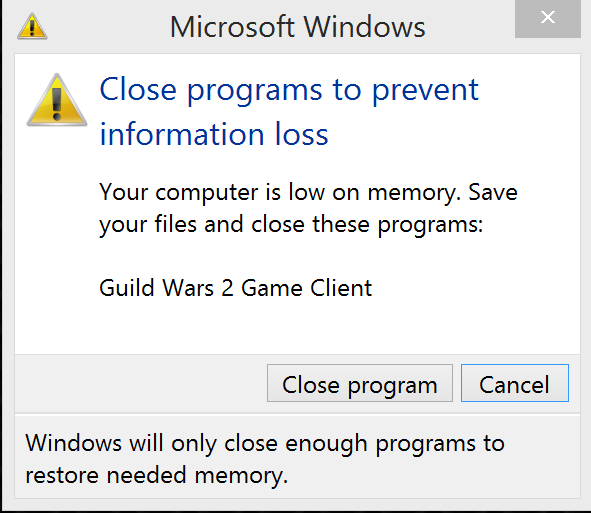
Hey there all. i recently purchased a new laptop “Blade 14 2014”, and i have been having difficulty’s running guild wars 2. I currently play at all medium settings at 1920×1080 mode. Every time i alt tab to go to my desktop the game client crashes and windows gives me the following message.
Windows successfully diagnosed a low virtual memory condition. The following programs consumed the most virtual memory: Gw2.exe (4532) consumed 1892368384 bytes.
I don’t have any other applications running. I alt tab to go open firefox/chrome/IE So far in all the incidents it dose not matter where i am in world or how long im playing for.
Here are some of the things iv done to try to fix it.
Run guild wars 2 in windows 7 compatibility mode *if not running in windows 7.
Use ultra low settings on everything and play in 1366×768
Re-install windows and game client.
Try playing in windowed mode.
The laptop specs are as follow.
Windows 8.1 Pro – Windows 7 Ultimate 64bit tested under both versions of windows
3200×1800 Screen scaled to 1920-1080
Nvidia GTX 870M 3GB DDR5 ram Driver 377.88
8 Gigs of on board memory
512 SSD
Thanks all for the suggestions and added help
Attachments:
Computer Network Issues after playing GW2
in Account & Technical Support
Posted by: Kadin Shino.7289
Have you tried checking your router and modem to see if they need updating? I know for Cisco routers and other routers to log in is 168.196.1.1. small prompt will pop up asking for password and username. username should be Admin and password is blank or password.
Check your manual how to log in. Im betting that one or the other needs updating.