Showing Posts For Karkas.5837:
HEALING NECROMANCER
Hello everyone!
Here’s my healing necromancer that I used during the Stronghold Beta ! Really fun!
https://www.youtube.com/watch?v=wi3o2fzwm6Q&list=PLpCjDwQXqK8CjWDEirdPvOitRNWMnjw3a
I explain pretty much everything about the gameplay in the video but if you just want the main build, here it is: http://gw2skills.net/editor/?fRAQNAodWjk00TbvNW2webCshSqAY6F4A6Vq3gQ4XB-TZRDwAOeCAaLDMb/BMHCAAnAAA
In the end this game is limited by the max no of cores used and max core speed.. not by your GPU
An I5 on 5 ghz will outperform your I7 at 4.0 anyday mostly because your processors main feature being hyperthreading isn’t used as you want maximum performance from the cores you’re using which obviously doesn’t include sharing 2 threads on 1 core. The fact most i5’s are faster per core makes them better at gaming then i&‘s as most games stilll use mono or dual thread program structures. If they’d split up Gw2 in 4 or more threads the game whould recieve a HUGE buff..
And the 980 is overkill I have 2 780’s so a bit more power, but it’s capable of rendering 3840*2160 at 60 FPS if needed at max settings ignorig all reflections and vsync, but including supersample… Just so you know.
Erfff… If that’s true then I don’t know why everyone seems to be recommending the i7 4790k in the first place…
Would you maybe do a recording of cpu and gpu load, temperatures and everything else while you play gw2 and then the same for another game?
Here you go, GW2 vs Witcher 2 on Ultra with Ubersampling. Around 120fps , with Ubersampling off around 140fps.
Attachments:

Oh and @Pixelninja, I’m getting about 63fps exactly where you are with the same settings (btw I get no difference between No Reflection and Terrain and Sky Reflections.)
I think you only get 63FPS because it’s nighttime in Game, try again at daytime. I get only ~66FPS at night at the Lion Statue.
I do get better fps (65-70) during the day, maybe the reflections are more important at night, BUT 65-70 fps is nothing, there’s no one there, with my config I should be getting more in such an empty place..
OP, did you try the suggestions found here?: https://forum-en.gw2archive.eu/forum/support/support/PC-FPS-and-Performance-based-issues/first#post338300
I have a i7-4770 @ 3.4 GHz and a GTX 770, and I used to get some problems with framerates in general play unless certain settings were toned down.
However, after I followed the suggestions in the thread I linked, I noticed immediate FPS improvements in all areas of the game while running on maximum settings (the suggestions say to use no reflections and native sampling, but I set both those to max and still have good framerates). I do still notice dips into the mid 40s in large scale events (i.e. Teq raid), and massive WvW zerging is usually not feasible on maximum settings. But I’ve been able to maintain a very consistent 60 FPS in areas like dry top and the silverwastes.
However, I do still like to turn the settings down in large scale stuff, just so I can keep nice framerates. The only place it will consistently drop is in WvW during large zerg stuff.
I tried all of that and while updating every single thing on my computer helped a lot (not just Windows, but the Bios, all possible drivers) I still can’t get 40fps (getting 25-30) in large scale events, and barely get 50 fps in LA, also can’t hit 60 in Camp Resolve(Silverwastes).
Oh and @Pixelninja, I’m getting about 63fps exactly where you are with the same settings (btw I get no difference between No Reflection and Terrain and Sky Reflections.)
So I’ve reinstall all my GPU drivers like you suggested… sadly I’m not noticing any fps increase…
Also, before I pick a random driver that’s older, do you have any recommendations on which one I should get?
PS: My Power Supply is a Rosewill Hive 650W.
Yes, my power settings are set to Maximum Performance.
Not to derail it, but looks like you’ve already OC’ed your 980, no? Isn’t stock clock 1227mhz?
Apparently it was… weird, now it isnt tho…. see how big the difference was.. didnt notice xd
(edited by Karkas.5837)
Sure ! Also look at his video http://www.youtube.com/watch?v=3XSvcnLcmwI, im pretty much running this, with 15-20 fps lower..
well you are not mirroring his ingame settings. also he is using a R9 285, thats closer to a 290 or a 970 then a 980.
Disable FXAA, drop high res character textures, shadows down to medium, then logout/back in and check your FPS again, I would expect it to be closer to the youtube video then.
Also, im sure this has been asked, your GPU is in the PCIE slot closest to the CPU correct?
Correct!
I did not mirrored his settings, because the 3 settings you mentionned didnt influence my fps at all. (Tried it again to be sure, confirmed)
Should I consider OC my CPU/GPU?
Sure ! Also look at his video http://www.youtube.com/watch?v=3XSvcnLcmwI, im pretty much running this, with 15-20 fps lower..
Attachments:

(edited by Karkas.5837)
Hahahah, was looking for a computer part XD
So with the BIOS update and the settings you (Ansau) suggested I went from 35 fps to 50 in LA.
But for large scale events I still get less then you do.. (30 before everyone attacks, and 20 when attacking) with a lower resolution than you. Still don’t understand why I’m not getting higher with my config..
Also.. Noob question, what’s the ’’OP’’ ?
What about hyperthreading like suggested dodgycookies?
Any driver suggestions?
Also here’s the updated version on the hwinfo.
Attachments:

Wasn’t 2 hours ago.. but everything is up to date now!
Gained a few frames, went from 35-45 in SW to 40-50… went from 15-25 to 18-29 during Teq (not full map tho..)..
Even there, shouldn’t I get around 60 with my specs? I mean… I’ve literally updated everything in my desktop…
I tried but no sadly didn’t see any difference there..
This guy has a problem, I can play at 70-80fps with Sweetfx enabled, while having an i5 4690k and a r9 285, lower specs than him.
As for you karkas, it seems a problem of the cpu. The fact that the cpu sits always around 45ºC means it isn’t working at full potential.
You could bring screenshots of the graphic settings, cpu-z (also ram speeds), bios energy settings, hwinfo after gaming for a while…Also, the game is installed in the ssd?
And do you have a specific configuration for the game in Nvidia panel?
Have you tried to do a repair, or running it as administrator?
Have you tried different drivers, or disabling Nvidia Game Experience and launching game directly from Gw2.exe?
• Ram speed, according to hwinfo, is 666.7 Mhz with a maximum of 800Mhz.
• Yes Gw2 is installed on the ssd.
• Nvidia specific: Power management mode: Prefer maximum performance
• Didn’t tried the repair, did reinstall.
• I’m always running it as admin.
• Didn’t try different drivers.
• Always launching from Gw2.exe
• Also, another precision, I’m connected to Internet by Wifi, not cable.. but I’m on 5Ghz.
I use GemFX myself, but there’s no FPS difference at all.
Also can you tell me what’s your FPS like in LA, world bosses zergs and those kind of places?
Here are the screenshots (couldn’t get one from my bios so I wrote it down).
Attachments:

(edited by Karkas.5837)
Here are the GPU-Z results…
Tested a bit more…
Got 100fps on empty map on my log-in.
Then 35-45 in Silverwastes.
And a stable 35 in LA.
Attachments:
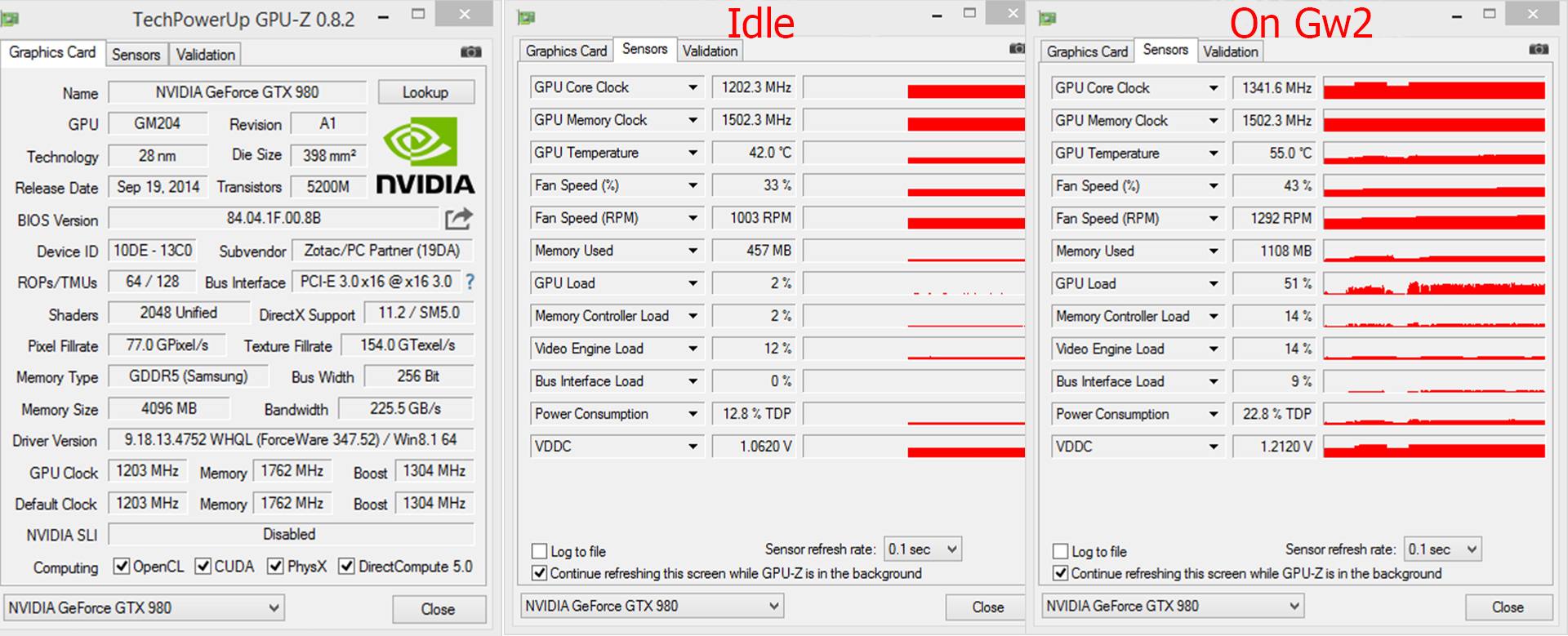
(edited by Karkas.5837)
• I don’t play with vSync or limited framerate but I tried with those on and it didn’t help.
• I play in 1080p
• Everything is pretty much at max, apart from max players and players quality to High. Also I can run it in Supersample without any fps difference.
• Temperature of my GPU when playing is around 50-55 (I saw it went to 62 but that was when I tried a small OC).
• When using GPUz I noticed in the PrefCap Reason section that as soon as my Gw2 was running (not in loading screens), I got VRel and VOp.
•Temperature of my CPU sits around 45 all the time.
• I don’t remember what card I had, pretty bad one that came with the computer, but I’m 100% sure my drivers are good, using GeForce Experience and I’m at my third total Windows 8.1 reinstall (Just reinstalled it on my SSD).
• I tried with GPU overclocked and gained about 2-3 fps.. maybe..
And I tried with CPU overclocked to 4.5 and 4.7 Ghz, didn’t change anything…
• For the Bus status, the Core Clock and the Memory Clock I’ll be back with those infos (away from home atm). I do remember the Core Clock and the Memory Clock red bars being pretty high when running Gw2, but what I don’t understand is that playing around in the graphics options didn’t seem to affect my fps that much..
(edited by Karkas.5837)
Hello, so I’ve got my new setup ready for Gw2 HoT but my fps hasn’t gone up that much…
New setup: i7 4790k, GTX 980, running/installed on SSD and 1.5T Hard Drive, 20GB of RAM.
I’m a bit disappointed, it’s jumping between 35-65fps in an average map, getting only 15-20 fps at Teq, 30-35 in Lion’s Arch…
I’ve heard many people say that they get more fps with a smaller setup..
Is this normal fps for my setup? If not what’s wrong?
Here’s my Phantasm Build ! A very simple and effective spike damage build based on our lovely phantasms! It’s a lot of fun!
You can see it in action here:
Or straight up build here:
http://gw2skills.net/editor/?fhAQNAR8alknpRtlpxDNMrRSqxcqnQ5XrRyBCokf0NA-TJBBwAAuIA02focZgAPBAA
Here’s my Condition Build ! Find it pretty strong so far.
You can see it in action here:
Or straight up build here:
http://gw2skills.net/editor/?fRAQNArYbjc00dbnNm3wfbidhQy8UIDKie6qD-TJRAwAAODAUeAAM3focZAA
Thanks a lot !
That’s what I thought… Any recommandations for a new CPU? And will I have to change the motherboard as well?
I don’t understang what’s happening.
I’m getting huge fps drops with my new GTX 980. It jumps from 60-70 fps to 20-25 fps in groups of about 20-25 people. In bigger groups, like when I was doing Tequatl the other day, I was at 15fps… which is just unplayable.
I’ve tried different solutions, like unparking my CPUs and running in compatibility mode.. no difference.
Here’s my config:
CPU: Intel® Core™ i7 CPU 930 @ 2.80GHz
Motherboard: Dell Studio XPS 9100
GPU: GeForce GTX 980
RAM: 12 GB
OS: Windows 8.1 64bit
Disk Space: 1.5TB ( 2 × 750 GB)
Any suggestions ?
(edited by Karkas.5837)
-More gameplay customization
Which means:
-More skills
Probably the biggest problem, Guild Wars 2 has a lack of skill choice compared to his predecessor.
-Weapon skills customization
Some suggestions :
-Always using #1 skill, so adding some variants to it would be great!
-Adding either weapon skill levels or weapon mastery level
-Adding new weapons
-Adding new underwater weapons
-Make so traits not only affect skill stats, but really customize your favourite skills (Not only skills in general, but precise skills).
Changing the number of foe that it hits, changing his range ,changing his animation, etc.
Other than that, great work! Guild Wars 2 is an amazing game !