Horrible FPS drop since last patch (Nov. 10)
in Account & Technical Support
Posted by: KogaPhantom.1846
in Account & Technical Support
Posted by: KogaPhantom.1846
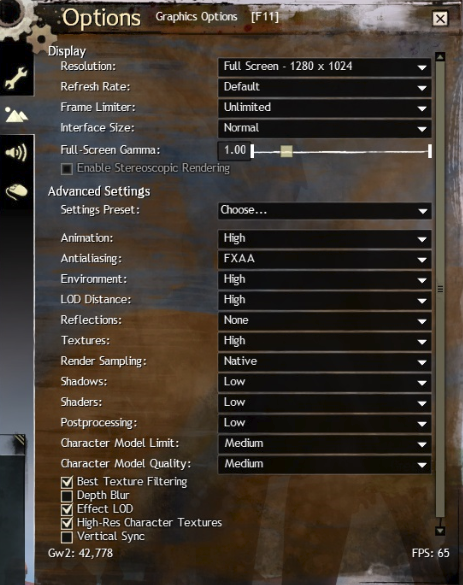
my fps kinda jumps around anywhere from 62 to 112 fps and i am using Nvidia Geforce Experience set to optimal settings only thing thats not optimized is my screen resolution i use 1280×1024....That screen shot was taken while i was in Divinity’s Reach
Windows 7 64bit
Asrock 970 Extreme 4 Motherboard
Amd FX 6350
8gb ram Corsair Vengence 1600 mhz
Evga Geforce gtx 750 ti ftw w/acx cooler 2GB card
Power Supply Thermaltake TR2 600W Bronze
try opening command prompt and type ipconfig /flushdns with your windows firewall off then if it downloads any updates then after it patches re-enable windows firewall
in Account & Technical Support
Posted by: KogaPhantom.1846
Is this for those of y’all experiencing “connection errors detected” when you’re trying to start up the game? Because that’s what I’m currently having issues with and restarting my computer did nothing.
yes if your downloading the new patches and keep getting low download speeds and then it hangs there for a few mins to secs then this helped some player some are still reporting it doesnt work….
have to disable windows firewall under control panel then also open command prompt and type in ipconfig /flushdns after the should say it was successfully flushed then open your guild wars launcher and it should downloader much faster and actually patch then after its done can re-enable your windows firewall
anyone here tried clearing their dns cache open command prompt and type ipconfig /flushdns and hit enter works for those having issues with downloading the patch they posted today also disabling the windows firewall and then re-enabling it after you get the updates
i havent done the flushdns and i dont use windows firewall, or any firewall for that matter.
also if you used that reddit fix i suggest removing that from that host file
anyone here tried clearing their dns cache open command prompt and type ipconfig /flushdns and hit enter works for those having issues with downloading the patch they posted today also disabling the windows firewall and then re-enabling it after you get the updates
I am in Divinity’s Reach right now ingame as Hel Rising my level 18 Guardian
in Account & Technical Support
Posted by: KogaPhantom.1846
i wanna say the file was something around 22 or 33 mb didnt really watch it to much once it started i got on here and was posting what i did to get it to work
1.) if you ever used that fix from reddit before
Run As Admin Notepad
Open that File
Remove 74.35.56.164 assetcdn.101.arenanetworks.com
Save
It must not prompt you to save as a new file2.) press windows key +R
type cmd
type ipconfig/flushdns3.)Turn off windows firewall
4.) Launch gw2 launcher
5.) Hope it works for you, worked for me.
Thanks To Koga Phantom!
Your very welcome and would suggest to turn off windows firewall along with your antivirus firewall for future until a workaround can be made but after your patched and all the downloads are done you can re-enable those firewalls
in Account & Technical Support
Posted by: KogaPhantom.1846
have you ever used TeamViewer before i could try and get it working for you if you want just would have to download it if you dont already have it
in Account & Technical Support
Posted by: KogaPhantom.1846
easiest way i found out to get it back to normal is copy that file to someplace else then open it there and remove 174.35.56.164 assetcdn.101.arenanetworks.com from that host file then where it says file click that and choose save not save as… then copy that and past it back to the driver/etc folder and replace it with that when it comes up to overwrite
in Account & Technical Support
Posted by: KogaPhantom.1846
remove this from that host file 174.35.56.164 assetcdn.101.arenanetworks.com
in Account & Technical Support
Posted by: KogaPhantom.1846
try going back to this step
The Fix:
Edit C:\Windows\System32\Drivers\etc\hosts using notepad (run as administrator)
Add this line at the bottom: 174.35.56.164 assetcdn.101.arenanetworks.com
and remove that address and then open command prompt and do ipconfig /flushdns
then close it then disable your windows firewall and if you have a antivirus firewall running to try disabling it then once if it works then you can turn them back on after its done downloading and patching
in Account & Technical Support
Posted by: KogaPhantom.1846
i tried that manual fix just before but it didnt work so i removed it then i went into control panel and disabled my firewall and the one below it and it didnt have a problem after that downloaded around 950 kb/sec and i am in game right now can turn firewall back on after the downloading and patching phase is done and then log into the game
in Account & Technical Support
Posted by: KogaPhantom.1846
you can turn them both back on after it’s done downloading and patched for future updates i just suggest do that every time they release a update until someone finds a better workaround
in Account & Technical Support
Posted by: KogaPhantom.1846
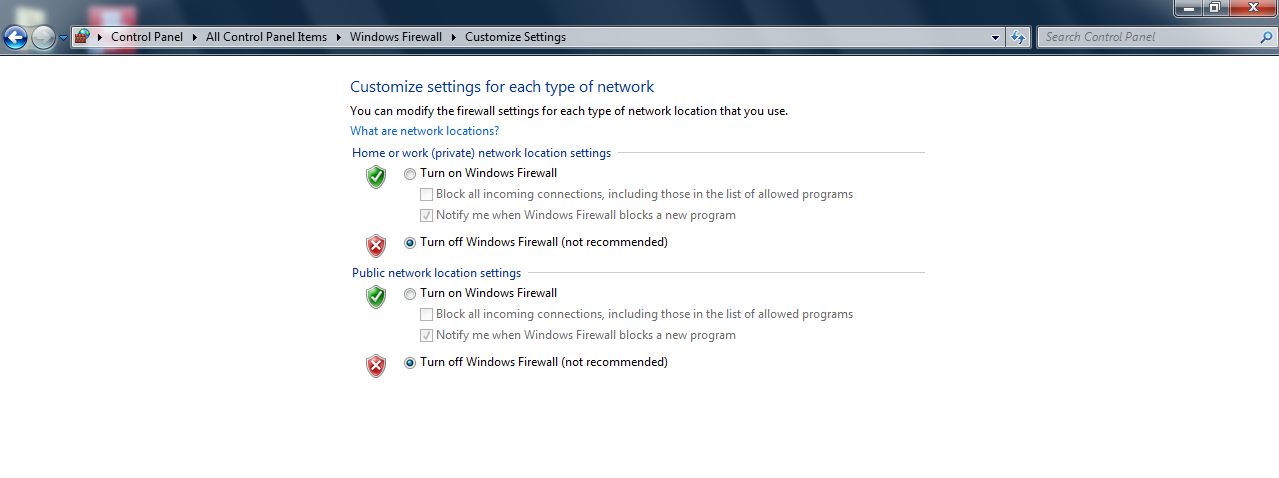
Here all i did was disable windows firewall and it worked like a charm

in Account & Technical Support
Posted by: KogaPhantom.1846
this is what i turned off
in Account & Technical Support
Posted by: KogaPhantom.1846
if your using windows 7 x64 bit i just turned off windows firewall to see if that would work and it did downloaded very fast and is in the patch phase right now
in Account & Technical Support
Posted by: KogaPhantom.1846
yea i am having the same issues it downloads around 20 kb/s when my actually download package is 45mbps down 6mb upload but it downloads around that 20 kb/s then stops at 0 kb/s then i get connection error(s) detected Retrying… but it just stays there
Not affiliated with ArenaNet or NCSOFT. No support is provided.
All assets, page layout, visual style belong to ArenaNet and are used solely to replicate the original design and preserve the original look and feel.
Contact /u/e-scrape-artist on reddit if you encounter a bug.