Showing Posts For Mazzacre.8509:
Still waiting to hear back about this issue.
Hello devs any suggestions or a fix it’s been months………….
Odesseus, there is not a GW2 folder or a GW2 application running on my computer because it will not download. I looked in preferences and there is nothing there pertaining to GW2. I also ran a search on my computer just in case there were hidden lingering files and I came up with 0 results. Also I tried closing Safari and that didn’t help either. I still get the above screenshot ankitten ot able to download the game.
Ok so just tried to mess around with the terminal code to see if I could get it to install and I ran into this:
/Applications/Guild\ Wars\ 2\ Installer.app/Contents/MacOS/tgInstall —use-dos-cwd C:Gw2 — C:\\GW2\\GW2.exe -repair
tgInstall[969:41069] Could not find image named ‘logo’.
Any ideas?? Still seeing this when trying to download:
Attachments:
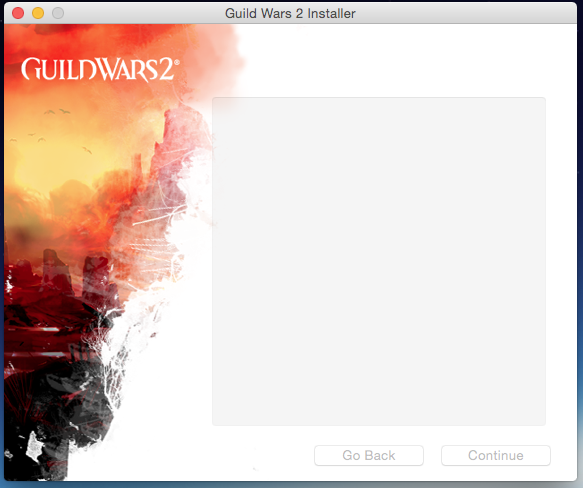
Still no fix?? I tried the above and copied and pasted: /Applications/Guild\ Wars\ 2.app/Contents/MacOS/cider —use-dos-cwd C:Gw2 — C:\\GW2\\GW2.exe -repair
Into terminal and it states: -bash: /Applications/Guild Wars 2.app/Contents/MacOS/cider: No such file or directory
When I go to install it doesn’t give me the option to continue with the installation it just opens up to the Guild Wars 2 Installer with nothing to select to begin the process. The continue button is grayed out. Can a dev or someone fix this, it’s been months and I haven’t played at all because of this issue.
I deleted the file and am trying to reinstall. It still doesn’t give me the option to click continue to instal the game. Had to actually download that game on the windows side since the MAC client is a fail. Any fix to this yet?? I honestly hate having to boot up windows side to play so much that I haven’t played in about 2 weeks…….
Same issue here. Just sits on the installer screen and will not allow me to select continue to begin installation at all. Running OS X Yosemite 10.10.2