Showing Posts For Taven.5402:
This map is a fun map..but not very competitive. I say removing from soloQ’s and tournaments.
I saw someone say that using the “dye remover” on the armor, then closing the hero panel to ale it save. Then re-opening the panel and try to re-dye the piece works.
Hope that actually helps. Good luck!
Thanks buddy, that helped!
Ever since I transmuted some barbaric armor over my lower lvl gear, suddenly ALL of my armor refuses to be dyed at all. It will change color on the dye screen, but when I close all of that, the dyed armor is not changed. What’s happening? ><
I entirely agree with this as well. I made an account back last Christmas thinking that the display name would be the name DISPLAYED on my first character. My mistake..xD
Yeah, I’m tired of this as well! It does not always tell you the right ip(it rarely does) that your getting in the email, but you HAVE to allow it to play. I’m tired of it, and it its faulty, and it needs to be removed until it is right. I understand the need to protect us, but this is ridiculous….either get rid of it, or give us a option to stop it because I believe 100% of the people who get this NEVER turned it on in their account settings.
I agree wholeheartedly with this. I may have not yet finished the game but making this game world more ‘alive’ will definitely do it some more good. Like with a thread I started a while ago about how emotes could interact with other players. Not the ones where you /point @-target- to get it to direct the emote at the person, more like a hug between two players that is actually animated.
Yeah..there should be a option to snore if you wish, like /snore to turn it off and on.
I am so behind this idea..it would be awesome if this was implemented.
I’ve made an interesting discovery…I still have the fuzzy graphics issue, BUT, I’ve learned that if I have GW2 playing, and I make as if I’m to switch users on my computer (Not characters or accounts) with GW2 still on, and instead open up the same user, when I click the still-running GW2 program, the graphics seems to have corrected itself…but unfortunately, this is not permanent. If I meet a loading screen, it will ‘auto alt-tab’ me out, and I’ll have to click the still running GW2 again to continue playing…but the fuzzy graphics issue resurfaces. The same thing happens if I alt-tab myself out, then back in. Can any of you tell me what’s going on, and if this means anything?
Attachments:
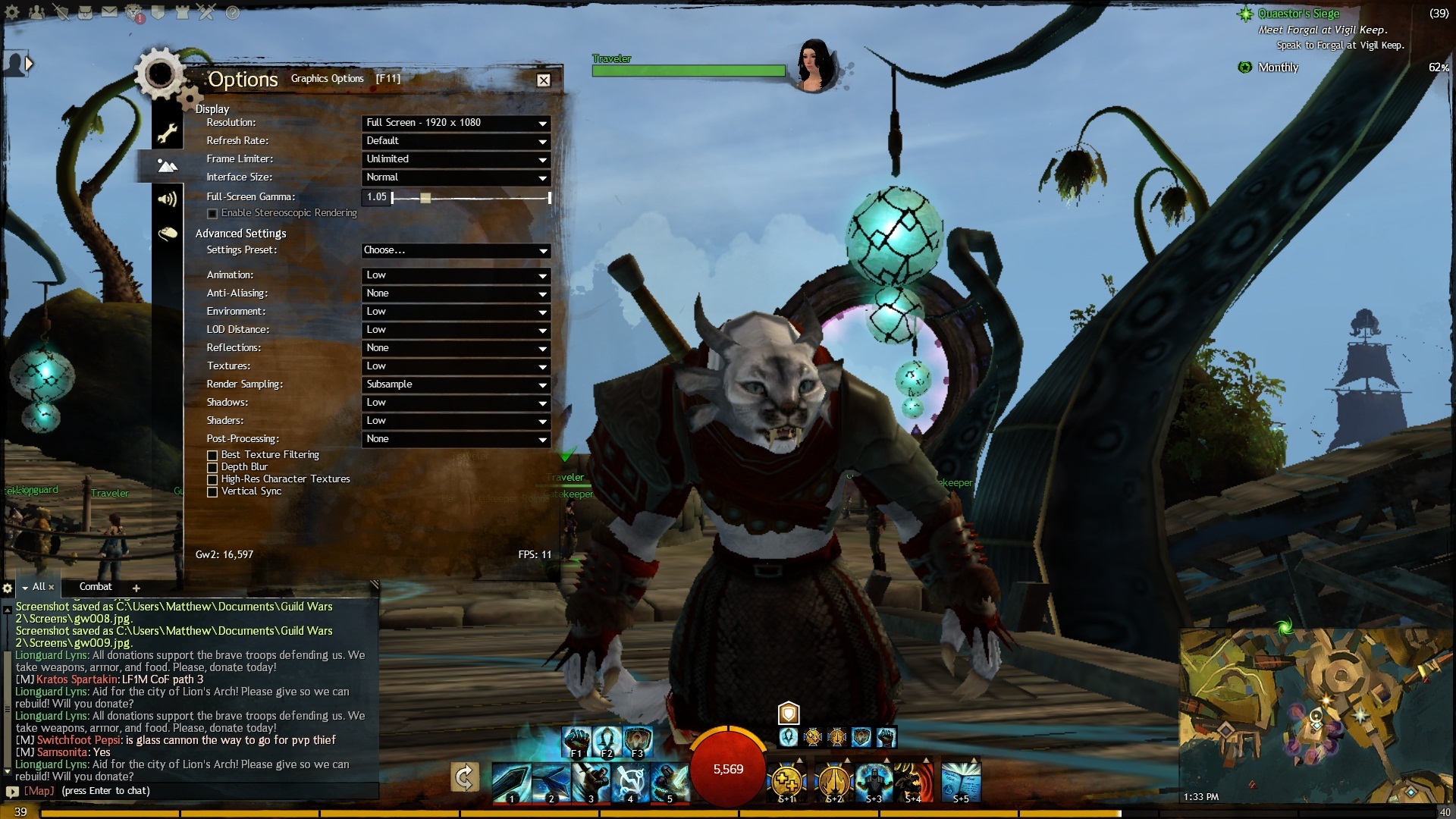
Hi Taven thanks for the screenshots and the DxDiag! It looks like you’ve got some of your settings turned down incredibly low which would distort the image somewhat, and I apologize if I had misread your issue.
I would definitely recommend creating a support ticket so that we can assist you one on one because there’s a bit more info we may need to request from you that I’m not sure you’d want to have to keep posting to the thread. This could potentially involve just some settings in your Catalyst Control Center.
As for the upgrades, 8 GB of RAM should be plenty, although you may want to consider upgrading your card if you’re looking for a performance boost. Guild Wars 2 is very CPU heavy, though upgrading your graphics card wouldn’t hurt either.
With AMD cards, you can look at it like this: the first digit is the generation, the second is the series, and the last two say the model. Examples:
4xxx, 5xxx, 6xxx, 7xxx are the generations, the higher the number the newer it is. Not necesary the most powerful but more efficient.
x9xx – The most powerful series.
x8xx – Mid-High-end tier series.
x7xx – Low-Medium-end tier series.
x6xx – Low-end tier series.So that should give you some idea of what you’re getting when looking at cards. Tom’s Hardware actually has a pretty helpful graphics card hierarchy chart which gives you a nice breakdown of most AMD and Nvidia cards.
If you have any other questions just let me know.
Phew, yesterday I wasn’t able to respond because of a forum glitch..but now I can. Thank you for the response, as you’ve answered my question about if I need to upgrade, but not about my blurry graphics problem..you see, long before this issue arose, the graphics were MUCH better than this, even though I had it set on rather low settings. 3 or so days ago, this problem showed up after I logged out, then logged back in..can you tell me what’s going on, and if there’s something that can be done on my side? And…how do I start a ticket? I might be missing it on the site. xD
Phew..glad you guys responded! Here’s my info, thanks! Btw, looking at my specs would 4 more Gs of ram allow me to play with a bit less lag, and/or do I need a better graphics card?
Attachments:

(edited by Taven.5402)
I am having the exact same problem with the blurry graphics, this started 4 or 5 days ago at least . I also have an AMD card that is fairly new. I have tried everything mentioned above with no success. There are two or three other people on the forums who also seem to be having this issue, but as of now they have not found a solution either. I am not sure what to try next. As the quaggans say, foo.

Yeah, it happened to me just yesterday..and quickly too! I logged out once to take care of some business, then logged back in and BAM! There it was…at least is good to know I’m not alone…but will ANET fix it? I’ve seen on the other forums that even people with high-end comps have issues (not exactly like ours) that have gone unresolved for MONTHS…and are STILL unresolved. With no working fix to this, it doesn’t make me feel very hopeful…
Aww..come on guys, don’t tell me you’re stumped now. ><
Ay yi…I have tried everything you guys have told me, I’ve tried the -repair fix, changing the res rendering, updating the drivers, STILL NO DICE! I’ve noticed that the issue is only coming up with THIS GAME…so it’s got to be something on my, or ANET’s end that’s causing this. Btw, as I said before, changing any of the other settings only makes the textures ‘shiny’ not how they were before…
That looks more like you’ve set the Rendering to Subsample. Maybe that’s the issue? Switch it to Native.
I mean what I said, I put it on native and it got worse. ><
How does one go about resetting to default settings or repairing the client after deleting the local.dat file? I assume the GW2.exe is the shortcut to the launcher, however I do not see an option to repair
to repair or verify your installation without downloading everything again, edit your shortcut to the game, eg. C:\Games\GW2\GW2.exe, and add the command line -repair or -verify at the end. Use a space as it is needed to recognize the command. If your shortcut looks like this “C:\Games\GW2\GW2.exe” just type the commands outside the last character, with a space again.
Final result should be like this: C:\Games\GW2\GW2.exe -repair
or like this:
C:\Games\GW2\GW2.exe -verify
“C:\Games\GW2\GW2.exe” -repair
“C:\Games\GW2\GW2.exe” -verifyThis will check all the files and download any corrupted or broken files.
How exactly do I do this in windows 7? I tried the render sampling thing already, it only makes things more choppy, hopefully this repair thing should help. IMO, an option to repair a game should be mandatory, I don’t know why ANET never thought of it.
AMD bought ATI, so they are the same thing. Look at your Catalyst control panel for settings.
Try reinstalling the drivers from amd.com
I reinstalled the drivers, still no dice. And when I look for the catalyst thing, I have a engine control center, is that the same thing? I’ve looked in it and I really don’t know what I’m doing.
- delete your local.dat file to reset back to default settings.
- check your intel/ati/nvidia profile settings
Found the local.dat file, but it has done nothing deleting it, AND I have AMD…how do I check for that? Do note that it suddenly changed to this after I logged on later today, with NO input from me. I’ve checked for viruses already.
(edited by Taven.5402)
I noticed how even if I’d have the graphics on low, everything STILL looked good. But I’ve noticed just recently, everything suddenly seems to have N64 graphics! My computer seems to just barely meet the requirements to play, and I liked how beautiful it was before. While this does increase the FPS… just looking at the world now makes my skin crawl! Any help? BTW..it appears changing the graphics options do NOTHING now, but make everything appear shiny instead of better.
Attachments:

I love this idea, being able to duel with anyone would be awesome, and we’d need a option to block the duel invites as well.. ALSO, if this is put in the game, we’d also need an option to fight to down or to the defeat.(Seeing as you don’t really die when ‘defeated’ in this game. xD)
we only need easy fix see dmg when we hit thief in stealth so how can fight vs anybody if i dont see hits in every mmo when get dmg in stealth you get revelated or they see dmg on you
sigh Simple. If you immobilize a thief and they go stealth they are STILL THERE. Stealth doesn’t clear immobilize, so keep attacking that spot. Throw some CC too. I’ve always laughed when they go stealth and suddenly appeared again but were downed when they did reappear. If that’s STILL not enough for you, use your chain skill.(Press 1) If you start to chain when you swing, you’ve hit the stealthed thief, so keep swinging and/or start hitting them harder.
i still fail to see a charr hug an asura even while kneeling without crushing their arm alone is as long as an asura is high almost, and kneeling to do a highfive… kinda kills the point… xD
There is a think called being gentle you know? xD And what’s so hard to see about it? A charr kneeling, or sitting, to hug an asura, same so with a highfive maybe. It’d probably be funny for a taller race to tease an asura for a highfive…then they suddenly jump up with rocket boots or something. Use your imagination.
This would be an AWESOME idea. I’m behind it 100%!
Yeah, I agree. That would be pretty awesome. Imagine how sweet a /highfive would be!
again asura and norn highfive’ing? either the asura would ahve to jump insanely high (and they almost look like they stumble already every time the jump) or the norn would have to bow down, which kinda ruins the whole “high” part of it
With the massive height sizes between character races I just fail to see how this would work and look properly
It’s simple really, All you have to do is if a bigger race is about to preform a conjoined emote like that, is to have the bigger participant kneel enough so the emote to be preformed. Imagine a charr kneeling to hug an asura, that’s heartwarming to me.
Simple system that was used by The Matrix Online, If someone wanted to perform a conjoined emote, they would target the character and type the emote. A confirmation box would popup on the other players screen and if accepted and within range, the emote would fire.
You’ve got the right idea on that. A confirmation box would be perfect for conjoined emotes, and an option to block out those types of emotes if you wished. Let’s keep this post alive guys. I’d love to see something like this implemented in the game.
Yeah, lets not get TOO intimate here. xD /kiss or /lick could possibly cause people to rage-faec and bawl all over Anet for even thinking of it. But I think a /carry emote would be nice. Norn could practically carry almost all of the races on their shoulders. And if people could coordinate to make emotes like this look bad, I don’t think Anet should get slammed for it. In fact, there should probably be some kind of system or report function that right away punishes people for doing that.
And no I am not talking about timing your dance with someone else, I mean emotes that put both characters in a short, or ongoing state. For example, if we added /hug as an emote, with confirmation from both characters, you’d actually see both characters hugging on the screen, not just ‘player1 hugs player2’ on the chat bar. I can understand that this might take time to implement, and may cause problems, but if this idea were taken, and expanded, it would be AWESOME for RP, and maybe screenshots as well.
It’s rather inconsistent, but as I play GW2 at random it would snap to desktop, as if I alt+tabbed to the desktop on it’s own. GW2 doesn’t crash, but when this happens, its rather annoying…any help on getting rid of this issue?