Showing Posts For Xellahmai.4350:
Guild Wars runs very poorly on the new macbook pro retina
in Account & Technical Support
Posted by: Xellahmai.4350
I hope you are not running it at native resolution… Maximum what 650M is capable of while still retaining reasonable performance is 1920×1200 (which is far from 5.1m pixels
)
I can get over 35fps in that other MMO at native retina resolution with all settings on high and antialiasing disabled. You’ll never get that type of performance with GW2 (with a 650M at 2880×1800) of course since it actually has a nice looking and modern graphics engine unlike that other MMO.
Anyways, I originally came on here to mention to ANet that you might want to update the SMC sticky to indicate that this issue can occur at any time and that a SMC reset will be needed every time it happens until Apple fixes the underlying issue.
Guild Wars runs very poorly on the new macbook pro retina
in Account & Technical Support
Posted by: Xellahmai.4350
Also if you hit this low FPS issue on your rMBP any time after performing the EFI update that accompanied 10.8.2, it’s not you; it’s the SMC. The same issue occurs with significant framerate loss in that MMO that shall not be named. It’s happened to me several times already and a quick shutdown/reset SMC/reboot has fixed it every time.
Instructions here: http://support.apple.com/kb/HT3964
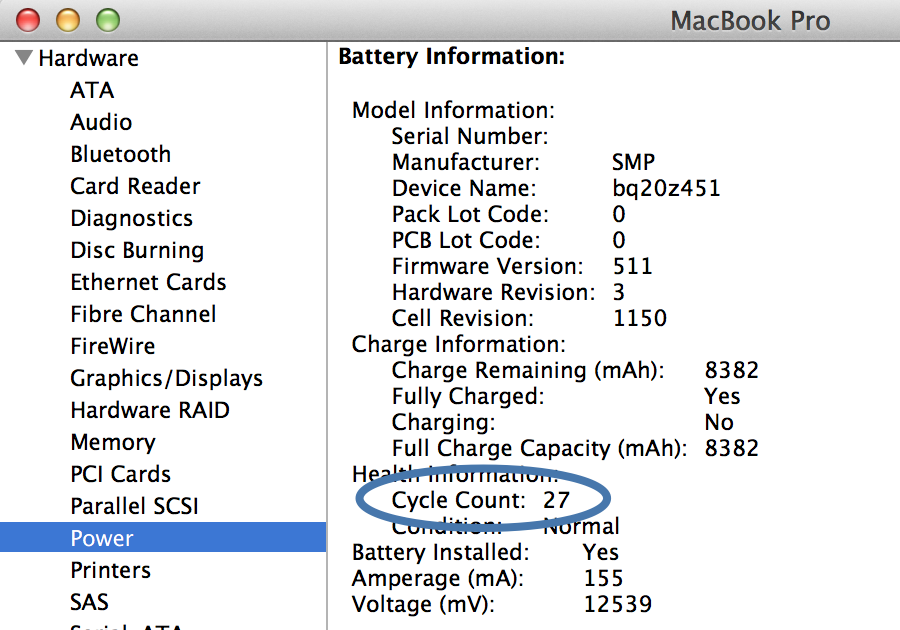
I had a lot of issues with the supplementary power (drain) mode on my early-2011 MBP 17", mostly when running two instances of the-MMO-that-shall-not-be-named and with a high battery cycle count. It might be worth taking a look at the health of your battery under About This Mac->More Info->System Report (see attached screenshot) to check if your battery is in good shape or not.
If you’re using an appropriate framerate cap then it shouldn’t be draining if you’re only running one 3D game under Mac OS X. Also check to make sure you don’t have flash animation crap (ads, etc.) running in a web browser in the background – that uses the GPU too and sucks power.
Attachments:
Is this true? We paid the same price as windows users did, so I expect the same support and updates that windows users get. Else I’m getting the feeling A-net just wants our money and doesn’t care about our concerns.
I wasn’t aware that Guild Wars 2 was being actively sold as a Mac product yet. I purchased a great Windows game that just happens to now offer beta access to a Mac port at no additional cost. I don’t expect anything at this point since I paid nothing for this beta product and no one is forcing me to use it.
I’m pleasantly surprised that the beta works pretty darn well, even with the FPS drop and low fidelity audio on my nvidia-based rMBP.
I’ve noticed a couple of missing VO sentences a few times recently on my female asura but didn’t think to grab screenshots as it happened.
Thank you ccrazool – I had no idea about being able to use 3 fingers for mouse turning on my trackpad. FREAKING AWESOME! Oh and tap to click does not need to be enabled for “mouse” turning to work, yay!
On my MBPr (10.8.2) the audio quality is so bad that I prefer not to run the game with headphones on when playing in Mac OS X. The audio output is awesome under Windows (bootcamp).
I’ve done some audio work and have fairly good hearing. The master audio sure as heck sounds like it’s being down sampled to 22Khz (as the OP indicated).
EDIT: I tried all positions on the “Sound Quality” slider but did not hear any change at all. I even tried exiting and relaunching after changing to “fastest” as SOLIDage suggested but noticed no difference.
(edited by Xellahmai.4350)