Showing Posts For aesu.6145:
I am playing gw2 from vpn because I work and live in China (I am European).
I would really like to buy some gems but both my UK paypal and visa are rejected with errors when I finalise the payment. This is driving me borderline crazy… I am such a big fan of the game and would like to buy gems and add some nice things to my account but I cannot…
I am using strongvpn and my connection shows me being located in San Francisco… is that why I cannot pay and it returns errors?
Same here…
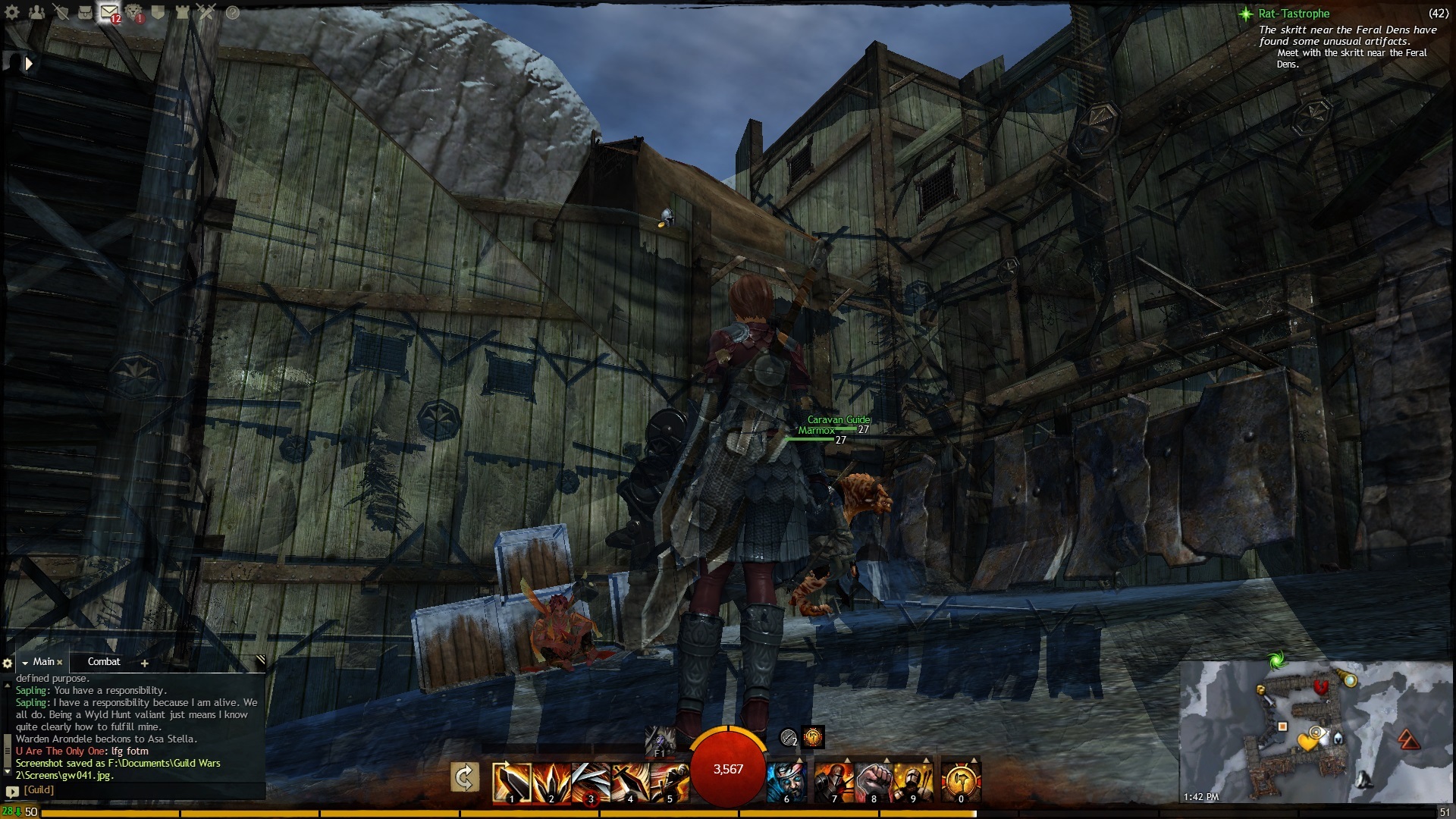
Can’t remember where this exactly was but it happens nearly everywhere now… depending on which angle my camera is @.
Attachments:

As you can see in attachment… for some reason the textures become semi transparent or whatever it is in different camera angles.
How can I fix it?
I am using Dell XPS 15 with NVidia 540m GT
Attachments:
So I finally found out what the issue was.
I enabled visualization of what was using my NVidia GPU and noticed a process called igfxupdate.exe using GPU but not show up on task manager. Strangely enough igfxupdate.exe is supposed to be the updater for my intel graphics card so it should not be using GPU at all.
I found this:
http://sys7em.com/MyDiary/151-Remove-nasty-igfxupdateexe-virus-from-your-windows-7
or if you like official MS websites more… here:
http://answers.microsoft.com/en-us/windows/forum/windows_7-security/igfxupdateexe-forces-cpu-to-load-100/5936cbd2-a758-4a27-946f-0bac401d56f3
“Hi, after several hours of attemps I think I finally found the offender:
much probably a Trojan Generic KDV 792778, it pretends to be the windows service “Search Indexer” and it creates the fake executable: “igfxupdate.exe” which tries to connect in internet and rises the cpu load all the time till you open the task manager to hide itself..
So I solved the problem like this:
in the windows services management console I disabled the above fake windows service (it was in automatic start mode) and after I deleted the igfxupdate.exe file that was in the windows system32 folder..
I rebooted the pc and I deleted the same service with the command: “sc delete SearchIndexer”..
problem solved! cpu back to normal level, not more unwanted connections and not more igfxupdate files around.
anyway for more safety it’s better to do also a complete scan with a good antivirus/malware software"
Well for me it certainly solved my issue, now GW2 is running fluently again!
Don’t mess with coreparking by messing with the registry. Go here for a better option!
What can you do by installing this program? Seems like some sort of process explorer…
Here are some forum links that further support that it is not due to Windows 8 (at the time of writing not even released).
https://forum-en.gw2archive.eu/forum/support/tech/Random-freezes
https://forum-en.gw2archive.eu/forum/support/tech/Friend-s-comp-BSOD-restarts-GW2-only/first#post1086891
https://forum-en.gw2archive.eu/forum/support/tech/How-is-this-game-so-demanding
https://forum-en.gw2archive.eu/forum/support/tech/Random-intermittent-lag-spikes/first#post1090131
https://forum-en.gw2archive.eu/forum/support/tech/Random-freezes/first#post1089886
31 pages here…
https://forum-en.gw2archive.eu/forum/support/tech/Low-FPS-merged/page/31#post1087018
I can go on if I decide to go to page 2 of the tech forums but in all seriousness… Why is there no response from GW2 team on this issue and why does it take so darn long (since beta this is happening) to acknowledge and patch this. What is the point of adding content and organizing events if half of the people cannot even properly run the game.
No it is not Windows 8, all my drivers are very up to date and it doesnt happen in any other graphic intensive game.
Before winters day I could play this game semi properly (hardly no BSOD). GW2 graphics engine is a total mess. If you read around the tech forums there are actually many people with exactly the same problem. If I was the only one I would rest my case, but there are many just like me. No matter what graphic settings I use, my FPS is terrible and I have game freezes every 10-20 seconds.
A decent game developer such as ANet should really be able to do better as this. I am seriously disappointed… GW had a lot less bugs and issues compared to GW2.
Hey I also have this issue combined with some BSOD and card resets. It seems graphics went really bad since winters day.
O well never mind just had another blue screen DPC_watchdog_violation… I give up on trying to “fix” this game until a fix comes from GW team that allows for people with a less than godly system to play this game…
No well honestly I do not believe that is the problem actually.
The graphics engine used for GW2 is below par, that is basically it.
“Try using Nvidia drivers 306.97… the 310.XX drivers have known issues with GW2. "
What issues do the 310 ones have? Stability issues or just some graphic glitches? I don’t want to roll back just to end up with blue screens again.
Ah I fixed it, no really it is just bad GPU usage… I know it is very CPU intensive but then again if my i7 cannot run it that would be outrageous. I under clocked my GPU with MSI afterburner from 671 to 600 Mhz on core clock and it all runs just fine now.
Please developers… please fix this issue… I played beta pre-order and had this issue there too.
Attachments:

(edited by aesu.6145)
The min system requirements for GW2 are
Windows® XP Service Pack 2 or better
Intel® Core 2 Duo 2.0 GHz, Core i3 OR AMD Athlon 64 X2, or better
2 GB RAM
NVIDIA® GeForce® 7800, ATI X1800, Intel HD 3000, or better (256 MB of video RAM and shader model 3.0 or better)
My laptop is fairly decent (I never mentioned it is high end) and the system is miles over the minimum system requirements. As I said I run FarCry 3 and BlackOps2 fluently, GW2 doesn’t look any better as FarCry 3 to me… honestly its a step back so why does it run so cranky?
My suspicion is that GW2 is really not optimized for medium systems to lower end, it’d be a great start if GW2 would allow users to choose between DirectX9 and 11 and add more graphic options.
Nothing hogs the CPU by the way… GW2 uses 5 to 50% of it just at the login screen already, in game it reduces to around 7 to 15% stable.
First of all I am running a fairly decent setup so that is not to blame.
Windows 8 (64 bit of course)
i7-2720QM
8Gb Ram
Nvidia 540m GT (2gb ram)
750 Gb hard drive @ 7200 RPM
A full option Dell XPS15 laptop from 2011.
I have been having many GPU crashes with the game client…
1. DCP Watchdog Violation
2. Kernel stopped working
3. Full computer reset without any reason (which I recon is CPU crash)
Also…
I clean my vents @ regular times with compressed air, the game runs at about 76 degrees C so the heat isn’t the issue.
I am using Nvidia Driver 310.70 (the latest one)
I have followed the Nvidia steps as described here: https://forum-en.gw2archive.eu/forum/support/tech/FPS-GPU-CPU-Performance-issues-FAQ/first#post695749
Right now I have the issue that while the graphics card clearly can handle the game, I get those very strange lag spikes where FPS drops to 1 and then goes back normal. This happens every ~ 20 seconds for about 10 seconds.
I can fix this by setting the game to CPU priority HIGH instead of normal (using Windows task manager).
However I am looking forward to a more… permanent fix.
This is the first and only game that has been making so much trouble on my pc! I figured my graphics card was broken or a driver issue… but I run Far Cry 3 without any hiccups and Black Ops 2 too. I really hope GW2 can get some decent optimization upgrades really soon because it is cumbersome to “fix” all those settings before I can enjoy the game.