Showing Posts For noWays.1487:
These print screens, above, i’ve made them while running gw2.
And how can i resolve that ?
1920×1080 is my resolution
Your previous screenshot shows in-game resolution of 1680×1050.
Playing in a non-native resolution can lower performance. Flip it to 1080 and see how it goes.
I’ve played on 1080 res untill last night, but the difference now is clear. On 1080 i have 20 fps on low, but now, on this res i have 20+ fps on High.
OP,
The screenshot you’ve attached that shows the sensor tab shows idle clocks. Maybe this is the reason for your low fps.
What do you mean ? Can you explain for a noob ? Please
After i’ve done that, i feel a little better, especially after i moved on high, but still pretty bad fps. Here is a screenshot.
Attachments:

1920×1080 is my resolution
When i’m playing with everything on low, i have like 20 fps while i’m fighting against 2, 3 mobs, ins’t normaly.
I bought this PC 3 months ago, especially to play this game on high or atleast without frames and now is worse than my old PC, which was way under this one
(edited by noWays.1487)
Second one on high settings
Attachments:

Here it is first one on high settings
Attachments:
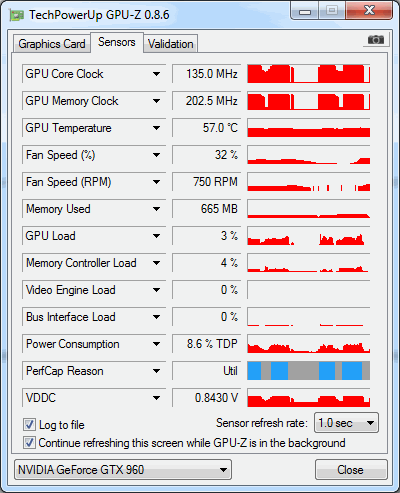
Hi guys, i don’t know what to do, even if i tried few options, still got very low fps on low details. I’ve played AC Syndicate on ultra without problems, Tomb Raider, Witcher 3, etc. On this game, same as LoL, i have problem with fps, frames and very annoying moments, unfortuanlly.
My system is:
Ndvidia GTX 960, 4 GB Ram
AMD FX-8350 4.0 GHz 8-core
8 GB Rams
Windows 7 ultimate 64