(edited by raprap.6901)
Showing Posts For raprap.6901:
I don’t know if it’s just Telia, but ever since I started playing this game (which is around August of this year), I haven’t experienced any major spikes or lag issues. Not until the Halloween patch came out. I tried the -diag parameter on Gw2.exe and it yielded some very disheartening results:
Hop RTT Lost/Sent = Pct Lost/Sent = Pct Address
0 shadowpotato [——-]
0/ 50 = 0% |
1 0ms 0/ 50 = 0% 0/ 50 = 0% router.asus.com
3/ 50 = 6% |
2 32ms 4/ 50 = 8% 1/ 50 = 2% dsl.——-.pldt.net
0/ 50 = 0% |
3 37ms 5/ 50 = 10% 2/ 50 = 4% —-—.pldt.net
0/ 50 = 0% |
4 31ms 5/ 50 = 10% 2/ 50 = 4% —-—.static.pldt.net
0/ 50 = 0% |
5 33ms 3/ 50 = 6% 0/ 50 = 0% —-—.static.pldt.net
20/ 50 = 40% |
6 177ms 23/ 50 = 46% 0/ 50 = 0% las-b3-link.telia.net [62.115.148.164]
4/ 50 = 8% |
7 280ms 27/ 50 = 54% 0/ 50 = 0% nyk-bb2-link.telia.net [62.115.116.95]
16/ 50 = 32% |
8 349ms 43/ 50 = 86% 0/ 50 = 0% kbn-bb4-link.telia.net [62.115.141.106]
1/ 50 = 2% |
9 357ms 46/ 50 = 92% 2/ 50 = 4% ffm-b1-link.telia.net [62.115.121.3]
0/ 50 = 0% |
10 357ms 44/ 50 = 88% 0/ 50 = 0% ffm-bb3-link.telia.net [80.91.248.85]
1/ 50 = 2% |
11 —- 50/ 50 =100% 5/ 50 = 10% 206-127-157-86.ncsoft.com [206.127.157.86]
0/ 50 = 0% |
12 377ms 49/ 50 = 98% 4/ 50 = 8% ncsoft-ic-306349-ffm-b11.c.telia.net [62.115.43.74]
0/ 50 = 0% |
13 364ms 45/ 50 = 90% 0/ 50 = 0% 206-127-158-1.ncsoft.com [206.127.158.1]
I thought maybe it would go away soon but I logged in to the game, every map that’s populated, I get spikes of up to 3k ping. Reminds me as to why I tried staying out of online games for a while.
As for now, I guess my lag-free bliss comes to an end today. I’ll check back and see if it recovers but I’m not too hopeful.
(edited by raprap.6901)
Not sure if this is happening to other players as well, but after the game patched 9/23, whenever I swap weapons, my FPS drops to less than 10FPS for a few seconds. I can constantly run 60 FPS (capped at 50FPS when I’m on battery) unless it’s a world boss if I don’t do weapon swaps. Haven’t changed any settings after the patch.
My specs:
- i7 6700HQ
- 16GB DDR3L RAM
- GTX 960M 4GB
- 250GB SSD
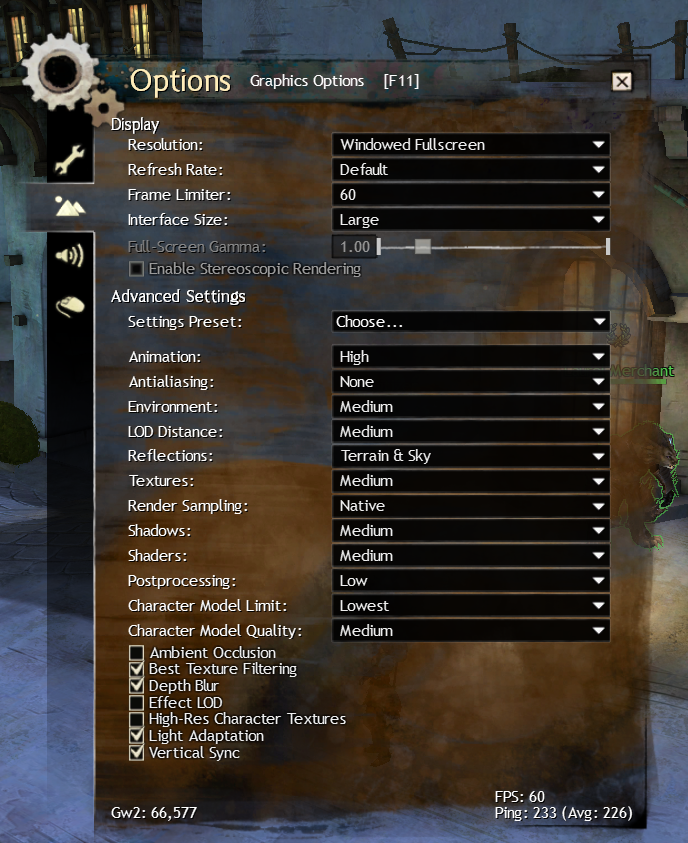
Attached is my current graphic settings. Any help would really be nice. The FPS drop is annoying especially if I try to PvP. Thank you!
EDIT:
After searching around, I found the option to repair the client and I did just that. It somehow improved the FPS issues when weapon swapping, but still drops from 60 to 20FPS instead of 10FPS. My brother tried weapon swapping on his desktop which has lower specs (Pentium G3258 3.2GHz, 8GB DDR3 RAM, Radeon R7 250, 500GB HDD), and he can almost spam it without noticeable drops. Not sure what else to do here anymore.
Attachments:

(edited by raprap.6901)
I have the same laptop. I get a constant stream of 60 FPS with these settings. I’m not too much of a fan of Anti-Aliasing but if you need that, go get FXAA. I tried running with FXAA and still is good for me. For Character Model Limit and Quality you can definitely set this to Medium or High. I just like setting it to Lowest since I usually run events with a lot of people and I prefer FPS over quality on that part. This laptop can handle a lot, but the thing is, I don’t want to force it to run fully loaded all the time.
One thing to note is disable the auto-optimization by GeForce experience. It messes up your settings a lot when you play unplugged every now and then. Another thing is Dell’s SupportAssist. Make sure that you’re not playing during its scheduled maintenance or your FPS will drop to 20s while it does it’s thing. Personally, I’ve set it to manual and just run it once every 2 weeks.