Brand new PC and game crashes all the time!
in Account & Technical Support
Posted by: seekerking.2875
in Account & Technical Support
Posted by: seekerking.2875
Why are the logs dated January 27 , 2013 to March 17, 2013?
Are these even up to date, or have you been screwing with the machine’s time? The OP was 23 days ago aka February, so chances are, you’re posting the wrong logs.
Genius.
Sounds like a psu failure.
If this happens when you run GW2 first thing as you start your computer, it is probable that your PSU is drawing power for GW2. Since it’s the first thing you did it demonstrates that a rise in temperature is not an issue since it has not been running; you can rule out overheating.
Replace PSU with something more powerful. Worse comes to worse, you continue to try and play GW2 and it blows a capacitor (did this trying to play Crysis on an old machine). You know that this is the culprit when your computer fails to boot/start up. The smell of burning plastic and a melted capacitor is evidence of this.
I have never played a MMO before that had such a vast amount of worthless loot, time vs reward is a total joke in this game.
http://wiki.guildwars2.com/wiki/Glob_of_Globby_Goo
http://wiki.guildwars2.com/wiki/Glob_of_Globby_Gloop
What could you possibly be referring to!?
I think they should keep it as it is now.
My only issue is that if the party leader dc’s, and after 10 minutes gets autokicked, the whole instance and party gets booted out, losing all progress. This is brutal for people who slave in pugs for fractals and other long dungeon runs. It’s just that stuff happens; power failures, technical failures, emergencies, etc.
also when you use Binding blade it should automatically target the nearest foe you hit with it but instead it targets the bush across the river and when you use “Leap of Faith” you go there instead of your target…
Can you make a video of this? The skill’s always worked as intended for me.
Did you target the bush or did you target something else? Because when you target something and use leap of faith, it goes to your target.
The thing you “target” is your intended thing you want to strike. It won’t even acknowledge the next closest thing unless you enable that option in your options settings, which I assume you’ve disabled. Check there first. Practice on dummies in LA.
Delete local.dat file in your guildwars appdata folder.
Should be located somewhere such as “C:\Users\username\AppData\Roaming\Guild Wars 2”
The user gains invulnerability during cutscenes as per anet’s solution to mobs spawning on characters and other entities attacking us at these events. I’m not sure about environment entities ignoring this effect, but it shouldn’t. When you get out of a cutscene and die from a boulder hit, it probably means that invulnerability wore off after the cutscene ended which gives you time to react e.g. dodge or move out of the way, unless you’re so unlucky as to get out right as a boulder is behind you. Live and learn.
Were you trying to pick something up? There’s a very annoying bug (unconfirmed, gee i wonder why) that when you try to pick up something off the ground the object bugs your direction so that you continue moving towards it indefinitely until you smash your keyboard to stop. I think at that battle you would probably be going for those boulders on the ground to break his shield?
This has happened to me in Lion’s Arch when I try to pick up a snowball about 10 other people also targeted. The object appears to be there but the user interaction messes up.
Which mob specifically caused multiple hits from one attack in Urban Battleground?
Delete local.dat for faster loading times in Lion’s Arch and other maps.
Lion’s arch is by far the worst place to appraise FPS performance. It’s crowded, particle effects are immense especially with FOV increased distances. Reduce the amount of rendering your machine needs by changing the character models and reflections down.
If you have no already, unpark all cores that are on your machine.
The fishnets from my barbaric legplates clip into my barbaric boots on the inside of my left leg. Please fix.
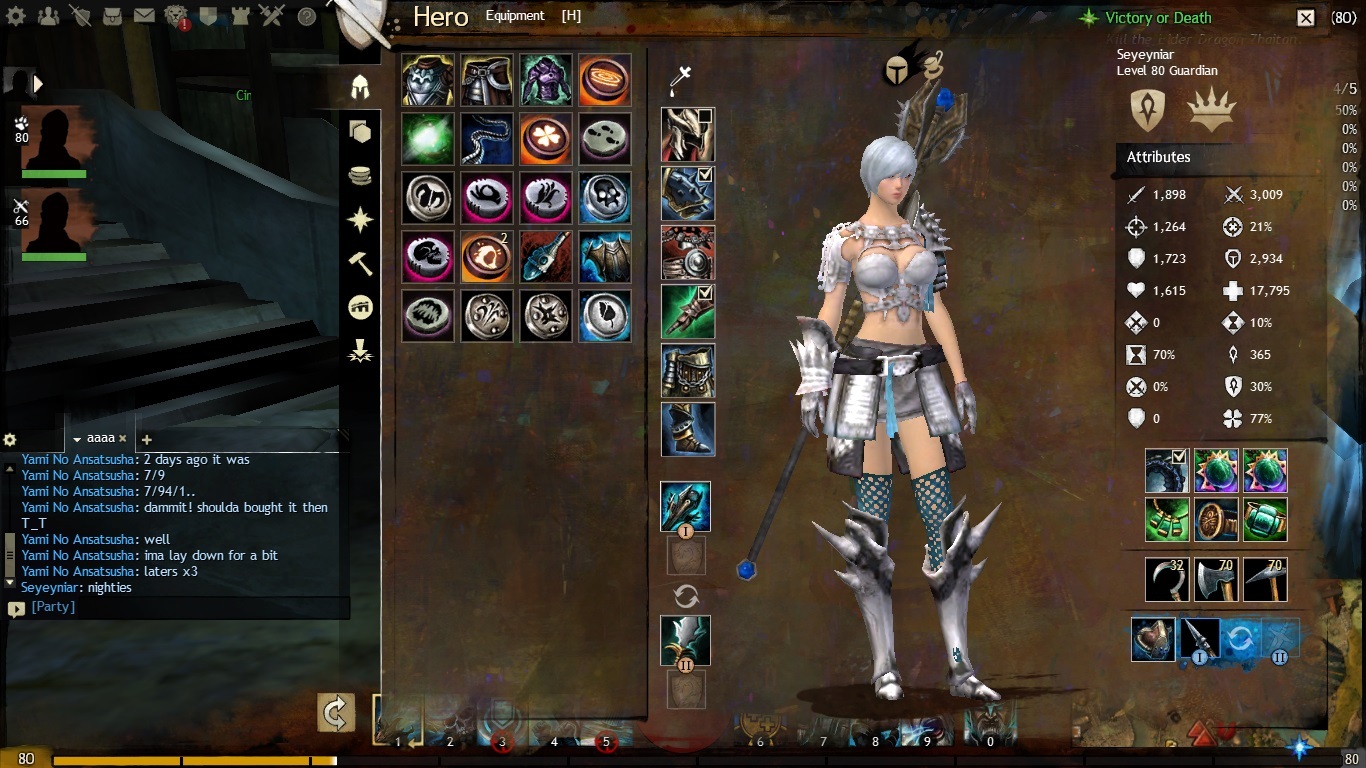
Skill description:
“Channel might to yourself and allies around you. Heal nearby allies when it ends.
Healing.png Healing: 1,500 (1.0)?
Might.png12 Might: 10 s
Radius.png Radius: 600"
I recently ran TA dungeon with another guardian, and we both have staffs. We channel this together so that we each get 24 stacks of might, + w/e else people throw in to give us 25. For my partner, they retain 25 stacks of might for the remaining duration of x amount of seconds, but when I pull and get hit, I lose all my stacks of might. There are no mobs in TA with removing boon descriptions as far as I know. This also happens instantaneously, as in, the moment we both stop channeling, not more than 2 seconds afterwards when I get hit, I lose my stacks of Might.
Can you link to the previous thread that you made regarding this issue? System specs and such would help.
Try disabling or uninstalling (preferably the former) any anti-virus/internet security programs that might have firewall settings that are inhibiting you from connecting.
If not, right click gw2.exe and at the end of the target line, add -repair.
Run it, and see if that helps. Remove the line afterwards to test the execution.
So see you all.
Much love to you.
Maybe I’ll come back in a few months and things will have fixed. I’ll keep that hope in my heart.
But so long for now.
Came to help, stayed for the sh*tstorm.
For others with black screen issues:
https://forum-en.gw2archive.eu/forum/support/tech/Black-Screen-Issue-AMD-ATI
https://forum-en.gw2archive.eu/forum/support/tech/Black-Screen-Issue-Nvidia/first#post3964
And please post in the right section: https://forum-en.gw2archive.eu/forum/support/tech
I’m not sure if this is what you’re talking about, but please refer to this thread: https://forum-en.gw2archive.eu/forum/support/bugs/Guardian-Vengeful-Trait/first#post3106764
Can you post your system specifications e.g. graphics card, processor, etc?
Try running the game in windows mode if you have not already. Certain games, I have experienced, crash when there is a sudden CPU usage jump from 0 to 100%, which, although my card and certainly your video graphics card should be able to handle, does not reallocate memory properly and causes the process to crash. Running in windows mode, for some reason, alleviates this issue.
I am running on a 6 year old machine and I have never had gw crash on me yet. I also play on an underpowered laptop that has family integrated graphics (the worst kind for gaming) and have never experienced crashing.
Hope this helps!
First of … better use Two Runes of Water to get more boon duration and heal power, than two major monk ones.
As for your problem:
10s base duration
+ 55% boon duration
—> 15.5s end duration+ 25% reta duration
—> 19.375s end duration (19.5s shown)With only + 30% boon duration, it’d be
10s * (1 + 30%) * (1 + 25%) = 16.25s
Oh so the reta duration affects the boon duration AFTER the base rate additions.
I thought it was BEFORE base rate calculations, so it was (10s x 25% +55%) instead of (10s x 55%) x 125%.
Thank you for the explanation.
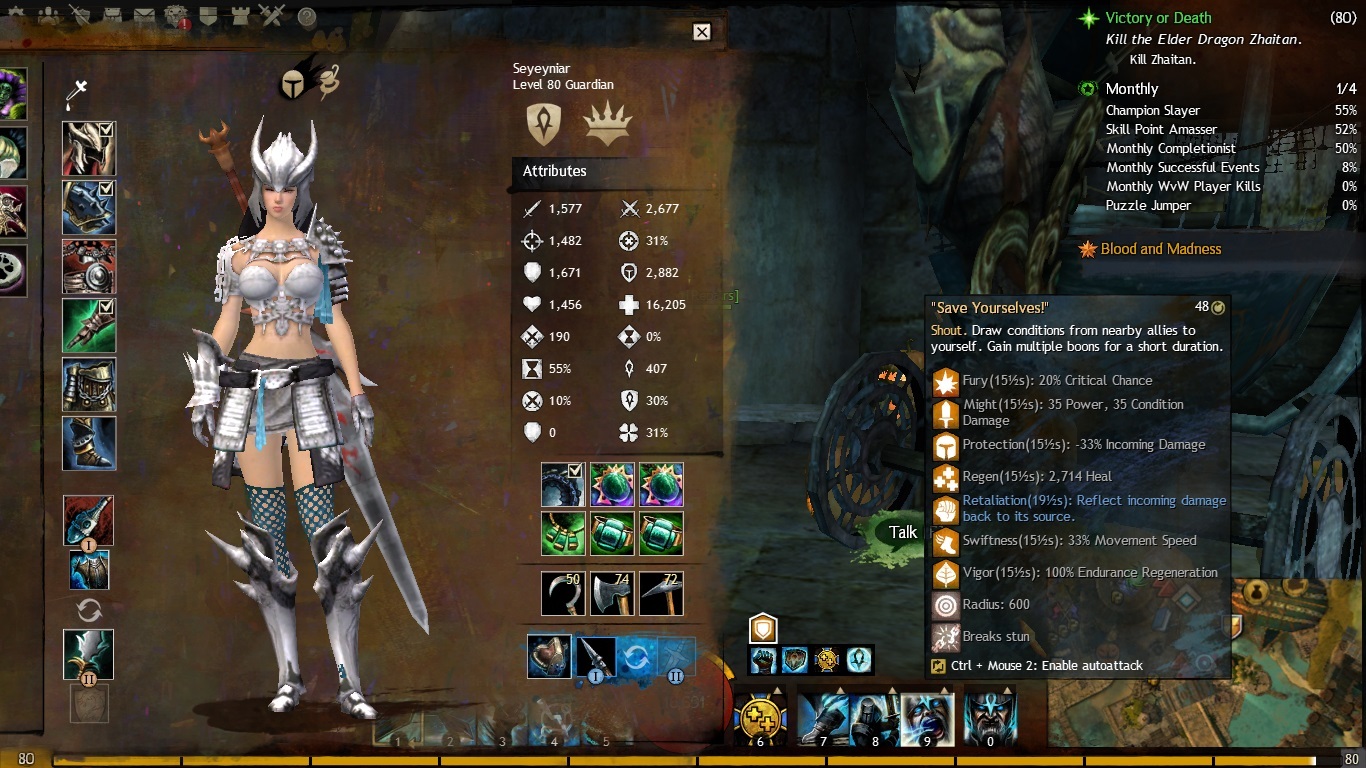
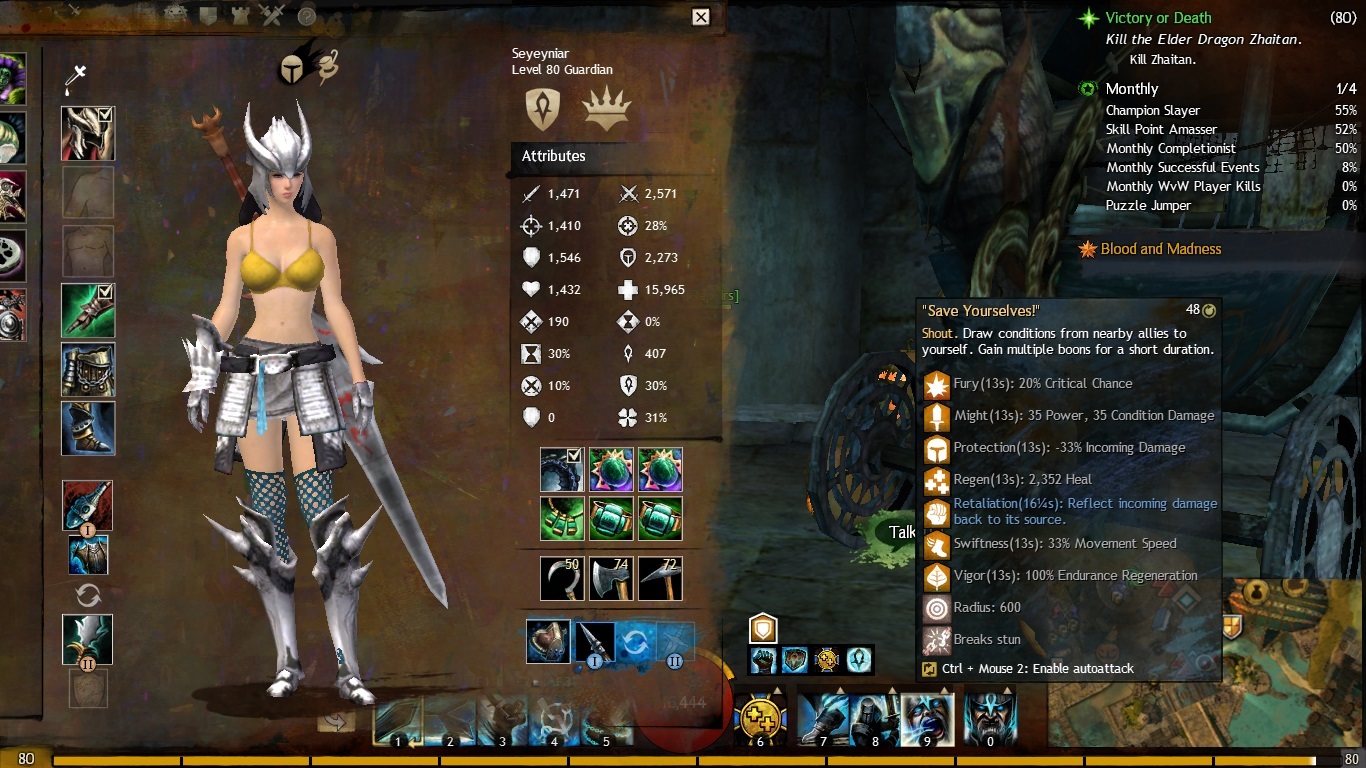
Under a Guardian’s vengeful trait, it gives +25% retaliation duration according to the description.
I have the boon duration maxed at 30% for that trait.
My current runes that affect boon duration are superior rune of the monk (2) which gives +15%, major rune of the monk (2) which gives +10%.
That gives 55% boon duration in total.
With vengeful, I SHOULD get 55% + 25% = 80% boon duration, meaning “save yourselves!” SHOULD yield 18seconds (+80% of 10 seconds) boon duration. However, when I checked, it gave me 19.5 seconds of retaliation. When I took vengeful off, it gave me 15.5 seconds of retaliation.
19.5s – 15.5s = 4 seconds or 40%.
This means that vengeful is giving NOT giving 25% retaliation duration increase, but rather, 40% retaliation increase.
However, when I took off my boon duration set (-35% boon duration), it gave me 16.25s of retaliation with “save yourselves!”. This is from 30% trait and 25% vengeful.
Math:
10s x 55% = 15.5% retaliation boon duration.
WHERE IS THE 1.25 COMING FROM?!
Anyone else can confirm this problem?


Why do you need the armor to be account bound? Why not just buy the armor on the character you need it on since the tokens are account bound. Having the armor be account bound would be redundant and a completely useless update considering all the other things in the game need fixing. Just swap your tokens to the character you need and then buy it. How much time would you really be saving by having the armor be account bound also? 30 seconds?
The armour is currently soulbound on acquire. That means that whichever character buys it, it will stay with him/her. The thing is, swapping the tokens from one character to another is redundant. Why can’t I buy the piece of armour on one character and transfer that armour through the bank directly, instead of needing to have an extra transaction?
This would save me approximately 4-5 minutes, really. For those of you who have 2-5 minute loading screens in LION’S ARCH (and i stress, LION’S ARCH, the most populated map in the game, i’d even add) for the majority of us who do have top tier computers, as well as those of us who have crappy computers that are still on dual core. This would add up SIGNIFICANTLY. Or would you like to see proof of how long it takes to load Lion’s Arch on my computer, along with how much is actually missing once the entire map is loaded? Again, not your fault, but the game wasn’t optimized for even the top tier computers of today, and some people have worse performance compared to my crap box.
Again, if you made the tokens account bound for the purpose of farming for other characters, the equipment should at least be made account bound and soulbound on use.
I suppose the main reason is it don’t really matter. And it make no difference.
What’s the different between saving the token or armor in the bank. It is the samething.
That’s the thing. You can’t save the armor in the bank because it’s soulbound on acquire, meaning it’s going to be on the person or just rotting on storage since it can’t be taken out by any other toon.
Let me clarify what the objective of my original post was meant to express.
This is NOT to put forward a notion that tokens should be soulbound. The questions posted are an inquiry and not an instigation that we should make this change.
Guys…..
He’s saying that, since the tokens are account bound anyway, why not make the armors account bound too? (and I assume soulbound on use)
If any of you bothered to read further into what I was requesting, you’d understand that Raestloz hit the head on the nail. So for any of you “disliking” my post, please learn to read first before jumping the gun on any opinion, that isn’t there i’ll add, that you find objectionable.
Now, to further clarify my question: why are the dungeon armours soulbound on acquire when the tokens are only account bound? We should be able to transfer them through the bank just like the tokens are since this added mechanism only adds complications.
Original post has been edited for further clarification.
(edited by seekerking.2875)
The main purpose of running dungeons is to get tokens and other equipment. And what do we do with these tokens? Use them as currency for dungeon armour vendors.
One thing I’ve noticed is that when buying from these vendors, these armours are soulbound. Why?
Another thing I’ve noticed is that tokens are NOT soulbound. Why?
I could simply drag and drop the tokens in the bank and unto another character to buy these equipments.
I find this attribute moot and very redundant since tokens can be transferred from one character to another, meanwhile, dungeon equipments obtained from vendors are soulbound.
Okay, since people didn’t understand what i really wanted to get across, i’ll rewrite this.
In the current state of dungeon token obtained equipment, they are soulbound on acquire.
I want to ask: why are they soulbound on acquire?
Consider this: the current situation of dungeon tokens makes them account bound. If I can transfer them from one character to another, then it would defeat the purpose of having the dungeon equipment be soulbound on acquire.
Instead, what I propose is that these dungeon equipments be the following: Account Bound and Soulbound on Use.
(edited by seekerking.2875)
It is about 4:15 PM EST, May 13 2013.
Im running fractals of the mist with 5 people, and we are all getting consistent lag and disconnections.
Together.
And i’m not talking, one disconnects after another. Yes, that happens sometimes. But people disconnecting in pairs together, and others, lagging in unison. Is there anything going on with the servers for anyone else?
12/25 lost/sent.
That’s bad, right?
I’m getting lag as well. 3-5 second skill lag in PVE and any other non-pvp related event.
Go into graphics settings and set everything to either none or low (including post processing, best texture filtering, and etc). That fixed it for me since reza wasn’t being rendered and displayed properly in my game.
so i suppose i need to replace my cpu and gpu and hope that works. I was not aware that to play gw2 on low i had to buy a $700 computer thanks for the help though.
I was not aware people with a computer more than 10 years old would realistically expect to run a high end game such as guild wars 2.
1.8 ghz is even older than my 6 year old computer with 2.7 ghz dual core processor.
It’s about time to make an investment in a new computer. You might as well if you want to pursue playing any game from TODAY.
Try changing it to windowed mode and fiddling with the resolution. Some monitors support high resolutions, others don’t. It can also be the game not being compatible with certain resolutions and card renderings with said resolutions.
Reset to default all settings on your nvidia card from the nvidia control panel. As in, factory reset.
Run gw2 and try to recreate the problem.
IF that doesn’t work…
Disable multi gpu display to single. Run gw2 and try to recreate the problem.
And if THAT doesn’t work.
Follow these instructions: https://forum-en.gw2archive.eu/forum/support/tech/Black-Screen-Issue-Nvidia/first#post3964
And if none of those work, return your card for a refund or exchange under warranty, deeming it “Defective” as it is unable to render video adequately. I’d say that blue blots everywhere is considered as defective. Maybe it’s a manufacturing batch that messed up all the cards of this line, you never know. Industrialization and mass production does that kind of stuff, so it’s no surprise that if you sent it back for a new one, you’d get another faulty card that is substandard but deemed “working” by nvidia.
in Account & Technical Support
Posted by: seekerking.2875
Double check to see if UAC is on… and if you’re installing it by disk, right click the CD in Windows Explorer → open.
There should be a gw2.exe or something similar to that inside, and click it manually.
If nothing happens, or you get the same result, open up task manager to see if multiple gw2.exe are running at the same time… That might be an issue.
The issue now is that if you can’t install by CD, or digital download, it means that there is authorization issues with your account on windows.
MAKE SURE YOU RIGHT CLICK → RUN AS ADMINISTRATOR REGARDLESS OF UAC BEING OFF.
in Account & Technical Support
Posted by: seekerking.2875
It sounds more like your windows services are failing… This has been known to happen with audio and that has to do with windows audio services.
First, do a direct x diagnoses whenever your game fails to run.
Second, inspect your video card to ensure that everything is plugged in, no dust being trapped or something.
Third, go to your device manager and right click on display adapters > detect any changes. If there’s a red ! mark on it, that means there’s a problem.
Im playing with an AMD Athlon 64 X2 Dual Core 6400+ and i haven’t had the slightest bit of trouble with FPS, lag, or disconnections of the like.
The issue with GW2 is that it doesn’t perform well with newer technologies like more recent graphics cards and 6+ cpu core processing.
in Account & Technical Support
Posted by: seekerking.2875
I do not think going to single core is a viable option. I did not upgrade my system for 32 bit to 64 bit to go back to my old configuration.
What version bit of Windows has no relevance to the processing unit installed on your machine. I’m talking hardware configuration; you’re talking software configuration.
Instructions:
Fire up guild wars 2
Fire up task manager
go to gw2.exe or whatever and right click → set affinity → check off all other cpu except for 1 or 2. (not cpu1 or cpu2, just whatever is here).
Run the game. See if it helps.
This is normal. It’s loading your contacts list.
in Account & Technical Support
Posted by: seekerking.2875
Try disabling multi/dual core processing via task manager for gw2 and try running it in windows mode.
GW2 is more CPU reliant, and is more optimized for single core processing.
Hope to hear back from people who actually try to take people’s advice and not whine about it and continue to complain about a perpetual problem in isolated incidents.
in Account & Technical Support
Posted by: seekerking.2875
Your not going to be able to play the game on that and yes it could keep it from downloading but get a second opinion.
Probably won’t be able to run the game. GW2 is more CPU reliant than GPU, so if the processor is lacking, OP will need to upgrade computer hardware.
You should do some research on game requirements before you should buy it.
Do you have enough space to download/install the game? It says 0kbps probably because the directory you’ve set, or have yet to configure, is full. It’s a 20gb game by the way.
If you’re having issues with disconnections which is the causation of the black screen, have you thought about reconfiguring your firewall? There’s a tutorial out there on one of AVG’s forums that provides a fix by manually opening ports for the game.
If this fixes the black screen, then this is purely a network issue and not a hardware one, since there is too much inconsistency with the graphics card users experiencing and recreating the issue. E.g. your 3 friends are using the same graphics card as you are but are not experiencing this problem.
If not, i suggest taking a look at this thread: https://forum-en.gw2archive.eu/forum/support/tech/Black-Screen-Issue-Nvidia
I’ve had absolutely 0 problems with Guild Wars 2 Running on my outdated machines. FPS is a good stable 40+, no crashes, intermittent fps lags, etc.
Specs:
3gb RAM (DDR2. 2 × 2gb. I have 4 gb ram in total, but only 3 usable)
32-Bit Windows 7 Service Pack 1
Nvidia gt 9500. Not over/under clocked. Too scared of instability issues.
AMD Anthlon 64 x2 6400+ processor
350gb disk drive
3.~ ghz
20 mbps, which roughly translates to 1.5-2 MB.
I don’t want to gloat that my obsolete machine can run the game perfectly without fps lag, but if out dated machinery can run it without an issue, there should not be any conflicts with newer, better hardware.
I for one want to question why Arenanet suggests “enabling vertical sync” for Guild Wars 2, as disabling it has improved FPS performance in many other games that have caused people who have intermittent FPS lag. Turning off vertical sync might be a good solution, actually.
When i try to play games that I am confident that are beyond my computer’s capacity, I go and disable multi-core processing in the task manager. Simply going to the program > set affinity > check off only one CPU, and i’m good to go.
Maybe this will help others.
(edited by seekerking.2875)
in Account & Technical Support
Posted by: seekerking.2875
I’m going to take a shot in the dark here and suggest running the game in windowed mode if you haven’t already. To OP, what processor do you have? If it’s anything like AMD Anthlon 5500+ or something, it’s probably a processor problem that occurs with a select handful of people due to multi-core processing conflicts. This has happened on other games, such as Borderlands, causing users to crash when moving to another area at the loading screen.
This is a bug. You motivate workers by pressing F. So far, i’ve confirmed that only the MALE npc’s give progress to the quest. However, the FEMALE npc’s do not.
Please fix this.
Not affiliated with ArenaNet or NCSOFT. No support is provided.
All assets, page layout, visual style belong to ArenaNet and are used solely to replicate the original design and preserve the original look and feel.
Contact /u/e-scrape-artist on reddit if you encounter a bug.