R9 270x Gaming - FX 6300 6x3.5gh Low fps
in Account & Technical Support
Posted by: thesacredone.1370
in Account & Technical Support
Posted by: thesacredone.1370
Looks like a good grahpics card, but it seems like your CPU is bottlenecking (slows down the performance of your graphics card) since it is only at 36% load while running a game like GW2. You can try another massive game like GW2 and post same pictures with it and let us see what results you get.
Edit: and get a more updated version of “core temp” since it lacks features , ie v1.0
Do these drops happen in other games? If yes then it could be your GPU, could be your cpu bottlenecking (but might be rare with such cpu as you have) how long have you had those 2?
in Account & Technical Support
Posted by: thesacredone.1370
Are you having such low fps only in Dry Drop/Silverwastes, LA, zerguing, bos fights… or it’s the same in empty maps, discovering the world, dungeons…?
Most of pve map are kinda stable ~35-40 FPS
PvP hurts below 30 FPS.
Some places like that one i love in Dry Top causes drop, even if there are just like 5 ppl around.
Boss fights is ofc one big joke. Maw ~10 FPS.
So far the only reason i visit www is for daily badges spender.
So Edge of Mists start place ~35 FPS.what if you reduce your ingame settings to low, do you see better frame rates in SW/Drytop? And by low I mean everything (high res textures, and character models too!)
I’ve posted comparison on previous page, but i see no problem on reposting it.
post a picture of GPU-z
in Account & Technical Support
Posted by: thesacredone.1370
If something is unacceptable then it’s the picture you made of CPU-z.. download gpu-z too and make more dept pictures of those 2 while running the game.
edit: also add core temp
(edited by thesacredone.1370)
Any good new’s about upadates for FPS drop’s ?
Nothing but to tell you to put the GPU at 16x slot (first top) most ppl did it and it worked.
thanks for the reply on my thread about low framerates, I installed the omega driver 14.12 for both chipset and GPU and the game runs fine now, so now my brother has perfect framerates and is happy with the game
that’s weird, the omega 14;12 driver is a the default driver that should be installed. probably that’s why.. not having gpu driver could kill the frames.
(edited by thesacredone.1370)
I had the same issue but with AMD Radeon hd 7970 (r9 280x called nowadays) , I couldn’t use first slot of the motherboard (pci-e gen 3 x16) since my GPU was fried or something so I bought a normal 280 and the first slot of the motherboard worked. My FPS is at 100 almost at all times.
If you don’t have a problem with using the first slot then go and put it there carefully, might work and fix it for you. if not try to unpark ur cores.
in Account & Technical Support
Posted by: thesacredone.1370
I can’t disable core per modules, i can disable only entire modules 5/6 3/4 and then i can disable 2nd core as well
2 cores
http://i.imgur.com/6xySeAG.jpg
6 coreshttp://i.imgur.com/r7Ikm9l.jpg
Well… tiny differencePost these screenshots again with GPU-Z and CPU-Z and Coretemp Loaded.
http://i.imgur.com/sgIoCKi.png
http://i.imgur.com/O02zpP7.jpgVolmarg, have you tried to play in windowed full screen? I will mostly do nothing, but you don’t lose anything to try…
Also have you tried different drivers?Latest + windowed = same effect.
Your CPU’s 2 cores are at 80%+, you must lower your in game settings or upgrade your CPU to Intel.
As long as your on AMD your performance is going to suffer under high detail settings. the only way to fix that is to upgrade the CPU to Intel. Sorry but thats just the fact of it.
If you can’t/won’t, then start by not using high res textures, full shadows, high post processing effects, and High res character models (probably disabled since your CPU is detected as a dual core right now).
Edit
For reference are 2 screenshots of a dual core G3258 clocked at 4Ghz running a HD5770. Built that system for under 200, by reusing my HD5770.First is a open field way point in Queensdale, while the 2nd is during a Jormag Fight.
Do you overclock you cpu? I see that your cpu is at 80% load, as mine sits in about 20%.
Also, I noticed that I have 12 cores, should I reduce it in msconfig to 2 / 4? if at all?
Thanks!

(edited by thesacredone.1370)
I had the same problem, but today I noticed that I got back to 60 fps. What I did that might have fixed my fps was that I downloaded this: http://www.razerzone.com/cortex . I went to the boost tab, defrag, chose guild wars 2 and then closed it. I also optimised it with raptr: http://raptr.com/ .
Are you sure that 1st link works? It told me no page exists.
I have tried RAPTR and Razer cortex before, nothing changed.
Have you done the steps I did ? If yes, have tried Defraging your PC?
I did. can you post a picture of your GPU-z? If you have.. Want to see your businterface. And if its like mine then I dunno what else to do.
Here you are
Do you overclock your CPU? and what model is it?

(edited by thesacredone.1370)
in Account & Technical Support
Posted by: thesacredone.1370
I can’t disable core per modules, i can disable only entire modules 5/6 3/4 and then i can disable 2nd core as well
2 cores
http://i.imgur.com/6xySeAG.jpg
6 coreshttp://i.imgur.com/r7Ikm9l.jpg
Well… tiny differencePost these screenshots again with GPU-Z and CPU-Z and Coretemp Loaded.
http://i.imgur.com/sgIoCKi.png
http://i.imgur.com/O02zpP7.jpgVolmarg, have you tried to play in windowed full screen? I will mostly do nothing, but you don’t lose anything to try…
Also have you tried different drivers?Latest + windowed = same effect.
Your CPU’s 2 cores are at 80%+, you must lower your in game settings or upgrade your CPU to Intel.
As long as your on AMD your performance is going to suffer under high detail settings. the only way to fix that is to upgrade the CPU to Intel. Sorry but thats just the fact of it.
If you can’t/won’t, then start by not using high res textures, full shadows, high post processing effects, and High res character models (probably disabled since your CPU is detected as a dual core right now).
Edit
For reference are 2 screenshots of a dual core G3258 clocked at 4Ghz running a HD5770. Built that system for under 200, by reusing my HD5770.First is a open field way point in Queensdale, while the 2nd is during a Jormag Fight.
I have AMD but intel aswel, that changes nothing.
It seems that you have more usage of CPU, unlike mine which is is at 5-12% usage. Could that be related?we know you have a FX6300, and we know its limitations. What do you have for Intel. If its like a Q6600 its in the same boat as the FX6300….
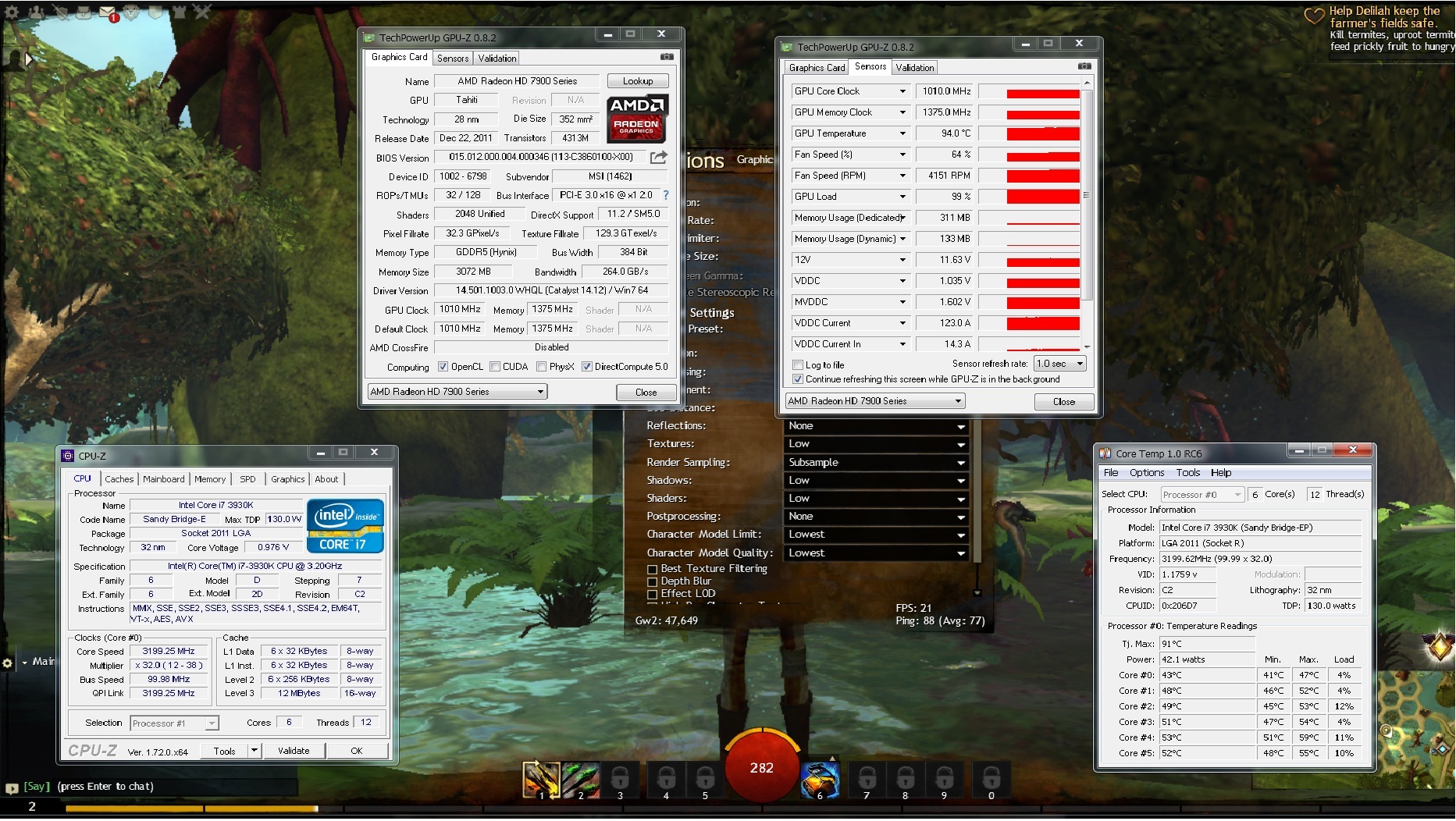
Here is what I got.
in Account & Technical Support
Posted by: thesacredone.1370
I can’t disable core per modules, i can disable only entire modules 5/6 3/4 and then i can disable 2nd core as well
2 cores
http://i.imgur.com/6xySeAG.jpg
6 coreshttp://i.imgur.com/r7Ikm9l.jpg
Well… tiny differencePost these screenshots again with GPU-Z and CPU-Z and Coretemp Loaded.
http://i.imgur.com/sgIoCKi.png
http://i.imgur.com/O02zpP7.jpgVolmarg, have you tried to play in windowed full screen? I will mostly do nothing, but you don’t lose anything to try…
Also have you tried different drivers?Latest + windowed = same effect.
Your CPU’s 2 cores are at 80%+, you must lower your in game settings or upgrade your CPU to Intel.
As long as your on AMD your performance is going to suffer under high detail settings. the only way to fix that is to upgrade the CPU to Intel. Sorry but thats just the fact of it.
If you can’t/won’t, then start by not using high res textures, full shadows, high post processing effects, and High res character models (probably disabled since your CPU is detected as a dual core right now).
Edit
For reference are 2 screenshots of a dual core G3258 clocked at 4Ghz running a HD5770. Built that system for under 200, by reusing my HD5770.First is a open field way point in Queensdale, while the 2nd is during a Jormag Fight.
I have AMD but intel aswel, that changes nothing.
It seems that you have more usage of CPU, unlike mine which is is at 5-12% usage. Could that be related?
(edited by thesacredone.1370)
in Account & Technical Support
Posted by: thesacredone.1370
It’s funny because I can run Shadow of Mordor and many other games on Ultra settings and have 60 fps solid. THIS game I run on 7 fps on high settings..
And sadly the support had no solution.
in Account & Technical Support
Posted by: thesacredone.1370
Are you running full screen or windowed? Also that’s not how VRAM works, check this out http://linustechtips.com/main/topic/198568-the-video-ram-information-guide/
I sent a ticket a week ago concerning the same issue (FPS) and I got no response. I also provided extra information.
To the player that recommended some help. There was a little improvement, but just a tad. I forgot to get new screenshots, but after the actions of the following:
I repaired GW2.exe
I defrag my computer
I installed the program (razer whatever)and I found something very interesting. When I did the razor boost, and popped open the game, the character selection screen showed the FPS over 60. Which was so so sweet. But then my heart was dashed once I loaded up in a map with no running world boss and only mildly populated…. dropped to 10-17 FPS. I tried other maps as well. Same thing.
Conclusion: It’s not my computer, it’s not my settings. It’s the update from whenever last time (guess that would be when they removed that pvp beta map, that’s when I first noticed it). It’s only been acting like this the last few days. It was perfectly fine last week.
We are on the same boat man
I had the same problem, but today I noticed that I got back to 60 fps. What I did that might have fixed my fps was that I downloaded this: http://www.razerzone.com/cortex . I went to the boost tab, defrag, chose guild wars 2 and then closed it. I also optimised it with raptr: http://raptr.com/ .
Are you sure that 1st link works? It told me no page exists.
I have tried RAPTR and Razer cortex before, nothing changed.
Have you done the steps I did ? If yes, have tried Defraging your PC?
I did. can you post a picture of your GPU-z? If you have.. Want to see your businterface. And if its like mine then I dunno what else to do.
Also, it seems that I get a good and steady 60fps with no problem in the character selction screen:
http://imgur.com/fCr3iuz
I had the same problem, but today I noticed that I got back to 60 fps. What I did that might have fixed my fps was that I downloaded this: http://www.razerzone.com/cortex . I went to the boost tab, defrag, chose guild wars 2 and then closed it. I also optimised it with raptr: http://raptr.com/ .
Are you sure that 1st link works? It told me no page exists.
I have tried RAPTR and Razer cortex before, nothing changed.
I would, but corrently I have the gpu at another slot as my PC wont boot propely. It gives 1 long 2 short beeps if I place it somewhere else.
That is your real problem .. now look here :
http://www.google.de/?gfe_rd=cr&ei=sOUzVeisMMiF8QfkhoCABw&gws_rd=ssl#q=1+long+2+short+beeps
Yes, I did my research. No need to give me googel links..
1 long 2 short beep means a Monitor or display card error. Which is what I said.If you did your research why do you ask here in the GW2 forum, since then you
should know that your problem is a hardware problem and in no way related
to GW2.Because, GW2 has FPS issues , a lot of peoplefixed it in their way. I tried my ways and unfortunately nothing helped.
I would, but corrently I have the gpu at another slot as my PC wont boot propely. It gives 1 long 2 short beeps if I place it somewhere else.
That is your real problem .. now look here :
http://www.google.de/?gfe_rd=cr&ei=sOUzVeisMMiF8QfkhoCABw&gws_rd=ssl#q=1+long+2+short+beeps
OP, do you remember by any chance what BUS interface she had? Was it like mine ? Pci-e 16x @ x1? Then when you fixed it, it was 16x @ 16x?
Yes, that is 100% your issue. You are only running at x1 where your card and slot can run at x16. You will have to figure out why it isn’t working, but that is your problem.
Ye, true.. I alread asked in tomshardware forums about my issue. Hope they can tell me why the other GPU pci-e don’t work.
Thanks for helping yo
I would, but corrently I have the gpu at another slot as my PC wont boot propely. It gives 1 long 2 short beeps if I place it somewhere else.
That is your real problem .. now look here :
http://www.google.de/?gfe_rd=cr&ei=sOUzVeisMMiF8QfkhoCABw&gws_rd=ssl#q=1+long+2+short+beeps
Yes, I did my research. No need to give me googel links..
1 long 2 short beep means a Monitor or display card error. Which is what I said.If you did your research why do you ask here in the GW2 forum, since then you
should know that your problem is a hardware problem and in no way related
to GW2.
Because, GW2 has FPS issues , a lot of peoplefixed it in their way. I tried my ways and unfortunately nothing helped.
I would, but corrently I have the gpu at another slot as my PC wont boot propely. It gives 1 long 2 short beeps if I place it somewhere else.
That is your real problem .. now look here :
http://www.google.de/?gfe_rd=cr&ei=sOUzVeisMMiF8QfkhoCABw&gws_rd=ssl#q=1+long+2+short+beeps
OP, do you remember by any chance what BUS interface she had? Was it like mine ? Pci-e 16x @ x1? Then when you fixed it, it was 16x @ 16x?
I would, but corrently I have the gpu at another slot as my PC wont boot propely. It gives 1 long 2 short beeps if I place it somewhere else.
That is your real problem .. now look here :
http://www.google.de/?gfe_rd=cr&ei=sOUzVeisMMiF8QfkhoCABw&gws_rd=ssl#q=1+long+2+short+beeps
Yes, I did my research. No need to give me googel links..
1 long 2 short beep means a Monitor or display card error. Which is what I said.
Thanks for replaying to me.
Was wondering because, GPU-z says that I do have 16x on pci-e since it says:
Pci-E 3.0 x16 @ x1 1.1Please, correct me if im wrong.
You sir have your gpu installed on a wrong pci-e slot. Correct slot would show @1.1 if only there was no graphical load on. Stick it the closest to the cpu you will know the difference in matter of seconds.
I would, but corrently I have the gpu at another slot as my PC wont boot propely. It gives 1 long 2 short beeps if I place it somewhere else.
Thanks for replaying to me.
Was wondering because, GPU-z says that I do have 16x on pci-e since it says:
Pci-E 3.0 x16 @ x1 1.1Please, correct me if im wrong.
You sir have your gpu installed on a wrong pci-e slot. Correct slot would show @1.1 if only there was no graphical load on. Stick it the closest to the cpu you will know the difference in matter of seconds.
That would be kind of hard, and I’m positive he has it in the proper slot, he just needs to reseat and/or clean it and it will jump from x1 back to x16. That’s exactly the issue my gf had. I had her switch it to the x4 slot on her mobo then back to the x16 and it worked magically.
I did move, cleaned, placed in another slots but I had to put it back to the slot since I had erross.
What do you think? It says that I do have x16 pci but width x1. kind of weird

I have heard that it’s related to the GPU being in the X1 slot at the motherboard.
But im not sure.
Thanks for replaying to me.
Was wondering because, GPU-z says that I do have 16x on pci-e since it says:
Pci-E 3.0 x16 @ x1 1.1
Please, correct me if im wrong.
Hey, nice to hear that you fixed her issue. What have you done to fix it?
Also, a pick of my GPU-Z, please take a look and see if you something wrong
http://gpuz.techpowerup.com/15/04/18/amq.png
or the whole thing:
http://i.imgur.com/VTQLpe3.jpg?1
in Account & Technical Support
Posted by: thesacredone.1370
OP , let us know if you got it.
Seems like a common issue, good PC’S having bad FPS.
It might be an AMD issue , since I did some research and found out AMD has fps problems with GW2.
(edited by thesacredone.1370)
Since this thread has full 13 pages means that I’m not the only one.
Anyone found a fix?
Can confirm. I’m having bad FPS aswel despite good (ok) PC.
Not affiliated with ArenaNet or NCSOFT. No support is provided.
All assets, page layout, visual style belong to ArenaNet and are used solely to replicate the original design and preserve the original look and feel.
Contact /u/e-scrape-artist on reddit if you encounter a bug.


