Showing Posts For Ghirkin.4689:
I’m not a Windows programmer so I don’t know if the chat window is capable, but I would rather see the account name as tool tip.
The chat window is definitely capable, they have their own implementation of tooltips, such as those used to display item links on hover in chat.
Maybe the tooltip could be the “default”, so when account names are hidden, and you hover over someone’s name, it shows the “player card” tooltip, similar to the one you get when you hover over someone’s portrait in a party—only with more condensed information to make the tooltip less intrusive. Instead of the tooltip appearing immediately, like with item links, there should be a 1-ish second hover delay before it shows up, to prevent it from coming up when clicking on someone’s name in chat to whisper them.
I still think abstracting out the character names should be an option, but this should be how it is handled by default.
As it stands each player has their character name show up in the guild chat box, but since guilds are an account-level thing, I think it would make more sense to have the option to display account names rather than character names.
This would mean no longer having to open the guild roster to check who is on what character, and avoid some confusion with people new to the game thinking that guilds are joined on a per-character basis. (It’s happened a few times in our guild, and we’re relatively small.)
Proposed alternatives to normal guild chat:
- Add the account name after the character name in the form of “@username”.
Example: http://i.imgur.com/rHKiGM3.png
- Display only the account name.
Example: http://i.imgur.com/huJzsqo.png
If this were to be implemented, it would be nice to see both options, as displaying only account names means that you’d never see people’s character names, and displaying someone’s name followed by “@username” takes up quite a bit of space—which could make it annoying for people playing at low resolutions.
This should be a toggleable option in the form of two checkboxes in the chat settings dialogue:
Example: http://i.imgur.com/dciOB7S.png
The second option (Hide character names) would be disabled unless the “show account names” options was checked.
Why not just add a checkbox to the options menu: “Use system cursor”. That way people have the option of using their default cursor in-game.
What, exactly, is an unarmed weapon?
I guess what I mean by “unarmed” weapon is that it would sill have to be classified as a weapon for the game to assign skills to it.
The point of this is for:
A) RP reasons. Personally I don’t RP, but I can see this being useful to those who do.
B) Generally being a badkitten. When playing with friends on my norn/charr warriors in low level zones it’s fun to use the rampage elite and… rampage through the zone using only your fists; sadly the elite is on a long CD.
For what? To kill Zhaitan with bare hands?
Why not! It would make a good challenge, similar to how people have done runs of other dungeons with no armour etc.
Hello,
Just a quick suggestion – It’s probably been mentioned before, but the search function is 404’ing right now so I couldn’t check.
I think a nice addition to the current combat would be an (almost) purely cosmetic ‘unarmed’ weapon, just for messing around in low level zones and for RP purposes.
The skillset would be dependant on race, not profession, and would deal direct damage only – No conditions/stuns/blocks/evades or anything like that to make sure unarmed does not require balancing or affect PvP/PvE as-is. The direct damage produced by the skills should be smaller than or equal to using a “level 0” white weapon on your character.
The skills could use some existing animations (i.e. Kick, along with the animations from the Rampage elite #1 skill chain.) and some new ones; punching, scratching (for Charr), headbutting, maybe some jumping kicks for the Asura, whatever “fits” with that race’s style, basically.
I’d be interested to see if anyone else is interested in this.
(edited by Ghirkin.4689)
Both me and 3 of my friends were playing in the Kodash borderlands and all four of us kept getting large amounts of lag whereby we could still move and chat, but could not use any skills. After the “lagspike” the client never resync’d with the server, but also did not DC, the only fix was to restart the client.
Just to say that it wasn’t my connection; the lag happened around the same time for all of us on all occasions. One of us was from a different country (not UK, that’s all I know) and he also experienced the lag. As the OP said this seems to be localized to the Kodash borderlands, both the Deso and Elona borderlands as well as EB seemed fine when we swapped to those.
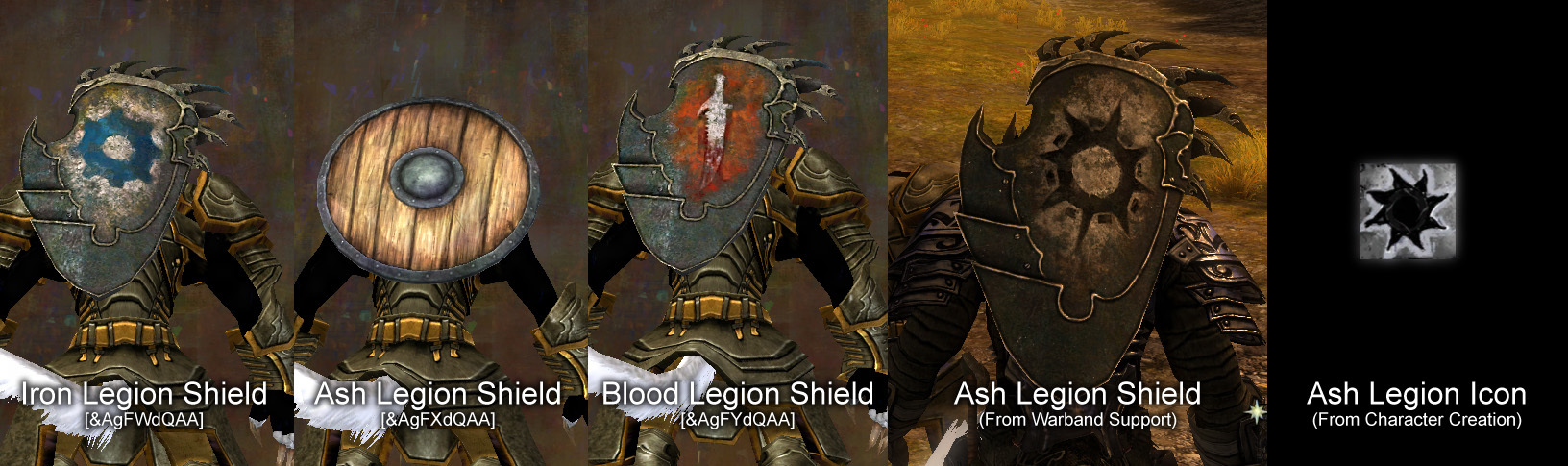
It would appear that the Ash Legion Shield available from Androchus the Hidden in Cadem Forest is using an incorrect model.
This bug has been around since launch, and reported many times but remains unfixed.
Links for the shields:
Iron Legion – [&AgFWdQAA]
Ash Legion – [&AgFXdQAA]
Blood Legion – [&AgFYdQAA]
PvP Ash Bulwark – [&AgFgegAA] (Correct Model, but PvP only)
At first I thought the model simply didn’t exist within the game, but after using the Warband Support elite skill, an Ash Legion Soldier spawned, equipped with a shield using the correct model; I have since checked the PvP locker and the three legions’ shields are there, all with the correct models.
The screenshot shows the three legions’ shields, along with the shield on the back of the Ash Legion Soldier summoned by the Warband Support skill.
Attachments:

(edited by Ghirkin.4689)
It would appear that the Ash Legion Shield available from Androchus the Hidden in Cadem Forest is using an incorrect model.
Links for the shields:
- Iron Legion – [&AgFWdQAA]
- Ash Legion – [&AgFXdQAA]
- Blood Legion – [&AgFYdQAA]
At first I thought the model simply didn’t exist within the game, but after using the Warband Support elite skill, an Ash Legion Soldier spawned, equipped with a shield using the correct model.
I have attached a screenshot showing the three shields from the Karma vendors, along with the shield on the back of the soldier, which I was unable to find a Link for.
Attachments:


I have been playing with medium shaders, as I noticed a bright white lighting effect on the right hand side of all characters in the game.
The light does not seem to originate from any point in particular, nor is it fixed in the game world, it appears to be fixed to the camera as it is always on the right hand side of characters.
Comparison of med/high settings
Example of ‘fixed to camera’ lighting
In very bright areas the lighting effect looks somewhat ‘normal’ but in areas of average light intensity the effect is very offputting, to the point where medium shaders are a preferable option, although environment details are lost in medium.
I was wondering weather this is an intentional effect, a bug within the game, with drivers, or something else.
If it is intentional I’d be interested to hear other’s opinions on the effect too.