Showing Posts For LyokoLeader.7049:
hmmm maybe it’s just the american servers since Northshiverpeaks & Jade Quarry keep crashing on me!
I don’t know whats going on but for the past couple days since the recent patch/update my game has not been able to keep a steady connection to t he game. After logging in and playing for more then 5 minutes it keeps saying
“Connection to the server is lost, please wait a few minutes before restarting the client and try again”
or something along those lines. Is this happening for everyone?
also don’t tell me to try restarting my wi-fi or anything like that because I have tried and that is not the problem!
XboxOne Controller
(Combat Mode)
Right Stick = Camera (Action Cam)
Left Stick = QWES
Left Stick Click = Auto-RunGoing clock wise
A = Skill 1
X = Skill 2
Y = Skill 3
B = Skill 4
RT = Skill 5Going clock wise
LB + A = Skill 6
LB + X = Skill 7
LB + Y = Skill 8
LB + B = Skill 9
LB + RT = Skill 0RB = Dodge
LB + RB = JumpGoing clock wise
Left Dpad = F1
Up Dpad = F2
Right Dpad = F3
Down Dpad = F4
LB + Down Dpad = F5LB + Left Dpad = “Counter Magic”
LT + A = Call Target
LT + X = Tab Target Enemy
LT + Y = Swap Weapons
LT + B = Escape / Cancel
LT + Up Dpad = Zoom In
LT + Down Dpad = Zoom Out
(Adventure Mode)
To toggle this mode, press the (Start Button) on Controller!
Right Stick = Camera (Action Cam)
Left Stick = QWES
Left Stick Click = Auto-RunA = Jump
X = Interact
Y = World Map
B = Escape / cancelRB = Dodge (good for stealth gliding)
Up Dpad = Zoom In
Down Dpad = Zoom OutHere is a video of me playing all 9 classes with XboxOne Controller:
PS – I’m using Xpadder, a 3rd party program, to keybind my mouse/keyboard to my XboxOne Controller and as you can see in the video link above, I play pretty decent on it.
My GOD!
That was fantastic lol and you did that with a controller? I know I’m fast but sheesh you have me beat! Beautifully done!
Yeah some of the keys you have mapped are the same as mine but mu dodge is mapped to LB and my jump RB. I made it that way to simplify some combos that I use with my Revenant!
You can see the keys I have mapped in the pictures posted above! I also put a link in case others wanted to try it out and change up some of the keys in order to test different combinations!
PS: Ima need you to train me on your ELEMENTALIST play style! ASAP!!!
Yeah! I played GW2 on controller since beta. That video is me playing before the action cam feature was a thing.
Also I don’t mind training you on Elementalist. That class is a lot of fun!
If you’re from NA server then Add me on Skype and let’s get started!My skype is: DreamyAbaddon

Very nice. Didn’t know you have been playing since launch….amazin!
Hope we can group in-game sometime also sent you a request on Skype!
XboxOne Controller
(Combat Mode)
Right Stick = Camera (Action Cam)
Left Stick = QWES
Left Stick Click = Auto-RunGoing clock wise
A = Skill 1
X = Skill 2
Y = Skill 3
B = Skill 4
RT = Skill 5Going clock wise
LB + A = Skill 6
LB + X = Skill 7
LB + Y = Skill 8
LB + B = Skill 9
LB + RT = Skill 0RB = Dodge
LB + RB = JumpGoing clock wise
Left Dpad = F1
Up Dpad = F2
Right Dpad = F3
Down Dpad = F4
LB + Down Dpad = F5LB + Left Dpad = “Counter Magic”
LT + A = Call Target
LT + X = Tab Target Enemy
LT + Y = Swap Weapons
LT + B = Escape / Cancel
LT + Up Dpad = Zoom In
LT + Down Dpad = Zoom Out
(Adventure Mode)
To toggle this mode, press the (Start Button) on Controller!
Right Stick = Camera (Action Cam)
Left Stick = QWES
Left Stick Click = Auto-RunA = Jump
X = Interact
Y = World Map
B = Escape / cancelRB = Dodge (good for stealth gliding)
Up Dpad = Zoom In
Down Dpad = Zoom OutHere is a video of me playing all 9 classes with XboxOne Controller:
PS – I’m using Xpadder, a 3rd party program, to keybind my mouse/keyboard to my XboxOne Controller and as you can see in the video link above, I play pretty decent on it.
My GOD!
That was fantastic lol and you did that with a controller? I know I’m fast but sheesh you have me beat! Beautifully done!
Yeah some of the keys you have mapped are the same as mine but mu dodge is mapped to LB and my jump RB. I made it that way to simplify some combos that I use with my Revenant!
You can see the keys I have mapped in the pictures posted above! I also put a link in case others wanted to try it out and change up some of the keys in order to test different combinations!
PS: Ima need you to train me on your ELEMENTALIST play style! ASAP!!!
This is really nice, Lyoko.
You are sacrificing f3, f4, f5 and Walk, right?
Or do you managed to put Walk into the left stick along normal movement, using the intensity gradient? (This is something I’ve been trying to do with the SC without success until now).
I actually swap f1 -f5 with LT + <
My walk is now hot keyed to : LT + RB
It used to be mapped to Left Stick Click, but changed because I use that for (about face – 360 turn) that way I’m never surrounded and I can turn around on a dime in close quarters instead of relying on the camera!
The f1-f5, I swap depending on what class, weapon, and skills I’m using. Like with engineer, I use only f1 & f2 by ysing:
F1: LT+<
F2: LT+>
Hello, LyokoLeader.
I’m beggining to play with a controller too, in my case using the Steam Controller, and while I’m still very clumsy, it really feel better than using the keyboard (even the “gamer” keyboard I bought last year).
Could you include more details about the bindings you made? I’m not going to install Xpadder since I don’t need it, but I would really love to know the map you used for your 360 controller: It has been a long week of trial and error making my own bindings for the SC, and there are still a lot of inputs I think could be better organized, so I’m looking at all the ideas I can find.
I’ll post my own bindings when I feel they are truly right (I hope next week).
Cheers and congrats!
(It’s hard to recognize you don’t have to be a querty minion!)
Sorry for the late reply lol was sleep!
On-topic :My 360 key mapping
WASD: has been mapped to the left control stick
Dodge: has been mapped to LB
Jump: has been mapped to RBW
Swap Weapons: has been mapped to the ` or select button
Options: has been mapped to start
Quick Turn / About face: has been mapped to left stick click
Draw / Sheath Weapon: has Ben mapped to R
Toggle Action Camera: has been mapped to right stuck click
Invitory/Map/Hero: has been mapped to >, v, < on the directional pad
Skills-
1: RT
2: X
3: YOU
4 /5 : B – depending on what class and weqpon I’m using
6 / healing: RT + X
7: RT + Y
8: RT + B
9: RT + A
0: RT + Right stick click
I’ll be posting pictures when I have time!
Edit Posted 2 Pics with my controll mappings!
The first one is with the default controls
The second one if for when you have the LT trigger/button held down!
Attachments:
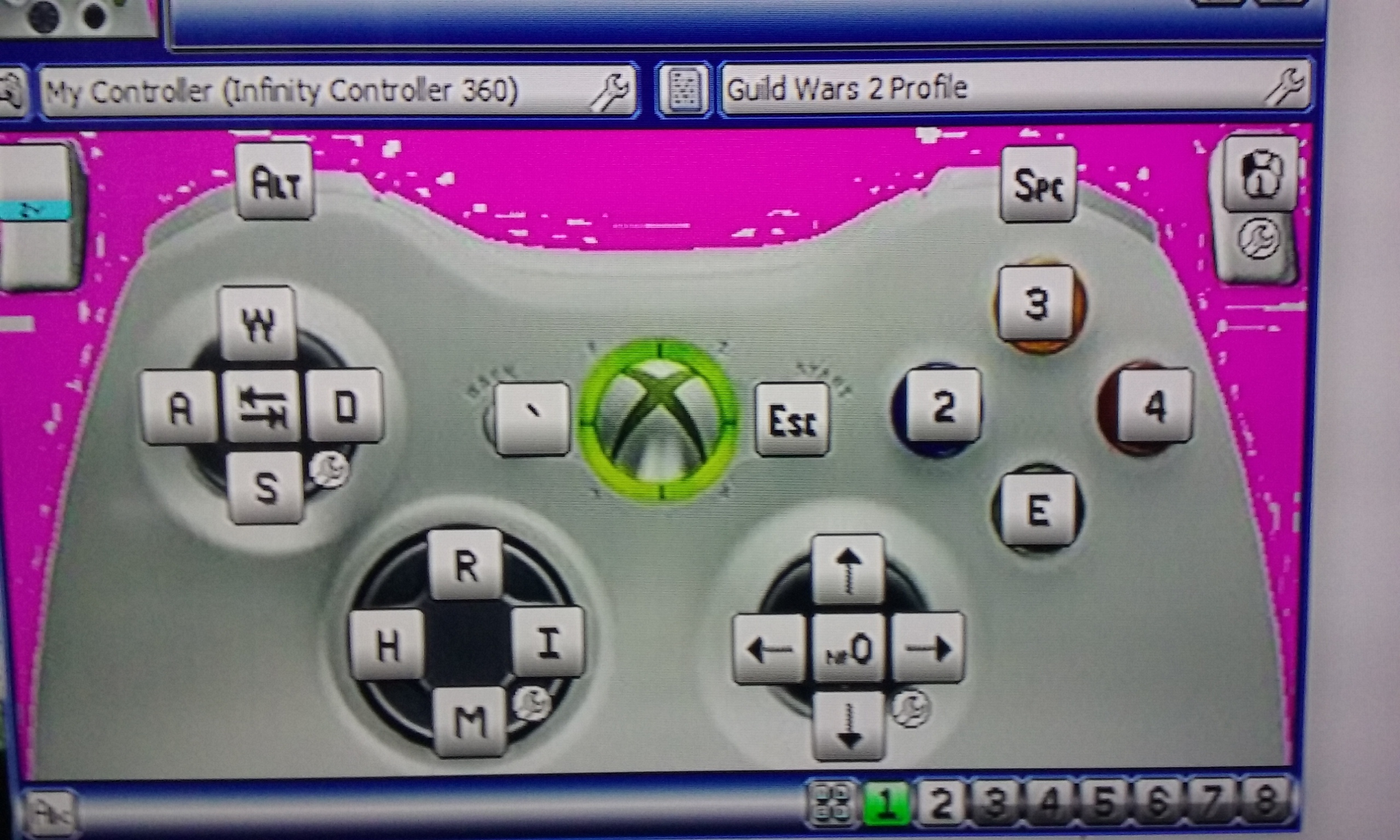

(edited by LyokoLeader.7049)
I second to that! Although i seem to have a little trouble map completion in the regular zones, when it comes to HOT its just insane how quick I fall trying to do a hero point. If anything it usually takes 3-4 or use just to do one!
Hello all. I know GW2 does not have controller support and probably never will! I started playing GW2 with the mouse/keyboard set up, but slowly started to drift away when I hooked my laptop to my 50-inch tv. I wanted to test the function to see if it was at all possible. I was not disappointed. I currently am using my 360 controller with the Xpadder program. I did this to see if I could manage mapping keys to a controller and still have that same GW2 action I love so much. I came to realize I respond 3x faster with a controller since I can remember the buttons lol. The keyboard confuses the heck outa me with so many keys.
Anyway on topic- i wanted to post my keybinding here if anyone was interested in trying it out for themselves. Although you will be limited on team commands and such for the commander role you still will have access to all skills, interaction, camera controls, and etc.
Downside…you will still have to use your keyboard to talk XD
PS: I have mapped my skills: 6-0 to be used holding the LT button on the controller.
I do not have anything mapped to my 5 skill because I usually use the 4 skill key to alternate between the two depending on what class and weapon Im using.
PSS: To use the program:
1: right click on the program
2: click properties
3: click compatibility tab
4: check run this program for windows 7 box
5: click always start program as administrator — otherwise the program will not work
6: Last step-- plug in controller and enjoy!
Keep in mind I am not a hacker or anything, I just wanted to share this with people who at least want to try it out. People would always ask me how the heck am I playing this game with a controller that has so many keys…..simple I only map the keys I really use to the controller lol.
Again try it out and tell me about your experience!
Side note: I had to upload it to filedropper so there would be no problems! If there is a problem just let me know!
Link: http://www.filedropper.com/gw2controller
Lastly: you may need winrar to extrat it to your computer/laptop!
(edited by LyokoLeader.7049)