Smoothness on character is missing on start up
in Account & Technical Support
Posted by: Metalphreek.6470
in Account & Technical Support
Posted by: Metalphreek.6470
I tried the FXAA Injector but it didn’t work at all for me :-/
Same here. This issue is ingame since release(!). Too bad, because I (and many other ppl) would like to use the small interface :-/
Thank you :-)
As I can see in the internetshop here:
*i5-2500k ~ 210 €
*i5-3570k ~ 205 €
Is that normal? I mean … why is a better cpu cheaper? oO
And as is mentioned before: Some ppl are saying that the i5-3570k is going way more hotter than the 2500k, so that they couldn’t oc the 3570k as much as the 2500k and getting more performance with the 2500k. Anything true about this?
Thanks for all those replies Now I finally understand why Intel’s i-Cores are so much better than AMD ones … what a pity … AMD was such a good CPU maufacturer back in time :-/
So I’m thinking about a new CPU and I see that in my country (germany) there are two i5 with nearly the same price:
I’ve read that the second one is going hotter but with 10% more performance.
Currently I have the “Dark Rock 2” cooler from be quiet!. So I think the 2500k will be better for me, isn’t it?
Also … which mainboard shall I buy? (Because of Chipset and so on)
Edit: Will i5 work good with my Radeon HD? I’ve heard rumors that you should never ever cross ati with intel and nvidia with amd.
(edited by Metalphreek.6470)
Hm … this is strange oO
I did everything you said and now my FPS is capped at 43 looking in the same direction as before, also there’s no FPS-difference between Render Sampling: Native and Supersample (as you can see).
Can you explain this strange behaviour? oO
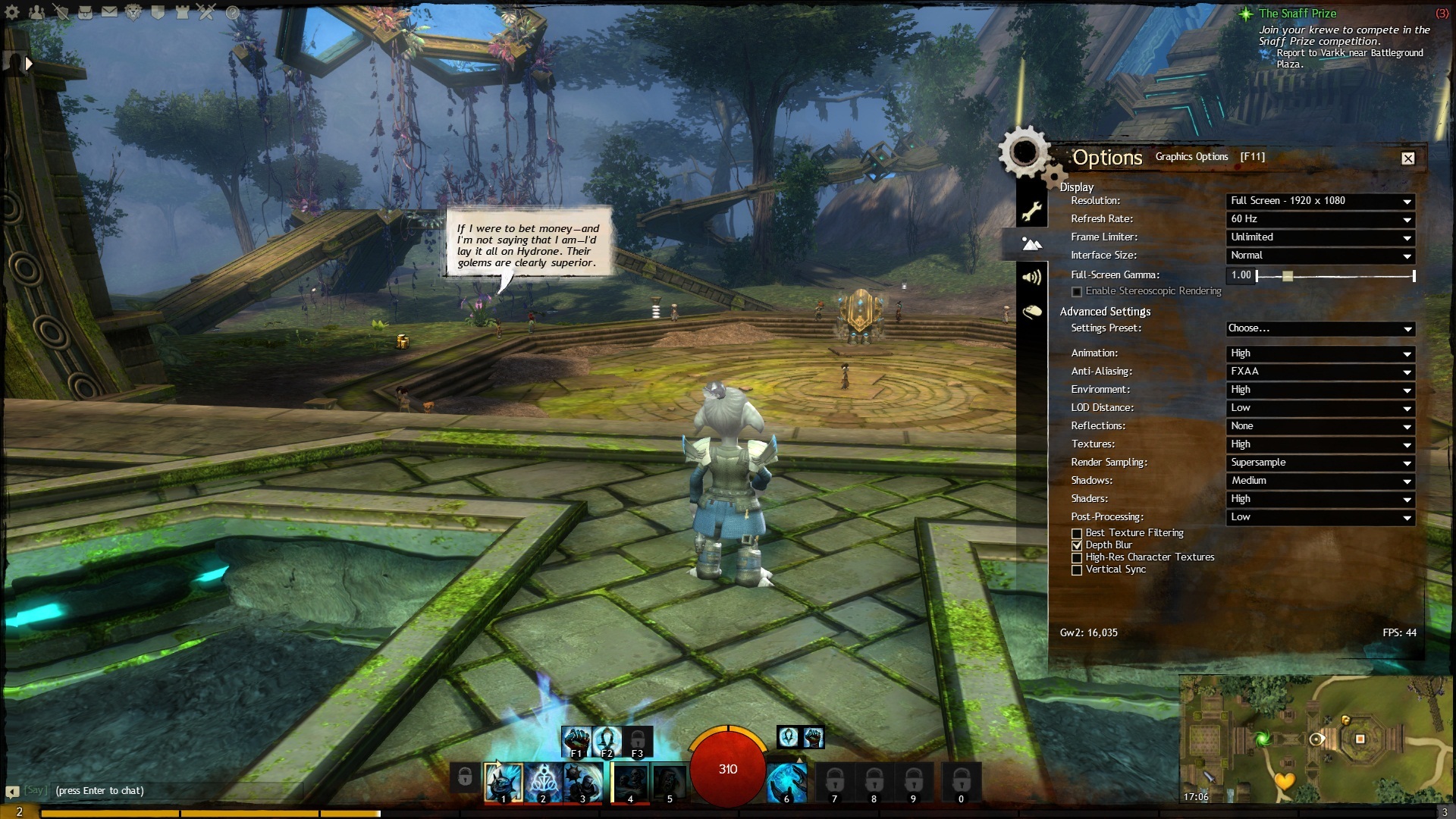

Thanks for the reply :-) I’ll try your configuration suggestion.
But theres one thing: A friend of mine has a way slower PC but he can play with everything on max with 80+ FPS constant oO
Edit: Can you recommend me a CPU for AM3+ Socket?
Edit 2: My graphics card is medium only? oO It’s listed as a High-End one
Well, hello there,
first my specs:
So, here’s my problem:
I’m standing in Metrica Province looking at a specific direction (see in attached screenshot) and my FPS won’t go over 30 FPS. It fluctuates between 29 and 30 when I’m just looking there.
So I took a look at my Hardware workload and I was surprised:
Is it just me or does the GW2-Engine not fully exploit my hardware?
Another thing is the GW2.log attached below. There are MASSIVE Errors and Debugs and I really don’t know WHY they are there?!
Please, can someone just help me? This “performance” is driving me crazy and those errors and debugs in the logfile are really strange. :-/
Thanks!
Greetings :-)
in Account & Technical Support
Posted by: Metalphreek.6470
Best and safest way for Laptop-Graphics are the official ones from the Laptop-manufacturer Website for your Laptop.
in Account & Technical Support
Posted by: Metalphreek.6470
Current graphics settings (apologies, bit of a noob): http://imgur.com/Mn7Kk
I don’t know why, but your drivers are looking a bit old to me. But you have a Mobile Graphics Card, so … I don’t know. In some cases the included Laptop Driver worked WAY MORE better than the current ones. On my old Laptop the current drivers caused heavy issues with my graphics. Your graphics-settings are okay this way.
Glad I could help you anyways and if you have any further questions: just ask ;-)
in Account & Technical Support
Posted by: Metalphreek.6470
More transparency indeed would be great :-/
in Account & Technical Support
Posted by: Metalphreek.6470
Okay, this is a strange thing … With those settings your game should look way MORE better. But try this config (even for more performance!):
Animation: High
Anti-Aliasing: None
Environment: High
LOD-Distance: High
Reflections: None
Textures: High
Render Sampling: Native/Supersample
Shadows: High
Shaders: High
Post-Processing: Depends on your own feeling, what looks better to you
[ ] Best Texture Filtering
[x] Depth Blur
[x] High-Res Character Textures
[ ] Vertical-Sync
Can you post a screenshot of your Graphicscard-Settings also, please? :-)
in Account & Technical Support
Posted by: Metalphreek.6470
Yesterday noon and afternoon my game runned extremely fine with a constant fps of 60 (with low fluctuation). After the big Patch yesterday evening the game is stuttering again like before Halloween-Patch … why do they ruin the gameplay with 90% of all patches? T_T Yesterday noon I thought “Nice! It runns smooth, let me give this game another chance”. Now … my thought are “Really nice game … but … the FPS-Issues are destroying the gameplay … what a pity…” … AGAIN!
Fix your god**** game, please! It would be a great game without this issue! :-(
in Account & Technical Support
Posted by: Metalphreek.6470
Looks like your Shader- and some other settings are on low. Can you post your Ingame-Graphic-Settings, please? :-)
seems like that gpu-z is reporting that gpu is running on x4 PCIe. now ill try to hammer pc a bit to make more room….
It happend what we all thought: Wrong PCIe-Slot. Good luck, sir! :-)
Check that what XcomCaveRat said. Download CPU-Z and check there if it’s running on x16. Not every PCIe-Slot runs with x16.
Did you place the new card in the same slot as the old?
First of all, try this:
1. Delete the “Local.dat” located in “Documents\Guild Wars 2”
2. Create or edit a Guild Wars 2 shortcut and add the “-repair” parameter (without the quotes)
3. Open this shortcut and let the repair work through
4. Start normal Client and check if it works better now.
Recognized this too. Looks annoyin’. Would be happy if AA is activated in character-selection too.
why would you need more than 30FPS for? really?
-_- I’ve had enough of this “30 FPS is enough” thingy. You CAN’T compare 30 Game-FPS with 30 Video-FPS. In games everything below 60 FPS is a mess for the eyes.
in Account & Technical Support
Posted by: Metalphreek.6470
Yeah … but … which AM3+ CPU is the best for around 200 bucks?
in Account & Technical Support
Posted by: Metalphreek.6470
Hi there!
As the topic says I’m currently on a AMD FX-4170 (I know … it was a fail …) and I’m thinking about buying a new CPU, ’cause the rest of my hardware is great.
So my question: Is the AMD FX-8350 worth the price, or would you prefer another AMD AM3+ Socket CPU?
Thanks for answers :-)
Greetings
Yep, I’ve tried this and it works. But it can’t be that a friend of me has over 80+ FPS with a HD 6950. In comparison my graphics-card is better.
It’s interesting that all of my cores have a load of 70%+ in GW2. This can’t be normal! :O
This FPS is just annyoing and if it’s not getting better in future I have to play WoW again sighs
Hello guys ’n girls,
when i play GW2 I get some really strange FPS behaviour. If i turn my character and/or camera my FPS drops from 60 to 20 immediately! If I run straight in a line my FPS is mostly stable, but sometimes it’s doing the same annoying drops.
I can’t explain why every other up-to-date game I can run in Ultra settings with 60+ FPS but GW2’s FPS is bouncing like a flubber. I just upgraded my NVidia GTX 560 GS to a Sapphire Radeon HD 7870 OC GHz Edition but there wasn’t a FPS inprovement AT ALL …
My Specifications
- AMD FX-4170 @ 4,5GHz OC’ed
- 8192MB DDR3-1866
- 2048MB Sapphire Radeon HD 7870 OC GHz Edition
- Windows 7 Home Premium 64 Bit
- 1680×1050×32 Resolution
I also tried the AMD Hotfixes as mentioned in the support, but changed nothing!
Tried different Catalyst drivers, even betas but nothing helped.
I really love this game, but the FPS is destroying the ambience and gameplay and of course the fun at all. I’ve invested over 500$ for a new system but the increase in FPS was only marginal.
I’m done with this until the FPS got better, but I’m very thankful and happy for every Performance Tip.
Thanks and bye.
Not affiliated with ArenaNet or NCSOFT. No support is provided.
All assets, page layout, visual style belong to ArenaNet and are used solely to replicate the original design and preserve the original look and feel.
Contact /u/e-scrape-artist on reddit if you encounter a bug.
