PHP/MySQL Code Monkey and MCITP. Owner of a Michigan-based Computer Service and Hosting Company.
Showing Posts For HCProfessionals.3601:
1 2
I don’t think anyone has to say anything after you watch this, lol!
PHP/MySQL Code Monkey and MCITP. Owner of a Michigan-based Computer Service and Hosting Company.
Several of us are running into rendering issues, and it is making it virtually impossible to gain much in WvW. Video here: http://www.youtube.com/watch?v=U5m_X11eUsQ
PHP/MySQL Code Monkey and MCITP. Owner of a Michigan-based Computer Service and Hosting Company.
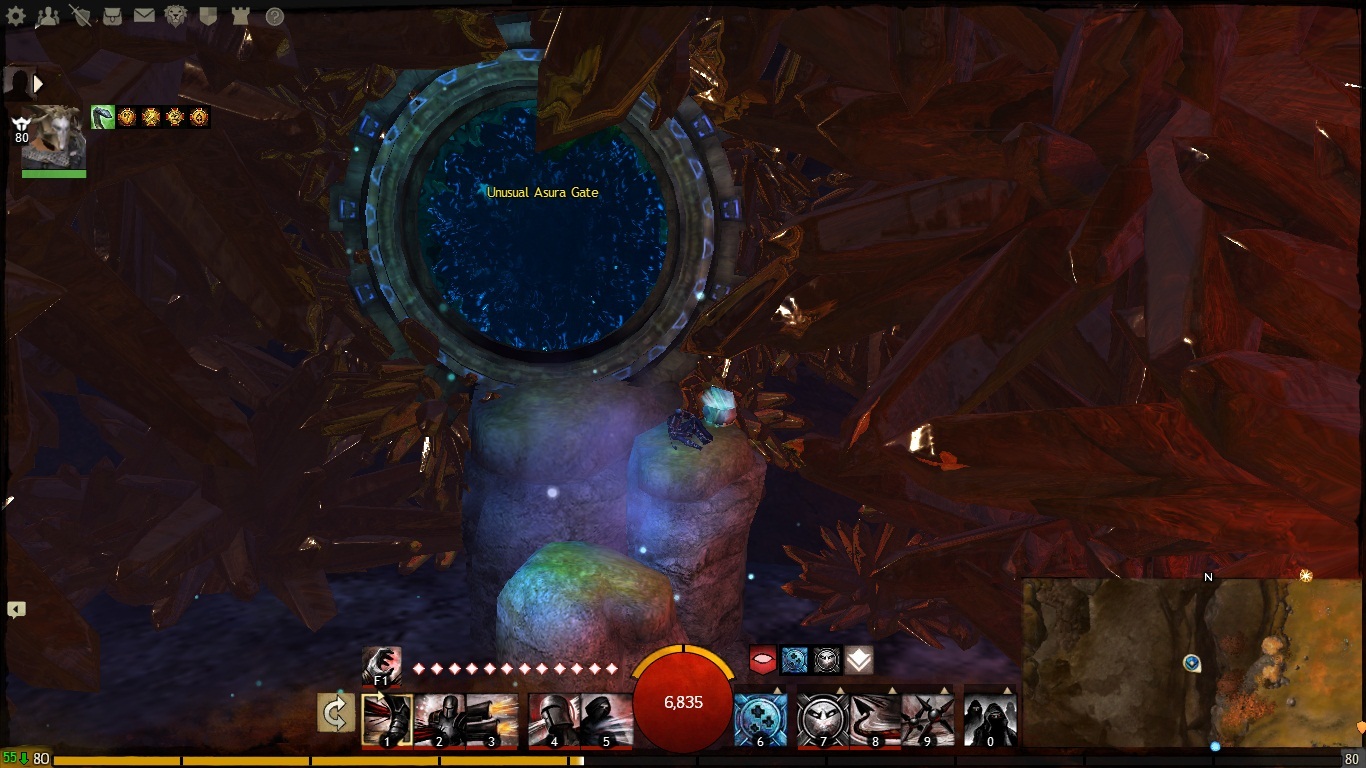
They call it Chaos Crystal Cavers for a reason… It is my least favorite, lol!
Attachments:
PHP/MySQL Code Monkey and MCITP. Owner of a Michigan-based Computer Service and Hosting Company.
War Machine International (International Branch of War Machine) is now recruiting active, experienced and driven players who would like to join forces with one of the largest and most active guilds within the realms of Guild Wars 2.
Please register at: www.warmachineintl.com and allow up to 48 hours for your registration to be reviewed.
PHP/MySQL Code Monkey and MCITP. Owner of a Michigan-based Computer Service and Hosting Company.
Nothing more than building a website from the ground up, installing a forum, etc.
I’m a hard coder and each guild website is unique and I give free hosting on my servers.
PHP/MySQL Code Monkey and MCITP. Owner of a Michigan-based Computer Service and Hosting Company.
I build websites for a living and have found a niche building people guild websites (as I’ve done in all other games) and want to trade in-game gold in exchange. Is this legal for me to do, as technically, I’m not buying gold? I’ve worked so hard for my characters and don’t want to go against the rules… I still buy gold from ArenaNet to help support them and will continue to monthly – and I recommend you do as well
Sorry, but this is a serious question and I need to know if I can continue or stop immediately.
PHP/MySQL Code Monkey and MCITP. Owner of a Michigan-based Computer Service and Hosting Company.
(edited by HCProfessionals.3601)
Maybe I’m just horrible at it, but it seems that if I stay on track for another month or so, I might have enough gold to buy 1 piece of Cultural Armor for 30g
How in the world are people making 100g so quickly without buying it…
PHP/MySQL Code Monkey and MCITP. Owner of a Michigan-based Computer Service and Hosting Company.
Playing with my buddy in the main storyline quest – Ships of the Line.
“Assist Merri with the ooze problem below decks.” – When trying to walk down to access below the deck, you are teleported back on deck. It took many attempts to actually get down below the deck and when we finally did, it wasn’t long before we were teleported back on deck – after what seemed like forever, we finally completed the quest.
“Destroy the Dead Ships before they sink your fleet.” – Similar issue. When trying to jump off the deck to the water, you are teleported back on deck. After about 20 minutes of trying, my buddy actually made it (and I never succeeded) to the ships and then he spent roughly another 30 minutes or better shooting the ships with his harpoon to destroy them.
PHP/MySQL Code Monkey and MCITP. Owner of a Michigan-based Computer Service and Hosting Company.
Yes, we are now recruiting and looking for members that would like to join us on the Stormbluff Isle server. We specialize is everything and nothing – more so just looking for a group that would just simply like to have good times… And we have Ventrilo (used by guild members who represent the Dark Hand.)
Contact HCProfessionals.3601 in-game.
PHP/MySQL Code Monkey and MCITP. Owner of a Michigan-based Computer Service and Hosting Company.
I like the idea, though I want to see it implemented the right way and also have an ability to turn it off.
PHP/MySQL Code Monkey and MCITP. Owner of a Michigan-based Computer Service and Hosting Company.
Enough with the childish bashing. If you have something worthwhile to say, then post, otherwise why not move on to another game while the rest of us work together on these forums and try to progress the game.
You guys do not understand the undertaking, commitment, and risk involved – 6 years of work. I’m a software engineer by trade and not one person has truly thanked me for what I do either. Software development is not an overnight process. Show some respect – they’re working on it!
PHP/MySQL Code Monkey and MCITP. Owner of a Michigan-based Computer Service and Hosting Company.
Windows 8 might be released to the manufacturer, but that doesn’t mean everyone else is completely ready for it – AMD, nVidia, etc. There are still going to be several bugs on release and it will be several months (just as with any OS) before Windows 8 will be ready. So no, it is just silly to ask for support for GW2 on an “unpolished” OS. There’s enough in the works for ArenaNet than to deal with this at the moment.
PHP/MySQL Code Monkey and MCITP. Owner of a Michigan-based Computer Service and Hosting Company.
ArenaNET give us a formal explanation on the patching issue!!
in Account & Technical Support
Posted by: HCProfessionals.3601
Here you go: https://forum-en.gw2archive.eu/forum/info/news/Update-Notes-September-17th-2012/first#post149651
PHP/MySQL Code Monkey and MCITP. Owner of a Michigan-based Computer Service and Hosting Company.
Anet, you dropped the ball this time... BAD!
in Account & Technical Support
Posted by: HCProfessionals.3601
Next time, maybe you should make a backup copy like a smart cookie and quit with the attitude. I understand that it’s frustrating that your files are most likely corrupt (No fault of ArenaNet), but it’s a little thing called technology and anything can go wrong at any given time.
/Backup
PHP/MySQL Code Monkey and MCITP. Owner of a Michigan-based Computer Service and Hosting Company.
Please don’t ask for support on Windows 8 until the operating system is finalized.
PHP/MySQL Code Monkey and MCITP. Owner of a Michigan-based Computer Service and Hosting Company.
Microsoft Security Essentials in conjunction with Malwarebytes is Win
PHP/MySQL Code Monkey and MCITP. Owner of a Michigan-based Computer Service and Hosting Company.
Also, you do know that you can purchase gems and convert them to gold on the Black Lion Trading Post right?
PHP/MySQL Code Monkey and MCITP. Owner of a Michigan-based Computer Service and Hosting Company.
Seems this is only affecting Divinities reach.
PHP/MySQL Code Monkey and MCITP. Owner of a Michigan-based Computer Service and Hosting Company.
Did you glance every hit? You can be there for the entire fight, but if you aren’t within a certain range level, you will glance most every shot -which doesn’t count.
PHP/MySQL Code Monkey and MCITP. Owner of a Michigan-based Computer Service and Hosting Company.
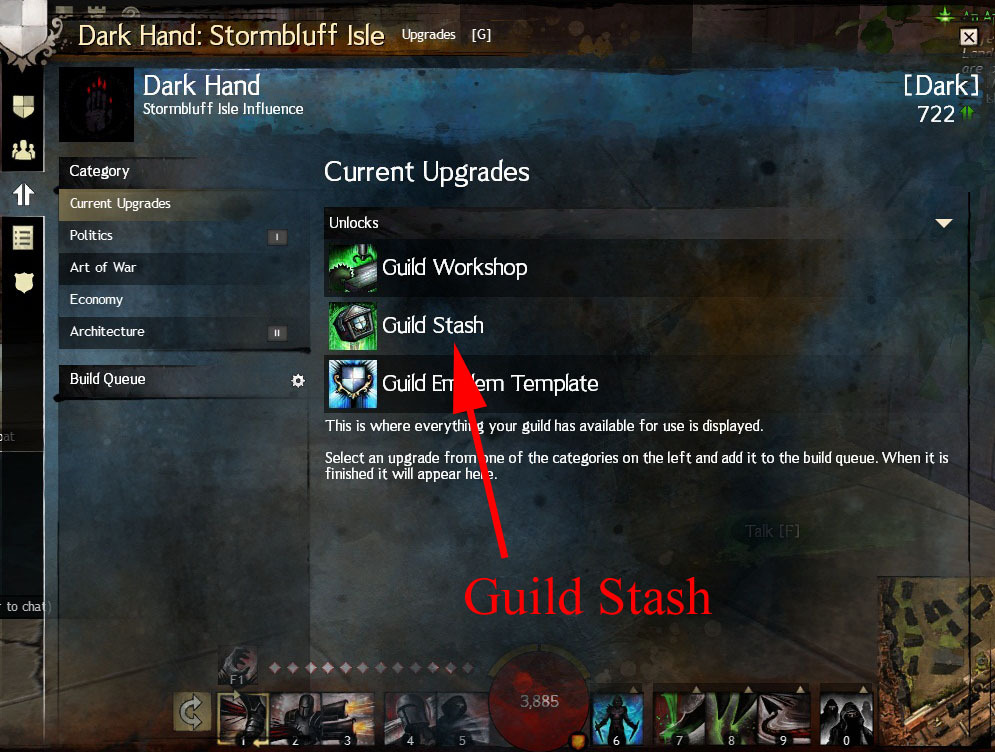
I’m in the same boat – can’t buy drinks, can’t access guild bank, etc. – and I’m the Guild Leader.
PHP/MySQL Code Monkey and MCITP. Owner of a Michigan-based Computer Service and Hosting Company.
I can’t buy drinks for the Guild. I have spent roughly 1 gold on drinks before I realized they never counted towards influence.
I just finished upgrading the Guild Bank and guess what, it says I don’t have permission – I am the Leader and have all permissions. I tried logging out and re-logging in – nope.
I’m attaching some screenshots for further review.
Attachments:


PHP/MySQL Code Monkey and MCITP. Owner of a Michigan-based Computer Service and Hosting Company.
Does this make any sense? (CPU usage)
in Account & Technical Support
Posted by: HCProfessionals.3601
O.o You have 2 instances of Internet Explorer and Firefox running while playing Guild Wars 2 (Choose one or the other, but dear God not both)… Also, do you understand the processing power of an i7?
PHP/MySQL Code Monkey and MCITP. Owner of a Michigan-based Computer Service and Hosting Company.
(edited by HCProfessionals.3601)
Crashing once Every Day then Fine after that
in Account & Technical Support
Posted by: HCProfessionals.3601
I’m not a fan of sleep mode. Just to test, next time to turn on your computer from sleep mode, restart it and then open the game and see what happens. You don’t let the computer go to sleep while you’re in-game do you?
PHP/MySQL Code Monkey and MCITP. Owner of a Michigan-based Computer Service and Hosting Company.
I’m running on an i5-2450M without a hiccup on my Dell XPS (Less than a month old). The only thing you would need to ever worry about is that you have a 64-bit OS – which you are. Why I say that is a guy built a system without help and he brought it to me. He had 12GB/RAM but he bought a 32-bit OS and he couldn’t figure out why only 3.4GB was useable :P
PHP/MySQL Code Monkey and MCITP. Owner of a Michigan-based Computer Service and Hosting Company.
lol, you’re good to go
i7’s have multi-threading on each core so it will recognize as an 8-core I believe.
PHP/MySQL Code Monkey and MCITP. Owner of a Michigan-based Computer Service and Hosting Company.
(edited by HCProfessionals.3601)
I’m sitting on a 1.5Mbps T1 Line at my house (Because I live in a rural area -woot!) with a max download speed of 190Kbps. Your argument is invalid
I pay 10x more than the average person does for high speed, but I have the best latency in the world 10-30ms. I hate it when someone complains about how slow their internet connection is.
PHP/MySQL Code Monkey and MCITP. Owner of a Michigan-based Computer Service and Hosting Company.
Auto-detect + Changing Render Sampling + Resolution == Win (Usually)
Also, I recommend using the latest stable drivers from the manufacturer.
PHP/MySQL Code Monkey and MCITP. Owner of a Michigan-based Computer Service and Hosting Company.
PHP/MySQL Code Monkey and MCITP. Owner of a Michigan-based Computer Service and Hosting Company.
Launcher *freezes* immediately and can't be closed
in Account & Technical Support
Posted by: HCProfessionals.3601
I really hate it when people use “Driver Finding Utilities”. Quit being lazy and go to the manufacturer’s website for your drivers.
If you are cleaning the registry with CCleaner, make sure you create a backup of the registry before performing operations. Accidents happen.
PHP/MySQL Code Monkey and MCITP. Owner of a Michigan-based Computer Service and Hosting Company.
Light blue blocks, lines, pixels and flashes all the time
in Account & Technical Support
Posted by: HCProfessionals.3601
What mathisk said is a possibility, but also be sure to keep up-to-date with the drivers
PHP/MySQL Code Monkey and MCITP. Owner of a Michigan-based Computer Service and Hosting Company.
I’m not a fan of refurbished laptops by any means, as in the computer world, laptops are really only meant to last about 2 years on average, but you will have a difficult time finding something new that will be suitable within that price limit. The only thing I can recommend at this point is to make sure it has a dedicated card with at least a 512MB vRam.
PHP/MySQL Code Monkey and MCITP. Owner of a Michigan-based Computer Service and Hosting Company.
Light blue blocks, lines, pixels and flashes all the time
in Account & Technical Support
Posted by: HCProfessionals.3601
Change our Render Sampling to something other than “native” and see if that helps – I recommend Subsample to start. If not, change your resolution as well.
You can always check for driver updates as well here: http://support.amd.com/us/Pages/AMDSupportHub.aspx
PHP/MySQL Code Monkey and MCITP. Owner of a Michigan-based Computer Service and Hosting Company.
Have you tried setting the binds in-game in the options menu under controls? I have a Logitech G5 and have done so in-game.
PHP/MySQL Code Monkey and MCITP. Owner of a Michigan-based Computer Service and Hosting Company.
Oh, in that case, I would recommend a Dell Vostro or ASUS to start with a minimum of a 512MB Dedicated card (1GB Dedicated card would be the best route for the future) – Don’t use Integrated graphics. Check out the i5 processors. Give me an idea on a budget and I’ll see if I can get you some recommendations. For laptops, I would say your budget should be at least $700 to $900 when you’re getting in gaming.
PHP/MySQL Code Monkey and MCITP. Owner of a Michigan-based Computer Service and Hosting Company.
Worried, would this desktop be able to run GW2?
in Account & Technical Support
Posted by: HCProfessionals.3601
If I’m not working with Dell, I stand by ASUS:
http://www.newegg.com/Product/Product.aspx?Item=N82E16883220156
Here’s another one as well:
http://www.newegg.com/Product/Product.aspx?Item=N82E16883229332
PHP/MySQL Code Monkey and MCITP. Owner of a Michigan-based Computer Service and Hosting Company.
Download SpeedFan and give me some temps on the GPU and CPU please so I can rule out overheating. Also, please use a cooling pad underneath and turn your laptop brightness down to about 75% (you shouldn’t see much difference in-game), but it will reduce the load and heat on your laptop by a lot.
Anything over 85c is unacceptable in my standards. http://www.almico.com/sfdownload.php
Your laptop will have a safety shutdown when it reaches a certain temp.
PHP/MySQL Code Monkey and MCITP. Owner of a Michigan-based Computer Service and Hosting Company.
(edited by HCProfessionals.3601)
Right click icon and check – Run as administrator. Also, Disable UAC and restart your computer.
If you are running Windows 7, which I am assuming, you can do so by going to Start -> Run -> Disable UAC -> You will see User Account Control, turn the slider all the way down, click ok and restart your computer.
If you are running Vista, upgrade to Windows 7 :P
You can access by going to Start -> Run -> msconfig -> Tools and running Disable UAC.
PHP/MySQL Code Monkey and MCITP. Owner of a Michigan-based Computer Service and Hosting Company.
Also, check to see what programs you have running in the background – antivirus, etc. See if you can set your virtual memory a little higher as well. Start → Right click Computer → Properties →Advanced system settings → Settings under Performance → Advanced Tab → Change → Set to custom size if not set already using the recommended value.
Unfortunately, with a 32-bit operating system, you can have up to 4GB/RAM and actually only 3.4GB will be usable.
PHP/MySQL Code Monkey and MCITP. Owner of a Michigan-based Computer Service and Hosting Company.
(edited by HCProfessionals.3601)
Worried, would this desktop be able to run GW2?
in Account & Technical Support
Posted by: HCProfessionals.3601
Integrated means it’s built into the motherboard. You can always add a graphics card to a desktop later though if it’s not enough
I could show you what to get if I knew what computer you were looking at. I need to know what version of PCI Express the motherboard will accept, 2.0, 2.1, 3.0 etc. – and I’ve seen the same model Dell come with all 3 of those depending on what motherboard they use.
PHP/MySQL Code Monkey and MCITP. Owner of a Michigan-based Computer Service and Hosting Company.
(edited by HCProfessionals.3601)
Worried, would this desktop be able to run GW2?
in Account & Technical Support
Posted by: HCProfessionals.3601
Wasn’t even paying attention, as I have been supporting everyone with laptops. You can get away with a little bit more on a desktop than a laptop because of the ease of upgrading. The big thing is make sure you have a dedicated graphics card (as low as $60) – which you can add later if it doesn’t come with one. Still, I wouldn’t use integrated graphics.
Also, I’m not big at buying a computer from Costco, get it from a company who actually specializes in computers and technology (not to burst anyone’s bubble). If you do buy from Costco, be sure to get the Bios password (or make sure one isn’t set on purchase) as I have had a couple customers in the past buy from there and they usually have a preset Bios password set.
PHP/MySQL Code Monkey and MCITP. Owner of a Michigan-based Computer Service and Hosting Company.
(edited by HCProfessionals.3601)
Why are A'net NOT listening to us? Or Replying
in Account & Technical Support
Posted by: HCProfessionals.3601
People never see the business side of things (I’m a business owner myself). The staff are working around the clock on this game, even on weekend. The amount of effort it takes to keep everything smooth and operational in phenomenal between the programmers, support reps, server maintenance, etc.
Remember, you are not their only customer and they can’t reply to every support ticket. There are over 2 million players and growing by the thousands every hour. So sit back and enjoy the ride – they’re working on it.
PHP/MySQL Code Monkey and MCITP. Owner of a Michigan-based Computer Service and Hosting Company.
Worried, would this desktop be able to run GW2?
in Account & Technical Support
Posted by: HCProfessionals.3601
If you are looking at Dell, an Inspiron in an entry level laptop, not built for gaming by any means. My recommendation (as a Dell Certified Partner myself) is to start with at minimum a Vostro with at least a 512MB Dedicated Card (actually a 1GB dedicated card would be much well suited for future compatibility). Do not get integrated graphics. I’m using a Dell XPS myself.
Start here: http://www.dell.com/us/soho/p/laptops.aspx?ref=us-soho-lt#!facets=54733~0~852726&p=1
PHP/MySQL Code Monkey and MCITP. Owner of a Michigan-based Computer Service and Hosting Company.
(edited by HCProfessionals.3601)
Intermittent zoning / waypoint issues
in Account & Technical Support
Posted by: HCProfessionals.3601
If it takes more than a couple minutes, less than 5 minutes for sure, then something is wrong – even during peak times. Unfortunately, I cannot answer this and your best bet would be to put in a ticket if you have not done so already.
Higher end routers have traffic shaping built in and you may want to take a quick peek in the advanced settings of yours just to be sure to rule it out.
PHP/MySQL Code Monkey and MCITP. Owner of a Michigan-based Computer Service and Hosting Company.
Constant Crashing (was fine a few days ago)
in Account & Technical Support
Posted by: HCProfessionals.3601
Ok, the very first thing we need to do, is make sure you have all the drivers for your machine installed. Go to device manager and check to see that you have no yellow exclamation marks – Start -> Run -> Type devmgmt.msc and open.
Go to the Dell support website (http://support.dell.com) and enter your Service Tag, or choose your model. Download and install drivers in this order – Bios (Only update if there is a newer version on running), Chipset, Audio, Ethernet, Wireless, Graphics. I say do it in this order, because we have seen issues in my shop with some Dell’s if we don’t do it in this order.
Be sure to do a reboot after each driver installation – especially Bios (should automatically anyways), Chipset and Audio. Let me know if this makes a difference.
PHP/MySQL Code Monkey and MCITP. Owner of a Michigan-based Computer Service and Hosting Company.
After reviewing that graphics card, I would say there is a slight possibility, but I would say your frame rate is going to be somewhere around the 30fps mark. The best way would be to go here and check: http://www.systemrequirementslab.com/cyri/intro.aspx
You have integrated graphics, which is non-upgradable unless you switch out the motherboard, which wouldn’t be feasible.
With laptops, unless you have a gaming rig (which this isn’t, even still I would follow this rule) make sure you have a good cooling pad underneath, turn your monitor brightness to about 75% and keep the in-game graphics on the lower end.
PHP/MySQL Code Monkey and MCITP. Owner of a Michigan-based Computer Service and Hosting Company.
It’s quite simple really. This is not WoW, this is Guild Wars 2 – so don’t even compare it.
PHP/MySQL Code Monkey and MCITP. Owner of a Michigan-based Computer Service and Hosting Company.
Please refer to my post here and let me know: https://forum-en.gw2archive.eu/forum/support/tech/Game-crashing-Memory-violation-c0000005-possible-solution/first#post130057
PHP/MySQL Code Monkey and MCITP. Owner of a Michigan-based Computer Service and Hosting Company.
I would just sit it out for a bit and keep an eye on ATI updates. What’s your Operating System and Service Pack?
PHP/MySQL Code Monkey and MCITP. Owner of a Michigan-based Computer Service and Hosting Company.
Game crashing - Memory violation c0000005 (possible solution)
in Account & Technical Support
Posted by: HCProfessionals.3601
Try running a “chkdsk /r”. You can do so by going to the command prompt and doing this upon next boot. Try reseating the memory as well. Let me know and we’ll go from there.
PHP/MySQL Code Monkey and MCITP. Owner of a Michigan-based Computer Service and Hosting Company.
1 2