Showing Posts For Ignitas.9573:

Future plans:
- better texture pack (golems aren’t triangles ;-) )
- implementation of the random pickups (if you know the original game, you will know what I mean)
- special effects (fighting animation…)
How can you help?:
- Please leave here your feedback, suggestions and bug reports
- If you know something concrete about the random pickups mechanics (how much dmg, which area of effect…) let me know
- Contribute in one of the following points, if you want
How to create your own texture pack?:
- Start with the defaul one
- You see, all 128×128 px cells are in the same png file on a 4×3 grid
- You can know edit into each cell your imagination of a golem (or whatever you want to do in your texturepack), but be carefull to stay each time in the right 128×128 px cell and keep the function of each cell (empty cell, bot, nothing, nothing – golem 1 locking up, right, down, left – golem 2 locking up, right, down, left)
- If you are ready save your 512×384 px png and send it here to me (reply, pm…) with an title, your nickname and everything else I should add in the publication of your Texturepack
Github:
Additionally you can contribute in each form (bug reports, suggestions, texturepacks, locale packs …) at my github project
How to translate it into other languages?:
- look for reference at the German localization file
- Add your translation with the pattern: “original English text”: “your translated text” (pleas keep the " and if you don’t want to translate a line, remove them, so it fall back to the English version)
- Send it here to me (reply, pm…) with your nickname for the publication
A big Thanks to:
For his/her work on a texturepack:
For his/her work on a language pack?:
(edited by Ignitas.9573)
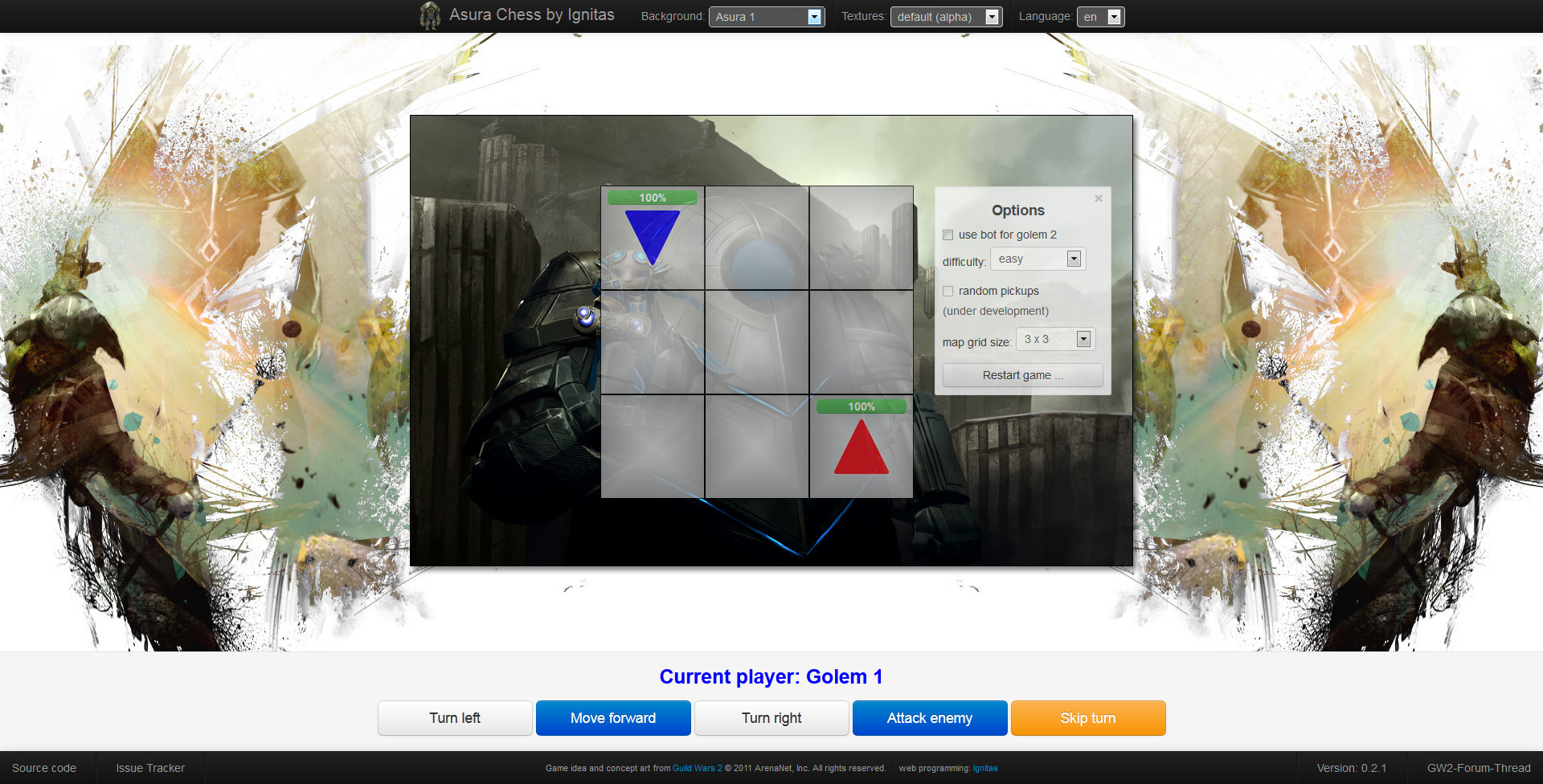
Most of you are probably familiar with this little mini game right at the beginning of the Asura starting region. Two remotely-controlled Golems are fighting each other on a 3×3 grid. Because I like this simple, but also funny game principle. I’ve started to implement the is an pure html5, javascript and CSS web game. If you want to test a first version, you can do this here, but notice: this is only a first beta so it could contain some little bugs.
Play Asura Chess v0.2.1 here: http://asura-chess.herokuapp.com/ or http://chrmoritz.github.com/asura-chess/
(Notice: Because I havn’t enough time at the moment, this is only a quick summary of the original post in the german forums here. which will be extended and improved in the future)
How to play:
- At the top navigation bar you can switch the background image for the game grid (you can find a list of awesome guild wars 2 concept art here, which will be extended in the future), the texture pack (at the moment only a very basic version available, but you can also create you one texturepack) and the language of the game.
- At the 3×3 grid you see the beginning blue golem 1 and the red golem 2. The peak symbolize the current orientation of the golem. On top of them you can see the health bar.
- If it is you turn, you can move your golem with the buttons at the bottom or by pressing 1 – 5 on your keyboard as you would do it ingame.
- Right to the grid, you find the options, where you set a bot for the 2nd goelm (symbolized as round figure without orientation). For this you have to restart the game with the button at the end of the options.
- On unbeatable you are unable to win against the AI. But this doesn’t mean, that your are kitten to lose. But either that or a rage quit because of an endless sequence of turns will happen after a period of time ;-)
- Normal will basically the same, but I’ve forbidden the bot to scrip turn, so you can now win.
- On Easy the bot makes random turns, so this mode is for beginners only.
Attachments:
(edited by Ignitas.9573)
If I launch it with the repair command will it completely restart the download?
no, it will download all remaining files
I know, thats not a very important bug, but could you add “resize: vertical;” to the css of each textarea. At the moment you can also increase the width of them, which can lead to textareas not fitting in the div.post.quick or div.post.reply.long so that not all content of them will be shown.
Attachments:

(edited by Ignitas.9573)
- To answer your question: key-bindings are stored server side.
- Since a mac has no backslash, the backslash binding is not possible and “Suspicious Asura” is a funny way of the game to say, that the binding is not possible.
- Try to add a alternative (2nd) binding of your heal skill to an other key, so that you can still use backslash on your pc.
Crash during play - lockedRect.pBits - A serious error has occurred ...
in Account & Technical Support
Posted by: Ignitas.9573
Hopefully, the availability of an update patch was not the cause of the game crashing. That would be a terrible way of forcing users to upgrade.
no, there was a cider update yesterday for all mac user (and a normal client update too)
Interesting, I can only find the Guild Wars 2.app and the Local.dat in the documents directory on my mac (nothing in cache and application support)
Try to force the client to use port 80 as described here.
Yes, it will continue at the point you have quit the launcher, but it will show you 0% (but the amount of left files will be lower)
[Guide] How to pass command line arguments to the mac client
in Account & Technical Support
Posted by: Ignitas.9573
This guide will show you, how to pass command line arguments to the mac client. This will be important, if you want to repair your client (with “-repair”) for example. For a list of more command line arguments visit this page in the official Guild Wars 2 wiki.
- Find your “Guild Wars 2.app” right-click it and select “show package contents”
- navigate throw “Contents” -> “Resources” to locate “CiderSettings.plist”
- open this file with a text editor of your choice (XCode or an other text editor with plist support will work best, but the standard TextEdit will also be ok)
- find the line: <string>—cmdline ""</string> (in TextEdit and other featureless text editors each " will be displayed as:
" - insert your command line parameter in between both " or both
(for -repair it should look like in the attached image below)" - save the file and start your “Guild Wars 2.app”, which should now run in this case in repair mode
This is a translation of my guide originally posted in the german forums .
Attachments:


- open Application Folder
- search for Guild Wars 2.app, right click and choose show package content (or something like that, I’m not running a english os x version, sry)
- “Contents” → “Resources” → “transgaming” → “c_drive” → “GW2”
- and there you can replace the GW2.dat and GW2.exe with the ones from the windowes version